

All Capabilities
Explore the full range of editing and automation features available across our SDKs, platforms, and solutions. For the bigger picture, read the deep dives on the embeddable editor and the white-label editor.
Showing 190 of 190 capabilities
No capabilities match your filters.
AI Generation
AI Image to Image
Transform and edit images using AI. Bring your own model. CE.SDK lets you integrate your model of choice.
- Gemini Flash Edit Google
- Seedream V4 Edit ByteDance
- NanoBanana Edit Google
- NanoBanana Pro Edit Google
- GPT Image 1 OpenAI
- Flux Pro Kontext Black Forest
- Flux Pro Kontext Max Black Forest
- Ideogram V3 Remix Ideogram
- Qwen Image Edit Alibaba
AI Image to Video
Animate images into video clips using AI. Bring your own model. CE.SDK lets you integrate your model of choice.
- Seedance V1 Pro ByteDance
- Minimax Video-01 Live Minimax
- Kling Video V2.1 Master Kuaishou
- Hailuo 02 Standard MiniMax
- Veo 3.1 Google
- Veo 3.1 First/Last Frame Google
Animation
Motion Blur
Blur moving blocks in exported videos, as a camera shutter does. Turn motion blur on for a graphic, text or caption block, and tune the shutter angle, the shutter phase and the number of samples for the whole scene. The blur follows keyframes, preset animations, group motion and Lottie animations, and the editor preview shows the same blur while you edit.
Animations & Transitions
Assets
Drag & Drop Assets
Drag an asset from the library straight onto your design. Drop it on a block to replace that block's content, or drop it on empty page space to place a new element exactly where you released it.
File Support Verification
Inspect runtime media support and resource metadata before import.
Audio Editing
Audio Volume Control
Adjust the volume of audio tracks to balance sound levels across your project.
Cut, Trim, and Split Audio
Edit audio clips by cutting, trimming, or splitting to achieve the perfect timing and flow.
Extract Audio from Video
We implemented APIs that users can extract the embedded audio tracks from videos allowing audio editing to be independent of video editing.
Audio Effects
Slow down or Speed up Audio
Adjust audio speed to fit timing or create dramatic effects in your projects.
Audio Formats
Audio Generation
Audio Recording
Voiceover Recording
Record voiceovers directly within the tool, adding narration and commentary with ease.
Automation
Document API
Seamlessly integrate and automate workflows with document APIs, enabling real-time access, manipulation, and management of documents within your applications to boost productivity and collaboration
Quick Actions
Perform common tasks instantly with quick actions, streamlining workflows and saving valuable time in your design process.
Server-side Processing
Automate the creation of variations with server-side automation, streamlining large-scale customizations and processing tasks efficiently on the backend.
Basic
Copy & Paste
Copy elements and pages with the system clipboard and paste them into another design, tab or editor, with their uploaded images. Paste images and text from other apps straight onto the page.
High-Contrast Themes
Switch the editor to a light or dark high-contrast theme that meets WCAG 2.1 AAA text contrast and draws a clear edge around every control, or follow the system's contrast setting.
Single Page Mode
Focus the editor on selected pages or page slices of a multi-page design. Other pages and slices leave the view but stay in the document and in the saved file.
Soft Proofing
Preview on the live canvas how a design looks in a CMYK or RGB output profile. Stored colors, exports and thumbnails do not change.
WCAG AA Conformant
Ensure accessibility with WCAG AA conformance, providing inclusive design that meets industry standards for readability, color contrast, and usability for all users.
Brand Safety & Consistency
Collaboration & Sharing
Color Management
Color Gradients
Enhance your designs with versatile gradient options giving you full creative control to blend colors smoothly and add depth, dimension, and visual appeal.
Color Palettes
Effortlessly elevate your designs with customizable color palettes that provide an instantly cohesive and professional look, enabling you to apply harmonious color schemes across your projects with just a click.
P3 Color Space
Achieve richer, more vibrant visuals with P3 color space support, offering a wider color gamut that brings your designs to life with enhanced color accuracy and depth.
Spot Colors
Achieve precise brand consistency with spot colors, allowing you to apply exact color matches for print and digital media, ensuring that your designs maintain their intended look and quality across every medium.
sRGB Color Space
Ensure vibrant, true-to-life colors with sRGB compatibility, delivering accurate color representation across all digital devices, so your designs look consistent and stunning wherever they’re viewed.
Content Management
Gallery as an Asset Source
By integrating the mobile gallery as a native asset source, you’re eliminating the need for disruptive system pickers and making personal media a first-class part of the editor. Users have instant access to their own photos and videos, making creation faster and more personal.
Out of the Box Asset Libraries
Access prebuilt asset libraries to quickly enhance your designs.
Customization
Custom Panels
Build custom panels that put your own tools, settings, and resources exactly where users need them, shaping the workspace around your workflow.
Customization & Extensibility
AI Coding Agent Plugin
Install the IMG.LY SDK plugin in an AI coding agent such as Claude Code or Codex, so it can read the CE.SDK docs for your version, explain how features work and build the integration in your project.
Cancel Operations
Cancel a running export, load, download or save at any time, and give it a deadline. The engine stops the work of the call at once and frees what it holds.
Error Messaging
Make CE.SDK errors clearer and more actionable so developers can understand problems faster and fix them without guesswork.
Feature Configuration
Decide which editor features the UI offers, for which blocks, and with which choices, and ask the editor why a feature is hidden and who decided.
Design
Auto Layout
Build designs that resize correctly with frames, flow and grid layouts, hug, fill and fixed sizing, and resize constraints.
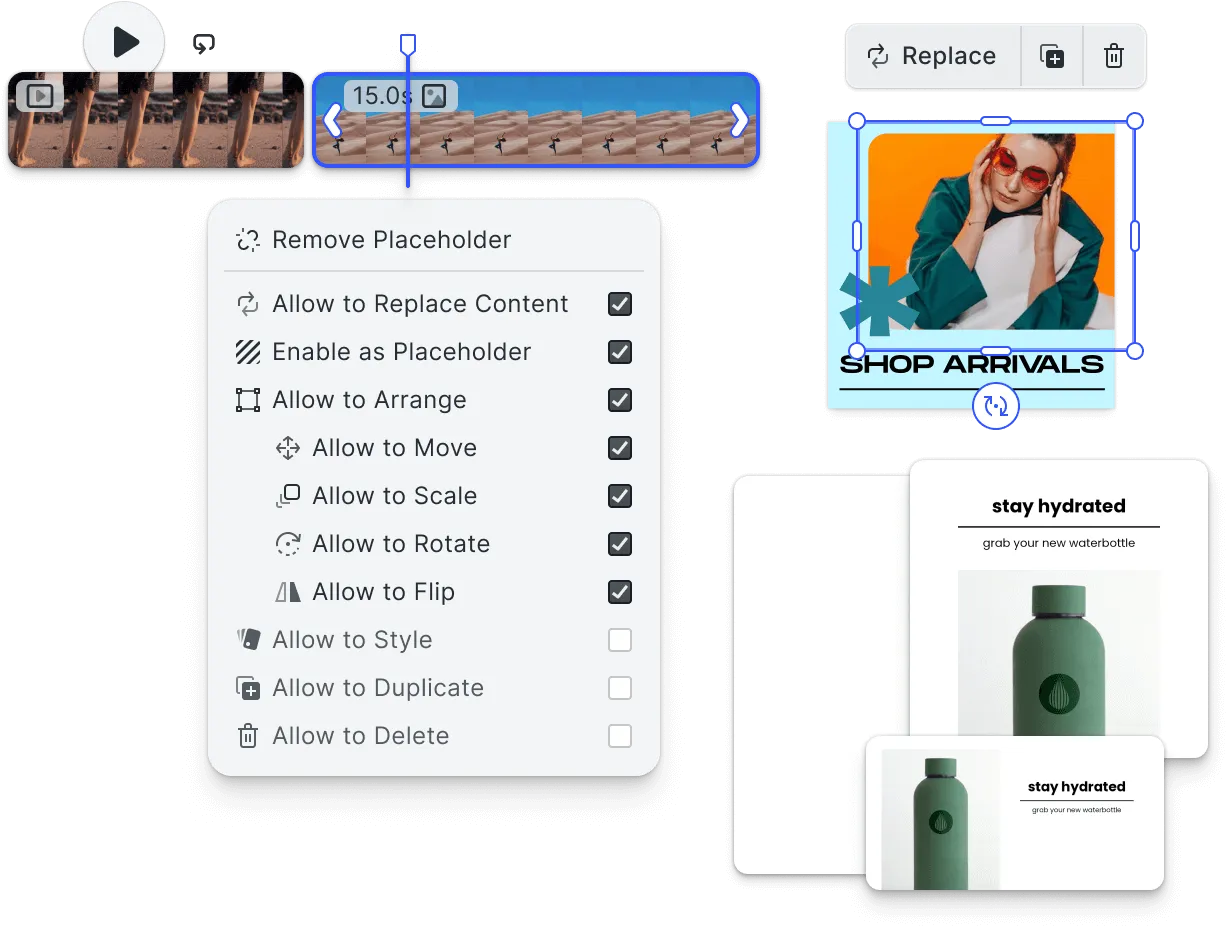
Components
Reuse a design with main components and instances, overrides, variants and component properties.
Drag to Swap Image Fills
Exchange the images of two elements by dragging one onto the other. Each element keeps its position and size, and the incoming image is re-fitted, so a layout can be rearranged without touching its structure.
Exclusion Areas
Mark a region of a page that content must stay out of, such as a window on an envelope, a spine on a book cover or an address panel on a mailer.
Figma Import
Import Figma local copies or accessible files through the REST API into CE.SDK scenes, with editable supported content and conversion diagnostics.
Layer List
See every page and element of a design in one list, and select, hide, lock, rename and reorder them from there, even when elements overlap on the canvas.
Masks and Track Mattes
Show only part of a design block. Cut graphics, text and groups to any shape with masks that you can soften, grow, shrink, fade, invert and combine. Mask a block with the alpha or luminance of another block, like a track matte, to reveal content through text, shapes or gradients.
Page Spreads
Split one page into page slices, such as the two halves of a book spread or the panels of a folded card. The page places its page slices in a row or a column, and content can cross the edge between two page slices or stop at it.
Shape Modifiers
Change the outline of any shape without redrawing it. Trim a path to draw only a part of it, repeat a shape in rows, rings and fades, round its corners, grow or shrink it, add zig zags, pucker, bloat or twist it. Modifiers stack in order, and every modifier value can be animated with keyframes.
Transform Parents
Make a graphic or text block follow the position, rotation and scale of another block, like a parented layer in a motion design tool. The follower keeps its own place in the layer list, opacity and visibility, and follows the other block also while that block is animated.
Document Formats
Adobe Illustrator (AI) Import *
Import native Adobe Illustrator (AI) files and pick up editing exactly where your design team left off.
Adobe InDesign (IDML) Import *
Import Adobe InDesign (IDML) files with layouts intact, bringing professional print designs straight into the editor.
Adobe PhotoShop (PSD) Import *
Import Photoshop (PSD) files with layers intact for advanced editing options.
PPTX Importer
Import PowerPoint and Canva-exported PPTX files directly into the editor, turning existing decks into fully editable designs.
SVG Export
Export designs as SVG: crisp, scalable vector graphics that stay razor-sharp at any size, for web and print alike.
Document Generation
PDF Export
Export designs in PDF format, preserving quality and layout for professional printing.
Document Management
Undo and Redo
Easily correct mistakes and explore design changes with unlimited undo and redo.
Ecosystem
EPS Artwork Import
Import supported EPS artwork into an existing design as a movable and scalable group of native blocks.
PDF Import
Import a PDF as an editable design, or place single pages of a PDF in an open design as editable groups.
Plugins
CE.SDK's extensibility layer: package custom editor functionality, panels, controls, actions, and asset sources into reusable plugins that behave like native editor features.
Extensibility
Bring your own third party AI Tools
Plug in your own AI providers and models so the editor’s intelligence grows with the tools you choose, with no vendor lock-in.
Handover
Adobe InDesign (IDML) Export
Export CE.SDK designs as IDML documents for continued editing in Adobe InDesign, with available document fonts and diagnostics for unsupported content.
Adobe Photoshop (PSD) Export
Export CE.SDK designs as layered PSD files with one file per page, editable supported text, raster appearance fallbacks, and export diagnostics.
Figma Export
Export CE.SDK scenes as Figma .fig files for continued editing, with supported native content, embedded images, and conversion diagnostics.
High-Level
Bulletproof Security
Retain complete control over your design workflow as data never leaves your own infrastructure.
Client-side Processing
Designed for easy modification, enabling you to adapt and extend the platform to meet evolving project requirements and unique creative workflows.
Image & Photo
Color, Distort and Wipe Effects
Restyle images, videos and graphics with color effects such as tritone, levels, invert and threshold, distort them with corner pin, bulge, wave warp and displacement map effects, hide them with linear, radial and venetian blinds wipes, and draw brush strokes along masks. A displacement map can read any graphic, text or group block as its map.
Export Preview
Export a small WebP image of a design to show in your app, without it counting as an export.
Image & Photo Capture
Camera Zoom
Get closer to the action with camera zoom, providing precise control to focus in on details or pull back for a broader view, perfect for immersive and flexible visual experiences.
Photo Capturing
Let users capture photos straight from their device camera and bring fresh shots into a design without leaving the editor.
Image & Photo Editing
Crop, Rotate, Straighten, and Flip
Achieve precise composition and alignment with tools for crop, rotate, straighten, and flip, giving you full control to tailor images exactly to your design needs.
Fit & Crop Modes
Easily tailor your images with Fit and Crop options, allowing precise control over framing to highlight essential content and achieve the perfect composition in any layout.
Fixed Aspect & Resolution Crop
Crop images to fixed aspect ratios and resolutions for consistent sizing and framing.
Recolor
Pick any color in a design and swap it for another, giving you full control to adapt palettes and match brand schemes in a click.
Image & Photo Effects & Styles
Blur Effects
Apply smooth, adjustable blur to images and elements to soften backgrounds, draw focus, or set a mood.
Chroma Keying and Greenscreen Effect
Unlock creative possibilities with chroma keying and greenscreen effects, allowing you to seamlessly replace backgrounds and integrate subjects into any environment for polished, professional visuals.
Color Balance
Achieve perfect harmony in your visuals with color balance, adjusting the tones to create natural, vibrant, or mood-specific effects that elevate your design’s impact.
DuoTone Effects
Add a modern, artistic touch to your visuals with Duotone effects, blending two colors to create striking contrast, depth, and mood in your designs.
Exposure Adjustments
Fine-tune brightness and detail with exposure adjustments, giving you control to lighten or darken images for the perfect visual balance and impact.
LUT Filters
Instantly enhance your images with LUT filters, applying professional-grade color grading for consistent, stylized, and visually impactful results across your designs.
Sharpness & Clarity
Enhance image detail with sharpness and clarity controls, allowing you to bring out textures, edges, and fine details for crisp, high-quality visuals.
Image & Photo Formats
GIF Import
Easily import GIFs to incorporate animated elements into your projects, adding motion and visual interest to your designs.
JPEG Import
Import JPEG images, offering a widely compatible format with good quality and compression.
Lottie Support
By adding support for Lottie files, the editor can import and manipulate vector-based animations described in JSON, rather than just rasterized GIFs. Lottie support brings customers modern, high-quality animation capabilities that go far beyond simple GIFs. This empowers them to create smoother, scalable, and more interactive designs.
PNG Import
Import images in PNG format, retaining transparency and high-quality details.
WebP Import
Import WebP images, providing high-quality visuals in a smaller file size for web efficiency.
Image & Photo Generation
JPEG Export
Export images in JPEG format, optimizing for web with good quality and small file sizes.
PNG Export
Export images in PNG format, ensuring high-quality visuals with transparency support.
WEBP Export
Boost web performance with WebP export, delivering high-quality images in a compact format for faster loading times and efficient bandwidth usage on digital platforms.
Layer Management
Alignment and Distribution
Precisely align and distribute elements for balanced and professional layouts.
Boolean Operations
Combine or subtract shapes using boolean operations to create complex designs.
Groups
Group elements together to easily move, resize, or modify them as a single unit.
Multiple Layers
Organize designs with multiple layers for better control and editing flexibility.
Opacity and Blending
Adjust opacity and blending modes to create depth and dynamic effects in your designs.
Page Management
Add, Insert, and Remove Pages
Easily add, insert, or remove pages to organize your multi-page projects.
Multiple Page Sizes
Mix multiple page sizes in a single document, producing multi-format outputs without duplicating files or rebuilding layouts.
Reorder Pages
Rearrange the order of pages to improve the flow and structure of your documents.
Performance
Background Export
Keep your workflow uninterrupted with background export, allowing you to continue designing while files are processed and saved in the background.
Consistency and Speed Across Every Platform
Achieve consistent, high-performance visuals across all devices with a cross-platform renderer, ensuring your designs look and perform identically on every platform for a seamless user experience.
Source Sets
Optimize image quality and loading speed with source sets, allowing you to deliver the best resolution for any device by automatically selecting the most appropriate image size for each display.
Plugins
HTML5 Exporter
Export designs as interactive HTML5: animations, banners, and rich presentations that deploy straight to the web with motion and fidelity intact.
Print Readyness
Bleed & Margins
Define bleed and margin settings to ensure accurate printing, preventing cutoff and maintaining professional layout standards.
Knockouts & Overprint
Apply knockouts to manage overlapping colors or layers in complex print designs.
PDF/X Plugin
Export print-ready PDFs that comply with industry-standard PDF/X specifications, slotting cleanly into professional printing workflows.
Underlayers
Add underlayers to provide base designs or colors for layered compositions.
Templating and Components
Text & Typography
Document Fonts
Surface the fonts already used in a document as their own group so existing typography is easy to reuse and stays consistent across the design.
Font Request Resolution
Preserve requested font identity and resolve it through registered assets or application providers.
Multiple Typeface Sources
Combine several font sources into a single typeface library so your brand fonts, licensed fonts, and user uploads appear alongside or in place of the built in typefaces.
Subscript and Superscript
Format ranges of text as subscript or superscript for prices, formulas, footnotes, and technical notation.
Tab Stops
Align text into columns with tab characters, so price lists, menus, tables and indexes line up inside one text block.
Text Justification
Justify text so that each line fills the block width by widening the gaps between words.
Text On Path / Circle
Add curved and circular text to CE.SDK so teams can create more expressive typography for logos, badges, and other layout-driven designs without leaving the editor.
Text Render Verification
Inspect rendered text for font substitution, missing glyphs, and ink outside its frame.
Typeface Filtering By Language
Let users filter typefaces by the language (subset) they cover so they can quickly find fonts that support the language they are working in, keeping even large multilingual libraries easy to navigate.
Text Animations
Text Animations
Animate text with entrance, emphasis, and exit effects to bring typography to life in video and design projects.
Text Automation
Text Editing
Font Weights and Families
Choose from a variety of font weights and families to achieve the perfect tone and emphasis in your designs.
Line Height and Character Spacing
Control kerning, leading, and tracking to fine-tune text spacing for optimal readability and style.
Paragraph Spacing
Adjust paragraph spacing and indentation to enhance readability and visual structure.
Text Auto Scale
Automatically scale text to fit within designated areas, ensuring consistent layouts.
Text Inline Editing
Edit text directly on the canvas for a seamless and intuitive text editing experience.
Text Runs
Apply formatting across continuous text runs, allowing flexible styling within single text blocks.
Text Transformations
Easily apply text transformations like uppercase, lowercase, and capitalization for stylistic effects.
Text Effects & Styles
Text Font Formats
OpenType (OTF) Import
Import OpenType fonts (OTF) to expand creative typography options with advanced typographic features.
TrueType (TTF) Import
Import TrueType fonts (TTF) for broad typographic flexibility across platforms.
Variable Fonts Support
Use OpenType variable fonts to reach an entire family, every weight and width, from one lightweight file, with smooth control over each axis.
Web Open Font Format (WOFF/WOFF2) Import
Import Web Open Font Format (WOFF) files for web-compatible typography options.
Usability
Canvas Zoom
Gain full control over your design details with canvas zoom, allowing you to seamlessly zoom in for precision editing or out for an overview, ensuring accuracy at every level.
Keyboard Interaction & Shortcuts
Boost efficiency and accessibility with keyboard interactions and shortcuts, allowing users to navigate, execute commands, and perform actions quickly and seamlessly without relying on a mouse.
Mouse Interaction
Modify elements of your design using sophisticated mouse and touch interactions.
Snapping Guides
Ensure flawless alignment with snapping guides, which automatically position elements as you design, making it easy to create clean, professional layouts with perfect precision.
Touch Interaction
Enable seamless user experiences on mobile and tablet devices with touch interaction support, allowing for intuitive gestures, taps, and swipes that bring your designs to life.
Vector Styles
Shadows
Add depth with adjustable drop shadows, lifting elements off the canvas for a polished, dimensional look.
Stroke Colors and Styles
Customize stroke colors and patterns, adding style and emphasis to shapes and lines.
Vector and Shape Editing
Video & Audio
Clip Transitions
Connect adjacent video clips with clip-to-clip transitions, cross fades, blurs, zooms, wipes, slides and more, added and adjusted right on the timeline so cuts feel smooth, cohesive, and professionally edited. Includes a transition library, per-transition settings, live on-canvas preview, and one-click apply or remove across a whole track.
Opus Export
Export the audio of videos and audio files with the royalty-free Opus codec, so video export also works in browsers that cannot encode AAC.
Opus Import
Import videos with Opus audio, including videos that were exported with Opus.
Page Cover Time
Choose the moment of an animated or video page that its still exports show, like the poster frame of a slide in a presentation app. A PDF of a multi-page scene shows each page at its own cover time.
Voice Isolation
Remove music and background noise from video and audio clips on the device, and keep the voice.
WebM Container Export
Export videos as WebM files with the royalty-free VP8, VP9 or AV1 video codecs and Opus or Vorbis audio, on every platform.
Video Composition
Adjust Video Clip Timing
Fine-tune the timing of video clips for precise synchronization with audio and effects.
Multiple Tracks
Support multiple audio and video tracks, allowing layered editing for complex projects.
Timeline
Align all media elements seamlessly to ensure synchronized playback and transitions.
Video Editing
Cut, Trim, and Split Video
Edit video clips by cutting, trimming, or splitting to achieve the perfect timing and flow.
Force-Trim
Automatically trim clips to their visible range, so every output stays clean, correctly sized, and ready for the final cut.
Thumbnail Generation
Generate frame thumbnails and audio waveform previews, giving editors a clear, navigable view of every clip on the timeline.
Video Captions
Add captions to videos to boost accessibility and comprehension, so every viewer can follow along with or without sound.
Video Effects & Styles
Slow down or Speed up Video
Control video playback speed, perfect for creating slow-motion or time-lapse effects.
Video Formats
AV1 Import
Import AV1 video files for next-generation compression with excellent quality at lower bitrates.
H264 Import
Import video in H264 format, widely compatible for efficient editing and playback.
H265/HEVC Import
Import H265/HEVC files for high-efficiency video with excellent quality at smaller file sizes.
MOV Container Import
Import MOV container files, supporting high-quality video for editing.
MP4 Container Import
Import MP4 container files, supporting the most widely used video format across platforms and devices.
VP8 Import
Import VP8 video files, providing efficient compression suitable for web use.
VP9 Import
Import VP9 video files, optimized for high-quality streaming with low data usage.
Video Generation
Video Recording
Dual Camera
Capture footage from two cameras simultaneously, ideal for multi-angle shots.
Reactions
Record and add reactions to videos, allowing for real-time responses and commentary.
Record multiple Clips
Capture multiple video or audio clips, enabling dynamic editing and transitions.
Timers
Set timers for automated actions, aiding in time-based editing or playback control.
Video Recording
Let users record video straight from their device camera, capturing footage in the moment and dropping it right onto the timeline.