


IMG.LY vs. Konva.js
The best Konva.js alternative for a complete design & video editor with turn-key UIs, creative automation and powerful templates.
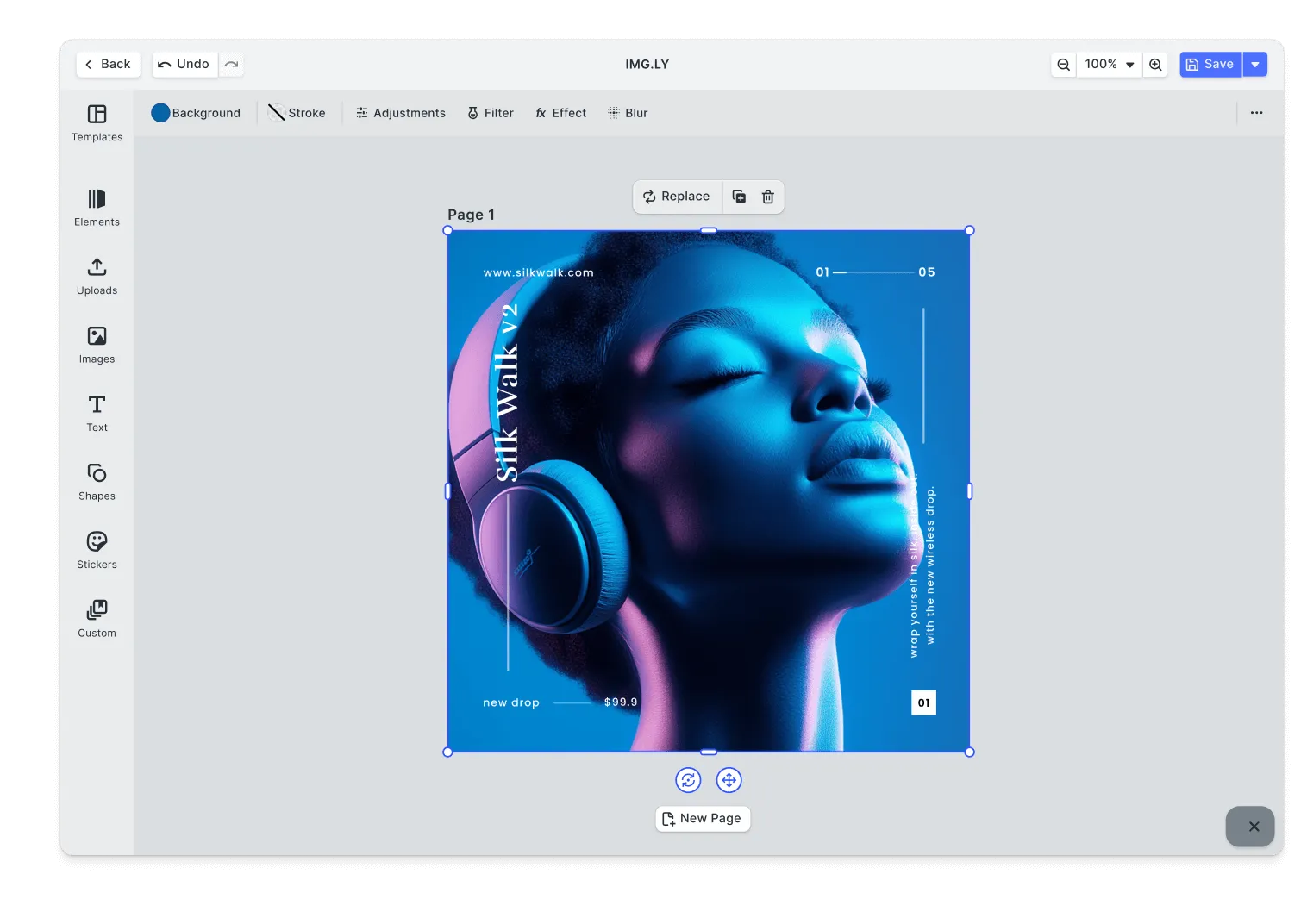
What makes IMG.LY the best Konva.js alternative?
Fully-featured design editor
Our SDK has matured in demanding environments, powering 500+ million creations per month.
Automated content generation
Use generative AI, batch processing, and programmatic design tools to automate and scale content creation.
In-browser video automation
Automate video creation and editing on the client. Scale content creation without additional costs.
Cross-platform
Our SDK is optimized across platforms ensuring consistent rendering and interoperability.
Trusted by 100+
industry leaders














What our clients say about us
Integrating IMG.LY’s editor meant we didn’t have to build or maintain a complex editing layer ourselves. That kept our team focused on our core AI ad engine and saved us countless development hours — while still giving our customers the ability to polish and customize creatives at scale.
Hikari Senju
CEO, Omneky

With IMG.LY we built a central creative portal that now powers over 140 dealer campaigns across multiple automotive brands. Before this, asset creation was slow and inconsistent.
Martin Röhr
Product Owner, Digitas

By embedding IMG.LY’s editor we were able to hit key RFP requirements and deliver a template-based creative experience that now serves 1,000+ customers. It helped us win more deals and exceed enterprise expectations without needing to hire dedicated design teams.
Rob Driscoll
Director of PM, Optimizely

Since integrating IMG.LY’s editor, we now deliver 30,000+ ad creatives per month, dramatically shorten time-to-launch, and help our clients cut design spend by up to $10,000 per month.
Logan Welbaum
Founder, Plai

Our customers create over a million personalized postcards each year choosing from over hundreds of templates with IMG.LY’s SDK. It’s the only solution that allows us to build our own specialized, on-brand UI that integrates seamlessly with our platform.
Jeanine Zaalberg
Product Manager, SwissPost

From a developer’s perspective, the most powerful feature of the photo editor is the integration process. It was completely flawless, quick, and easy to integrate.
Stefano Fornari
CTO, Funambol
We compared IMG.LY SDK with other solutions and found that it would be the best fit for us since it provides all the features that are crucial for our use case.
Carem Pereira
SCRUM Manager, HP

IMG.LY vs. Konva.js at a glance
| Feature | IMG.LY | Konva.js | Notes |
|---|---|---|---|
| Primary Use Case | Complete creative SDK for building applications with embedded editing tools and automated content generation. Combines ready-to-use visual editors for end users with headless APIs for backend automation. Single SDK handles video editing, graphic design, and print production. Supports both interactive workflows where users create content manually and automation workflows where systems generate assets programmatically from templates and data sources. | Low-level JavaScript canvas library for building custom interactive 2D graphics applications. Provides object-oriented API for canvas manipulation, enabling developers to create shapes, animations, and interactive elements from scratch. Developers build their own editors and tools on top of Konva's canvas primitives. Used as foundation for custom design tools, games, and graphics applications requiring granular control over canvas rendering. | IMG.LY serves both interactive editing and headless automation with unified SDK. Konva.js provides low-level canvas primitives for building custom applications. |
| Target Audience | Businesses building creative applications for two use cases: apps where users create content through embedded editors, and systems that generate assets automatically. Serves social media platforms, print-on-demand services, marketing tools, e-commerce sites, and content management systems. Targets organizations needing both user-facing editing capabilities and backend automation for personalized content at scale. | Web developers building custom canvas-based applications from scratch. Requires JavaScript development expertise to build editing interfaces and functionality. Appeals to teams needing full control over implementation details and willing to invest engineering time building editors. | IMG.LY serves broader enterprise needs with comprehensive creative systems supporting both interactive editors and automation workflows. Konva.js targets developers building custom canvas applications from scratch. |
| Technical Approach | SDK with three integration options: use pre-built UI components, build custom interfaces with engine APIs, or run headless for automation. Cross-platform engine delivers consistent rendering across web browsers, mobile apps, and Node.js servers. Organizations choose how to deploy and maintain full control over infrastructure and data. | JavaScript library providing object-oriented wrapper around HTML5 Canvas 2D context. Extends native canvas with event handling, animations, layering, and node management. Requires developers to implement editing features, UI components, and workflows themselves. Supports Node.js server-side rendering with additional canvas backend packages (node-canvas or skia-canvas). Framework-agnostic with official bindings for React, Vue, Svelte, and Angular. | IMG.LY offers more comprehensive unified engine supporting UI-based editing and headless automation with full infrastructure control. Konva.js offers low-level canvas library requiring extensive custom implementation. |
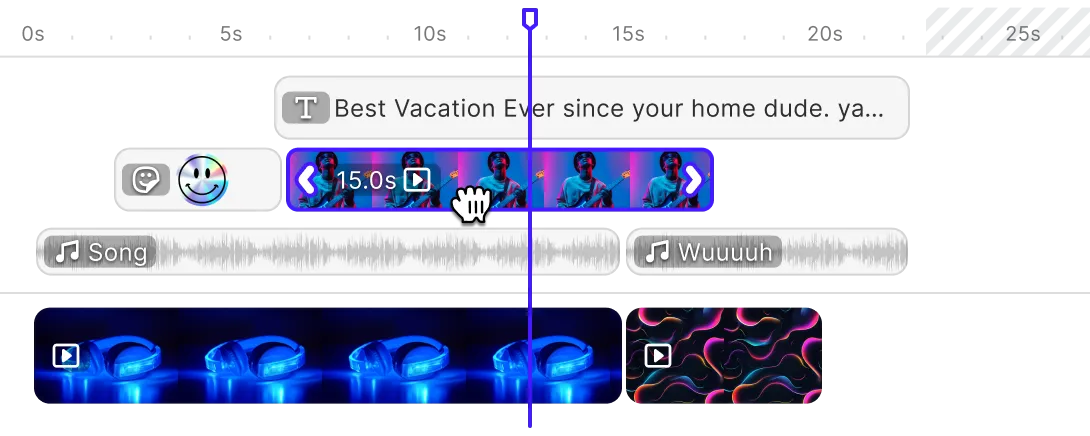
| Advanced Video Editing | Timeline-driven video editor with multi-track composition supporting frame-level precision. Direct browser-based MP4 manipulation using WebCodecs eliminates transcoding delays. Layering system handles video clips, images, audio tracks, and graphic overlays simultaneously. Scene management, adaptive template rendering, and export flexibility across formats enable both interactive user editing and programmatic batch generation. | Does not provide video editing capabilities. Developers have built prototype video editors using Konva.js for canvas overlay manipulation, but library lacks video processing, timeline management, audio handling, or export functionality. Video features require significant custom development integrating external libraries for codecs, processing, and rendering. | IMG.LY provides comprehensive video editing with interactive UI and cross-platform deployment. Konva.js has no video editing capabilities and requires building all video functionality from scratch. |
| Advanced Design Editing | Full design editing suite with vector graphics, text styling, layout tools, and print-ready output including CMYK and Pantone support. Provides collage editors, web-to-print templates, advanced typography, smart layouts, and role-based permissions. Exports to PNG, JPEG, TGA, binary, and PDF formats. | Partial. Provides low-level canvas drawing primitives for shapes, text, and images. Developers implement design editing features using Konva's node system and transformation APIs. No built-in design editor, templates, typography controls, or print workflows. Requires building all UI components, selection tools, property panels, and export functionality. Polotno Studio is example of design editor built on top of Konva.js. | IMG.LY offers full-featured design editor supporting print and web design workflows. Konva.js provides canvas primitives requiring custom editor development. |
| Templating & Dynamic Editing | Intelligent template engine with self-adjusting layouts that respond to content dimensions and aspect ratios. Placeholder-driven system supports both UI-based template creation and API-driven population. Role-based template access controls enable team collaboration with defined permissions. Templates maintain consistency whether rendered through interactive editors or automation pipelines, with the same template definition driving both workflows. | No built-in template system. Developers build template functionality by managing application state and recreating canvas elements. Konva supports JSON serialization of stage for simple applications, but serialization cannot save event handlers, images, or filters. For complex applications, developers manage state separately and reconstruct canvas from data. | IMG.LY provides fully customizable templates with adaptive layouts and programmatic control. Konva.js requires custom template implementation. |
| Creative Automation | Provides equal-weight automation capabilities alongside embedded editing. Operates headless in Node.js for programmatic generation pipelines, same SDK handles both user editing interfaces and backend automation without additional components. Integrates with data sources, CRMs, marketing platforms for automated asset generation. Template definitions work identically whether rendered through UI or API calls. Organizations deploy automation workflows on infrastructure they control without cloud service dependencies or vendor lock-in. | Partial. Supports Node.js server-side rendering with additional canvas backend packages (node-canvas or skia-canvas). Developers implement automation by programmatically creating and manipulating Konva nodes, then exporting to image formats. Requires significant custom code to build automation workflows. No built-in batch processing, template population, or data integration. | IMG.LY offers more comprehensive embedded editing and automation as unified solution with equal-weight capabilities. Konva.js supports server-side canvas rendering requiring extensive custom automation development. |
| AI Capabilities | Extensible AI framework supporting custom model integration alongside built-in intelligent features. Smart layout algorithms automatically optimize designs for readability and visual balance. Plugin architecture enables teams to connect proprietary or third-party AI services for specialized workflows. AI enhancements operate as editing assistants while preserving full manual control over final creative decisions. | No built-in AI capabilities. Developers integrate AI services by building custom implementations. Library focuses on canvas rendering without AI-powered features. Teams implement AI functionality separately and connect through custom code. | IMG.LY focuses on design assistance and content generation with plugin extensibility. Konva.js requires custom AI integration. |
| Asset Management | Asset system combining embedded libraries with external integrations; Getty Images, Unsplash, and Airtable connect directly without middleware. Organizations extend the default library with custom asset sources while maintaining local data control. Supports both video and design assets through unified management interface. Client-side architecture keeps all media under application control rather than external service dependencies. | No built-in asset management system. Developers implement asset libraries by managing image loading, caching, and organization in application code. Konva loads images and videos via standard browser APIs. Teams build custom asset browsers, upload handlers, and media management. | IMG.LY offers enterprise-grade integration with third-party providers and custom sources. Konva.js requires custom asset management implementation. |
| User Interface | Production-ready modular interface available for applications requiring user-facing editors. Canvas-based interaction with timeline controls, filter palettes, effect panels, and audio mixers enable direct content manipulation. Component architecture permits reorganizing panels, substituting controls, or building entirely custom interfaces. Alternatively, headless mode bypasses UI entirely for automation workflows. Same SDK supports both UI-based editing applications and invisible backend generation systems. | No built-in user interface. Developers build all UI components from scratch using HTML, CSS, and JavaScript frameworks. Konva handles canvas rendering and interaction, but menus, toolbars, property panels, and controls require custom implementation. Offers examples and demos as starting points. | IMG.LY offers broader deployment options with optional production-ready UI for interactive editing or headless operation for automation. Konva.js requires building entire editor interface from scratch with no UI components. |
| White-labeling | Zero-branding architecture ensures no vendor identification appears in user-facing interfaces or rendered outputs. Visual customization encompasses complete UI restructuring, not merely cosmetic theming. Internationalization built-in supports global deployments. Headless mode eliminates UI entirely for fully custom implementations. Organizations achieve pixel-perfect brand alignment including custom color palettes matching corporate guidelines. | The MIT licence puts no restriction or attribution requirement on customization, and Konva ships no UI, so there is no branding to remove. Developers build branded solutions using Konva as invisible foundation. No Konva branding in outputs. Full control over implementation and appearance. | IMG.LY ensures comprehensive white-labeling with structural UI customization. Konva.js offers complete control through open-source license. |
| Interactive Editing | Canvas-first interaction model delivers instantaneous visual feedback as users manipulate content. Timeline scrubbing, zooming, and playback respond without server latency. Effect previews render in real-time using GPU acceleration. Multi-platform consistency ensures identical behavior whether editing on web, mobile, or desktop. Direct manipulation paradigm, click, drag, adjust, matches professional creative tools rather than code-based workflows. | Partial. Provides event handling for mouse, touch, and pointer interactions. Supports drag and drop, transformations, and animations out of the box. Developers implement editing interactions by attaching event listeners to canvas nodes. No built-in editing behaviors, selection tools, or manipulation handles. Interactive functionality requires custom development. | IMG.LY supports responsive interactive editing optimized for cross-platform web and mobile use. Konva.js provides event system requiring custom interaction implementation. |
| Multi-Layer Editing | Unlimited-depth layer system organizes video clips, graphics, audio, and effects with sophisticated composition controls. Blending modes, opacity gradients, and z-axis management enable professional-grade visual effects. Grouping and parenting relationships create reusable composition hierarchies. Lock and visibility controls keep complex projects manageable. Layer architecture maintains consistency across all deployment targets: web, mobile, and desktop. | Partial. Supports layering through Stage, Layer, and Group concepts. Developers organize nodes hierarchically and control rendering order. Provides basic layer management, grouping, and nesting. No built-in layer panel UI, blending modes beyond basic operations, or advanced composition features. Layer functionality requires custom UI development. | IMG.LY supports comprehensive multi-layer composition with advanced controls and unlimited layers. Konva.js offers layering system requiring custom UI and advanced features. |
| Component Architecture | Decoupled engine and editor layers enable flexible integration patterns: full UI, custom UI, or headless operation. Granular component registration system lets developers inject custom tools without SDK modifications. Order APIs control component layout programmatically. Plugin framework extends core capabilities while preserving upgrade paths. Architecture supports partial adoption, use only needed components rather than monolithic implementation. | Partial. Object-oriented architecture with Stage, Layer, Group, and Shape nodes. Developers compose functionality using Konva classes and inheritance. No component framework or plugin system. Customization through JavaScript inheritance and composition patterns. Modular at code level but not architectural framework level. | IMG.LY supports highly modular component architecture with granular customization. Konva.js offers object-oriented design requiring custom component patterns. |
| Cross-Platform Support | Platform-spanning deployment model covers web frameworks (React, Angular, Vue, Svelte, Next.js), native mobile (iOS, Android), cross-platform mobile (React Native, Flutter), desktop (Electron, macOS), and backend (Node.js). Single codebase adapts to each platform's idioms while maintaining functional parity. Same templates render identically whether processed on user devices or backend servers. | Browser-only. Works in modern browsers supporting HTML5 Canvas. Official framework bindings for React (react-konva), Vue (vue-konva), Svelte, and Angular. Server-side rendering supported in Node.js with additional canvas backend packages. No native mobile SDKs for iOS or Android, requires browser or WebView. No desktop application support beyond Electron. | IMG.LY supports web, mobile, desktop, and server environments. Konva.js works in browsers and Node.js only. |
| Customizability | Granular configuration system spanning UI appearance, functional workflows, and architectural patterns. Toolbar reconfiguration, asset library customization, and workflow adjustments occur through code-based APIs. Print-focused features include CMYK and Pantone color space support. Role-based permission models enable multi-tenant deployments. Headless APIs bypass default UI entirely for completely custom implementations. | Complete customizability through open-source codebase and JavaScript flexibility. Developers control every aspect of implementation from canvas rendering to UI components. No built-in constraints or opinionated patterns. Customization happens at code level rather than configuration level. | IMG.LY offers customization down to the architecture. Konva.js provides complete code-level control through open-source library. |
| Extensibility | First-class plugin architecture enables custom tool development without SDK modification. Extension points cover UI components, export formats, asset sources, and processing pipelines. Teams integrate proprietary services or third-party APIs while maintaining SDK upgrade compatibility. Modular design supports selective feature adoption, load only needed capabilities to optimize bundle size. | Partial. Open-source MIT license allows forking and modification. Developers extend functionality through JavaScript patterns like inheritance and composition. No formal plugin system or extension APIs. Community-contributed extensions exist but no official plugin ecosystem. Extensibility through code modification rather than architectural extension points. | IMG.LY has a plugin system that extends the editor without forking it. Konva.js extends through code modification and custom development. |
| Ease of Integration | Platform-specific integration guides with working code samples across React, Angular, Vue, Flutter, React Native, and server frameworks. Pre-built editor solutions reduce initial implementation to configuration rather than development. Evaluation period includes full SDK access for production-readiness assessment. Multi-tier documentation serves both quick-start and deep-dive needs. | Partial. Well-documented API with tutorials and examples. Official framework bindings simplify React, Vue, Svelte, and Angular integration. Requires significant development work to build functional editors. Learning curve for developers unfamiliar with canvas programming. Active community provides examples and support. npm installation: `npm install konva`. | IMG.LY offers comprehensive documentation for deeper SDK integration across more platforms. Konva.js provides good documentation requiring extensive custom development. |
| Flexible Rendering Approach | Flexible rendering deployment: client-side processing keeps data local and uses device GPUs for interactive editing, while the CE.SDK Renderer provides server-side automation on Node.js infrastructure. A single engine ensures pixel-identical output whether rendering happens in the browser or on backend servers. Choose client-side for user editing and server-side for automation, both powered by the same SDK. | Browser-based. HTML5 Canvas rendering in browsers using 2D context. Server-side rendering available in Node.js with additional canvas backend packages (node-canvas or skia-canvas). Rendering approach depends on developer implementation. No unified engine across environments, output quality depends on browser or Node.js canvas implementation. | IMG.LY adapts rendering location to workflow type (user editing vs automation). Konva.js renders in browser or Node.js with backend packages. |
| Mobile Performance | Native mobile SDK for iOS and Android plus cross-platform framework support (React Native, Flutter) ensure editing capabilities match desktop experiences. Same rendering engine across all platforms maintains consistent output quality. Performance tuning targets modern device capabilities without degrading older hardware support. Codec handling and memory management optimize for mobile constraints. | Limited. Browser-only support on mobile devices. Performance depends on browser canvas implementation and device capabilities. React Native support exists but relies on WebView or custom native modules. No native iOS or Android SDKs. Mobile performance varies by device and browser. | IMG.LY provides consistent cross-platform performance across native iOS, Android, React Native, and Flutter. Konva.js works in mobile browsers with performance varying by device. |
| Production Readiness | Battle-tested across enterprise deployments generating 500M+ creative outputs monthly. Continuous release cycle maintains compatibility while introducing features. Multi-tier support structure scales from community resources to dedicated engineering assistance. Organizations deploy without infrastructure concerns, SDK handles complexities internally. | Partial. Mature open-source library used by major companies like Meta and Microsoft. Regular updates and active maintenance. Production-ready for canvas rendering but requires significant development to build complete editing solutions. No commercial support, relies on community and documentation. Used as foundation rather than complete product. | IMG.LY supports enterprise-scale deployments with 500M+ monthly productions. Konva.js offers stable canvas library requiring custom editor development. |
| Scalability | Scales through two complementary approaches: distributed client-side rendering where user devices handle processing, and centralized server-side automation on organization-controlled Node.js infrastructure. Template-driven workflows enable generating variations whether users create one-off content or automation pipelines produce millions of assets. Architecture handles both interactive editing at scale (millions of users) and batch automation workloads without performance degradation. Organizations scale horizontally by adding infrastructure capacity they manage. | Partial. Client-side canvas rendering performance depends on browser and device. Supports animating thousands of shapes with performance optimization techniques like caching and layering. Server-side scalability possible with Node.js but requires custom infrastructure. Developers implement scaling strategies themselves. No built-in automation or batch processing. | IMG.LY scales through both user-driven creation and backend automation on controlled infrastructure. Konva.js scales based on custom implementation and infrastructure. |
| Storage & Data Ownership | Zero data exfiltration architecture, all content remains within application boundaries during editing. Client-side operation eliminates external service dependencies for storage. Optional server deployment maintains team control over infrastructure and data residency. Asset integrations (Getty, Unsplash) occur only when explicitly configured. | Client-side JavaScript library with no external service dependencies. All data remains under application control. Developers implement storage solutions using databases, file systems, or cloud services of choice. No vendor lock-in or external data transmission. | IMG.LY offers client-side/on-premise operation with full user data control. Konva.js provides local rendering with complete developer control. |
| Offline Capabilities | Full-featured editing without network connectivity after initial SDK delivery. Local rendering, export, and template manipulation operate independently of internet access. Asset libraries function offline when using embedded or custom sources. Particularly valuable for mobile apps and intermittent connectivity scenarios. | Works completely offline once loaded. Canvas rendering operates locally in browser without network requirements. Developers implement offline functionality through standard web technologies like Service Workers and IndexedDB. No cloud dependencies. | IMG.LY supports editing, processing, and export without internet connectivity. Konva.js works offline with all rendering happening locally. |
| Clear Pricing Model | Usage-based enterprise licensing adapts to platform mix, deployment scale, and feature requirements. Evaluation period provides production SDK access for thorough assessment before commitment. | Free. Open-source MIT license with no cost for any use case. No pricing tiers, subscriptions, or usage limits. Community support through documentation, examples, and GitHub discussions. | IMG.LY delivers enterprise licensing with exhaustive capabilities. Konva.js is completely free under MIT license. |
| Community & Support | Platform-segmented documentation addresses web, mobile, desktop, and server integration patterns. Enterprise licensing includes dedicated support channels with SLA guarantees. Solution architects assist with complex integrations and performance optimization. | No commercial support, community-driven assistance only. Open-source community with documentation, tutorials, and examples. GitHub repository with issue tracking and discussions. Framework-specific guides for React, Vue, Svelte, and Angular. Stack Overflow presence for troubleshooting. | IMG.LY provides comprehensive documentation and direct support channels based on license tier. Konva.js offers community support through documentation and open-source channels. |
Key capabilities
Learn more about some of the functionalities of IMG.LY’s SDK.
Editing
Printing





Templating
Text variables.
Enable mass personalization and creative automation by embedding variables.
Placeholders & lockable designs.
Constrain templates to guide your users’ design and ensure brand consistency.
Configurable presets.
Enforce a consistent aesthetic across all creations by using preset filters, adjustments, fonts, and crop ratios.
Customizability
Build custom UIs.
Use the headless API powering all creative operations to implement an entirely custom UI.
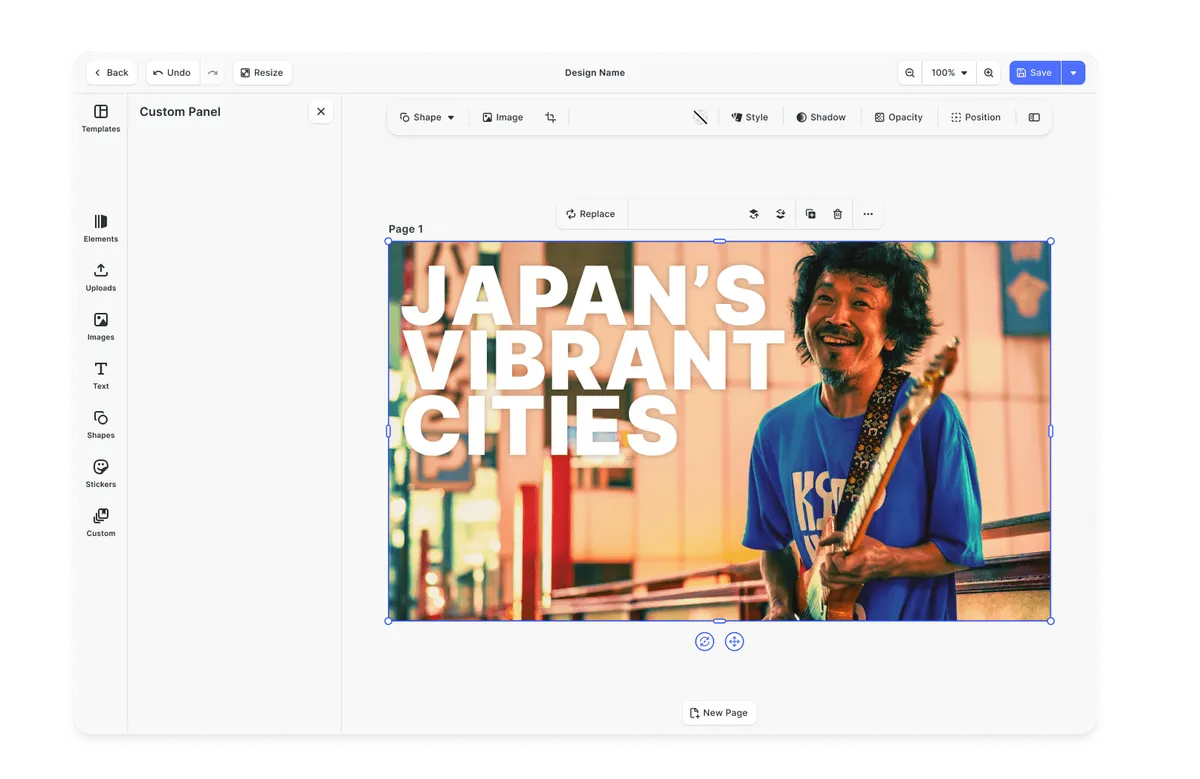
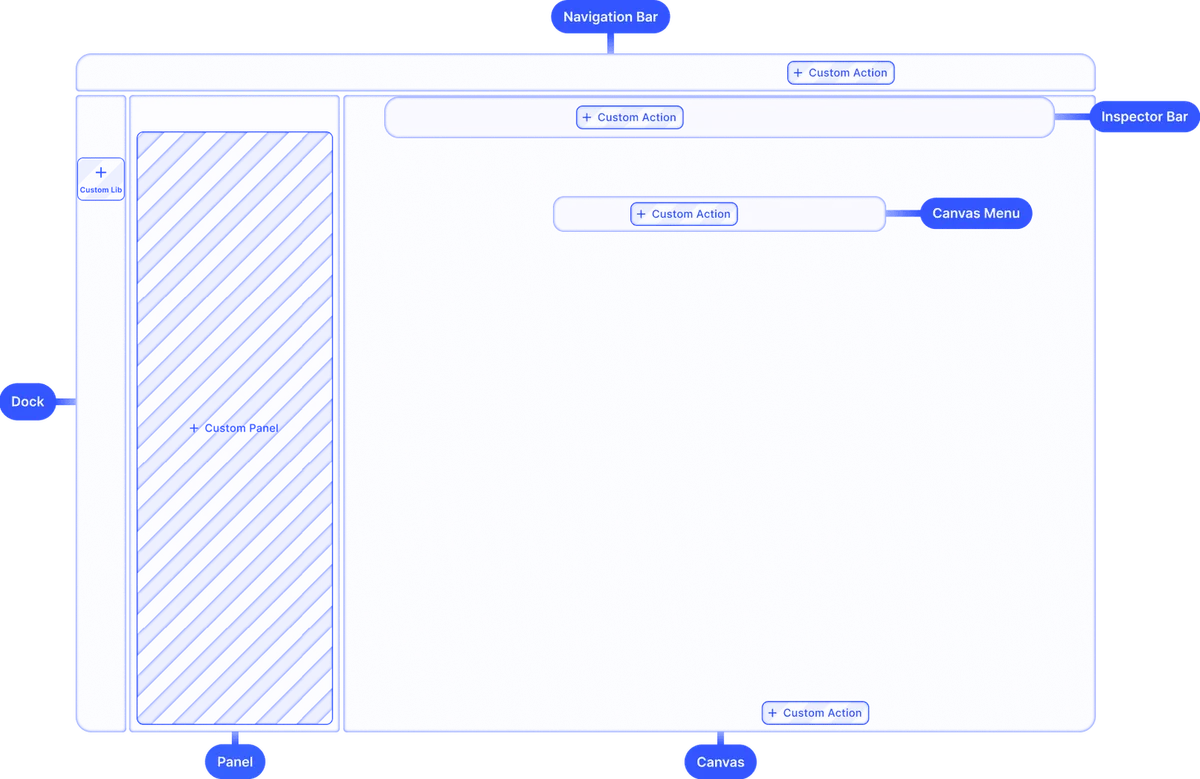
Theming.
Theme the editor to match your app.
Media libraries.
Set up custom libraries that are easily sortable.
Toolbar customization.
Reposition toolbar elements, change icons, or rename tools to fit your use case.
Internationalization.
Add support for additional languages, and customize any button label.
Export options.
Export designs in JPG, PNG, or PDF with custom quality, page ranges, and dimensions.
Check out other use cases
Learn more about related solutions.
Apparel Designer
Whether t-shirts, hoodies or caps, build for any use case, deploy on any platform.
Get in touch
Contact our sales team to learn more about licensing options and get access to our AI plugins for CE.SDK.
FAQs
A powerful alternative to Konva.js is IMG.LY, which offers a canvas-based editor with extensive customization options. It supports interactive design elements, layers, animations, and real-time editing, making it easier to integrate rich media editing into applications without requiring extensive low-level development.
Konva.js is a JavaScript library for drawing and manipulating graphics on an HTML5 canvas, while IMG.LY is a full-fledged design editor SDK with a UI, editing tools, and asset management.
IMG.LY offers a fully customizable UI out of the box, whereas Konva.js requires manual UI development.
IMG.LY offers extensive cross-platform support, including Web, iOS, Android, and server-side environments, ensuring consistent rendering and interoperability across various platforms. Konva.js is primarily web-based, focusing on HTML5 Canvas and JavaScript.
No, Konva.js lacks built-in asset management, while IMG.LY allows easy integration with asset libraries.
Yes, IMG.LY includes fully integrated video editing capabilities, such as trimming, overlays, and animations. Konva.js does not support video editing features.
IMG.LY is fully extendable via a plugin system, allowing users to add unique features and automate processes. Konva.js does not offer a headless mode and relies on manual rendering.
IMG.LY supports dynamic asset manipulation, including videos, images, text, stickers, and flexible overlays, covering full media editing. Konva.js is limited to static image and text rendering.
IMG.LY can import design files from Photoshop (PSD), InDesign (IDML), and Illustrator (AI), and export scene files for saving work-in-progress, so existing design work carries over with its layers intact. Konva.js does not have the capability to import external design files and only exports finished designs as PDFs, PNGs, etc.
No, Konva.js is a graphics rendering library, while IMG.LY is a complete editing solution with layers, assets, and UI controls.
IMG.LY is more user-friendly as it comes with an intuitive UI, while Konva.js requires coding knowledge.