



A creative editor embedded in your app, not bolted on
Add a design, photo, or video editor that runs inside your product with one SDK : on your own domain, with your data, and under your control.
- Runs inside your app, not in an iframe
- One SDK across web, mobile, desktop
- Full-UI or headless
- No editor to build or maintain
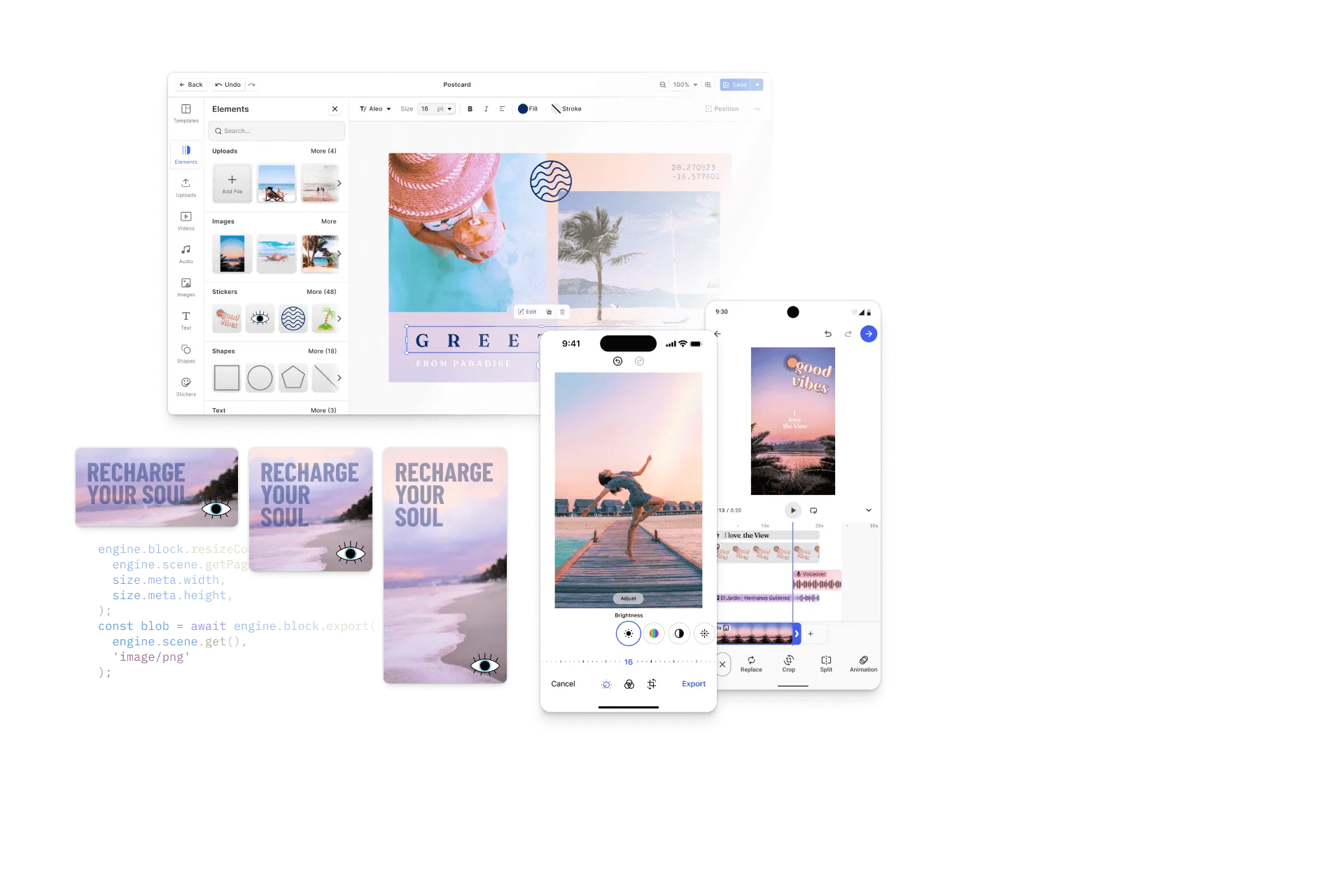
An editor that becomes part of your product
CE.SDK installs into your own app, so the editor runs on your domain with your data, fully under your control. Your users stay in your product, and your team skips the months-long build.
Yours, not a hosted iframe
The editor runs inside your app, not as a sandboxed third-party surface, so you own the UI, the domain, and the data.
One SDK, every stack
The same engine installs across web, mobile, desktop, and server, so you integrate once and keep behavior consistent wherever you ship.
Without building it yourself
Start from proven infrastructure instead of building a canvas, rendering pipeline, and file handling from scratch, and skip the ongoing maintenance.
Embedded by 100+
product teams














Integrating IMG.LY’s editor meant we didn’t have to build or maintain a complex editing layer ourselves. That kept our team focused on our core AI ad engine and saved us countless development hours — while still giving our customers the ability to polish and customize creatives at scale.
Hikari Senju
CEO, Omneky

With IMG.LY we built a central creative portal that now powers over 140 dealer campaigns across multiple automotive brands. Before this, asset creation was slow and inconsistent.
Martin Röhr
Product Owner, Digitas

By embedding IMG.LY’s editor we were able to hit key RFP requirements and deliver a template-based creative experience that now serves 1,000+ customers. It helped us win more deals and exceed enterprise expectations without needing to hire dedicated design teams.
Rob Driscoll
Director of PM, Optimizely

Since integrating IMG.LY’s editor, we now deliver 30,000+ ad creatives per month, dramatically shorten time-to-launch, and help our clients cut design spend by up to $10,000 per month.
Logan Welbaum
Founder, Plai

Our customers create over a million personalized postcards each year choosing from over hundreds of templates with IMG.LY’s SDK. It’s the only solution that allows us to build our own specialized, on-brand UI that integrates seamlessly with our platform.
Jeanine Zaalberg
Product Manager, SwissPost

From a developer’s perspective, the most powerful feature of the photo editor is the integration process. It was completely flawless, quick, and easy to integrate.
Stefano Fornari
CTO, Funambol

We compared IMG.LY SDK with other solutions and found that it would be the best fit for us since it provides all the features that are crucial for our use case.
Carem Pereira
SCRUM Manager, HP

Embed vs. build: the real total cost
Most of a creative editor is invisible. The canvas is the easy part; the rendering engine, file formats, and export are what take months to get right and never stop needing maintenance.
Building it yourself
Months of engineering to reach a first version, then ongoing work to maintain rendering, formats, browser and OS changes, and every new capability, pulled from your core product.
Embedding CE.SDK
Install the SDK and ship. With CE.SDK Agent Skills, a proof of concept runs in hours and you can reach production in about two weeks. IMG.LY maintains the engine, file formats, and rendering pipeline, so your team stays on your product.
Full-UI or headless, same engine
Embed the editor with its full interface, drive the engine headlessly with no UI, or combine both. It’s one engine, so you can change how much UI you expose without changing platforms.
Full-UI editor
Ship the complete editing interface to your users, then show, hide, reposition, or rename controls and apply your brand theme so it fits your product.
Headless API
Run the same engine with no UI to compose and render designs programmatically from your own interface, backend, or pipeline.
Extend the editor, don’t outgrow it
Embedding isn’t a ceiling. Add capabilities as your product grows, with drop-in plugins, your own components, and AI, all on the same foundation.
Bundled plugins
Drop in ready-made plugins like background removal, vectorizer, and QR code, without building or integrating them yourself.
Your own components
Register custom UI components to bring your product’s own controls, panels, and actions into the editor.
AI when you want it
Connect generative models through the AI Gateway and feed their output into the editor as editable layers.
Runs on your infrastructure, not ours
The editor deploys where your app already runs. There’s no IMG.LY-hosted surface in front of your users, so content and data stay under your control.
Client-side on the web
All editing runs in the browser using WebAssembly and WebGL for hardware-accelerated performance, so user content never leaves the browser unless you upload it.
Native on mobile
The same engine ships as native SDKs for iOS and Android, and through React Native and Flutter.
Server-side with Node.js
The same engine runs headlessly on Node.js for batch and server-side rendering, keeping your logic consistent from client to backend.
Trusted in production
The editor your users run every day, without the performance, security, or maintenance risk of one you built.
Fast, hardware-accelerated
A GPU-accelerated engine on WebAssembly and WebGL keeps editing smooth across large designs and longer clips, all client-side.
Secure by default
Editing runs client-side, so user content never leaves the browser unless you upload it. IMG.LY is SOC 2 Type II certified, with SSO on enterprise plans.
Proven at scale
The same engine powers 500M+ creations every month across thousands of applications, with a steady cadence of releases IMG.LY maintains for you.
Want to make it look like yours?
Embedding puts the editor in your app; white-labeling makes it your brand. Theme the UI, remove all IMG.LY branding, and configure every part of the interface.
Explore white-labelingFrom install to production in weeks
A realistic path from first install to a themed editor running on your own domain.
Install and run the editor
Install CE.SDK with one package-manager command and load the editor against a documented API. With CE.SDK Agent Skills, a proof of concept runs in hours.
Theme and configure the UI
Apply your brand theme, show or hide the navigation bar, dock, and inspector, and decide how much of the interface to expose: full-UI, headless, or a mix.
Connect your data and assets
Wire in your own storage, DAM, or CDN for images, fonts, and templates, and load, save, and export documents through the API.
Add the capabilities you need
Turn on the design, photo, and video features your product needs, add plugins and your own components, and connect generative models through the AI Gateway.
Ship to production on your domain
Validate across browsers and devices, then roll out the editor inside your app on your own domain, with client-side processing so user content stays with you.
Embed the editor in your web app
Install CE.SDK with one command and drive the engine client-side with a clean, documented API.
npm create vite@latest your-project-name -- --template react-ts && cd your-project-namenpm install @cesdk/cesdk-jsnpm create vite@latest your-project-name -- --template vue-ts && cd your-project-namenpm install @cesdk/cesdk-jsng new your-project-name && cd your-project-namenpm install @cesdk/cesdk-jsnpm create vite@latest your-project-name -- --template svelte-ts && cd your-project-namenpm install @cesdk/cesdk-jsnpx create-next-app@latest your-project-name --typescript && cd your-project-namenpm install @cesdk/cesdk-jsnpm create vite@latest your-project-name -- --template vanilla-ts && cd your-project-namenpm install @cesdk/cesdk-jsNative SDKs for iOS and Android
The same engine, shipped as native SDKs for every mobile stack.
pod 'IMGLYUI'pod installimplementation("ly.img:editor:1.53.0")npm install @imgly/editor-react-nativeflutter pub add imgly_editorEmbed on the desktop
Bring CE.SDK to Electron and native macOS apps with the same API.
npm install @cesdk/cesdk-jspod 'IMGLYUI'pod installpod 'IMGLYUI'pod installRun the engine headlessly
Drive the same engine server-side with Node.js for batch rendering and automation.
npm install @cesdk/nodeimport CreativeEngine from '@cesdk/node';
Cut integration to minutes with IMG.LY Agent Skills
CE.SDK Agent Skills give AI coding assistants bundled documentation, guided code generation, and autonomous project scaffolding for embedding the editor across 10 web frameworks.
claude plugin marketplace add imgly/agent-skillsclaude plugin install cesdk@imglynpx skills add imgly/agent-skills -a claude-codenpx skills add imgly/agent-skills --skill docs-react -a claude-codegit clone https://github.com/imgly/agent-skills.gitcp -r agent-skills/plugins/cesdk/skills/docs-react .claude/skills/cesdk-docs-reactLearn more about Agent Skills
Build a Canva-like editor you own
If you’re looking to build a Canva-like editor, embedding CE.SDK gives you the templates, customizable UI, and engine to do it inside your own app, so you own the product and the data instead of renting a hosted tool.
The build guide
A practical walkthrough of building a Canva-style editor on CE.SDK, from install to a working design tool.
The alternative to a hosted tool
See how an embedded SDK compares to a hosted editor when you need to own the UI, the data, and the roadmap.
Looking for what the editor can do?
The features are the same however you embed them. Explore what each editor can do on the product pages.
See how teams ship with CE.SDK
Read how product teams embedded a creative editor instead of building one.
Browse case studiesReady to embed a creative editor?
Contact our team to talk through frameworks, integration, and licensing for embedding CE.SDK in your product.
Frequently Asked Questions
It is a creative editor that runs inside your own web, mobile, or desktop app, rather than a hosted tool your users visit on another site. CE.SDK installs as a package in your codebase, so the editor ships as part of your product.
A production creative editor (canvas, rendering, file formats, undo/redo, export, cross-browser and cross-device support) is a multi-year effort to build and maintain. Embedding CE.SDK gives you that foundation immediately and keeps it maintained, so your team focuses on your product.
Yes. CE.SDK lets you build a Canva-like experience inside your own application, with a customizable UI, templates, and the same engine that powers editing, so you own the product and the data.
Web (JavaScript, React, Angular, Vue, Svelte, Next.js), mobile (iOS, Android, React Native, Flutter), desktop (Electron, macOS, Mac Catalyst), and server-side (Node.js). The same engine runs across all of them.
No. The embedded editor ships a full editing UI for your users, and a headless API runs the same engine with no UI when you want to build a completely custom interface or drive it programmatically. You can mix both.
You install CE.SDK with one package manager command and have the editor running against a documented API in a day. A production integration, themed and wired to your data, is typically days to a few weeks depending on scope.
On the web, all editing runs client-side in the browser using WebAssembly and WebGL. The same engine runs natively on mobile and server-side with Node.js, so it deploys inside your app and infrastructure rather than on an IMG.LY-hosted service.
No. Editing runs client-side, so user content never leaves the browser unless you upload it. IMG.LY is SOC 2 Type II certified, with SSO available on enterprise plans.
Yes. You can start a free trial with full access to the SDK and all features. Contact our team to get started.