



White-label the editor to match your brand
Make CE.SDK look and feel like part of your product. Theme the UI to your brand, strip every trace of IMG.LY branding, and run it on your own domain.
- Fully themeable UI
- No IMG.LY branding or watermark
- Runs on your domain
- Content never leaves your app
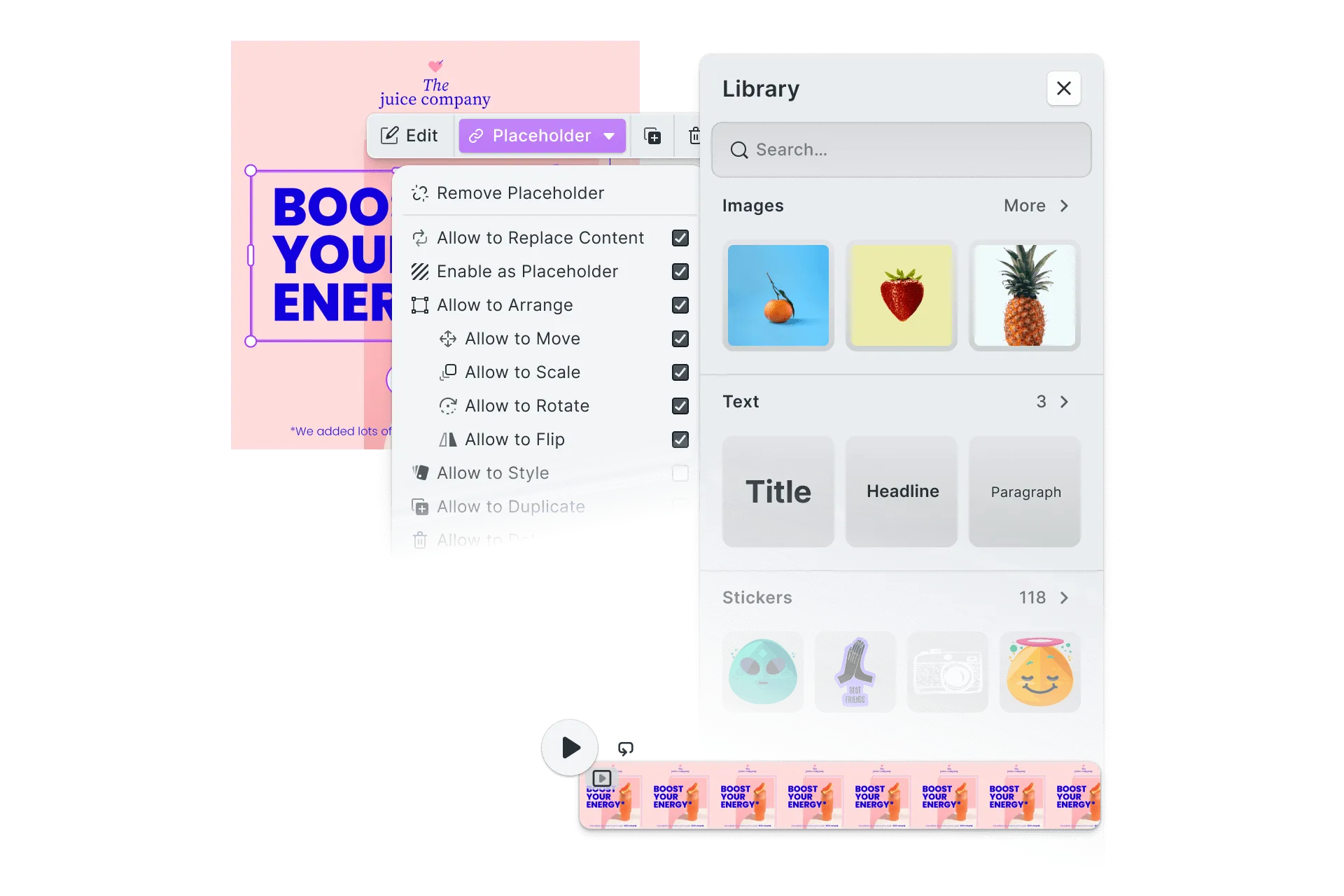
Your brand, your product
White-labeling is how CE.SDK is built, not a mode you switch on. The editor fits your product on two fronts: how it looks, and where it runs.
Looks like you built it
Apply your brand theme so the editor matches your product’s colors, typography, and styling, not an approximation of them.
No trace of IMG.LY
No badge, no watermark, no attribution. Every panel, icon, and label carries your identity.
In your app, on your domain
The editor lives inside your app on your own domain. No IMG.LY-hosted iframe sits between you and your users, and their content never leaves your app.
Branded editors shipped by 100+
product teams














Integrating IMG.LY’s editor meant we didn’t have to build or maintain a complex editing layer ourselves. That kept our team focused on our core AI ad engine and saved us countless development hours — while still giving our customers the ability to polish and customize creatives at scale.
Hikari Senju
CEO, Omneky

With IMG.LY we built a central creative portal that now powers over 140 dealer campaigns across multiple automotive brands. Before this, asset creation was slow and inconsistent.
Martin Röhr
Product Owner, Digitas

By embedding IMG.LY’s editor we were able to hit key RFP requirements and deliver a template-based creative experience that now serves 1,000+ customers. It helped us win more deals and exceed enterprise expectations without needing to hire dedicated design teams.
Rob Driscoll
Director of PM, Optimizely

Since integrating IMG.LY’s editor, we now deliver 30,000+ ad creatives per month, dramatically shorten time-to-launch, and help our clients cut design spend by up to $10,000 per month.
Logan Welbaum
Founder, Plai
Our customers create over a million personalized postcards each year choosing from over hundreds of templates with IMG.LY’s SDK. It’s the only solution that allows us to build our own specialized, on-brand UI that integrates seamlessly with our platform.
Jeanine Zaalberg
Product Manager, SwissPost

From a developer’s perspective, the most powerful feature of the photo editor is the integration process. It was completely flawless, quick, and easy to integrate.
Stefano Fornari
CTO, Funambol
We compared IMG.LY SDK with other solutions and found that it would be the best fit for us since it provides all the features that are crucial for our use case.
Carem Pereira
SCRUM Manager, HP

What white-label actually means for an editor SDK
“White-label” gets used loosely. With CE.SDK it’s a concrete promise: no co-branding, no “powered by” badge, no hosted iframe, just the editor as part of your product. Here’s what that covers.
- Full control of the look, from your brand colors and typography to built-in light and dark themes
- Every part of the interface shown, hidden, rearranged, or replaced with your own components
- All IMG.LY branding removed, with no watermark, badge, or attribution anywhere
- Your own domain, running client-side in the browser or natively on mobile
- Your users’ content kept in your environment, never sent to IMG.LY
- Copy localized into every language your product ships in
- A commercial license to embed the editor inside your own product
No “Made with IMG.LY”, anywhere
Nothing in the editor or the files it produces points back to us.
Nothing in the UI
No badge, no “Made with” chip, no attribution line. The interface carries your name, icons, and copy from the first frame.
Nothing on the exports
Files export clean. There’s no watermark or mark on the images, videos, or PDFs your users create.
On every white-label plan
Branding removal is included in every license that covers white-labeling, not sold as a separate add-on. There is no attribution requirement.
Customize the interface, not just the colors
Theming sets the look. Beyond it, nearly every part of the interface is configurable, so the editor behaves the way your product does, not the way ours does.
Brand theme
Set colors, typography, spacing, and radius with CSS custom properties, or start from the built-in light, dark, and system themes.
Every part of the interface
Show, hide, or restyle the navigation bar, dock, inspector, canvas bar, and context menus, so the layout fits your app instead of following ours.
Features and component order
Toggle features on or off with the Feature API, and reorder or recompose any part of the UI with the Component Order API to expose only what your users need.
Custom components
Register your own components to place your product’s controls, panels, and actions directly inside the editor’s interface.
Your own asset sources
The editor is storage-agnostic. Serve your own templates, images, fonts, and audio from your DAM, CDN, or stock provider. The content library is yours too.
Defaults and language
Ship sensible defaults with page formats, crop presets, movement constraints, and color palettes, and localize every label into the languages you support.
Configure it down to the detail
Every region, feature, and default is documented, so your team can map the editor to your product precisely.
See the customization docsLooking for what the editor can do?
The features are the same whatever brand they wear. Explore what each editor can do on the product pages, or start with how the embeddable editor fits into your app in the first place.
See how teams ship with CE.SDK
Read how product teams put a branded, embedded editor in front of their users.
Browse case studiesDrop the branded editor into your web app
Install CE.SDK with one command and theme it to your brand in the same config you use to embed it.
npm create vite@latest your-project-name -- --template react-ts && cd your-project-namenpm install @cesdk/cesdk-jsnpm create vite@latest your-project-name -- --template vue-ts && cd your-project-namenpm install @cesdk/cesdk-jsng new your-project-name && cd your-project-namenpm install @cesdk/cesdk-jsnpm create vite@latest your-project-name -- --template svelte-ts && cd your-project-namenpm install @cesdk/cesdk-jsnpx create-next-app@latest your-project-name --typescript && cd your-project-namenpm install @cesdk/cesdk-jsnpm create vite@latest your-project-name -- --template vanilla-ts && cd your-project-namenpm install @cesdk/cesdk-jsThe same branded editor, native on mobile
Ship the themed editor as native SDKs for iOS, Android, React Native, and Flutter.
pod 'IMGLYUI'pod installimplementation("ly.img:editor:1.53.0")npm install @imgly/editor-react-nativeflutter pub add imgly_editorBring your branded editor to the desktop
Embed CE.SDK in Electron and native macOS apps with the same theming and configuration.
npm install @cesdk/cesdk-jspod 'IMGLYUI'pod installpod 'IMGLYUI'pod install
Scaffold and theme the editor with IMG.LY Agent Skills
CE.SDK Agent Skills give AI coding assistants bundled documentation and guided code generation for embedding and customizing the editor across 10 web frameworks.
claude plugin marketplace add imgly/agent-skillsclaude plugin install cesdk@imglynpx skills add imgly/agent-skills -a claude-codenpx skills add imgly/agent-skills --skill docs-react -a claude-codegit clone https://github.com/imgly/agent-skills.gitcp -r agent-skills/plugins/cesdk/skills/docs-react .claude/skills/cesdk-docs-reactLearn more about Agent Skills
White-labeling, product by product
The same branding controls, shown on the editor you are actually shipping.
Photo editor
Filters, crops, and adjustments under your brand and your wording.
Ready to make the editor yours?
Contact our team to discuss white-labeling and theming CE.SDK for your product.
Frequently Asked Questions
It means the editor ships as part of your product, not ours. You control the UI theme, icons, and copy, remove all IMG.LY branding, serve it from your own domain, and license it under commercial terms, so your users only ever see your brand.
Yes. There is no "Made with IMG.LY" badge, no watermark, and no attribution requirement. The editor carries your name and your visual identity end to end.
No. White-labeling is about branding and deployment, not features. The same design, photo, video, and print capabilities are available however you brand it. See the product pages for the full feature set.
Theme the editor with CSS custom properties, controlling colors, typography, spacing, and radius, and switch between built-in light, dark, and system themes. You can also show, hide, reposition, or rename the panels and controls, and localize every label.
Yes. CE.SDK runs inside your application on your domain, in the browser via WebAssembly or natively on mobile. There is no IMG.LY-hosted iframe and no third-party domain in front of your users.
Yes. The editor is themed with CSS custom properties, so you can map it to the same colors, fonts, and spacing your product already uses, and it reads as a native part of your app rather than an embedded tool.
CE.SDK is licensed commercially for embedding the editor inside your own product. Contact our team to discuss licensing that fits your deployment.
The editor runs client-side or in your own infrastructure, so your users' content stays with you. IMG.LY never sees or stores it, which keeps data residency under your control.
Yes. Enterprise licenses include custom terms, dedicated support, SLAs, and volume pricing. Contact us to discuss your requirements.