Add a voice isolation action to your iOS video editor so users can remove music and background noise from a clip and keep the voice.
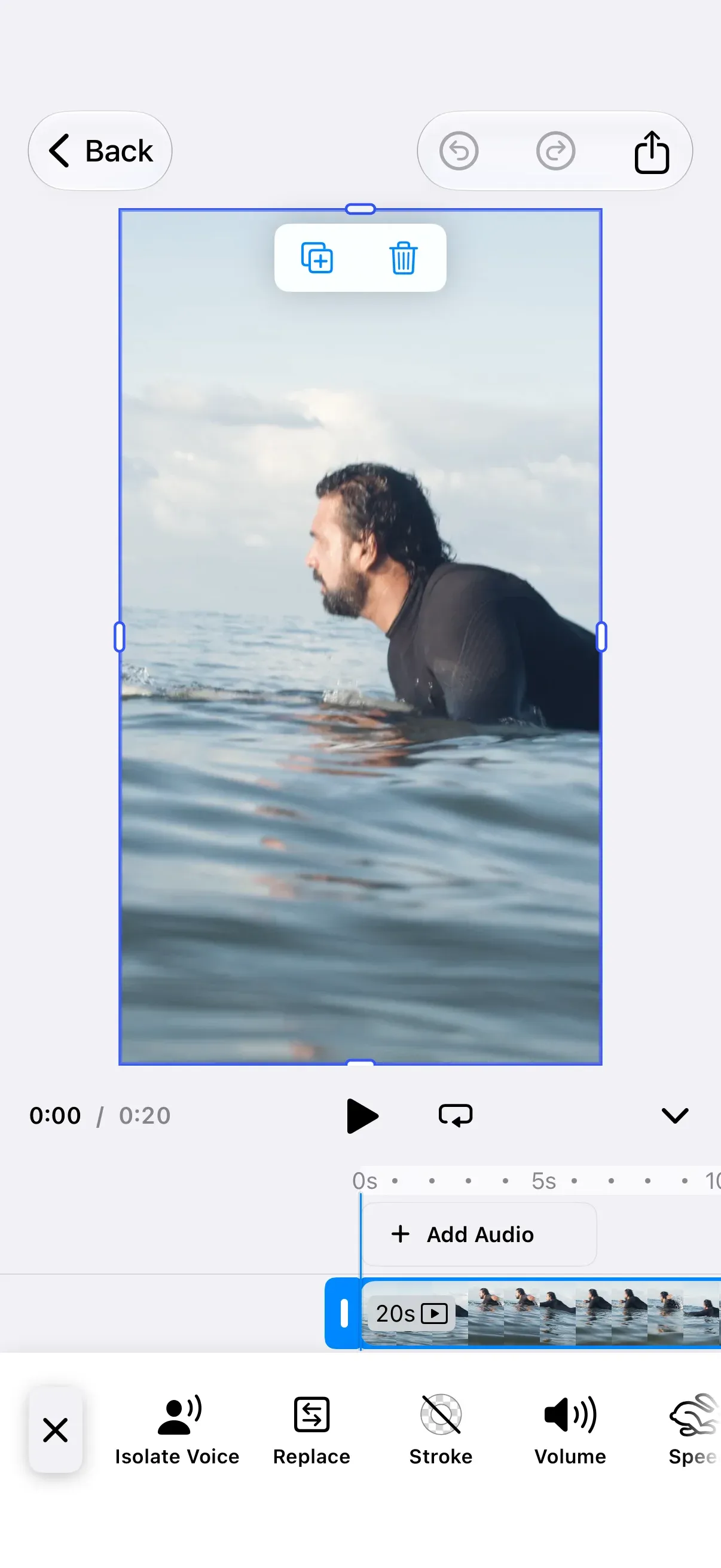
The Voice Isolation plugin adds an “Isolate Voice” button to the inspector bar of a selected video or audio clip. VoiceIsolationPlugin cleans the audio on the device with the DeepFilterNet3 model and ONNX Runtime. You can also clean a clip from your own code, or replace the model with your own provider.
This guide builds on the Video Editor Starter Kit. The plugin works with any editor configuration that has an inspector bar.
Install the Plugin#
Add the IMGLYPluginVoiceIsolation Swift package to your project with Swift Package Manager. Use the same version as CE.SDK, 1.86.0:
https://github.com/imgly/IMGLYPluginVoiceIsolation-swiftThe package has three library products:
| Product | Pulls in | Pick when |
|---|---|---|
IMGLYPluginVoiceIsolation |
Core and ONNX | You want IMG.LY’s model. This is the default. |
IMGLYPluginVoiceIsolationONNX |
Core and ONNX Runtime | You import the modules one by one. |
IMGLYPluginVoiceIsolationCore |
Core, without ONNX Runtime | You bring your own provider. |
In an arm64 release build, ONNX Runtime adds about 31 MB to the app bundle.
DeepFilterNet3 is by Hendrik Schröter and is licensed under MIT or Apache-2.0 (Rikorose/DeepFilterNet).
Use the Plugin#
Import IMGLYEditor and the plugin module in the file where you set up the editor:
import IMGLYEditorimport IMGLYEngineimport IMGLYPluginVoiceIsolationCompose VoiceIsolationPlugin() with your editor configuration. Without arguments, the plugin uses IMG.LY’s model and inserts its button first in the inspector bar.
Editor(settings) .imgly.configuration { VideoEditorConfiguration() VoiceIsolationPlugin() }When the user taps Isolate Voice, the plugin:
- Shows the loading state of the clip while the model runs.
- Cleans an audio clip in place. A video clip first moves the audio track that it plays into a new audio clip, as Separate Audio does for that track, and the video clip is muted. The new audio clip gets the cleaned audio.
- Keeps mono audio mono and stereo audio stereo. Audio with more than two channels becomes stereo.
- Adds one undo step, which brings the original audio back.
The button cleans one clip at a time. A tap on another clip waits until the earlier taps finish. The button stays on a video clip after the clean. A second tap separates and cleans the audio of the video again. The first clean muted the video, so the new audio clip is muted too, as with Separate Audio on a muted video.
Configure the Plugin#
VoiceIsolationPlugin(configuration:onError:inspectorBarModifier:) sets where the model comes from, when it downloads, how errors show and where the button goes. This example sets every option. It keeps the default model location, downloads the model on the first clean, shows errors in an alert and moves the button to the end of the inspector bar:
Editor(settings) .imgly.configuration { VideoEditorConfiguration() VoiceIsolationPlugin( configuration: IMGLYVoiceIsolationConfiguration( // The default model location. Replace it with the folder on your server or in your app. modelBaseURL: IMGLYVoiceIsolationConfiguration.defaultModelBaseURL, loadMode: .lazy, ), onError: { error in errorMessage = error.localizedDescription }, inspectorBarModifier: { items, button in items.addLast { button } }, ) } .alert("Voice Isolation Error", isPresented: .constant(errorMessage != nil)) { Button("OK") { errorMessage = nil } } message: { Text(errorMessage ?? "") }| Option | Default | Description |
|---|---|---|
IMGLYVoiceIsolationConfiguration.modelBaseURL |
https://staticimgly.com/imgly/plugin-mobile-voice-isolation/1.0.0 |
The folder that holds the model files enc.onnx, erb_dec.onnx, df_dec.onnx and config.ini, 8.6 MB in total. IMGLYVoiceIsolationConfiguration.defaultModelBaseURL holds the default. |
IMGLYVoiceIsolationConfiguration.loadMode |
.eager |
.eager starts the download when the editor opens. .lazy waits until the first clean. |
onError |
nil |
Receives the error when a tap on the button fails. Without it, the plugin logs the error. |
inspectorBarModifier |
Adds the button first | Inserts the button into the inspector bar. The closure receives the inspector bar items and the button. A closure that does not insert the button removes it. |
- The plugin keeps a downloaded model in the app’s caches directory, one copy for each
modelBaseURL. A new URL downloads the model again, and so does a model that iOS removed from the caches directory. - When a tap on the button fails,
onErrorreceives the error. It is aVoiceIsolationError, an error of your own provider, or an error of the engine, AVFoundation, the network connection or the file system. WithoutonError, the plugin logs the error under the subsystemly.img.plugin.voiceIsolation. A clip that the user changes or deletes during the clean reports no error. - To change the title of the button, add your title under the key
ly_img_plugin_voice_isolation_inspector_bar_buttonto your app’sLocalizable.xcstrings. Add a value for each language that your app supports. The plugin ships English and German titles. Localization explains how the editor finds its strings.
Isolate Voice From Your Code#
isolateVoice(of:engine:) cleans a clip wherever you have the engine, for example when the editor creates its scene. A video clip gets its audio separated first, as with the button. VoiceIsolationPlugin.canIsolateVoice(of:engine:) tells you whether a clip can be cleaned. This example opens a video and cleans its clip before the editor shows it:
let voiceIsolation = VoiceIsolationPlugin()return Editor(settings) .imgly.configuration { VideoEditorConfiguration { builder in builder.onCreate { engine, _ in try await VideoEditorConfiguration.defaultOnCreate(createScene: { engine in let basePath = try engine.editor.getSettingString("basePath") guard let videoURL = URL(string: "\(basePath)/ly.img.video/videos/pexels-kampus-production-8154913.mp4") else { return } try await engine.scene.create(fromVideo: videoURL) })(engine) guard let clip = try engine.block.find(byType: .graphic) .first(where: { VoiceIsolationPlugin.canIsolateVoice(of: $0, engine: engine) }) else { return } do { let cleanedClip = try await voiceIsolation.isolateVoice(of: clip, engine: engine) print("Cleaned audio clip \(cleanedClip).") } catch { print("Could not isolate the voice: \(error.localizedDescription)") } } } voiceIsolation }- Call
isolateVoiceon the plugin instance that you compose with the editor, so that the call and the button share one model. - The call waits until the clip is cleaned and returns the audio clip that got the cleaned audio: the clip itself for an audio clip, the new audio clip for a video clip.
- Unlike the button, the call does not wait for other cleans. Calls that you start together decode their audio at the same time, and each needs its own temporary files. IMG.LY’s model cleans one clip after the other, and your own provider decides for itself.
- The call shows no loading state. To show one, set the clip’s state with
engine.block.setState(_:state:)to.pending(progress:)before the call and back to.readywhen it returns or throws. - It adds no undo step, so the change joins the next undo step of the editor. The example cleans the clip before the user can edit, so it needs none. Elsewhere, call
engine.editor.addUndoStep()after the call, so that the change gets an undo step of its own.
The call throws a VoiceIsolationError, an error of your own provider, or a CancellationError when the editor closes. IMG.LY’s model reports a failed download or load as .modelDownloadFailed(_:), and a failed clean as .processingFailed(_:). Other errors of the engine, AVFoundation, the network connection or the file system reach you as they are. For example, the call throws an error of the engine when the engine cannot download the clip’s file. VoiceIsolationError has these cases:
| Error | Cause |
|---|---|
.unsupportedBlock |
The block is not an audio clip or a video clip whose audio the editor can separate, or its fill/change scope does not allow the change. This includes a loaded video without an audio track. Check it with canIsolateVoice(of:engine:) first. |
.noAudio |
The clip has no audio track when the call loads it, or its audio has no samples. |
.blockChanged |
The clip was deleted or changed during the clean: it got another file, or its fill/change scope stopped allowing the change. A video clip also counts as changed when it is muted or unmuted, or when it plays faster than 3x. Separate Audio counts as a change when it mutes the video. The plugin leaves the clip unchanged. |
.modelDownloadFailed(_:) |
The model could not be downloaded or loaded, or the bundled model was not found. |
.processingFailed(_:) |
The audio could not be read, decoded, cleaned or written. For example, AVFoundation cannot read its format. |
Keep the Cleaned Audio#
The plugin uploads nothing. Each cleaned clip plays a local file, which IMG.LY’s model writes as a WAV file with 16-bit samples at 48 kHz, in mono or stereo. The file is in the app’s caches directory, in the folder ly.img.plugin.voiceIsolation/results. A clip of any length works: IMG.LY’s model cleans the audio in short pieces, so its memory does not grow with the length of the clip. The plugin cleans the clip’s whole audio file, not the trimmed part. The cleaned file of one minute of stereo audio takes about 11 MB. The clean needs at least as much again for temporary files. It also copies the audio track of a video clip, or the audio of an audio clip that does not play a local file. A long clip can fail on a device with little free storage.
iOS can clear the caches directory. To keep the cleaned audio of a scene that you save, upload each file:// URL that engine.editor.findAllMediaURIs() returns. Then call engine.editor.relocateResource(currentURL:relocatedURL:) with the local URL and the URL of the upload. The Working With Resources guide covers both calls. To keep the scene on the device instead, save it with engine.scene.saveToArchive(), which stores the cleaned audio in the archive.
Use Your Own Provider#
For your own model or service, adopt VoiceIsolationProvider. Your configuration returns the provider, and VoiceIsolationPlugin keeps the button and the block call. A custom provider needs only the IMGLYPluginVoiceIsolationCore product. With that product alone, import IMGLYPluginVoiceIsolationCore and pass configuration: to the plugin, because the initializer without it comes with the umbrella product.
The plugin decodes the audio of the clip into a WAV file with 16-bit samples at 48 kHz and passes it as input. Mono stays mono, and audio with more than two channels becomes stereo. Write the cleaned audio to output in a format that iOS decodes, such as WAV, and with the length of input. Otherwise the trim of the clip and its sync with the video shift. The plugin calls prewarm() when the editor opens. Its default does nothing.
struct CustomVoiceIsolationProvider: VoiceIsolationProvider {  func prewarm() async throws {    // Download or load your model here.  }
  func isolateVoice(from input: URL, to output: URL) async throws {    // Replace this copy with your model or service. Write a WAV file with the format and length of `input`.    try FileManager.default.copyItem(at: input, to: output)  }}
struct CustomVoiceIsolationConfiguration: VoiceIsolationConfiguration {  var provider: any VoiceIsolationProvider = CustomVoiceIsolationProvider()}
Pass your configuration to the plugin:
VoiceIsolationPlugin(configuration: CustomVoiceIsolationConfiguration())The plugin passes the errors that your provider throws to onError and to the caller of isolateVoice(of:engine:).
Chain With the IMG.LY Provider#
To run your own model before IMG.LY’s, write its result to a file in the input format and pass that file to IMGLYVoiceIsolationProvider. This needs the IMGLYPluginVoiceIsolation or IMGLYPluginVoiceIsolationONNX product. The example forwards prewarm(), so that IMG.LY’s model still downloads when the editor opens.
struct ChainedVoiceIsolationProvider: VoiceIsolationProvider {  let imglyProvider = IMGLYVoiceIsolationProvider()
  func prewarm() async throws {    try await imglyProvider.prewarm()  }
func isolateVoice(from input: URL, to output: URL) async throws { let firstPass = FileManager.default.temporaryDirectory .appendingPathComponent(UUID().uuidString) .appendingPathExtension("wav") defer { try? FileManager.default.removeItem(at: firstPass) } // Replace this copy with your model. Write a WAV file with the format and length of `input`. try FileManager.default.copyItem(at: input, to: firstPass) try await imglyProvider.isolateVoice(from: firstPass, to: output) }}VoiceIsolationPlugin(configuration: CustomVoiceIsolationConfiguration( provider: ChainedVoiceIsolationProvider(),))API Reference#
| API | Category | Purpose |
|---|---|---|
VoiceIsolationPlugin(onError:inspectorBarModifier:) |
Plugin registration | Adds the Isolate Voice button with IMG.LY’s model. Comes with the IMGLYPluginVoiceIsolation product. |
VoiceIsolationPlugin(configuration:onError:inspectorBarModifier:) |
Plugin registration | Adds the Isolate Voice button with the provider of a configuration. |
IMGLYVoiceIsolationConfiguration(modelBaseURL:loadMode:) |
Configuration | Sets the model location and the download time. |
IMGLYVoiceIsolationConfiguration.defaultModelBaseURL |
Configuration | The CDN folder of IMG.LY’s model. |
VoiceIsolationPlugin.canIsolateVoice(of:engine:) |
Block call | Returns whether a clip can be cleaned. |
isolateVoice(of:engine:) |
Block call | Cleans a clip and returns the audio clip that got the cleaned audio. |
engine.block.setState(_:state:) |
Block call | Shows the loading state of a clip during a block call. |
engine.editor.addUndoStep() |
Undo | Adds an undo step after a block call. |
VoiceIsolationProvider.prewarm() |
Custom provider | Prepares a provider when the editor opens. |
VoiceIsolationProvider.isolateVoice(from:to:) |
Custom provider | Writes the cleaned audio of a WAV file. |
IMGLYVoiceIsolationProvider(modelBaseURL:loadMode:) |
Custom provider | Creates IMG.LY’s provider, to run after your own model. |
engine.scene.create(fromVideo:) |
Scene | Creates a video scene from a video file. |
engine.block.find(byType:) |
Scene | Finds the blocks of a type, such as the graphic blocks that hold video clips. |
engine.editor.findAllMediaURIs() |
Result files | Lists the media URLs of the scene, such as the file:// URLs of cleaned audio files to upload before a save. |
engine.editor.relocateResource(currentURL:relocatedURL:) |
Result files | Points the scene to an uploaded copy of a cleaned audio file. |
engine.scene.saveToArchive() |
Result files | Saves the scene together with the files it refers to. |
Related Types#
| Type | Purpose |
|---|---|
VoiceIsolationConfiguration |
The protocol of a configuration, which returns the provider. |
VoiceIsolationError |
The errors of the block call and of IMG.LY’s provider. |
IMGLYVoiceIsolationConfiguration.LoadMode |
.eager or .lazy. |
Next Steps#
- Record Voiceover - Let users record voiceover clips in the editor.
- Audio - Create audio blocks and extract the audio of a video.
- Inspector Bar - Customize inspector bar items and their order.
- Working With Resources - Relocate resources before you save a scene.
- Video Editor - Start from the Video Editor Starter Kit.