Add a voice isolation action to your Android video editor so users can remove music and background noise from a clip and keep the voice.
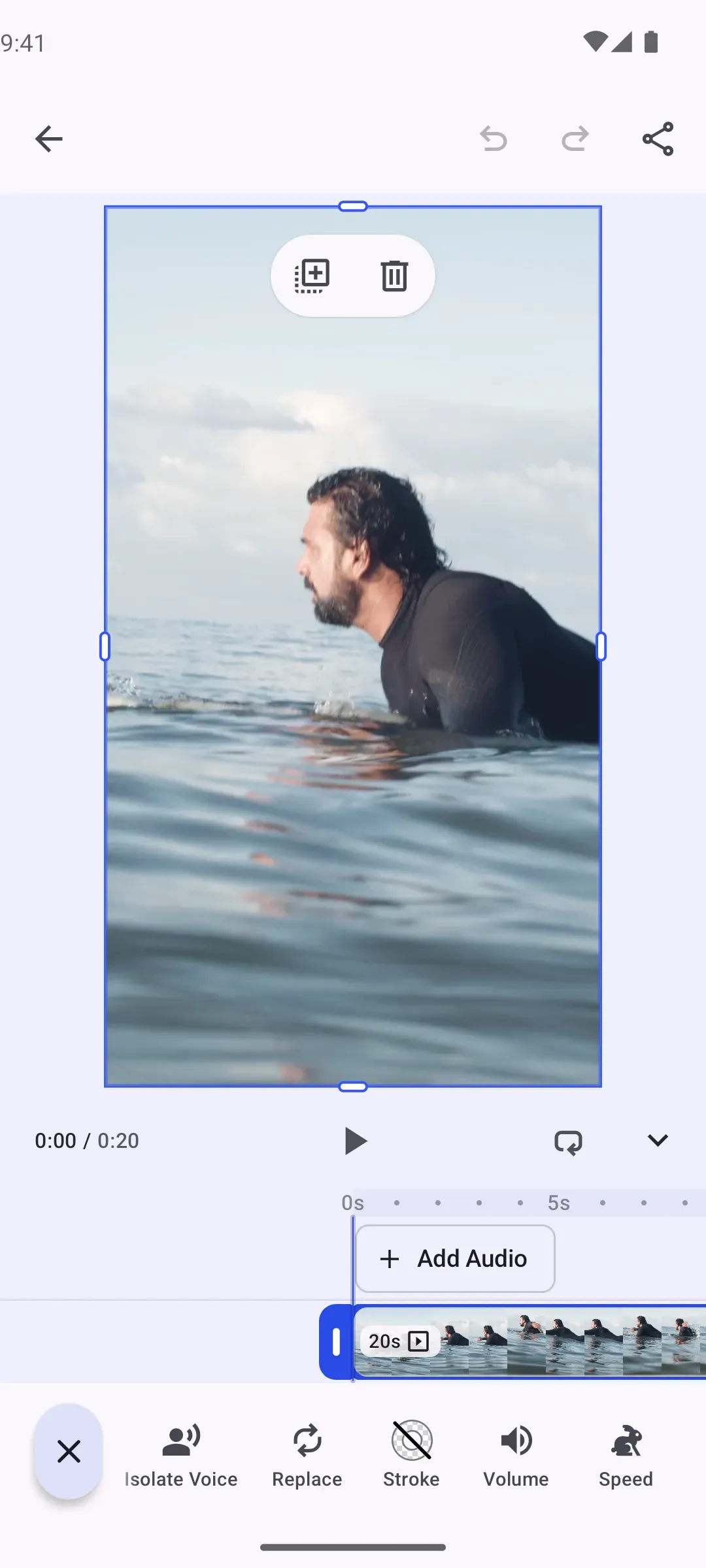
The Voice Isolation plugin adds an “Isolate Voice” button to the inspector bar of a selected video or audio clip. IMGLYVoiceIsolationPlugin cleans the audio on the device with the DeepFilterNet3 model and ONNX Runtime. You can also clean a clip from your own code, or replace the model with your own isolator.
This guide builds on the Video Editor Starter Kit. The plugin works with any editor configuration that has an inspector bar.
Install the Plugin#
Add the IMG.LY implementation to the module that hosts CE.SDK:
dependencies { implementation("ly.img:plugin-voice-isolation-imgly:1.86.0")}It brings ly.img:plugin-voice-isolation, which holds the button, the block call and the VoiceIsolator interface. ONNX Runtime adds about 27 MB to an arm64-v8a app, and about 10 MB to its download size.
DeepFilterNet3 is by Hendrik Schröter and is licensed under MIT or Apache-2.0 (Rikorose/DeepFilterNet).
Use the Plugin#
Compose IMGLYVoiceIsolationPlugin with your editor configuration. The plugin inserts its button first in the inspector bar and uses the default IMG.LY configuration.
Editor( license = license, configuration = { EditorConfiguration .remember(::VideoConfigurationBuilder) .then(::IMGLYVoiceIsolationPlugin) }, onClose = onClose,)When the user taps Isolate Voice, the plugin:
- Shows the loading state of the clip while the model runs.
- Cleans an audio clip in place. A video clip first moves the audio track that the editor plays into a new audio clip, as Separate Audio does, and the video clip is muted. The new audio clip gets the cleaned audio.
- Keeps the channels of the clip, so stereo stays stereo.
- Adds one undo step, which brings the original audio back.
The button cleans one clip at a time. Taps on other clips wait until it is free.
Configure the Plugin#
Configure IMGLYVoiceIsolationPlugin to change where the model comes from, when it downloads, the HTTP client or the button position. This example sets every option. It keeps the default model location and HTTP client, downloads the model on the first clean and moves the button to the end of the inspector bar:
.then(::IMGLYVoiceIsolationPlugin) { config = IMGLYVoiceIsolationConfig( // The default model location and timeouts. Replace them with your server and your timeouts. modelBaseUri = "https://staticimgly.com/imgly/plugin-mobile-voice-isolation/1.0.0".toUri(), loadMode = IMGLYVoiceIsolationConfig.LoadMode.LAZY, httpClient = OkHttpClient.Builder() .connectTimeout(15, TimeUnit.SECONDS) .readTimeout(120, TimeUnit.SECONDS) .writeTimeout(120, TimeUnit.SECONDS) .build(), ) inspectorBarModifier = { addLast { InspectorBar.Button.rememberVoiceIsolation(config = it) } }}| Option | Default | Description |
|---|---|---|
config.modelBaseUri |
https://staticimgly.com/imgly/plugin-mobile-voice-isolation/1.0.0 |
The folder that holds the model files enc.onnx, erb_dec.onnx, df_dec.onnx and config.ini, 8.6 MB in total. |
config.loadMode |
IMGLYVoiceIsolationConfig.LoadMode.EAGER |
EAGER starts the download when the editor opens. LAZY waits until the first clean. |
config.httpClient |
OkHttpClient with a 15 s connect timeout and 120 s read and write timeouts |
Loads the model and the audio of clips that come from a remote URI. |
inspectorBarModifier |
Adds the button first | Inserts InspectorBar.Button.rememberVoiceIsolation(config = it) into the inspector bar. The lambda receives the plugin’s config. A modifier that does not insert the button removes it. |
- The plugin keeps the model in the app’s files directory, one copy for each
modelBaseUri, also for a bundled model. A new URI downloads the model again. - When a clean fails, the plugin logs the error with the tag
VoiceIsolationand shows a toast. A clip without audio and a model that does not download each get their own message. A clip that the user changes or deletes during the clean gets no toast.
Isolate Voice From Your Code#
isolateVoice cleans a clip as the button does: a video clip gets its audio separated, and the audio gets cleaned. Unlike the button, the call does not wait for other calls, shows no loading state and adds no undo step, so your app decides. canIsolateVoice tells you whether a clip can be cleaned. Both functions take the engine, so call them wherever your app has it, for example in onCreate after the scene exists. This example opens a video and cleans its clip when the scene exists:
val voiceIsolationConfig = remember { IMGLYVoiceIsolationConfig() }EditorConfiguration .remember(::VideoConfigurationBuilder) { onCreate = { onCreate( createScene = { val engine = editorContext.engine engine.scene.createFromVideo( videoUri = editorContext.baseUri .buildUpon() .appendPath("ly.img.video") .appendPath("videos") .appendPath("pexels-kampus-production-8154913.mp4") .build(), ) val clip = engine.block.findByType(DesignBlockType.Graphic) .firstOrNull { canIsolateVoice(block = it, engine = engine) } if (clip != null) { // A separate coroutine, so that the editor opens while the model cleans the clip. editorContext.coroutineScope.launch { // The call shows no loading state, so the app shows it. The user can delete the // clip during the call. engine.block.setState(clip, BlockState.Pending(progress = 0F)) try { val cleanedClip = isolateVoice( block = clip, engine = engine, config = voiceIsolationConfig, context = editorContext.activity, ) if (engine.block.isValid(clip)) { engine.block.setState(clip, BlockState.Ready) } // Lets the user undo the cleaning as a step of its own. engine.editor.addUndoStep() Log.i("VoiceIsolation", "Cleaned the audio of clip $cleanedClip.") } catch (exception: VoiceIsolationException) { if (engine.block.isValid(clip)) { engine.block.setState(clip, BlockState.Ready) } Log.e("VoiceIsolation", "Could not isolate the voice.", exception) } } } }, ) } } .then(::IMGLYVoiceIsolationPlugin) { config = voiceIsolationConfig }isolateVoicetakes the config that selects the isolator, and a context. The example shares one config instance with the plugin, so both use the same isolator.- The call suspends until the clip is cleaned. The example launches it in
editorContext.coroutineScope, so the editor opens meanwhile, and closing the editor cancels the call. - Calls that your app starts together are not queued. The isolator decides how many of them it runs at once.
- The call shows no loading state. The example sets the clip’s state to
BlockState.Pendingbefore the call and back toBlockState.Readywhen it returns or throws. - It returns the audio clip that got the cleaned audio: the clip itself for an audio clip, the new audio clip for a video clip.
- It adds no undo step, so the change joins the next undo step of the editor. Call
engine.editor.addUndoStep()after it to make the change an undo step of its own.
The call throws a VoiceIsolationException:
| Exception | Cause |
|---|---|
UnsupportedBlock |
The block is not a video or audio clip that can be cleaned, for example a video that has loaded without an audio track. Check it with canIsolateVoice first. |
NoAudio |
The clip turns out to have no audio when it loads, or its audio has no samples. |
BlockChanged |
The clip was deleted or changed during the clean, for example it got another file or its audio was separated. The plugin leaves the clip unchanged. |
ModelDownloadFailed |
The model could not be downloaded or loaded. |
ProcessingFailed |
The audio could not be decoded, cleaned or written. |
Keep the Cleaned Audio#
The plugin uploads nothing. Each cleaned clip plays a WAV file with 16-bit samples at 48 kHz and the channels of the clip. The file is in the app’s cache directory, in the folder ly.img.plugin.voiceIsolation/results, and the clip refers to that local file.
Android can clear the cache directory. To keep the cleaned audio of a scene that you save, upload each file:// URI that engine.editor.findAllMediaURIs() returns. Then point the scene to the upload with engine.editor.relocateResource(currentUri = localUri, relocatedUri = uploadedUri). The Working With Resources guide covers both calls.
Use Your Own Isolator#
For your own model or service, add the core package and implement VoiceIsolator. Your config selects the isolator, and VoiceIsolationPlugin keeps the button and the block call.
dependencies { implementation("ly.img:plugin-voice-isolation:1.86.0")}The plugin decodes the audio of the clip into a WAV file with 16-bit samples at 48 kHz and the channels of the clip, and passes it as input. Write the cleaned audio to output in the same format and with the same duration, so that the cleaned audio stays in sync with the clip. The plugin can call isolateVoice on the main thread, so move file and model work to another dispatcher. It calls prewarm when the editor opens.
private class CustomVoiceIsolator : VoiceIsolator {    override suspend fun prewarm(context: Context) {        // Download or load your model here. The plugin calls this when the editor opens.    }
    override suspend fun isolateVoice(        context: Context,        input: File,        output: File,    ) {        // The plugin can call this on the main thread, so the file work runs on the IO dispatcher.        withContext(Dispatchers.IO) {            // Replace this copy with your model or service. Write a WAV file with the format and length of input.            input.copyTo(output, overwrite = true)        }    }}
private data class CustomVoiceIsolationConfig(    override val isolator: VoiceIsolator = CustomVoiceIsolator(),    override val httpClient: OkHttpClient = OkHttpClient(),) : VoiceIsolationConfig
Throw a VoiceIsolationException for an error that the user can act on. The plugin wraps any other exception in VoiceIsolationException.ProcessingFailed.
Set your config on VoiceIsolationPlugin:
.then(::VoiceIsolationPlugin) { config = CustomVoiceIsolationConfig()}Chain With the IMG.LY Isolator#
To run your own model before IMG.LY’s, write its result to a file in the input format and pass that file to IMGLYVoiceIsolator.isolateVoice(). This needs ly.img:plugin-voice-isolation-imgly.
private class ChainedVoiceIsolator(    private val imglyIsolator: IMGLYVoiceIsolator = IMGLYVoiceIsolator(IMGLYVoiceIsolationConfig()),) : VoiceIsolator {    override suspend fun prewarm(context: Context) {        imglyIsolator.prewarm(context)    }
override suspend fun isolateVoice( context: Context, input: File, output: File, ) { val firstPass = File(context.cacheDir, "${UUID.randomUUID()}.wav") try { withContext(Dispatchers.IO) { // Replace this copy with your model. Write a WAV file with the format and length of input. input.copyTo(firstPass) } imglyIsolator.isolateVoice(context = context, input = firstPass, output = output) } finally { firstPass.delete() } }}.then(::VoiceIsolationPlugin) { config = CustomVoiceIsolationConfig(isolator = ChainedVoiceIsolator())}API Reference#
| API | Purpose |
|---|---|
EditorConfiguration.remember(builderFactory=_, builder=_) |
Creates the editor configuration that the plugin is composed with. |
then(builderFactory=::IMGLYVoiceIsolationPlugin, builder=_) |
Adds the Isolate Voice button with the IMG.LY isolator. |
IMGLYVoiceIsolationConfig(modelBaseUri=_, loadMode=_, httpClient=_) |
Configures the model location, the download time and the HTTP client. |
VoiceIsolationPlugin.config |
Selects the isolator of the plugin. |
VoiceIsolationPlugin.inspectorBarModifier |
Inserts the button into the inspector bar. |
InspectorBar.Button.rememberVoiceIsolation(config=_, builder=_) |
Creates the Isolate Voice inspector bar button. |
canIsolateVoice(block=_, engine=_) |
Returns whether a clip can be cleaned. |
isolateVoice(block=_, engine=_, config=_, context=_) |
Cleans a clip and returns the audio clip that got the cleaned audio. |
VoiceIsolator.prewarm(context=_) |
Prepares a custom isolator when the editor opens. |
VoiceIsolator.isolateVoice(context=_, input=_, output=_) |
Writes the cleaned audio of a WAV file. |
IMGLYVoiceIsolator(config=_) |
Creates the IMG.LY isolator, to run after your own model. |
engine.scene.createFromVideo(videoUri=_) |
Creates a video scene from a video file. |
engine.block.findByType(type=_) |
Finds the blocks of a type, such as the graphic blocks that hold video clips. |
engine.block.setState(block=_, state=_) |
Shows the loading state of a clip during a block call. |
engine.editor.addUndoStep() |
Adds an undo step after a block call. |
engine.editor.findAllMediaURIs() |
Lists the media URIs of the scene, such as the file:// URIs of cleaned audio files to upload before a save. |
engine.editor.relocateResource(currentUri=_, relocatedUri=_) |
Points the scene to an uploaded copy of a cleaned audio file. |
Related Types#
VoiceIsolationConfig: the interface of a config, with thehttpClientand theisolator.VoiceIsolationException: the errors of the block call and of an isolator.IMGLYVoiceIsolationConfig.LoadMode:EAGERorLAZY.
Next Steps#
- Record Voiceover - Let users record voiceover clips in the editor.
- Audio - Create audio blocks and separate the audio of a video.
- Inspector Bar - Customize inspector bar items and their order.
- Working With Resources - Relocate resources before you save a scene.
- Video Editor - Start from the Video Editor Starter Kit.