Add on-device background removal to your editor with a single plugin registration — no server uploads, no API keys.
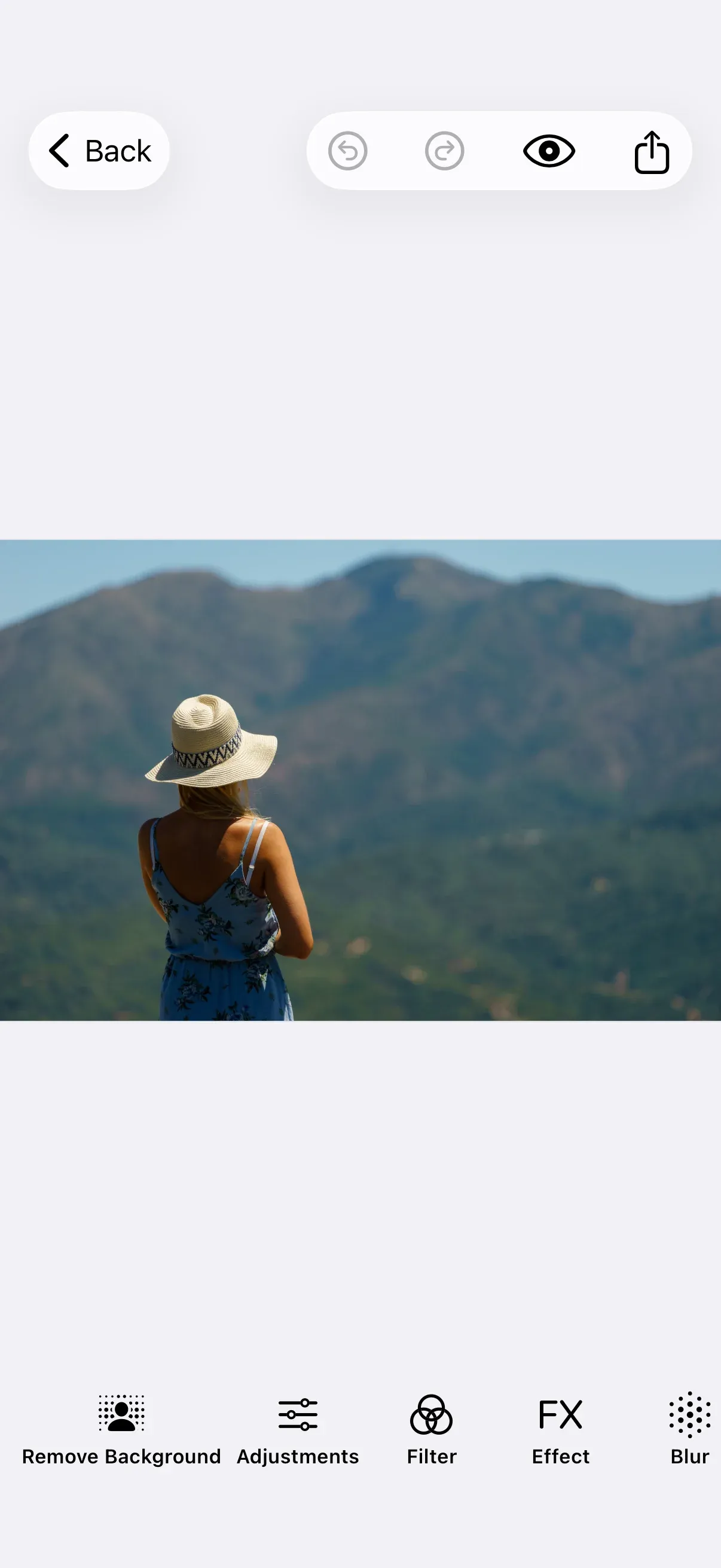
The BackgroundRemovalPlugin adds a “Remove Background” button to the editor dock. When tapped, it extracts the current page’s image, runs segmentation on-device, and replaces the image with the cut-out result. By default it uses IMG.LY’s IS-Net foreground segmentation model — the same model used by the web background-removal plugin — accelerated on the Apple Neural Engine. An alternative Apple Vision backend ships in the same package for portrait-heavy apps that want zero model download.
This guide builds on the Photo Editor Starter Kit. The plugin operates on the current page’s image fill, so it fits photo-style configurations best; any editor configuration that hosts a dock and edits page image fills can register it the same way.
Install the Plugin#
Add the IMGLYPluginBackgroundRemoval Swift package to your project via Swift Package Manager:
https://github.com/imgly/IMGLYPluginBackgroundRemoval-swiftThe umbrella product re-exports both backends. If you only need one, depend on a sub-library instead to skip the unused dependency:
| Product | Pulls in | Pick when |
|---|---|---|
IMGLYPluginBackgroundRemoval |
Core + ONNX + Vision | You want the default IMG.LY backend, the Vision backend, or both. |
IMGLYPluginBackgroundRemovalONNX |
Core + onnxruntime XCFramework (~20 MB) | You only want the IMG.LY IS-Net backend. |
IMGLYPluginBackgroundRemovalVision |
Core + Vision wrapper | You only want Apple Vision. Skips the onnxruntime binary. |
IMGLYPluginBackgroundRemovalCore |
Core only | You’re implementing a fully custom backend. |
If you depend on a sub-library, import that module instead of IMGLYPluginBackgroundRemoval. The no-configuration initializer is only available via the umbrella product — pass configuration: explicitly when registering the plugin.
The default IMG.LY backend downloads its segmentation model from IMG.LY’s CDN when the editor is first presented (default .eager load mode, ~84 MB for the default FP16 model) and caches it on disk. The first user tap is near-instant because the model is fetched and CoreML-compiled in the background while the editor is being presented.
Use the Plugin#
Import IMGLYEditor and the plugin module in the file where you set up the editor:
import IMGLYEditorimport IMGLYEngineimport IMGLYPluginBackgroundRemovalRegister the plugin alongside your editor configuration. Called with no arguments, the convenience initializer uses the default IMG.LY backend — no further setup needed:
Editor(settings) .imgly.configuration { PhotoEditorConfiguration() BackgroundRemovalPlugin() }The plugin adds a “Remove Background” button to the dock. When the user taps it, the plugin:
- Reads the current page’s image fill
- Runs segmentation on the image bytes
- Composites the foreground over a transparent background
- Replaces the original image with the result
Configure the Plugin#
The following sections show each public customization option.
Pick a Backend#
Pass a BackgroundRemovalConfiguration value to the configuration: parameter to choose the segmentation backend. Omitting it picks the IMG.LY backend with default settings.
VisionBackgroundRemovalConfiguration() selects Apple Vision. This backend has no model download and the smallest binary and memory footprint:
Editor(settings) .imgly.configuration { PhotoEditorConfiguration() BackgroundRemovalPlugin(configuration: VisionBackgroundRemovalConfiguration()) }IMGLYBackgroundRemovalConfiguration exposes the IS-Net model’s tuning knobs. Pass an explicit instance to override the defaults:
Editor(settings) .imgly.configuration { PhotoEditorConfiguration() BackgroundRemovalPlugin( configuration: IMGLYBackgroundRemovalConfiguration( model: .fp32, modelBaseURL: IMGLYBackgroundRemovalConfiguration.defaultModelBaseURL, loadMode: .lazy, ), ) }The configuration carries three fields, all with sensible defaults:
| Field | Type | Default | Purpose |
|---|---|---|---|
model |
IMGLYBackgroundRemovalConfiguration.Model |
.fp16 |
Which IS-Net model variant to use. |
modelBaseURL |
URL |
IMG.LY’s CDN | Where to fetch the model from. Pass a file:// URL to ship a pre-bundled model. |
loadMode |
IMGLYBackgroundRemovalConfiguration.LoadMode |
.eager |
When to fetch and CoreML-compile the model. |
.fp16produces visually indistinguishable output to.fp32at half the bytes on the wire and runs on the Apple Neural Engine. Pick.fp32only when you have a specific numerical-accuracy requirement..eagerabsorbs the download and compilation cost while the editor is being presented so the first tap is near-instant..lazywaits until the first tap, saving bandwidth and battery if the feature goes unused.
Error Handling#
By default, errors are logged to the console under the subsystem ly.img.plugin.backgroundRemoval. To present a custom error alert, pass an onError closure:
Editor(settings) .imgly.configuration { PhotoEditorConfiguration() BackgroundRemovalPlugin(onError: { error in errorMessage = error.localizedDescription }) } .alert("Background Removal Error", isPresented: .constant(errorMessage != nil)) { Button("OK") { errorMessage = nil } } message: { Text(errorMessage ?? "") }Common errors include the current page not carrying an image fill (BackgroundRemovalError.noImageFound), the Vision backend not finding a person in the image (BackgroundRemovalError.backgroundRemovalFailed), and IS-Net model-download failures over a flaky network (BackgroundRemovalError.modelDownloadFailed).
Dock Button#
The dock button is prepended by default. Use dockModifier to control where it appears:
Editor(settings) .imgly.configuration { PhotoEditorConfiguration() BackgroundRemovalPlugin( dockModifier: { items, button in items.addLast { button } }, ) }The closure receives the existing dock items list and the plugin’s button; insert the button wherever fits your dock layout.
API Reference#
| API | Category | Purpose |
|---|---|---|
BackgroundRemovalPlugin(onError:dockModifier:) |
Plugin registration | Convenience initializer that picks the default IMG.LY backend. |
BackgroundRemovalPlugin(configuration:onError:dockModifier:) |
Plugin registration | Full initializer with explicit backend, error handler, and dock placement. |
BackgroundRemovalConfiguration |
Plugin contract | Protocol every backend configuration adopts. |
IMGLYBackgroundRemovalConfiguration |
Backend configuration | Configures the IS-Net backend (model, base URL, load mode). |
IMGLYBackgroundRemovalConfiguration.Model |
Backend configuration | .fp16 (default) or .fp32. |
IMGLYBackgroundRemovalConfiguration.LoadMode |
Backend configuration | .eager (default) or .lazy. |
VisionBackgroundRemovalConfiguration |
Backend configuration | Configures the Apple Vision backend (people-only). |
BackgroundRemovalProvider |
Plugin extension | Protocol for plugging in a custom segmentation backend. |
BackgroundRemovalError |
Error handling | LocalizedError cases surfaced through onError. |
Next Steps#
- Dock — Customize dock items and ordering.
- Photo Editor Starter Kit — The editor preset that hosts this plugin.
- Open the Editor From an Image — Start the editor with image content.