Change the path of a shape with modifiers. Trim an outline, repeat a shape, round its corners, or bend it.
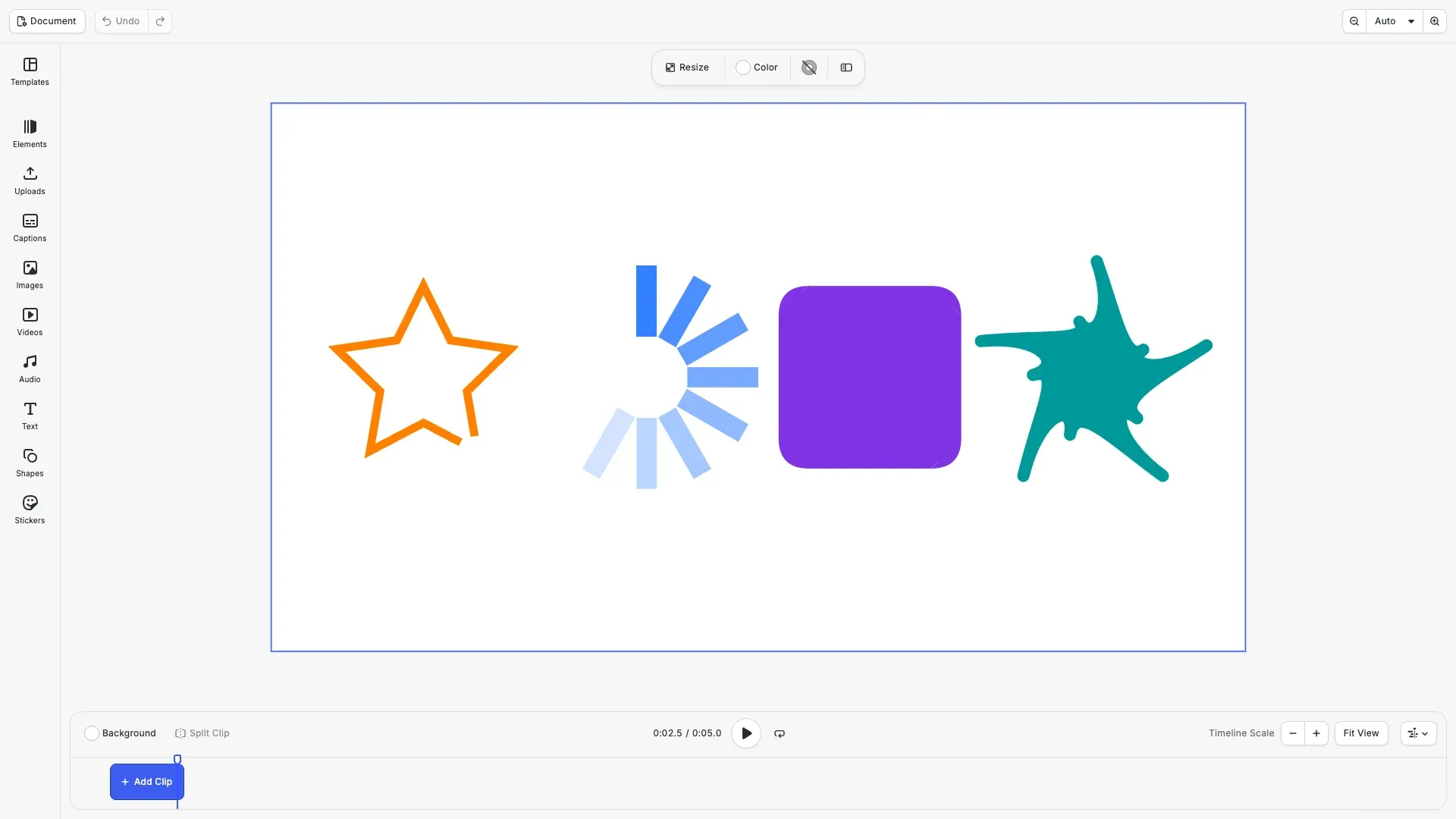
A modifier is a block that changes the path of a shape. You attach it to a shape block, and the engine applies it before it draws the fill and the stroke. A shape can have a list of modifiers, which apply in order. Every modifier property accepts keyframes. The editor has no modifier controls, so you add modifiers with the block API. Imported Lottie animations use the same modifiers, see Lottie.
This guide covers how to create, order, animate and remove modifiers, and what each modifier type does.
Modifier Types#
createModifier() accepts these types:
| Type | Effect |
|---|---|
'trim' |
Keeps only a part of the path |
'repeater' |
Draws the shape several times, each copy one step further |
'round_corners' |
Rounds the corners between straight segments |
'offset' |
Grows or shrinks the shape |
'zigzag' |
Adds peaks and valleys to the segments |
'pucker_bloat' |
Pulls the corners towards the center or pushes them away |
'twist' |
Turns the path around a center, more near the center than at the edge |
You can also pass the full type, for example '//ly.img.ubq/modifier/trim'.
Creating a Modifier#
We use a small helper that adds a 5 second graphic block with a shape and a color fill to the page. The duration matters only for the animations later in this guide.
// Adds a 5 second graphic with a shape and a color fill to the pageconst addGraphic = ( shapeType: 'star' | 'rect', x: number, y: number, width: number, height: number, color: RGBAColor) => { const graphic = engine.block.create('graphic'); engine.block.setShape(graphic, engine.block.createShape(shapeType)); const fill = engine.block.createFill('color'); engine.block.setColor(fill, 'fill/color/value', color); engine.block.setFill(graphic, fill); engine.block.setWidth(graphic, width); engine.block.setHeight(graphic, height); engine.block.setPositionX(graphic, x); engine.block.setPositionY(graphic, y); engine.block.setDuration(graphic, 5); engine.block.appendChild(page, graphic); return graphic;};Modifiers belong to the shape block, not to the graphic block. supportsModifiers() returns true for every shape block and false for all other blocks. We get the shape with getShape(), create a 'trim' modifier and add it to the end of the list with appendModifier().
const orange = { r: 1, g: 0.5, b: 0, a: 1 };const outline = addGraphic('star', 120, 360, 360, 360, orange);
// Modifiers belong to the shape block, not to the graphic blockconst outlineShape = engine.block.getShape(outline);console.log(engine.block.supportsModifiers(outlineShape)); // trueconsole.log(engine.block.supportsModifiers(outline)); // false
const trim = engine.block.createModifier('trim');engine.block.appendModifier(outlineShape, trim);
Trimming a Path#
A trim keeps the part of the path between modifier/trim/start and modifier/trim/end. Both are fractions of the path length from 0 to 1, with the defaults 0 and 1. modifier/trim/offset moves the kept part along the path. An offset of 1 is a full turn. Equal start and end values draw nothing.
// Draw the outline only: no fill and a thick strokeengine.block.setFillEnabled(outline, false);engine.block.setStrokeEnabled(outline, true);engine.block.setStrokeWidth(outline, 16);engine.block.setStrokeColor(outline, orange);
// Keep the first 75% of the path, moved by an eighth of the path lengthengine.block.setFloat(trim, 'modifier/trim/start', 0);engine.block.setFloat(trim, 'modifier/trim/end', 0.75);engine.block.setFloat(trim, 'modifier/trim/offset', 0.125);// 'Simultaneous' trims each contour on its own, 'Individual' trims all contours as one pathengine.block.setEnum(trim, 'modifier/trim/mode', 'Simultaneous');
modifier/trim/mode controls a path with several contours, such as a shape with a hole. 'Simultaneous', the default, trims each contour on its own with the same start and end. 'Individual' trims all contours as one path, in path order. On a shape with a stroke and no fill, a trim draws a part of the outline.
Animating Modifiers#
Every modifier property accepts keyframes. The keyframe times refer to the duration of the graphic block that uses the shape. Here the trim end grows from 0 to 1 in the first 3 seconds, so the star outline draws itself.
// Draw the whole outline during the first 3 seconds of the 5 second blockengine.block.setKeyframes(trim, 'modifier/trim/end', [ { time: 0, value: { type: 'Float', value: 0 }, easing: { type: 'Preset', preset: 'EaseInOut' } }, { time: 0.6, value: { type: 'Float', value: 1 } }]);An absolute track replaces the static value, so the static end of 0.75 does not show while the track exists. For more on tracks and easing, see Keyframes.
Repeating a Shape#
A repeater draws modifier/repeater/copies copies of the shape, 3 by default. Each copy is transformed one step further than the copy before it:
positionXandpositionYmove each copy. The default is 100 units to the right.scaleXandscaleYscale each copy, androtationturns it clockwise in degrees. Both use the pointanchorX,anchorYin the frame of the block.offsetshifts all copies by a number of steps.startOpacityis the opacity of the first copy. The copies fade towardsendOpacity.compositesets the paint order. With'Below', the default, the first copy is on top. With'Above', the last copy is on top.
We turn a bar 30 degrees per copy about a point below it, so 12 copies form a ring.
// A 40 x 140 bar, repeated around a point 220 units below its top edgeconst bar = addGraphic('rect', 720, 320, 40, 140, { r: 0.2, g: 0.5, b: 1, a: 1});const repeater = engine.block.createModifier('repeater');engine.block.setFloat(repeater, 'modifier/repeater/copies', 12);// Each copy turns 30 degrees further about the anchor and does not moveengine.block.setFloat(repeater, 'modifier/repeater/anchorX', 20);engine.block.setFloat(repeater, 'modifier/repeater/anchorY', 220);engine.block.setFloat(repeater, 'modifier/repeater/rotation', 30);engine.block.setFloat(repeater, 'modifier/repeater/positionX', 0);engine.block.setFloat(repeater, 'modifier/repeater/positionY', 0);// The copies fade from full opacity towards 10%engine.block.setFloat(repeater, 'modifier/repeater/startOpacity', 1);engine.block.setFloat(repeater, 'modifier/repeater/endOpacity', 0.1);// 'Above' draws each copy on top of the copy before itengine.block.setEnum(repeater, 'modifier/repeater/composite', 'Above');engine.block.appendModifier(engine.block.getShape(bar), repeater);Every copy uses the same path, so a trim or another modifier changes all copies alike. The number of copies is rounded to a whole number. Animating it adds the copies one by one. On a subshape of a compound shape or on the shape of a mask, a repeater repeats the outline. The copies there form one outline, without the opacity fade.
// Grow the ring from 1 to 12 barsengine.block.setKeyframes(repeater, 'modifier/repeater/copies', [ { time: 0, value: { type: 'Float', value: 1 } }, { time: 0.8, value: { type: 'Float', value: 12 } }]);Modifier Order#
The modifiers of a shape apply in list order, so each modifier changes the result of the modifier before it. insertModifier() adds a modifier at an index from 0 to the length of the list. We add a zig zag first, then insert a corner rounding at index 0 so that it applies before the zig zag.
const badge = addGraphic('rect', 1000, 360, 360, 360, {  r: 0.5,  g: 0.2,  b: 0.9,  a: 1});const badgeShape = engine.block.getShape(badge);
// Smooth peaks and valleys, 6 per side, 12 units from the pathconst zigzag = engine.block.createModifier('zigzag');engine.block.setFloat(zigzag, 'modifier/zigzag/size', 12);engine.block.setFloat(zigzag, 'modifier/zigzag/ridges', 6);engine.block.setEnum(zigzag, 'modifier/zigzag/pointType', 'Smooth');engine.block.appendModifier(badgeShape, zigzag);
// Insert the rounding at index 0, so it applies before the zig zagconst roundCorners = engine.block.createModifier('round_corners');engine.block.setFloat(roundCorners, 'modifier/round_corners/radius', 60);engine.block.insertModifier(badgeShape, roundCorners, 0);
modifier/zigzag/size is the distance of the peaks and valleys from the path. modifier/zigzag/ridges is the number of peaks and valleys per segment, 5 by default. modifier/zigzag/pointType is 'Corner' for sharp points or 'Smooth' for round points. One modifier can be in the lists of several shapes.
Changing the Geometry#
The other geometry modifiers each have a small set of properties:
| Property | Default | Effect |
|---|---|---|
modifier/round_corners/radius |
0 | The corner radius |
modifier/offset/amount |
0 | The distance to grow the shape. A negative value shrinks it. |
modifier/offset/join |
'Miter' |
The offset corners: 'Bevel', 'Miter' or 'Round' |
modifier/offset/miterLimit |
4 | The miter limit, as a multiple of the amount |
modifier/pucker_bloat/amount |
0 | The fraction of the way from each corner to the center. 1 moves the corners to the center. A negative value moves them away. |
modifier/twist/angle |
0 | The turn at the center in degrees, clockwise |
modifier/twist/centerX, centerY |
0 | The center of the twist in the frame of the block |
We bloat a star, twist it around the center of its block and grow the result by 12 units.
const flower = addGraphic('star', 1440, 360, 360, 360, {  r: 0,  g: 0.6,  b: 0.6,  a: 1});const flowerShape = engine.block.getShape(flower);
// A negative amount bloats: it pushes the vertices away from the centerconst puckerBloat = engine.block.createModifier('pucker_bloat');engine.block.setFloat(puckerBloat, 'modifier/pucker_bloat/amount', -0.3);engine.block.appendModifier(flowerShape, puckerBloat);
// Turn the path 45 degrees at the center of the block, less towards the edgeconst twist = engine.block.createModifier('twist');engine.block.setFloat(twist, 'modifier/twist/angle', 45);engine.block.setFloat(twist, 'modifier/twist/centerX', 180);engine.block.setFloat(twist, 'modifier/twist/centerY', 180);engine.block.appendModifier(flowerShape, twist);
// Grow the result by 12 units with round cornersconst offset = engine.block.createModifier('offset');engine.block.setFloat(offset, 'modifier/offset/amount', 12);engine.block.setEnum(offset, 'modifier/offset/join', 'Round');engine.block.appendModifier(flowerShape, offset);
Reading and Finding Modifiers#
getModifiers() returns the modifiers of a shape in the order they apply. findByType() with a modifier type finds every modifier of that type in the scene.
const badgeModifiers = engine.block.getModifiers(badgeShape);console.log(  badgeModifiers.map((modifier) => engine.block.getType(modifier)));// ['//ly.img.ubq/modifier/round_corners', '//ly.img.ubq/modifier/zigzag']
// Find every trim modifier in the sceneconsole.log(engine.block.findByType('//ly.img.ubq/modifier/trim')); // [trim]
Removing and Destroying Modifiers#
removeModifier() removes the modifier at an index from the list. It does not destroy the modifier block, so you can add it again. Call destroy() to delete a modifier. This also removes it from the list of every shape that uses it.
// Remove the zig zag at index 1. The modifier block still exists.engine.block.removeModifier(badgeShape, 1);console.log(engine.block.isValid(zigzag)); // true
// Destroy it when no shape uses it any moreengine.block.destroy(zigzag);
Destroying a graphic block also destroys the modifiers of its shape.
Handling Errors#
Invalid input throws an EngineError. Its code names the problem. A modifier method on a graphic block is a common mistake, because the modifiers belong to its shape.
try { // A graphic block has no modifiers. Pass its shape instead. engine.block.getModifiers(outline);} catch (error) { if (isEngineError(error)) { console.log(error.code); // 'BLOCK.MODIFIERS_UNSUPPORTED' }}Modifiers and Other Block Operations#
Modifiers take part in the usual block operations:
- Undo and redo restore the modifier list and the modifier values.
- Saving and loading a scene keeps the modifiers, their order and their values.
- Duplicating a block copies the modifiers of its shape in order.
- Scaling a block or changing the design unit converts the length properties and their keyframes. These are the corner radius, the offset amount, the zig zag size, the twist center, and the repeater anchor and position.
appendModifier(), insertModifier() and removeModifier() need the shape/change scope on every block that uses the shape. Keyframes on a modifier need the appearance/animation scope.
Troubleshooting#
- The type is not a modifier (
BLOCK.MODIFIER_UNKNOWN_TYPE): use one of the types in the table above. - The block does not accept modifiers (
BLOCK.MODIFIERS_UNSUPPORTED): pass the shape block. Get it withgetShape(). - The block to add is not a modifier (
BLOCK.MODIFIER_NOT_A_MODIFIER): create the block withcreateModifier(). - The index is outside the list (
BLOCK.MODIFIER_INDEX_OUT_OF_BOUNDS):insertModifier()takes an index from 0 to the list length.removeModifier()takes an index below the list length. - A trimmed shape draws nothing: check that the trim start and end differ.
API Reference#
| Method | Description |
|---|---|
block.createModifier(type) |
Create a modifier block |
block.supportsModifiers(block) |
Check whether a block accepts modifiers |
block.getModifiers(shape) |
Get the modifiers of a shape in the order they apply |
block.appendModifier(shape, modifier) |
Add a modifier at the end of the list |
block.insertModifier(shape, modifier, index) |
Add a modifier at an index |
block.removeModifier(shape, index) |
Remove a modifier from the list without destroying it |
block.findByType(type) |
Find every modifier of a type |
block.setFloat(block, property, value) |
Set a number property of a modifier |
block.setEnum(block, property, value) |
Set an option of a modifier |
block.setKeyframes(block, property, keyframes) |
Animate a modifier property |
block.destroy(block) |
Destroy a modifier and remove it from every list |
Next Steps#
- Keyframes: animate modifier properties and other block properties over time.
- Edit Shapes: change the properties of the shape itself.
- Combine Shapes: combine shapes with boolean operations.