Blur moving blocks in exported videos and in the preview, as a camera shutter does.
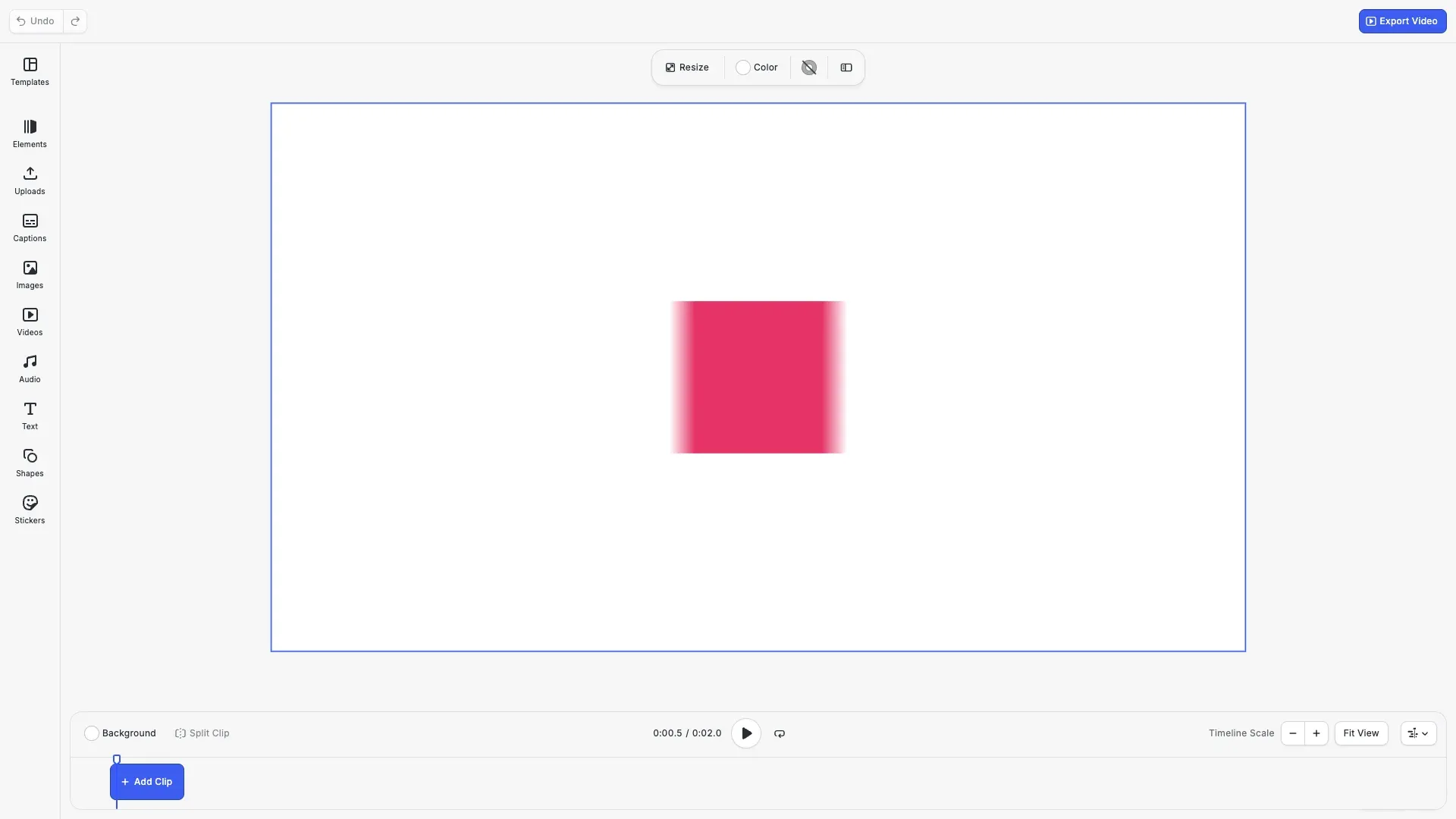
Motion blur smears a moving block along its path during one frame. A block with motion blur draws the average of several samples over the time that the shutter stays open. The blur renders in video export and in the preview. The editor has no motion blur control, so you set it with the block API.
This guide covers how to turn motion blur on for a block, how to tune the shutter and the samples of the scene, how the frame rate sets the length of the blur, the preview blur and its setting, and video export.
Animating the Block#
Motion blur needs motion. A block blurs only while something moves it during the shutter: keyframes, a preset animation, the motion of its group, or a Lottie animation in its video fill. A block that stands still draws unchanged.
We move a square across the page in 1 second with position/x keyframes, and back. For keyframes, see Keyframes.
// A square that crosses the page in one second. Motion blur needs motion.const block = engine.block.create('graphic');engine.block.setShape(block, engine.block.createShape('rect'));const fill = engine.block.createFill('color');engine.block.setColor(fill, 'fill/color/value', {  r: 0.9,  g: 0.2,  b: 0.4,  a: 1});engine.block.setFill(block, fill);engine.block.setWidth(block, 300);engine.block.setHeight(block, 300);engine.block.setPositionY(block, 390);engine.block.appendChild(page, block);engine.block.setDuration(block, 2);
engine.block.setKeyframes(block, 'position/x', [  { time: 0, value: { type: 'Float', value: 100 } },  { time: 0.5, value: { type: 'Float', value: 1520 } },  { time: 1, value: { type: 'Float', value: 100 } }]);
Turning Motion Blur On#
The block property motionBlur/enabled turns motion blur on for one block. It is false by default. The setter needs the appearance/animation scope.
// Blur the block while it movesengine.block.setBool(block, 'motionBlur/enabled', true);console.log(engine.block.getBool(block, 'motionBlur/enabled')); // trueGraphic, text and caption blocks have the property. Pages, scenes, groups and fills do not, and setting it on them throws. Use findAllProperties() to check a block.
// Graphic, text and caption blocks have the property. Pages do not.const blockProperties = engine.block.findAllProperties(block);console.log(blockProperties.includes('motionBlur/enabled')); // trueconst pageProperties = engine.block.findAllProperties(page);console.log(pageProperties.includes('motionBlur/enabled')); // falseA group does not blur as a whole. Turn motion blur on for its children, and they blur when the group moves.
Shutter Angle and Phase#
The scene holds one shutter for all blocks with motion blur. Both values are in degrees of one frame.
motionBlur/shutterAnglesets how long the shutter stays open. The default is 180, which is half a frame. The range is 0 to 720. A larger angle draws a longer trail, and 0 draws no blur.motionBlur/shutterPhasesets where the shutter opens, relative to the frame time. The default is 0, so the trail lies ahead of the block. The range is -360 to 360. A phase of minus half the angle centers the blur on the frame time. A phase of minus the angle puts the trail behind the block.
// The scene holds the shutter for all blocks with motion blur.// 360 degrees keeps the shutter open for one full frame.engine.block.setFloat(scene, 'motionBlur/shutterAngle', 360);// -180 degrees, half the angle, centers the shutter on the frame timeengine.block.setFloat(scene, 'motionBlur/shutterPhase', -180);Samples#
motionBlur/samples sets how many samples one frame averages. The default is 16 and the range is 1 to 64. More samples give a smoother trail and take longer to render. With 1 sample, no blur is drawn.
// More samples give a smoother trail and take longer to renderengine.block.setInt(scene, 'motionBlur/samples', 32);console.log(engine.block.getInt(scene, 'motionBlur/samples')); // 32Frame Rate#
The shutter angle refers to one frame of the video export. A video export without a framerate option uses the scene property scene/frameRate, which is 30 by default. The preview uses the same frame. A framerate option changes the length of one frame, so a higher frame rate draws a shorter trail.
// One frame of the scene frame rate is the span the shutter angle refers toengine.block.setFloat(scene, 'scene/frameRate', 30);Preview Motion Blur#
The preview draws the same blur as the video export. While the preview plays or changes, it draws fewer samples, at least 4, and smaller blur images to keep up. On a display that refreshes slower than the scene frame rate, it keeps up at the refresh rate of the display. It draws all samples once it settles. A block in crop or text editing draws sharp, so the edit shows.
The features/previewMotionBlurEnabled setting is true by default. Set it to false to show the blocks sharp while editing. The video export ignores this setting, and the scene does not save it. See Settings for the other editor settings.
// The preview draws the motion blur by default.// Set the value to false to show the blocks sharp while editing.engine.editor.setSettingBool('features/previewMotionBlurEnabled', true);Exporting a Video#
exportVideo() draws the motion blur into every frame. An image export with export() draws the blocks sharp, so a single frame never shows the blur. The example adds an Export Video button to the navigation bar.
// Image export draws no motion blur. Export a video to see it in a file.const exportVideo = async () => { const video = await engine.block.exportVideo(page, { mimeType: 'video/mp4' }); await cesdk.utils.downloadFile(video, 'video/mp4');};Handling Errors#
A shutter or samples value outside its range throws an EngineError with the code BLOCK.MOTION_BLUR_VALUE_OUT_OF_RANGE. The scene keeps the old value.
try { engine.block.setInt(scene, 'motionBlur/samples', 100);} catch (error) { if (isEngineError(error)) { console.log(error.code); // 'BLOCK.MOTION_BLUR_VALUE_OUT_OF_RANGE' }}Motion Blur and Other Operations#
- Saving and loading a scene keeps the block flag and the shutter values.
- Older scenes load with motion blur off and the default shutter.
- Loaded values outside their range are clamped to the range.
- Undo and redo restore the block flag and the shutter values.
Troubleshooting#
- The block does not blur: check that something moves the block during the shutter, that
motionBlur/samplesis greater than 1 and thatmotionBlur/shutterAngleis greater than 0. - An exported image is sharp: image export draws no motion blur. Export a video.
- The trail is too short: raise
motionBlur/shutterAngle, or export with a lower frame rate. - The trail looks like separate copies: raise
motionBlur/samples. - A value is out of range (
BLOCK.MOTION_BLUR_VALUE_OUT_OF_RANGE): keep the angle from 0 to 720, the phase from -360 to 360 and the samples from 1 to 64. - A value is not a number (
EDITOR.VALUE_NOT_FINITE): pass a finite shutter angle and phase. - The video export fails (
ENCODE.VIDEO_BLOCK_HAS_ERROR): the trail of a block is too large to render on this device. Make the block or its motion smaller, or lower the export size. - Setting the flag throws: the block is not a graphic, text or caption block, or the
appearance/animationscope is off.
API Reference#
| Method | Description |
|---|---|
block.setBool(block, 'motionBlur/enabled', value) |
Turn motion blur on or off for a block |
block.getBool(block, 'motionBlur/enabled') |
Check whether a block has motion blur |
block.findAllProperties(block) |
List the properties of a block, to check for motionBlur/enabled |
block.setFloat(scene, property, value) |
Set motionBlur/shutterAngle, motionBlur/shutterPhase or scene/frameRate |
block.setInt(scene, 'motionBlur/samples', value) |
Set the samples per frame |
editor.setSettingBool('features/previewMotionBlurEnabled', value) |
Turn the preview motion blur on or off |
block.setKeyframes(block, property, keyframes) |
Move the block |
block.exportVideo(page, options) |
Export a video with motion blur |
Next Steps#
- Keyframes: move blocks with keyframe tracks.
- Create Animations: add preset animations that move blocks.
- Settings: change other editor settings.