

Packaging artwork on the dieline, in your print shop
An embeddable packaging editor where users design on the flat net of a carton, with the cut line and fold lines from your printer’s dieline already in place. Both kinds of line go into the artwork’s PDF, each under a spot color name of its own.
Packaging editors for printers, brands and online shops
Packaging printers
Take orders for printed cartons and labels online. Each order reaches prepress as one PDF holding the artwork and the lines your cutting table works from.
Brand and product teams
Let regional teams change a flavor name or an ingredient line on approved packaging, while the dieline and the brand artwork stay locked where your designers placed them.
Shops for small brands
Give small brands a way to design a short run of boxes for their own products, starting from a box style your printer already makes.
Trusted by 100+
industry leaders















Integrating IMG.LY’s editor meant we didn’t have to build or maintain a complex editing layer ourselves. That kept our team focused on our core AI ad engine and saved us countless development hours — while still giving our customers the ability to polish and customize creatives at scale.
Hikari Senju
CEO, Omneky

With IMG.LY we built a central creative portal that now powers over 140 dealer campaigns across multiple automotive brands. Before this, asset creation was slow and inconsistent.
Martin Röhr
Product Owner, Digitas

By embedding IMG.LY’s editor we were able to hit key RFP requirements and deliver a template-based creative experience that now serves 1,000+ customers. It helped us win more deals and exceed enterprise expectations without needing to hire dedicated design teams.
Rob Driscoll
Director of PM, Optimizely

Since integrating IMG.LY’s editor, we now deliver 30,000+ ad creatives per month, dramatically shorten time-to-launch, and help our clients cut design spend by up to $10,000 per month.
Logan Welbaum
Founder, Plai

Our customers create over a million personalized postcards each year choosing from over hundreds of templates with IMG.LY’s SDK. It’s the only solution that allows us to build our own specialized, on-brand UI that integrates seamlessly with our platform.
Jeanine Zaalberg
Product Manager, SwissPost

From a developer’s perspective, the most powerful feature of the photo editor is the integration process. It was completely flawless, quick, and easy to integrate.
Stefano Fornari
CTO, Funambol

We compared IMG.LY SDK with other solutions and found that it would be the best fit for us since it provides all the features that are crucial for our use case.
Carem Pereira
SCRUM Manager, HP

Every carton order arrives with its dieline
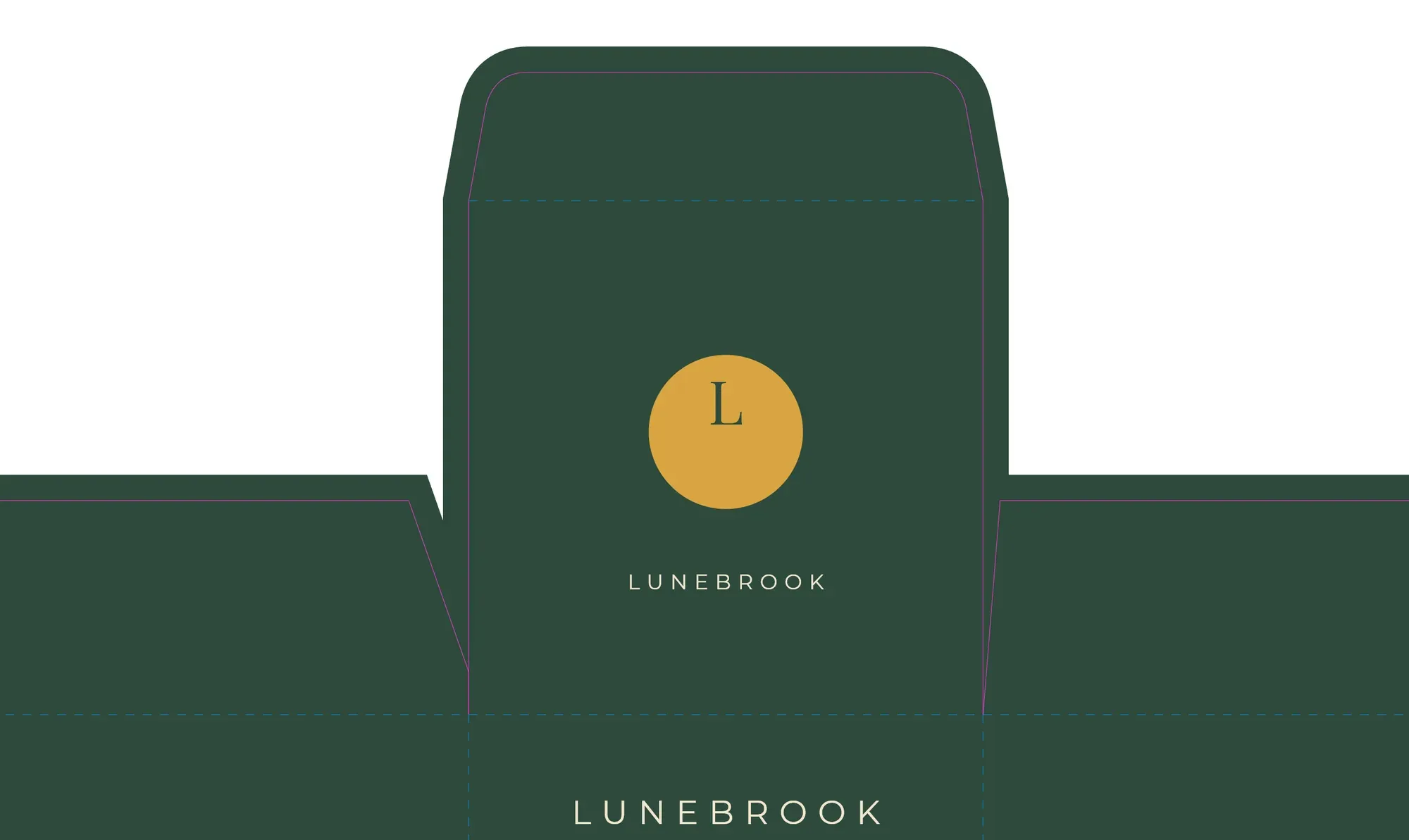
The dieline sits under the design
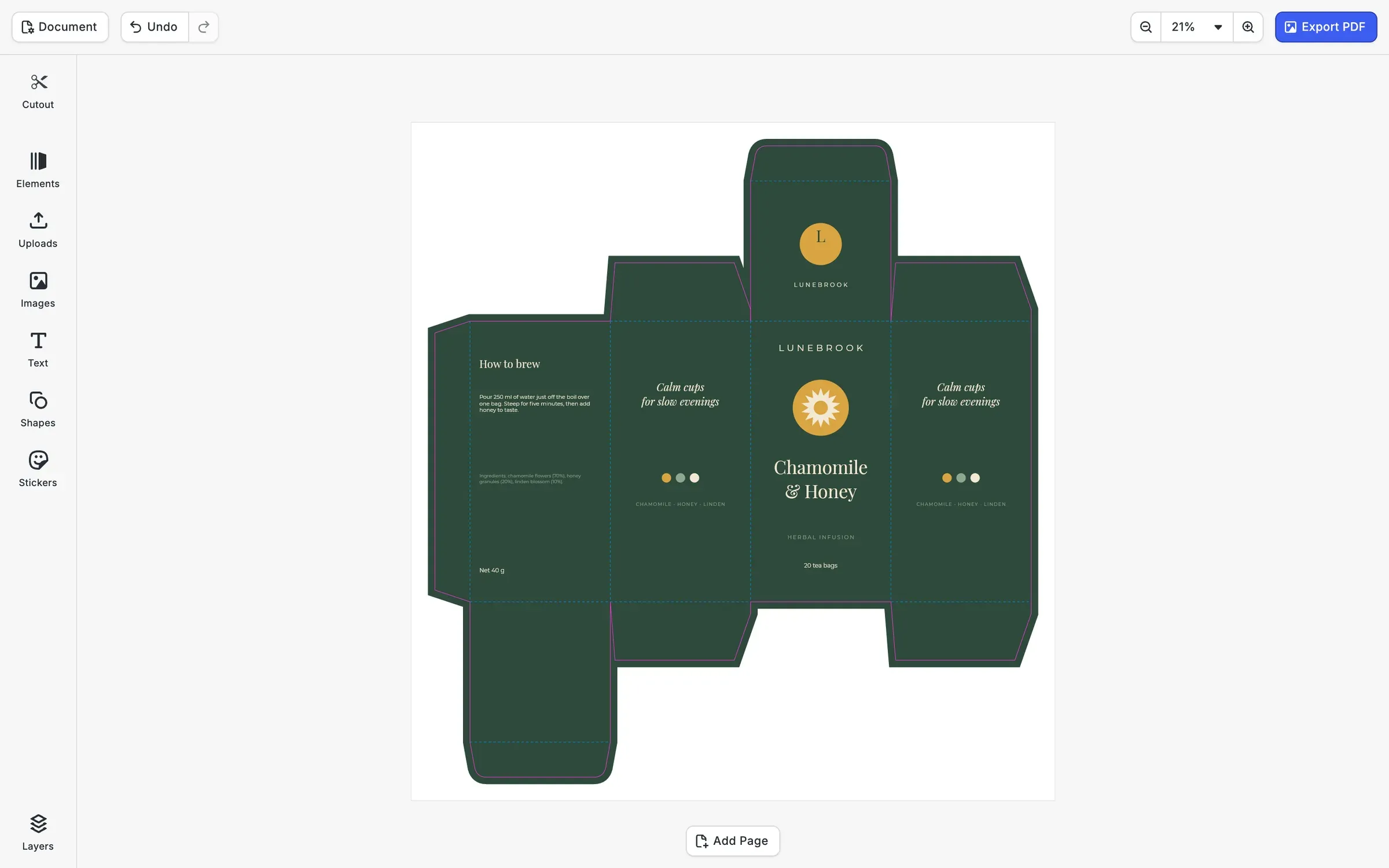
Your developers add the cut line from your printer’s dieline as a path, and the flat net becomes the page users design on. On the carton shown, the green runs 3 mm past the cut on every edge, so a blade that lands a little wide still cuts through color.
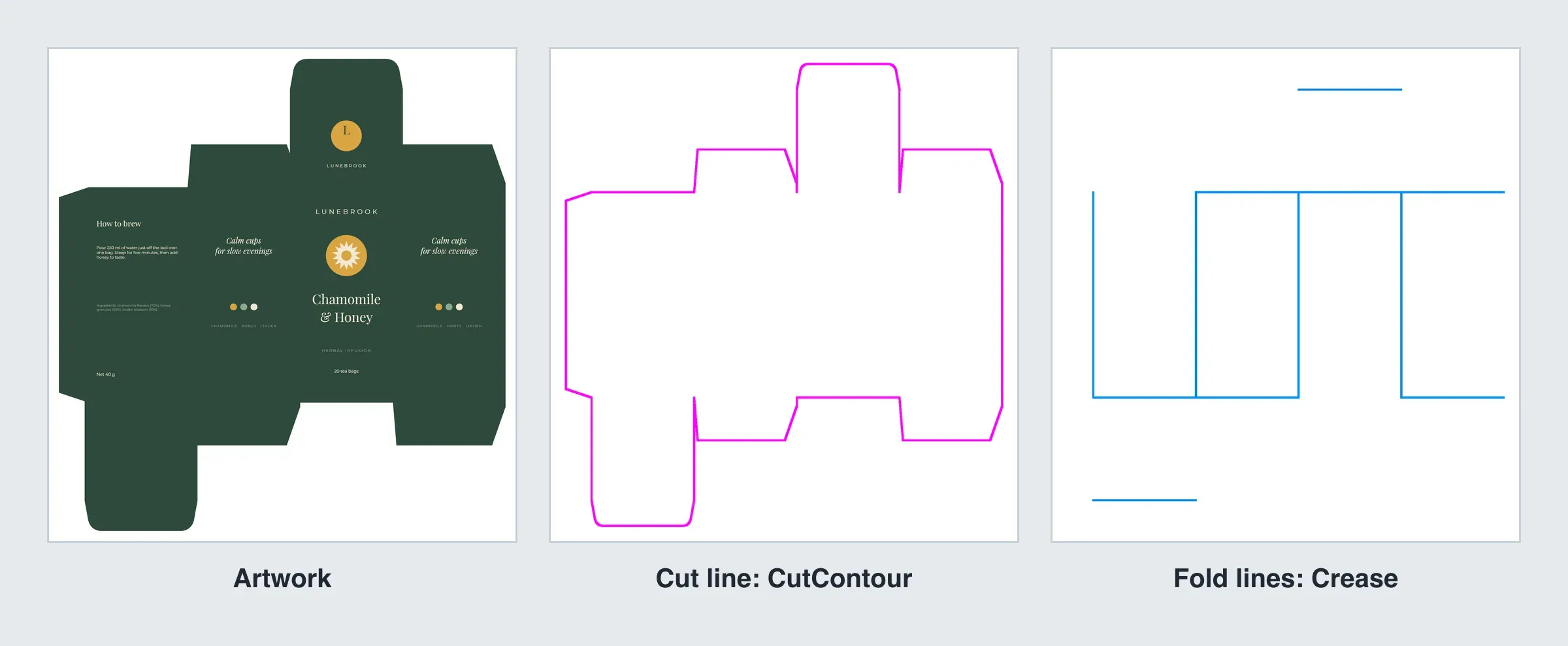
Fold lines on a spot color of their own
CE.SDK has two cutout types, and the second is drawn as a dashed line. Your developers can rename the spot color it exports under to the name your finishing equipment reads as a crease, such as Crease. The PDF then carries the artwork, the cut as CutContour and the folds as Crease, each on its own separation.
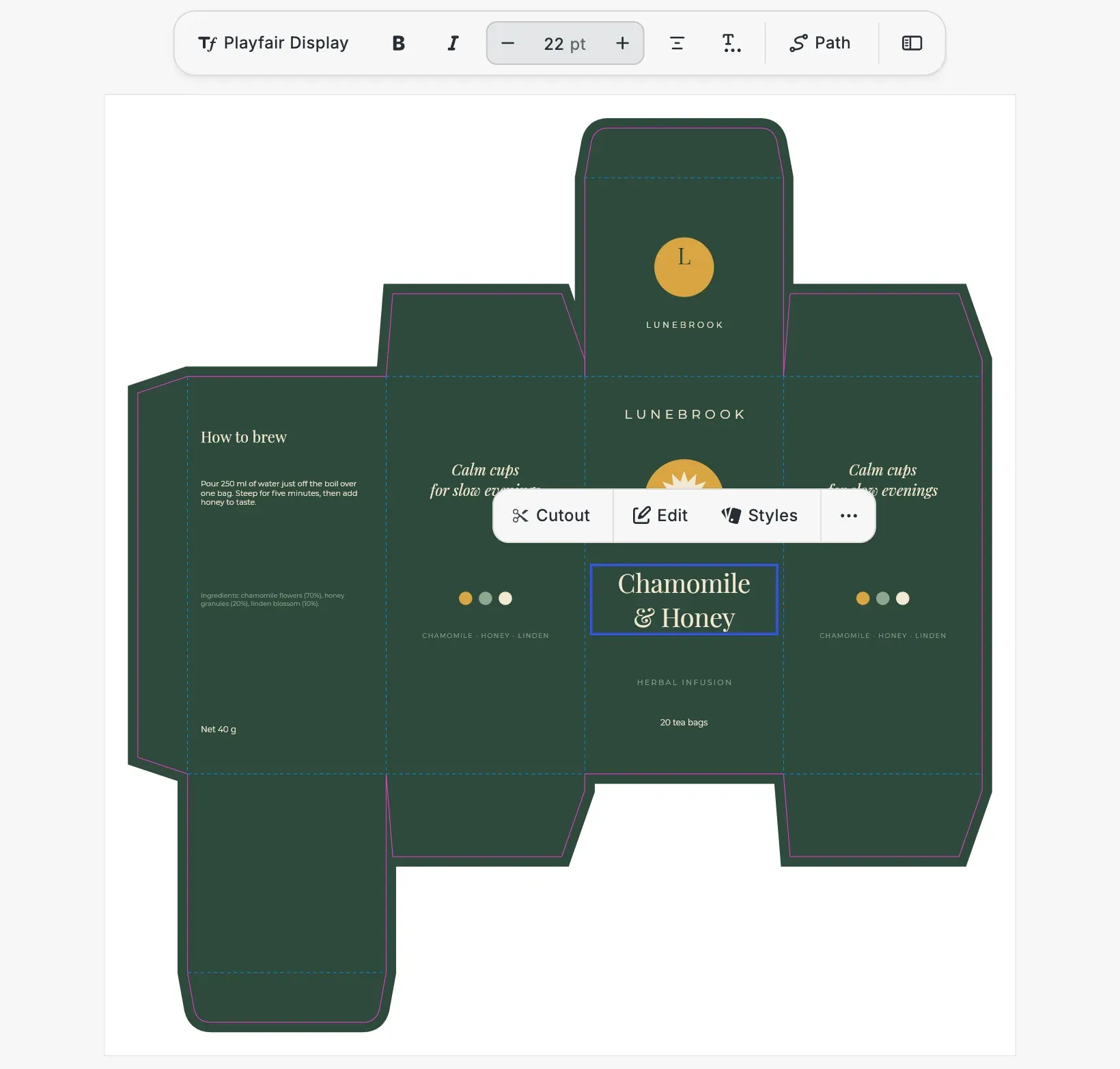
Users change the text on a fixed dieline
Your team decides which parts of a template users may edit. Here the bag count and the product name are open, while the cut line, the fold lines and the background are not, so a click on them selects nothing and a drag leaves them where they were.
From a dieline file to cartons on the press
A first release can cover one box style from your printer. Each style you add after that brings its own dieline and template, and the editor around them stays the same.
Get a dieline editor running
The cutout lines starter kit opens with the Cutout panel in the dock, plus a toolbar to set the type, offset and smoothing of each line.
Bring in your dielines
Convert the dieline of each box style into one path for the cut and one for the folds, then set the spot color names your finishing equipment expects.
Design a template per box style
On each net, designers place the artwork with bleed past the cut and choose which texts and images users may change.
Make a trial run
Cut and crease a few cartons from exported files, fold them up and check that every panel lands where it should before the editor goes live.
More you can add to your packaging editor
For your users
A pixel logo, traced into shapes.
The vectorizer plugin redraws an uploaded pixel logo as vector outlines right in the browser, so users can stretch it across a lid without it turning blurry.

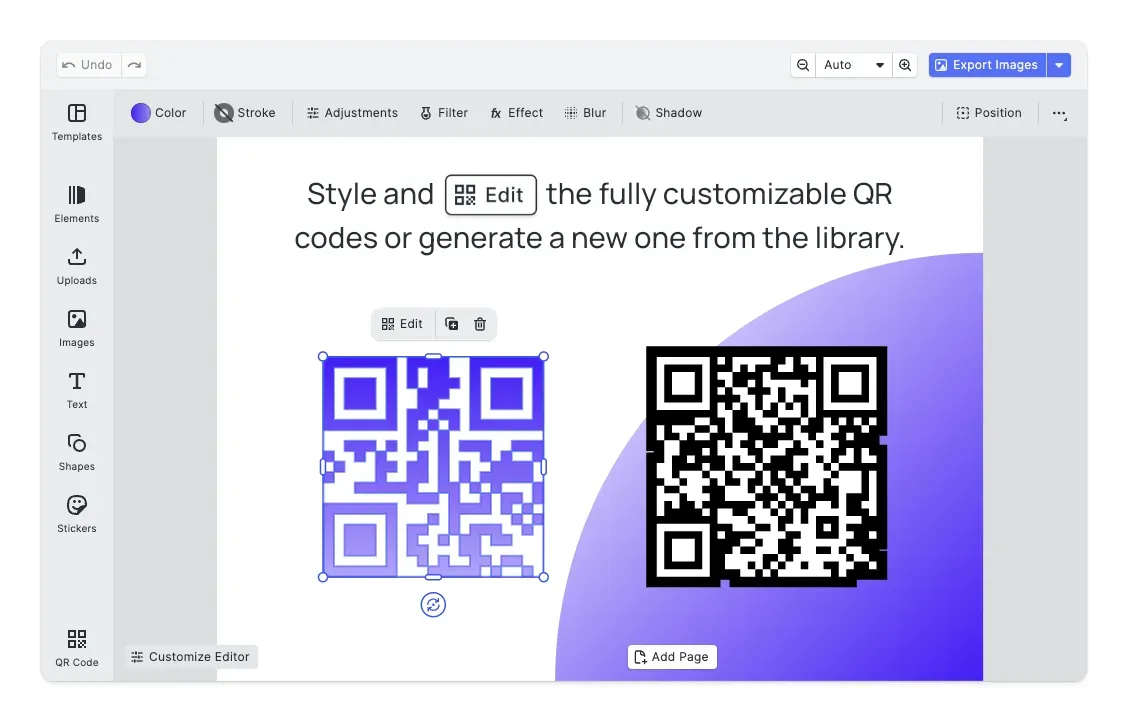
A refill page users can scan.
The QR code plugin turns a web address, say a refill or recipe page, into a code printed on the carton and redraws it in place whenever users paste a different address.
For your platform
PDF/X-4 for prepress.
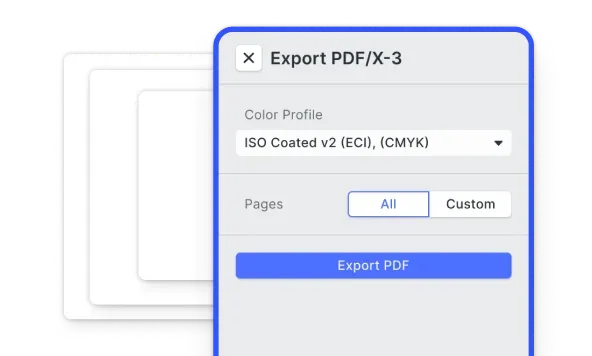
Exported through the print-ready PDF starter kit, the carton comes out as PDF/X-4 carrying a CMYK output profile and bleed, and the cut and fold lines stay on their named spot colors.
Every flavor from one carton.
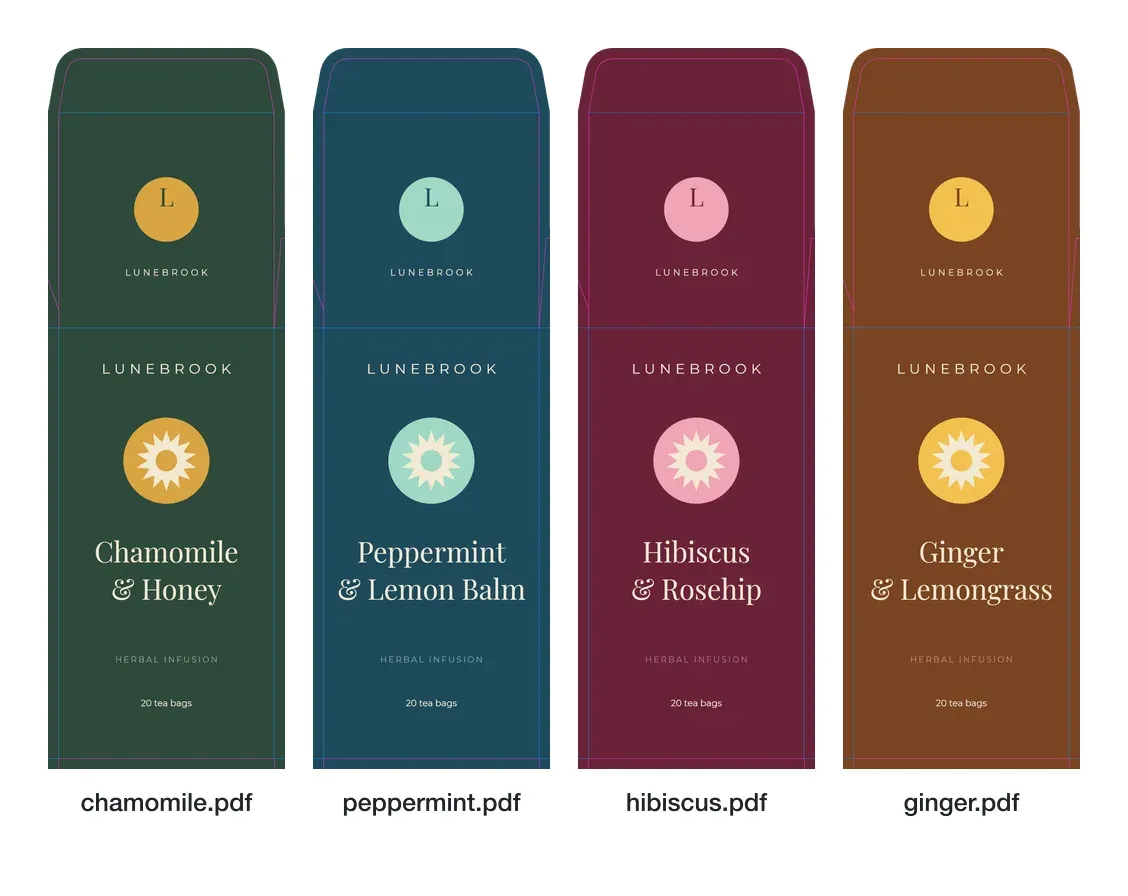
Headless, the engine opens a carton template, puts in the name and colors of each flavor and writes a PDF per flavor, with nobody opening the editor.
Browse all capabilities
How The Print Bar Turned Its Editor Into Its Best Salesperson

Five-figure
self-service order with zero sales contact
4 weeks
live before peak Christmas season
2-person
dev team, editor maintenance outsourced
The Print Bar is an Australian custom-apparel and print-on-demand company. Founded in a garage in 2011, it now runs production campuses in Brisbane and Melbourne, letting customers design and order custom merchandise online.
Pretty much nothing went wrong for our launch. We demolished our expectations.
The Print Bar

Challenge
The Print Bar’s customers are overwhelmingly non-designers, yet its design tool, built in 2012 and barely touched since, fought them at every step. Simple actions like resizing text meant digging through settings panels, and customers were abandoning mid-design, during the creative step that should have been the most enjoyable part of the journey.
Solution
The Print Bar rebuilt its design experience on IMG.LY’s CE.SDK: self-hosted, developer-first, and configurable to disappear into its own branding. The editor deliberately removes options for its non-designer audience and quietly enforces print-production requirements (resolution, formats, bleed) in the background, so first-time buyers create production-ready files without ever thinking about DPI.
- One customer placed a five-figure order entirely self-serve, with no calls or quotes.
- The relaunch shipped four weeks before peak Christmas season with effectively zero launch issues.
- A two-person dev team offloaded editor maintenance and refocused on the business.
Packaging editors by product
Bottle Labels
A label editor for bottles and jars, where a logo users upload as a pixel image is redrawn as vector outlines before it goes on the label.
Gift Paper
A wrapping paper editor where users pick a new color for one motif and the rest of its color group follows across the sheet.


Put your box styles in front of your users
Tell us which box styles you sell and who prints them, and we’ll get back to you with a custom quote for your use case.
Packaging Editor SDK FAQs
A packaging editor SDK lets your developers add a design editor to your app or print shop, so users lay out the artwork for a box, a label or a sleeve where they place the order. IMG.LY's packaging editor is CE.SDK, which shows the printer's cut line and fold lines on the page users design on.
Usually your printer or the structural designer who drew the box supplies it, as a PDF or a vector file. Your developers turn the cut and the folds into SVG paths, and CE.SDK places them on the page, where they keep their position on the net.
CE.SDK has two cutout types, solid and dashed, and every line of one type exports under the same spot color name. A carton can carry the cut on the solid type and the folds on the dashed type, whose spot color your developers rename to your crease color.
It is not meant to. Each line is a spot color on its own separation, which cutting equipment reads as a path to cut or crease once the names match its settings. The magenta and blue in the editor only show where the lines run.
Yes, when your team works with the Adopter role. In that role users change only the parts a template opens to them, and the cut and fold lines your team placed can't be selected, moved or deleted.
Yes. On iOS, Android, macOS and in Node.js, your developers create the same lines, choose their type and name their spot colors through the engine, and the lines go into the PDF there too. The Cutout panel in the dock comes from the cutout library plugin for the web editor, which also runs in Electron.
Yes. Beyond the CE.SDK documentation, IMG.LY's solutions team offers different levels of support based on your license type. To talk through your dielines and your printer's requirements, contact the team.