
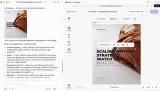

Let your agent create editable print designs
CoDesign SDK gives your agent design tools on your own servers. It turns a prompt, a brand kit or a customer’s file into a flyer, a poster or a postcard, and returns a PDF/X-4 in CMYK with a design file your team can still fix by hand.



Built on the engine print platforms already run






Go from a prompt to editable, print-ready designs
Your agent runs each job with CoDesign SDK on your servers, whether it starts from a blank page or from a file your customer uploads. Jobs run in the background, and each one returns an editable file.
Every result stays editable
The agent hands back design files, not flat images. Wrong price on the flyer? Your team or your customer clicks it, types the fix and exports again, without a new prompt.
The press gets PDF/X-4 in CMYK
Ask for a print file and the job exports PDF/X-4 in CMYK next to the design, with FOGRA39 as the default profile. Your prepress team still checks each file and signs it off.
Designed in each customer’s brand
The agent works from the brand kit you hand it: the customer’s colors, fonts and logo, plus image style and grid when the kit defines them.
What your agent can do with CoDesign SDK
The same tools make a new design and rework one that already exists.
Start from a prompt or a file
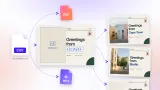
Generate a new design from a brief and your brand assets, or open InDesign, Photoshop, PDF and PowerPoint files as editable designs.

Apply any customer’s brand
Hand the agent a customer’s brand kit and it redoes the design in that brand: colors, fonts and logo, plus image style and grid when the kit defines them.

Fit one design to every format
The agent lays the design out again as a roll-up, an A4 flyer or an A6 postcard, with new margins and type sizes instead of stretching it.



Catch mistakes before they print
The agent checks text fit, contrast and layout, fixes what it finds, and exports the file for the press.
How your agent gets design tools
CoDesign SDK is a JavaScript library built on the CE.SDK engine, the same engine that runs our editor in more than 600 products. It brings no agent of its own: your agent calls its tools, on your model account. Here is what that looks like when a customer sends your platform a file to print.
A customer uploads their agency’s InDesign file
The request lands on your servers and goes to your agent, running next to your own services. The file and your customers’ brand kits stay in your storage.
Your agent calls the design tools
It plans the job and calls CoDesign SDK the way it calls a database or a browser: open the file as an editable design, apply the customer’s brand, lay it out for each size you print.
The design knowledge ships with the tools: guidelines the agent reads before it starts, so you don’t have to teach your agent design.
A print file and an editable design come back
A few minutes later (2 to 4 on average in our evaluations) a PDF/X-4 in CMYK and a CE.SDK file land in your product. Open the file in the editor and change anything: text you set stays text, and every image is its own layer.
It runs inside your own platform
Use the agent you already have
Your own agent calls the design tools, on your own model account. Switch agents or models whenever you like.
Your servers, your storage
Everything runs in your backend and your containers, and your designs and brand kits stay in your storage.
Start from the agent you already run
Pick your agent SDK and follow the quickstart: start the executor container, run a Node script and type a brief. The kits export a PNG, and changing the export format to PDF/X gives you a PDF/X-4 file instead.
Or start from a complete app
Two starter kits are whole products, with a web page and a server. Clone one, run it on your machine with Docker and Node, and replace its parts with yours until it is a feature of your print platform.
Agentic Design Manager
Your customers’ own files, redone in each customer’s brand.
- Turns PDF, Photoshop, InDesign and PowerPoint files into designs
- Designs in each brand’s own fonts, colors, logos and images
- Serves the same tools as an MCP server for your customers’ AI assistants
Agentic Resize
One design in, every size you sell out.
- New margins, type sizes and spacing for each size
- Keeps the palette and every element, never stretches
- A PNG and an editable design file per size
- Shaped like a resize API in your product
Tell us about your print platform
CoDesign SDK is for web-to-print platforms, print storefronts and franchise print portals that want the repeat design work done inside their own product.
Need customers to watch each change appear on the canvas? That is the wrong fit today, because a job takes minutes.
Frequently Asked Questions
InDesign (IDML), Photoshop (PSD), PDF and PowerPoint files open as editable designs. Text set in the source file stays text and each image becomes its own layer, although text that is already part of a flat image stays part of that image.
When the job asks for it, the agent exports PDF/X-4 in CMYK, and it can also export PNG, JPEG, WebP or plain PDF from the same design. Every job returns the editable design as well, so a change after review starts from the file and not from scratch.
That's your decision, and we'd keep one. The agent's check reports text fit, contrast and layout problems, plus any rules you add to its instructions, but it is a review aid rather than an approval gate. Your reviewers or the customer open each result in your editor and sign it off there.
A few minutes, 2 to 4 on average in our evaluations, and the file arrives when the job is done. For print that is rarely the bottleneck, since the press runs hours or days after the file is ready. It suits queued and batch work, such as a new customer or a new product range, but not live editing on a customer's canvas.
Yes. The agent starts from your existing scenes and templates, and fetches images and fonts through links your product signs. Its results are normal CE.SDK designs that open in your editor, so run the same CE.SDK version in both and upgrade them together.
Yes, when the page has it. Bleed is a setting of each page, and a page with bleed exports at the trim size plus the bleed, with the trim size marked in the PDF. The agent is told to set 3 mm on print designs, but if every file must carry it, set it in your own code before the export.
PDF/X-4 with the FOGRA39 profile is the default. You can ask for PDF/X-3 or PDF/X-1a instead, and choose GRACoL or your printer's own ICC profile.
That is a job for a template, not for the agent. When the layout is fixed and only the name or address changes, fill a template from your data with variable data printing, which renders each record without a model call. Use the agent when the design itself has to change.
Any agent that can call tools, on any tool-calling model. We test with Claude Opus 5 and Gemini 3.8 Flash. There are quickstarts for the Vercel AI SDK, Claude Agent SDK, OpenAI Agents, Mastra, LangChain and Pi, and from other languages you can host the tools behind an MCP server in Node.
They stay in your storage and are rendered in executors you run. Executors call api.img.ly when they start, to check the license, and on each file export, to meter billing, and these calls carry no design content. With your own model and image tool, no design content reaches IMG.LY.