Define, apply, and manage spot colors in CE.SDK for professional print workflows with exact color matching through premixed inks.
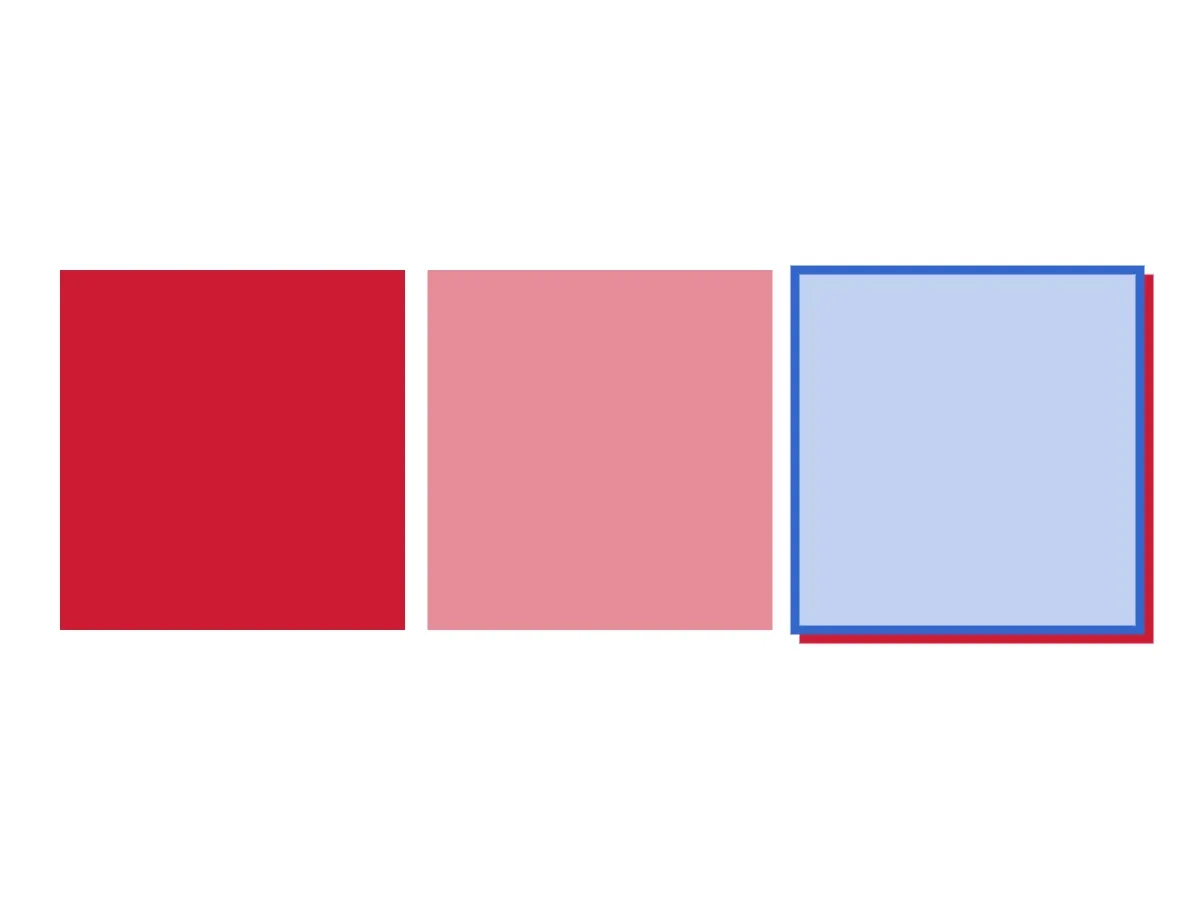
Spot colors are named colors reproduced using premixed inks in print production, providing exact color matching that CMYK process colors cannot guarantee. CE.SDK maintains a registry of spot color definitions on the editor instance, where each entry has a name and screen approximations (RGB and/or CMYK) for display. The premixed ink is selected at print time based on the spot color name.
This guide covers how to define spot colors with RGB and CMYK approximations, apply them to fills, strokes, and shadows, control intensity with tints, query and update definitions, and assign spot colors to cutout types for die-cutting operations.
Understanding Spot Colors#
Spot colors differ from CMYK process colors in several important ways:
- Exact color matching — Premixed inks guarantee consistent color reproduction across print runs.
- Brand consistency — Essential for logos and corporate brand colors.
- Specialty effects — Enable metallic, fluorescent, and other specialty inks.
- Color gamut — Some colors cannot be reproduced with CMYK process inks.
A spot color in CE.SDK has four components:
name— The identifier used in the print output (for example,"Brand-Red-485").- Approximations — RGB and/or CMYK values used for on-screen display.
tint— A value from 0.0 to 1.0 that controls color intensity.externalReference— Optional metadata recording the originating color system (for example, an in-house brand palette identifier or a print vendor’s spot-color library code). Carried through to the export but ignored at render time.
Color.spot(name:tint:externalReference:) is the Swift representation. tint defaults to 1 and externalReference defaults to "".
Define Spot Colors#
RGB Approximation#
Register a spot color with engine.editor.setSpotColor(name:r:g:b:). This creates a new spot color if the name doesn’t exist, or updates the RGB approximation if it does. Each component ranges from 0.0 to 1.0.
engine.editor.setSpotColor(name: "Brand-Primary", r: 0.8, g: 0.1, b: 0.2)RGB approximations control how the spot color is rendered on screen during editing.
CMYK Approximation#
Add a CMYK approximation with the setSpotColor(name:c:m:y:k:) overload to provide print-accurate previews alongside the RGB display. Calling either overload with an existing name updates that approximation without affecting the other.
engine.editor.setSpotColor(name: "Brand-Primary", c: 0.05, m: 0.95, y: 0.85, k: 0.0)engine.editor.setSpotColor(name: "Brand-Accent", r: 0.2, g: 0.4, b: 0.8)engine.editor.setSpotColor(name: "Brand-Accent", c: 0.75, m: 0.5, y: 0.0, k: 0.0)Provide both approximations whenever possible: RGB drives the on-screen display, while CMYK enables accurate print preview.
Apply Spot Colors to Design Elements#
Apply a spot color to any color property with engine.block.setColor(_:property:color:) and a Color.spot(name:tint:externalReference:) value. The spot color must be defined first — undefined names fall back to magenta on screen.
let primaryFill = try engine.block.getFill(primaryBlock)try engine.block.setColor( primaryFill, property: "fill/color/value", color: .spot(name: "Brand-Primary", externalReference: "Brand-Colors"),)The externalReference argument is optional metadata describing where the spot color comes from (a named-color system identifier such as a print vendor’s spot-color library code, an internal style identifier, and so on). It is preserved by the engine alongside the name but doesn’t affect on-screen rendering.
Color is a single enum across all color spaces, so the same setColor method works for .rgba, .cmyk, and .spot values without a separate code path per color space.
Using Tints#
tint scales the spot color’s intensity without changing the underlying name in the print output. A tint of 0.5 produces a 50 percent strength variation; the name in the exported PDF stays the same.
let tintFill = try engine.block.getFill(tintBlock)try engine.block.setColor(tintFill, property: "fill/color/value", color: .spot(name: "Brand-Primary", tint: 0.5))Use tints for lighter variations in a design system rather than defining a separate spot color per shade.
Strokes and Shadows#
Spot colors work with any color property — including "stroke/color" and "dropShadow/color". Enable the feature, configure offsets and widths as usual, then assign the spot color.
let accentFill = try engine.block.getFill(accentBlock)try engine.block.setColor(accentFill, property: "fill/color/value", color: .spot(name: "Brand-Accent", tint: 0.3))
try engine.block.setStrokeEnabled(accentBlock, enabled: true)try engine.block.setStrokeWidth(accentBlock, width: 6)try engine.block.setColor(accentBlock, property: "stroke/color", color: .spot(name: "Brand-Accent"))
try engine.block.setDropShadowEnabled(accentBlock, enabled: true)try engine.block.setDropShadowOffsetX(accentBlock, offsetX: 6)try engine.block.setDropShadowOffsetY(accentBlock, offsetY: 6)try engine.block.setColor(accentBlock, property: "dropShadow/color", color: .spot(name: "Brand-Primary", tint: 0.6))
Query Spot Color Definitions#
List and Inspect Approximations#
Retrieve every defined spot color with engine.editor.findAllSpotColors(). Query individual approximations with engine.editor.getSpotColor(name:); the return type is selected by the type annotation — annotate RGBA for the RGB approximation or CMYK for the CMYK approximation.
let definedNames = engine.editor.findAllSpotColors()print("Defined spot colors: \(definedNames)")
let primaryRGB: RGBA = engine.editor.getSpotColor(name: "Brand-Primary")let primaryCMYK: CMYK = engine.editor.getSpotColor(name: "Brand-Primary")print("Brand-Primary RGB: \(primaryRGB)")print("Brand-Primary CMYK: \(primaryCMYK)")
Querying an undefined spot color returns the magenta default for the requested representation. The same magenta value is also returned for a name that is defined but only has the other representation set (for example, querying RGBA after calling setSpotColor(name:c:m:y:k:) only), so check findAllSpotColors() to reliably determine whether a name is defined — the returned components alone are not enough.
Read Colors from Blocks#
engine.block.getColor(_:property:) returns a Color enum value. Reusing the primaryFill from the Apply Spot Colors to Design Elements step, pattern-match the result to extract the spot color components.
let storedColor: Color = try engine.block.getColor(primaryFill, property: "fill/color/value")if case let .spot(name, tint, _) = storedColor { print("Block is using spot color \(name) at tint \(tint)")}Update and Remove Spot Colors#
Update Approximations#
Update an existing spot color by calling the set overload again with the same name. This changes how the color appears on screen without changing the name written to the print output, and existing blocks automatically reflect the new approximation.
engine.editor.setSpotColor(name: "Brand-Primary", r: 0.85, g: 0.15, b: 0.25)Remove Spot Colors#
Remove a spot color with engine.editor.removeSpotColor(name:). The Swift binding is marked throws for forward compatibility, but the call currently always succeeds — removing an undefined name is a no-op.
try engine.editor.removeSpotColor(name: "Temporary-Color")Removing a spot color doesn’t update blocks already using it — they display magenta until the color is redefined or replaced with a different value.
Spot Colors for Cutouts#
CE.SDK can assign a spot color to a cutout type for die-cutting and other print finishing operations. Use engine.editor.setSpotColorForCutoutType(cutoutType:name:) to associate a defined spot color with CutoutType.solid or CutoutType.dashed. Query the current assignment with getSpotColorForCutoutType(cutoutType:).
engine.editor.setSpotColor(name: "DieLine", c: 0.0, m: 1.0, y: 0.0, k: 0.0)try engine.editor.setSpotColorForCutoutType(cutoutType: .solid, name: "DieLine")let assignedName = try engine.editor.getSpotColorForCutoutType(cutoutType: .solid)print("Cutout type .solid uses spot color: \(assignedName)")When no assignment is made, .solid defaults to "CutContour" and .dashed defaults to "PerfCutContour". All cutout blocks of the given type render with the assigned spot color immediately after the call.
Troubleshooting#
Spot Color Displays as Magenta#
The spot color hasn’t been defined. Call setSpotColor(name:r:g:b:) or setSpotColor(name:c:m:y:k:) with that name before applying it to a block.
Color Approximation Looks Wrong#
Call the matching setSpotColor overload again with new component values. RGB values drive the on-screen display while CMYK values drive the print preview, so updating one does not change the other.
API Reference#
| Method | Description |
|---|---|
engine.editor.setSpotColor(name:r:g:b:) |
Define or update the RGB approximation of a spot color. |
engine.editor.setSpotColor(name:c:m:y:k:) |
Define or update the CMYK approximation of a spot color. |
engine.editor.findAllSpotColors() |
Return the names of every defined spot color. |
engine.editor.getSpotColor(name:) -> RGBA |
Read the RGB approximation. Returns magenta if undefined. |
engine.editor.getSpotColor(name:) -> CMYK |
Read the CMYK approximation. Returns magenta if undefined. |
engine.editor.removeSpotColor(name:) |
Remove a spot color from the registry. |
engine.editor.setSpotColorForCutoutType(cutoutType:name:) |
Assign a spot color to CutoutType.solid or .dashed. |
engine.editor.getSpotColorForCutoutType(cutoutType:) |
Read the spot color assigned to a cutout type. |
engine.block.setColor(_:property:color:) |
Apply a color (including .spot) to a block property. |
engine.block.getColor(_:property:) |
Read a color from a block property. Returns a Color enum. |
| Type | Description |
|---|---|
Color.spot(name:tint:externalReference:) |
Spot color reference. tint defaults to 1; externalReference defaults to "". |
CutoutType.solid / CutoutType.dashed |
Cutout type values accepted by the cutout APIs. |
Next Steps#
- Export for Printing — Export designs with spot colors for professional print production.
- Apply Colors — Apply colors to fills, strokes, and shadows.
- CMYK Colors — Work with CMYK process colors.