For years, teams have used CE.SDK to power rich, customizable editing experiences across web, mobile, and desktop. But one critical component of true end-to-end creative automation remained challenging: server-side rendering.
Until now, export workflows depended on client devices, brittle FFmpeg scripts, or slow headless browser setups. While these approaches worked, they often fell short for enterprise scale workflows, AI pipelines, or high-volume creative automation.
Today, we’re excited to introduce the CE.SDK Renderer, the native, GPU-accelerated server-side rendering engine that completes the CE.SDK ecosystem.
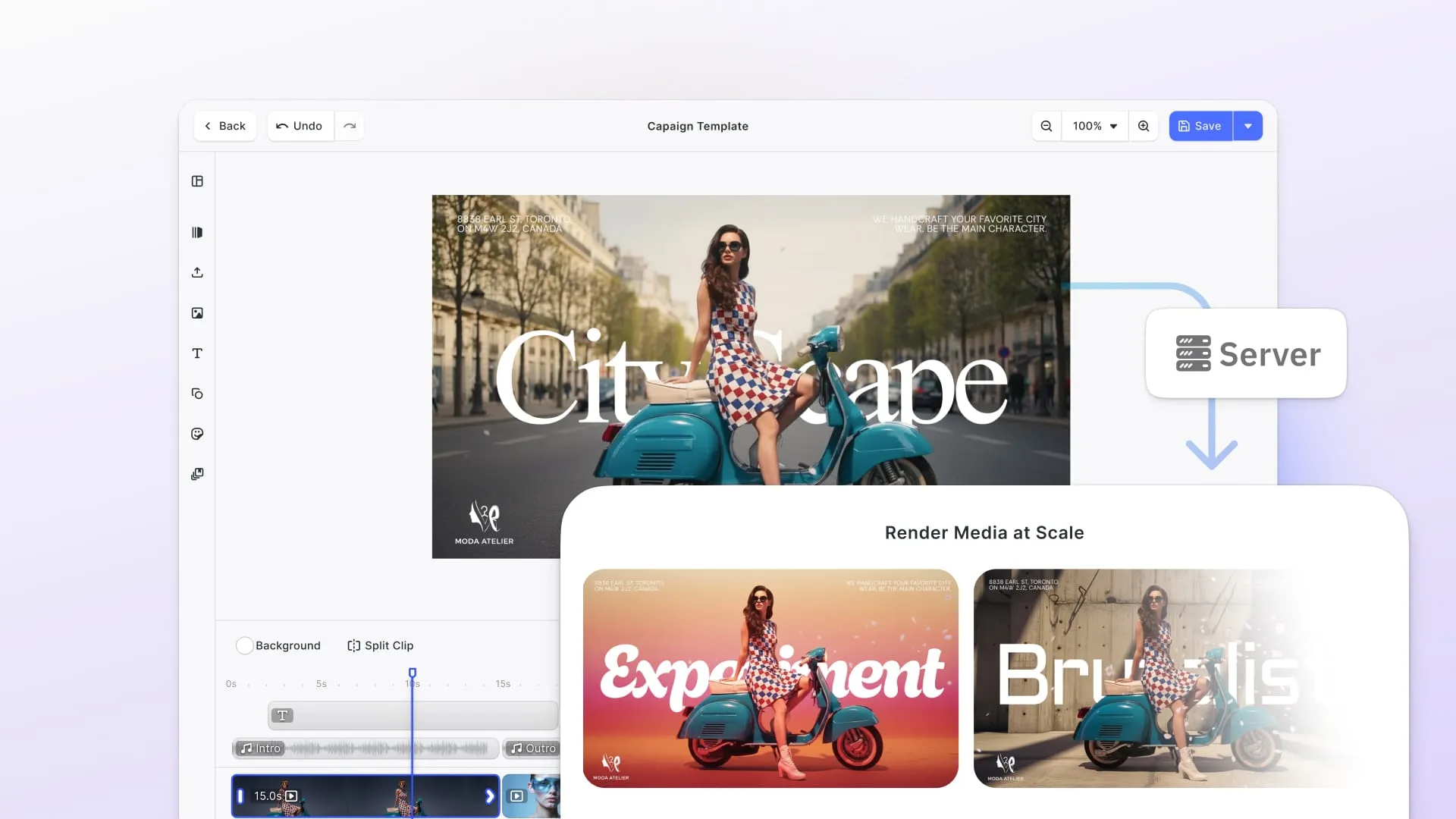
The Renderer brings CE.SDK’s design engine to your backend with fast, compliant, enterprise-ready export for images, PDFs, and video, enabling organizations to generate media at scale with full fidelity and predictable performance.
Updated September 2026.
Why the CE.SDK Renderer Matters
Rendering Has Been the Last Barrier to Full Automation
Teams could design and generate templates programmatically, but producing the final asset (especially video) was constrained by:
- Lack of GPU acceleration
- No native CE.SDK export on servers
- Legal requirements for H.264/H.265
- Unstable browser virtualization
- Node.js memory and performance limits
The CE.SDK Renderer solves all of this in one fell swoop with a native Linux binary packaged as a Docker container, built explicitly for backend media generation.
Many of our SaaS customers have told us the same thing: they want a safe, supported alternative to FFmpeg that they don’t have to maintain themselves.
What the CE.SDK Renderer Delivers
The CE.SDK Renderer fully unlocks its value in the IMG.LY ecosystem by providing a creative automation infrastructure layer for the user facing portion of IMG.LY’s editor SDK. It enables two core capabilities that modern creative automation depends on: scalable rendering and, in its AV-licensed edition, compliant video export:
GPU-Accelerated Export Performance
Native code and GPU acceleration allow rendering faster than playback for typical social formats. In our published benchmarks, measured in October 2025 on an Nvidia L4, a 17.7 second 1080x1920 template exports in 12.7 seconds on the production pipeline, and a 13.5 second one in 8.8 seconds.
4K is the point where that reverses: a 20.5 second template that renders in 12.6 seconds at 1080x1920 takes 33.2 seconds at 2160x3840. Batch throughput is where the Renderer earns its place, rather than any single 4K export being instant.
Licensed Video on the Backend (H.264/H.265)
The AV-licensed edition renders MP4 video entirely on your servers with the codec patents covered. Powered by Fluendo’s AV stack, it provides enterprise-grade legal protection for H.264/H.265, eliminating the risks associated with unlicensed or open-source encoding. This gives teams the confidence to run video-heavy pipelines at scale.
Built for Scale
Perfect for workloads generating hundreds or thousands of creative variations: ads, postcards, dynamic social assets, catalogs, and more on stable maintainable infrastructure supplanting FFmpeg or brittle pipelines based on headless browsers.
Perfect Visual Fidelity
Because it uses the same CE.SDK engine that powers the editing experience, the Renderer produces output that matches exactly what users see in the editor. This fidelity is critical for automated pipelines, ensuring every exported asset is accurate, consistent, and visually correct.
Together, these unlock a complete creative automation workflow: design → generate → render.
How It Works
Async Exports
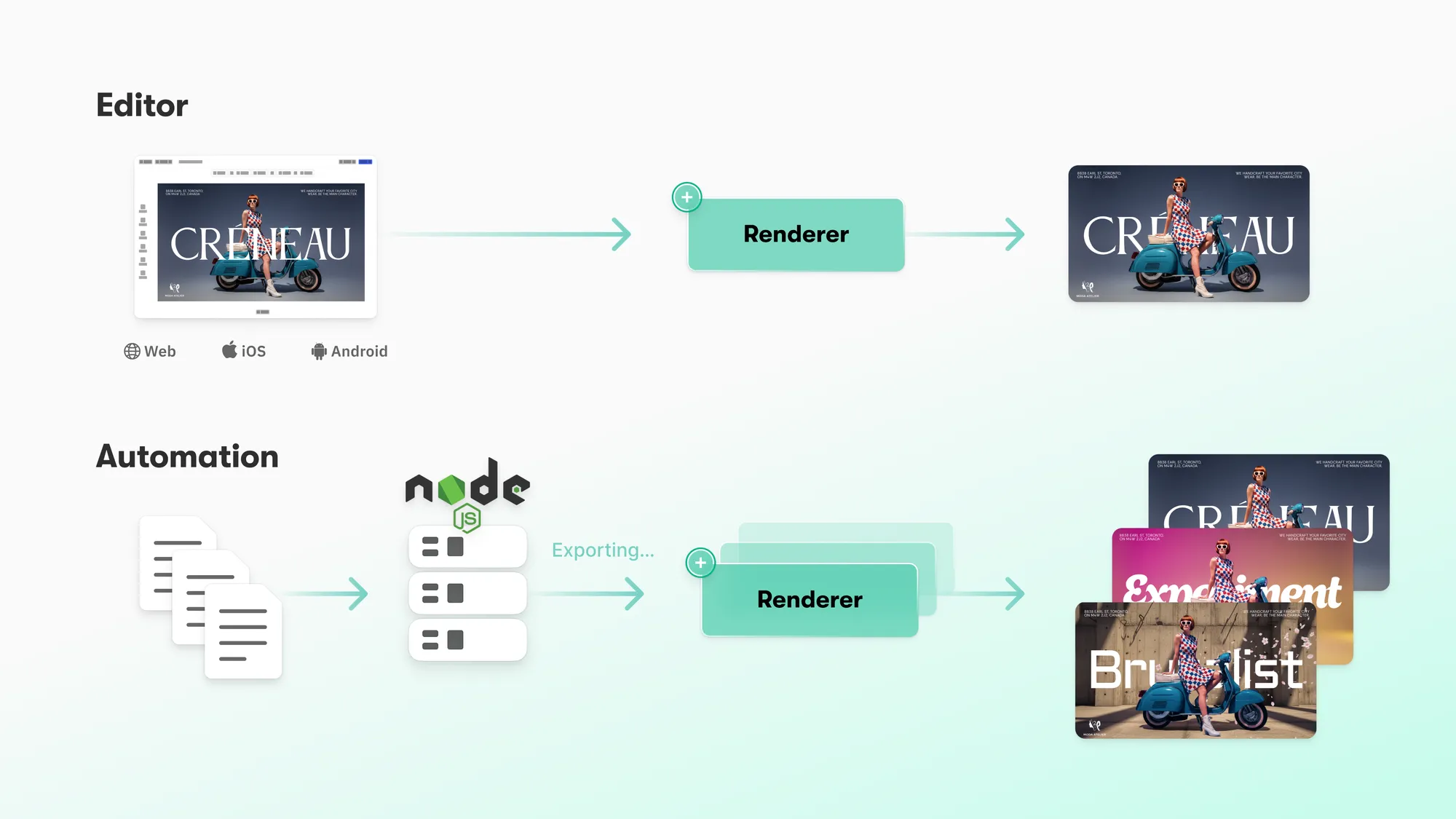
- A CE.SDK scene is created via browser editor, mobile app, or Node.js.
- The scene is sent to the Renderer, running in Docker.
- The Renderer outputs: PNG/JPEG, PDF, MP4 (H.264; H.265 is bundled, and a given build may not support every H.265 profile)
- The rendered asset is returned to your application or batch pipeline.
- Users can continue editing while export happens asynchronously.
This removes export load from the client entirely and opens the door for sophisticated backend media generation.
Batch Rendering
- Multiple CE.SDK templates are prepared for automation.
- An external data source (CSV, JSON, API) is connected to the templates to generate all design variants.
- Each resulting scene is sent as a separate job to the Renderer running in Docker.
- The Renderer outputs PNG/JPEG, PDF, or MP4 for every variant.
- All assets are returned to your backend or stored in your pipeline, enabling large-scale automated creative production.
Running It
The Renderer ships as a Docker container in four variants: with or without bundled assets, and with open-source or licensed codecs. The open-source images are on Docker Hub:
docker pull docker.io/imgly/cesdk-renderer:<version>
docker run --rm docker.io/imgly/cesdk-renderer:<version> --help
The images are built for x86_64 Linux only. Replace <version> with a release number such as 1.82.0, because the latest tag can point to an older build.
The AV-licensed images live behind an authenticated registry:
docker login container.img.ly -u "oauth" -p "YOUR-API-KEY"
docker pull container.img.ly/imgly/cesdk-renderer-avlicensed:<version>
Log in with the API key tied to your Linux codec license in the IMG.LY dashboard. The login token is valid for one hour, and the licensed images also need your CESDK_LICENSE at run time.
The assetless variants (docker.io/imgly/cesdk-renderer-assetless:<version> and container.img.ly/imgly/cesdk-renderer-avlicensed-assetless:<version>) are the ones to reach for when you already host your own fonts and templates and do not want them duplicated in the image. Full setup, including the NVIDIA container runtime, is in the server setup guide, which assumes Ubuntu 24.04 LTS. Image exports work without a GPU, just significantly slower, while the compatibility guide lists an NVIDIA GPU as required for video export.
Example Use Case: Hyper-Personalized Video Ads at Massive Scale
One of our customers runs large demographic-targeted campaigns where a single master video must transform into tens of thousands of personalized variants. Instead of showing the same creative to everyone, they tailor each video to the viewer’s profile think German, mid-30s, dog owner.
From one base creative, their system dynamically generates up to 100,000 unique versions. Their backend assembles all scene variations in Node.js, then hands them off to the CE.SDK Renderer to produce the final video files.
Before adopting CE.SDK Renderer, this workflow was painful: brittle FFmpeg scripts, unpredictable render results across machines, codec licensing concerns, and processing times that stretched over days.
Maintaining this setup consumed engineering time that would have been better spent on improving the creative logic itself.
With CE.SDK Renderer, the entire pipeline became both scalable and predictable. They now render thousands of variants with consistent results, licensed codecs, and throughput high enough to keep up with real-world campaign demands. Instead of fighting their rendering stack, their team can focus on creative automation and campaign performance.
This is just one example of how CE.SDK Renderer enables production-grade, high-volume personalized media at scale something that previously required complex custom infrastructure.
Licensing Options
Open-Source Renderer
A lightweight version using open-source codecs. It’s fast, simple to run, and great for prototyping or early-stage products. Because it doesn’t include licensed H.264/H.265 encoding, it isn’t suitable for enterprise video production or legally compliant distribution.
AV-Licensed Renderer (Fluendo)
This edition includes licensed H.264/H.265 encoding powered by Fluendo. The production pipeline is required for commercial use, and the specific patent coverage is set out on our patents and acknowledgements page. It uses concurrency-based licensing and is designed for production workloads, regulated industries, and any platform generating video at scale.
FAQ
What is the CE.SDK Renderer? A native, GPU-accelerated server-side rendering engine that exports CE.SDK scenes to PNG, JPEG, PDF and MP4 on your own infrastructure. It ships as a Linux Docker container and uses the same engine as the editor, so output matches what users saw when they designed it.
How fast is server-side rendering with CE.SDK? For typical vertical social formats, faster than playback. Our published benchmarks, measured in October 2025 on an Nvidia L4, export a 17.7 second 1080x1920 template in 12.7 seconds on the production pipeline. 4K is slower than real time: a 20.5 second template that renders in 12.6 seconds at 1080x1920 takes 33.2 seconds at 2160x3840. Actual times depend on scene complexity, asset sizes and network speed.
Do I need a GPU to run the Renderer? Not for image exports, which work without one but are significantly slower. The compatibility guide lists an NVIDIA GPU as required for video export. The setup guide targets Ubuntu 24.04 LTS with the NVIDIA container runtime, and the hardware requirements are documented separately.
What is the difference between the open-source and AV-licensed Renderer? Codec licensing. The open-source variant uses open-source codecs and suits prototypes and evaluation. The AV-licensed variant includes H.264 and H.265 encoding licensed through Fluendo and is the one required for commercial use. Both come in an assetless variant for teams already hosting their own fonts and templates.
Can the Renderer replace FFmpeg in our pipeline? That is the usual reason teams adopt it. It removes the maintenance of a bespoke FFmpeg setup and the licensing uncertainty around H.264 and H.265, and because it runs the same engine as the editor, exports match the design rather than approximating it.
How does batch rendering work? Templates are populated from a data source, each resulting scene is submitted to the Renderer as its own job, and the outputs come back to your backend or storage. Export runs asynchronously, so users can keep editing while assets are produced.
Conclusion
By bringing fast, compliant, and scalable rendering to the backend, the CE.SDK Renderer removes one of the biggest engineering hurdles in creative automation. Whether you’re generating hundreds or hundreds of thousands of assets, it gives you the tools to build stable, modern media pipelines without the maintenance burden. The simplest path to production-grade creative automation.
Start your free trial today and get started in minutes.