
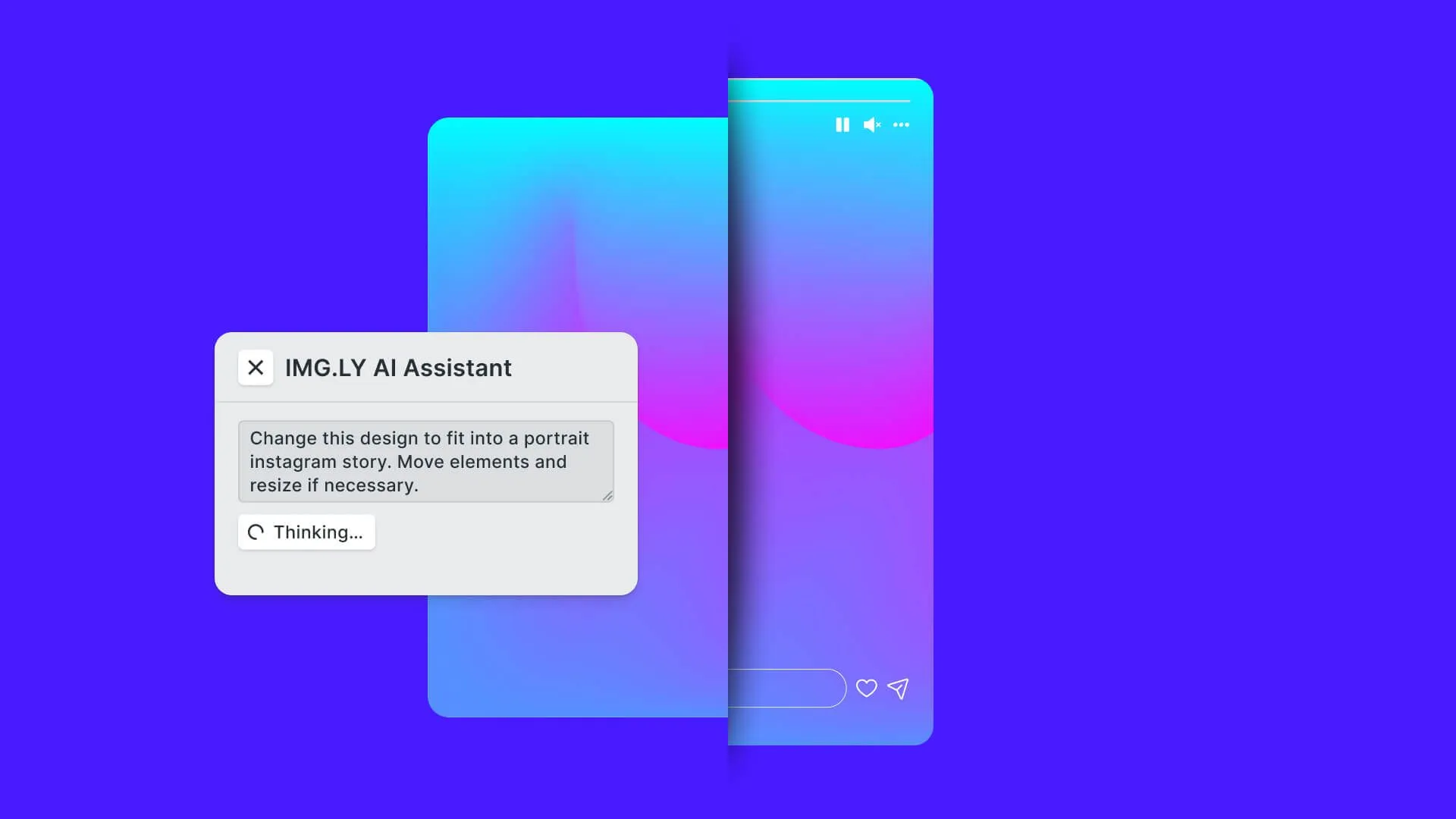
Generative AI is transforming the tech landscape, finding applications in virtually every field. At IMG.LY, we’re exploring how these advancements can revolutionize creative workflows. This article presents a research project, where we integrate Large Language Models (LLMs) with our flagship product, CreativeEditor SDK (CE.SDK), to enable natural language-driven design edits.
Our flagship product, CreativeEditor SDK (CE.SDK) allows for advanced creative workflows for countless use cases in industries ranging from print to marketing tech. Most use cases can be realized with the out-of-the-box feature set, but it also exposes an API, called Engine API, to build complex custom workflows with designs and videos.
In this article, we will showcase how to combine our CE.SDK Engine API with LLMs to edit designs with natural language.
Updated September 2026.
Introduction to LLMs
Generative AI is often associated with chatbots, but its capabilities stretch further. It is a versatile text processor that can transform any textual input into various structured outputs. This adaptability is due to its training on diverse textual patterns, allowing it to support a wide range of text-to-text applications beyond just generating conversational prose.
Carefully crafting an input text (prompt) in a way that instructs the LLM to output a specific structured output format allows us to use LLMs to solve almost any arbitrary text-based task.
Crafting prompts is an art in itself. When ensuring that we receive the required output we need to adhere to the following steps:
- Consider what type of data our model was trained on to ensure the correct formatting of our input text. The most basic example is using English as our “main prompt language” since most LLMs are mainly trained on English text samples.
- All necessary problem-specific information to solve the task needs to be included in the prompt. While LLMs often possess an inherent understanding of the world inferred from the vast amount of text they are trained on, they may not know much about our specific problem. Furthermore, LLMs have the notorious tendency to hallucinate, that is fill in missing context with incoherent or incorrect information. To ensure the best performance, the input to the LLM must provide as much context as possible.
- Finally, we need to instruct the LLM well enough to output text-based data in a format we can then parse and process.
Human vs. AI Workflows for Executing Design Tasks
We started this project with the vision to use generative AI to magically handle requests like these (in increasing order of complexity):
Make the logo biggerTranslate this design into GermanAdopt this template to our brand colors and brand assetsTransform this Instagram story portrait design into a landscape YouTube thumbnail
When trying to delegate a task to an AI, it’s best to start by thinking about how these tasks are currently solved by humans.
Let’s walk through how a human would complete a task such as
Make the logo bigger:
- Humans would visually scan the design and automatically segment it by its elements such as objects, backgrounds, or text.
- Humans would then read and comprehend the task “Make the logo bigger”
- Finally, users would use their existing knowledge of how to move and interact with design software to fulfill the task by manipulating the individual elements in the design.
Based on these considerations we can extract the implicit knowledge necessary to fulfill a task and make it explicit for the benefit of our LLM.
Design Representation:
To enable the LLM to understand and manipulate a design, it is essential to provide a representation of the design. This can be either textual or a mix of textual and visual (if the LLM has vision capabilities) data. While supplying the current design as a raster image to the LLM is trivial, serializing a CE.SDK design into a textual format requires a custom serialization process. The textual representation is important since it allows the LLM to identify, address, and comprehend the different components of the design effectively.
Refer to Appendix: Use-Case dependent serialization of CE.SDK Designs for a more in-depth explanation of how to accomplish this.
Editing Protocol:
LLMs do not interact with design software using traditional human interfaces like a mouse, keyboard, or visual feedback. Therefore, we need a specific protocol for the LLM to propose changes to the design. We have developed a method where we pass a textual representation of the design to the LLM as part of the prompt so that the LLM can indicate changes to the design by returning a modification of this representation.
Practically, this means that if we pass in an element such as <Image id="1337" x="100" y="100" .../>, the LLM can change those x and y attributes by simply returning <Image id="1337" x="0" y="0" .. /> inside its output text. Since we can identify the design element that was changed using the ID attribute, we can then calculate the programmatic changes that need to be applied to the design, like in this case engine.block.setPositionX(1337, 0) and engine.block.setPositionY(1337, 0).
Refer to Appendix: Parsing and transforming LLM response for a deeper look into this topic.
Using Generative AI to Execute Design-Related Tasks
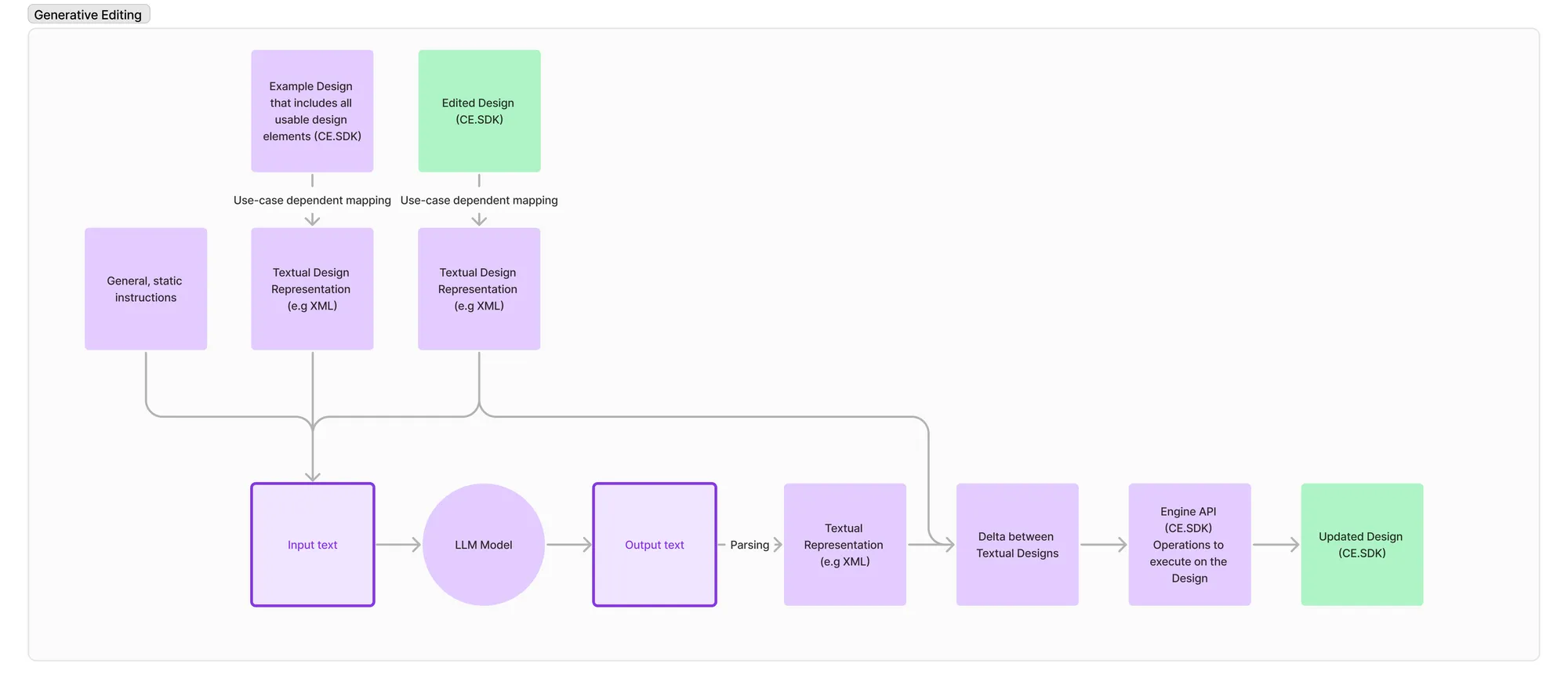
Based on what we have learned, we assemble a workflow, with the LLM as the center point that allows the LLM to execute design-related tasks on any of our CE.SDK designs. This workflow can be divided into two sub-tasks: Composing an input text (prompt) with all necessary context and parsing and applying the output of the LLM to the CE.SDK design.
Composing the Input Text
As seen in the graphic above we first compose the input text based on different components to provide the model with all necessary context to fulfill the user’s editing request: This includes a general text to “instruct” the model, the actual request that the user entered, an exemplary design representation to explain our output format to the model and a representation of the currently edited design.
The general, static text to “instruct” the model is composed of the following three parts.
- What we are trying to achieve in general:
"You are an AI with expertise in design, specifically focused on XML representations of designs". - Output format instructions:
Your responses should only contain one XML document. Ensure that you do not introduce new attributes to any XML elements. You can change image elements by setting the alt attribute, which then will be used to search Unsplash for a fitting image. A sample alt text is “A mechanic changing tires with a pair of beautiful work gloves on”.
Additionally, pay close attention to the layout: verify that no elements in the XML document extend beyond the page boundaries. This constraint is critical for maintaining consistency and accuracy in XML formatting. Always double-check your XML output for these requirements. - The actual user request:
e.g.,"Make the logo bigger"
By including a textual representation of a comprehensive example design we can show the model which layer types are available as well as which properties of those layers can be manipulated.
The model now has all the necessary context and building blocks to respond to user requests in a format that we can process downstream.
Applying the Output Text
In the first step, we scan the output text for an XML-like document and if we find one, attempt to parse it.
This will yield a structured data object we can compare to the one we passed in and calculate which elements have been modified, added, or removed.
The resulting change set can then be translated into specific calls to the CE.SDK Engine API to change the current design.
Issues faced
Latency: One issue with the 2024 state-of-the-art models was their big latency: Each LLM response contained approximately 1000 tokens. That meant each request took 7-45 seconds (depending on the model) to complete. This long delay could be unacceptable for some user experiences. We saw this issue as transitory and expected upcoming models to have much smaller latency while maintaining their capabilities.
Pricing: Each request/response with GPT-4 turbo as a backing model cost around 5 cents and restricted some use cases. We also expected the pricing to drop significantly. The then-new GPT-4o model for example reduced the price by half.
Hallucinations: LLMs do not always follow the instructions properly and, e.g., produce output that is not parsable. Hallucinations directly correlate with the capabilities of the model, and the issue was not apparent with the 2024 state-of-the-art LLMs such as GPT-4 and GPT-4o.
Conclusion
We present a novel and adaptable approach to use Generative AI and LLMs specifically to interact with IMG.LY’s CreativeEditor SDK. We showcase how this technology can be used to execute common design requests on arbitrary CE.SDK Designs. The proposition that LLMs can understand textual representations of visual elements was by no means obvious. This research project has revealed that it is very well within the scope of LLMs to translate instructions from a visual semantic context to its textual representation and back. This invites more inquiries into LLMs as assistants for tasks with a heavy visual component such as design.
While further research is needed to make this technology available in production environments, we are confident that Generative AI-based editing will play a big role in the future of Graphics and Video editing.
What This Research Became
This write-up dates from the research phase. The approach it describes, giving a language model a compact textual representation of a design and applying its response back to the scene, has since shipped in three forms:
- CoDesign is an AI design agent that runs as a local MCP server and returns editable design files rather than flat images. It is the direct product descendant of the serialization work in the appendices below.
- Agent skills install CE.SDK documentation and code generation into AI coding assistants, and the MCP server puts CE.SDK’s documentation in front of any MCP client. Setup guides exist for Claude Code, Cursor, OpenAI Codex and others.
- The AI Editor puts generative operations inside the editor itself, with models supplied through the AI gateway or your own provider.
The parsing problem described under “Issues faced” is the one that changed most. Structured output and tool calling now do what the response transformation in the second appendix had to do by hand.
Appendix: Use-case Dependent Serialization of CE.SDK Designs
LLMs work based on “tokens”, which are sub-word fragments. However, a design, like e.g a poster design or a social media graphic, is highly visual. That means that we need a way to convert a design into text, a way to serialize it. Our CE.SDK engine can serialize an existing scene using our engine.scene.saveToString method. However, this serialization contains a huge pile of information that is not necessary to do edits inside the file. LLMs are priced by token and their speed is also relative to the number of tokens the input and output have. Thus, the number of tokens should be reduced.
We looked at several ways to convert the current state of the design into a textual representation. Since GenAI is trained on a lot of (X)HTML which has an XML-like format, we decided to serialize any designs into a tag-based XML-like format.
The IMG.LY editor internally refers to design elements like images or texts as “blocks”. These blocks are uniquely identifiable and addressable using a numeric ID. We use this ID to be able to identify a serialized design block in the input and output of the LLM. Example: <Image id="12582927" x="0" y="0" width="800" height="399" />
For each of the CE.SDK block types like e.g “Text” or “Graphics” (representing images or vector shapes), we will use the CE.SDK Engine API to query very specific data from the block. That means that for example we only have a text attribute for Text blocks.
This rather specific mapping of only certain properties from the CE.SDK design into the text serialization allows us to optimize the design serialization for different use cases. A use-case where we, e.g., want to automatically name each layer does not require fine-grained information about, e.g., the font size.
Appendix: Parsing and transforming LLM response
The LLM answers with arbitrary tokens. At the time of this research, the models we used offered no way to restrict the response to a certain syntax. By settling on a well-defined and widely used format we instruct the model to also reply with an XML-like document, similar to the one we passed in as “current state”.
After receiving the LLM’s Response we first make sure that only a single XML document is present inside the response. We then compare the retrieved XML document with the state of the Design that we passed into the LLM and generate a change set. This change set contains entries like “Color of block with ID=123 has changed”. These change set entries are then converted into programmatic commands, like e.g engine.block.setColor(engine.block.getFill(123), 'fill/color/value', color) and executed on the current design.
One challenge at the time was the inability to restrict the output space. Thus, we were never guaranteed that the LLM did not add, e.g., new XML node names, or that it even replied with a proper, valid XML-like document. The lever we used to influence the probability of a proper XML-like document was strong prompting together with models that are good at following those instructions.
In our tests, the 2024 state-of-the-art models like GPT-4 could follow those instructions without any further tooling.
Further Research Topics
It’s also worth exploring fine-tuning an LLM specifically for this task which could improve the performance of the LLM for the specific tasks.
It would also be possible to use more advanced libraries like Guidance, which allows to define a grammar for the LLM response thus making sure that the output of the LLM is always parseable.
Another way to improve the performance would be to methodically test different prompt templates and find a way to measure and compare the output quality.
FAQ
Can a language model edit a design file? Yes, provided the design is given to it as text it can reason about. The research described here serializes a CE.SDK scene into a compact textual form, sends it to the model with the user’s instruction, and applies the response back to the scene. The finding that was not obvious at the outset is that models translate reliably between a visual semantic context and its textual representation.
Why not send the full scene to the model? Cost and speed. A complete CE.SDK serialization carries a great deal of information that is irrelevant to the edit being requested, and models are priced and paced by token. The first appendix describes serializing only what the use case needs.
How do you stop the model returning something you cannot parse? At the time of this research, by transforming and validating the response by hand, which is what the second appendix covers. Structured output and tool calling have since made most of that unnecessary, and constrained-generation libraries such as Guidance were the contemporary alternative.
Is this available as a product? Yes. CoDesign is an AI design agent that runs as a local MCP server and returns editable design files rather than flat images. CE.SDK also ships agent skills for AI coding assistants, an MCP server that puts CE.SDK’s documentation in front of any MCP client, and an AI Editor that puts generative operations inside the editing interface.
What is the difference between generating an image and generating a design? An image is finished; a design is editable. A model that returns a flat image ends the workflow, while one that returns a scene with addressable layers, text and constraints hands the work back to a person who can continue it. That distinction is the whole point of representing the design as structured text rather than pixels.
Which models does this approach require? None in particular. The method depends on a model handling a structured textual representation and returning something parseable, not on a specific vendor. In the product that followed, models are supplied through the AI gateway or through your own provider.
Thank you for reading!
3,000+ creative professionals gain exclusive access and hear of our releases first. Subscribe to our newsletter and never miss out.