
Embedding an editor that fits your brand, scales, and meets all technical constraints is harder than it looks. For many, Canva (and its Canva Connect offering) is a natural first thought because of its extensive user base and polished editor.
Yet, as you go down the rabbit hole of product requirements, white-labeling, deployment type, customization of UI and workflows, and cost predictability, you might start looking for alternatives with more flexibility and a developer-first approach - like IMG.LY.
To help you decide whether Canva is a good fit for your business or if you’re better off choosing an alternative, we put together a comprehensive guide that will answer questions like:
- What Canva Connect API do well - and where businesses run into limits?
- Which companies might benefit from looking for an alternative solution?
- How IMG.LY compares to Canva and which industries and use cases benefit most from choosing IMG.LY?
To make it really comprehensive, we went through a lot of nitty-gritty details so please explore the table of contents and make sure you find the bits and pieces that interest you most. If white-labeling is what you’re after, our white-label editor page shows how to theme CE.SDK to your brand, remove IMG.LY branding, and run it on your own domain.
Ready? Let’s dive in.
Updated September 2026.
What is Canva Connect API and How it Works
Canva Connect (Canva Developers SDK, also known as the Connect API) is how Canva enables third-party platforms to integrate parts of its design experience into external products. In a nutshell, it lets apps create or autofill designs over a REST API and then hand the user a temporary link that opens that design in Canva. Editing happens on canva.com, in Canva’s own interface, and the user returns to your product afterwards. Canva calls this return navigation, and it is a different shape from an editor SDK you host inside your own product.
Common use cases for Canva Connect
For most platforms, Canva Connect acts as a bridge rather than a deeply embedded creative layer, giving users access to Canva’s familiar design interface within another product, while maintaining Canva’s own hosted environment and branding.
Marketing & Campaign Platforms
These platforms often use a “Create with Canva” or “Design Visual” button that opens Canva in a new tab. Users can work on campaign assets, like social posts, ads, or email banners, directly in Canva, then reimport the finished files into the marketing tool for scheduling or publishing. It’s a quick way to let marketers access Canva’s ecosystem without leaving their workflow, but the experience remains distinctly Canva-branded and cloud-hosted.
CMS & Content Tools
In content management systems or website builders, Canva Connect helps non-designers quickly generate visuals for hero sections, thumbnails, or blog banners. The integration provides an accessible design option for users who may not have dedicated design resources. Customization and template control largely remain on Canva’s side, limiting how deeply teams can enforce brand guidelines or creative constraints.
Print & Publishing Platforms
In web-to-print and publishing tools, users can design materials inside Canva and send finished print-ready exports back into the platform for order fulfillment. It’s convenient for consumer-facing workflows like business cards or flyers, though direct color management and print-specific constraints sit behind preview APIs gated to Canva Print Partners, so print providers often need additional checks or conversion steps before final production.
Lightweight SaaS Integrations
For SaaS products that simply want to offer design as an option rather than own the full creative workflow, Canva Connect is a low-friction way to embed that capability. It’s ideal for tools prioritizing convenience over customization, for example, startups that don’t require strict branding, offline editing, or control over the editor’s interface. However, since Canva Connect remains cloud-hosted and branded, it’s not suited for scenarios where teams want a fully white-labeled or deeply integrated creative layer.
Canva Connect can be leveraged in other use cases, especially integrations focused on speeding up content creation for smaller teams or products that prioritize ease of use. However, as product requirements evolve into more complex workflows or brand control becomes more critical, some businesses might find that Canva Connect’s structural limitations become roadblocks.
Limitations & challenges
Canva Connect is not designed for every creative use case, particularly when a product demands full control over the editing experience, deployment, or data environment. Because Canva remains a hosted service and a branded platform at its core, brands often find constraints as they scale or seek tighter integration into their own ecosystem.
Most common challenges:
Branding & white-labeling
Canva is designed first and foremost as a branded platform. This makes full white-label deployments difficult for SaaS companies or platforms that need the editor to blend seamlessly into their product. So if you want the editor to feel like a native part of your app, Canva is not the best option.
Integration depth & customization
While Canva’s API enables cloud-based connections for importing or exporting assets, the editing experience itself remains limited to predefined templates and a fixed UI layer. Developers report that deeper programmatic control, such as custom toolbars, event hooks, or automated layout adjustments, is difficult to achieve, making it difficult to accommodate more complex, custom editing workflows.
Offline / native embedding limitations
Canva explicitly discourages use of the Connect API in environments where credentials cannot be securely stored, such as mobile or desktop apps, browser extensions, or PWAs without a backend:
“Apps that use the Canva REST APIs must be associated with a web app. We don’t support apps in environments where it’s difficult to securely store credentials, such as mobile or desktop apps, browser extensions, Progressive Web Apps (with no backend), and Single Page Apps.” Instruction from Canva’s docs.
Deployment & data control
Because Canva is a cloud-only platform, it cannot be hosted privately or deployed within a customer’s infrastructure. For organizations with strict data-residency, security, or compliance requirements, this can be a deal-breaker. The Connect flow is managed on Canva’s servers, leaving little flexibility for on-prem or hybrid setups.
Pricing & usage predictability
While Canva Enterprise offers custom pricing, many users note challenges forecasting costs at scale, especially with usage-based models tied to export or asset volumes. Some features, templates, or fonts are locked behind higher tiers.
Automation & templating
Canva does offer programmatic generation through two APIs. The Brand Templates APIs are documented for users on a Canva plan with access to brand templates, which Canva names as Canva Pro, Canva Teams, or Canva Enterprise. Publishing a design as a brand template additionally requires a Team admin, Brand designer, Organization admin, or Organization designer role. The Autofill API fills a brand template from your data and returns a finished design, and Canva documents it on the same plan set. Canva also documents a preview trial quota on Autofill for users below Enterprise, after which the API directs them to upgrade. The difference shows up at volume. Every autofill is an asynchronous job running on Canva’s infrastructure, subject to their rate limits, and it produces a design that then lives in Canva. CE.SDK runs the same engine headlessly through the Node.js SDK inside your own infrastructure, with batch processing, text variables and locked templates all available server-side, and the output lands wherever your pipeline puts it. For personalized campaigns or bulk creative generation, where the rendering happens is most of the decision.
Rate limits, asynchronous APIs & predictability
Connect APIs are not always synchronous: many operations are handled as background jobs you must poll. Canva advises exponential backoff and caution about rate limits, as stated in the official documentation.
If you exceed quotas, requests may be throttled or rejected, which introduces unpredictability and constraints on scaling.
In short, Canva Connect is a great solution for adding familiar design capabilities quickly, but it’s less suited for teams that need full ownership of the user experience, flexible deployment, or deep integration with existing workflows. For those use cases, developer-centric SDKs like IMG.LY offer more control and scalability.
Who Would Benefit from Looking for Alternatives to Canva Connect API
While the limitations above are technical in nature, the decision to seek an alternative is usually driven by broader business and operational needs.
Here are the most common reasons companies make the switch:
- Need full brand control: You need to remove all third-party branding from the editor UI and deliver a seamless, fully native experience that matches your product design and user expectations.
- Looking for deployment flexibility: Your product or organization requires on-premise or private-cloud hosting, or must comply with strict data residency and security standards.
- Want automation & dynamic templates: You need to dynamically generate templates or integrate design creation into complex automation pipelines, such as personalized marketing or AI-driven creative workflows.
- Want to utilize API extensibility: Your team wants to connect the editor directly to external APIs, for example, pulling product data, campaign assets, or analytics into the creative process, which is difficult to achieve with Canva Connect’s closed environment.
- Looking for AI capabilities: You’re looking to incorporate modern AI features like automated background removal, image enhancement, text-to-image generation, or intelligent layout suggestions, capabilities that are easier to implement with open, developer-first SDKs.
- Prioritizes predictable pricing: Your business model can’t support usage-based billing that fluctuates unpredictably with user activity or content volume.
- Need native mobile & offline performance: Your users need fast, reliable editors that work on mobile devices with low latency and offline support, especially in field or enterprise environments.
- Values compliance & data ownership: Your legal and compliance teams require complete control over where assets are stored, processed, and exported, often for regulatory or contractual reasons.
If your company identifies with those needs, Canva Connect API might not be a good fit for you. Luckily, there are a few alternatives available on the market. In this article, we will focus on IMG.LY.
IMG.LY: A Modern, Flexible Solution
For teams that want to own their creative experience end-to-end, IMG.LY offers a fundamentally different approach. Built for developers, it provides a modular SDK and APIs that bring professional-grade photo, video, and design editing directly into your product without forcing users to leave your environment or compromise on branding.
Unlike hosted or closed platforms, IMG.LY’s CreativeEditor SDK (CE.SDK) is designed to give you complete control over every layer of the editing experience: UI, workflow, deployment, and performance.
Whether you’re embedding a simple image editor or building an advanced design tool with automation, the platform scales with your requirements - from startups to global enterprises.
What IMG.LY brings to the table
- Modular SDK for Web, iOS, Android, React Native, Flutter, Node.js, Electron and macOS: IMG.LY’s SDKs are built to integrate seamlessly into any environment, whether it’s web, mobile, server, or hybrid. You can select only the components you need, from simple image cropping to full multi-page design editing or advanced video compositing. This modular approach makes it easy to embed creative capabilities directly into your product without unnecessary bloat, ensuring tight alignment with your existing tech stack.
- White-label & fully customizable UI: Unlike hosted editors, IMG.LY lets you make the editor truly your own. Every visual element: colors, icons, layout, panels, tool visibility, and even interaction patterns can be tailored to your product’s design system. The result is a completely seamless experience where users never feel they’ve left your app, preserving brand consistency and user trust.
- Flexible deployment: You decide where and how your editing infrastructure runs. Whether you prefer standard SaaS cloud hosting, need private-cloud isolation for compliance, or full on-premise deployment for complete data control, IMG.LY supports it. Enterprise teams can maintain performance and meet strict regulatory or security requirements without compromising on creative functionality.
- Performance & offline capabilities: The SDK is built for speed and reliability in real-world use. The creative engine runs directly on the client, so editing actions happen instantly - no waiting on server round trips. Hardware acceleration ensures smooth rendering even for complex, multi-layer designs, while that same client-side execution holds up in low-connectivity and offline conditions across web, mobile, and desktop. Whether users are fine-tuning visuals in the field or running automated render jobs at scale, performance stays predictable and responsive.
- Developer-first architecture & documentation: Built for engineers, IMG.LY offers rich event hooks, plugin points, and a robust programmatic API layer that allows deep integration into your workflows. You can build automation pipelines, trigger actions during the editing lifecycle, or even create custom tools tailored to your product’s needs, all while maintaining full control of the user experience. Comprehensive, developer-focused documentation and LLM-friendly text resources make onboarding and integration fast and efficient.
- Transparent licensing: No opaque usage-based surprises. The pricing is straightforward, predictable, and designed to scale with your business. Flexible enterprise plans give you freedom to grow, budget confidently, and align costs with real product adoption.
These capabilities give teams the flexibility to build tailored editing experiences that feel native to their product.
Feature-by-Feature Comparison
To make it easier, here is a side-by-side comparison of the points teams tend to decide on first.
| Axis | IMG.LY CE.SDK | Canva Connect API |
|---|---|---|
| Where the editor runs | Inside your own product. The UI is themed to your design system, and on licenses that cover white-labeling, IMG.LY branding, watermarks and attribution are removed. | On canva.com. You send the user to Canva’s editor with a design link, and they return to your platform when they are done. Canva’s brand guidelines govern how you name and present the integration. |
| Integration shape | Client SDKs you install into your app, plus a headless engine API for building a completely custom interface. The editor and the headless API drive the same engine and the same document model, so scripted changes and user edits act on one scene. | A server-side REST API. Canva publishes an OpenAPI description and a starter kit, and states it does not maintain or publish client SDKs, so the client is yours to generate or write. |
| Platforms | One SDK, supported on Web, iOS, Android, React Native, Flutter, Node.js, Electron and macOS. On the web it is documented for JavaScript, React, Angular, Vue, Svelte, SvelteKit, Next.js and Nuxt. | Web apps with a backend. Canva’s security recommendations say apps must be associated with a web app, and that it does not support mobile apps, desktop apps, browser extensions, Progressive Web Apps without a backend, or single page apps. |
| Deployment and where designs live | The engine runs client side in the browser or app, and headlessly on servers you operate. Self-hosting the engine and content assets is required for production, and the IMG.LY CDN is documented as development and prototyping only. Design data stays in the infrastructure you run. | A cloud service. Every operation is a call to api.canva.com, and assets and designs live in the user’s Canva Projects, which the asset and design endpoints read, update and delete. Across Canva’s full developer documentation corpus, nothing describes a self-hosted or on-premise deployment. |
| Data residency | Wherever you deploy. The engine runs in the browser, on the device, or on your servers, and engine and content assets are served from your own infrastructure. There are two documented exceptions. License validation is normally remote, with offline-compatible options available, and generative AI calls go to whichever provider you configure, either directly, through a proxy you self-host, or through the managed IMG.LY AI Gateway. | An organization-level setting, not a per-request one. Canva’s help page offers three values on Enterprise, Campus and District plans, no preference, United States or European Union, changed by an organization admin and recorded as an audit event. |
| Automation and variable data | The same engine runs headlessly through the Node.js SDK for batch rendering, driven by locked templates, placeholders and text variables (Web, iOS, Android, Server). Output lands wherever your pipeline sends it. | The Autofill API fills a brand template from your data. Canva documents it and the Brand Templates APIs it draws on for users on a plan with access to them, such as Canva Pro, Canva Teams or Canva Enterprise, with publishing a brand template limited to four named roles. Below Enterprise, Autofill carries a preview trial quota, then requires an upgrade. |
| Call model | Engine calls are in-process calls, in the browser or in Node.js. An edit is a function call against the scene, not a network round trip, and there is no job to poll. | Asset upload, autofill, design import, resize and export run as asynchronous jobs: you start a job, then poll a matching get-job endpoint until it reports success or failure. Canva recommends an exponential backoff strategy for that polling. |
| Throughput limits | Engine operations run in your own process, so no per-call API quota governs them and throughput follows the hardware you give it. Calls out to a generative AI provider are the exception, and follow that provider’s own limits. | Documented per endpoint, per user of your app, in requests per minute. Creating an asset upload job is 30, a design autofill job 60, a design export job 20, a design import job 20. The matching get-job endpoints sit higher, at 120 to 180, so polling is not usually the binding constraint. Over the limit, the endpoint returns 429. |
| AI features | Model-agnostic plugins inside the editor. On web the documented capabilities are image generation, video generation, audio generation for speech and sound effects, text generation, auto captions, and background removal. On iOS, Android, React Native and Flutter the documented AI plugins are image generation, auto captions and background removal. Every one connects through a provider you choose: a direct provider configuration, a proxy you self-host, or the managed IMG.LY AI Gateway. | Mostly on a different surface. The REST API has one model-backed endpoint, the image-to-design import job, which uses Canva’s Magic Layers to split an image into editable layers; it is a preview API and needs the Magic Layers team permission. Nothing else across its fourteen endpoint groups generates or edits content with a model, and there is no text-to-image, text-to-video or background removal endpoint. Canva’s AI generation lives on its MCP server instead, where a generate-design tool turns a natural-language brief into candidate designs for a person to choose from. |
| Print output | CMYK color and spot colors (Web, iOS, Android, Server), knockouts for overlapping colors and layers (Web, iOS, Android, Server), PDF/X export through a plugin (Web, Server), bleed and margins (Web), and cutouts and underlayers for die-cut and layered work (Web). | The general export API takes JPG, PNG, GIF, PPTX, MP4, PDF, CSV and HTML, with a quality setting but no CMYK, bleed or crop mark parameters. Those sit on a preview endpoint restricted to Canva Print Partners, whose PDF export accepts cmyk, pdfx, bleed in microns and crop_marks. Canva’s separate Print API handles order flow for partners in its print fulfillment network. |
| Design-file export | Editable IDML for InDesign (Web, Server) and layered PSD for Photoshop (Server). | No IDML or PSD option in the export API. |
| Templates and brand assets | You bring the templates. Custom templates, locked templates, placeholders and brand kits are all listed for Web, iOS, Android and Server, and the editor is storage-agnostic, so asset sources point at your own CDN, DAM, or a stock provider such as Unsplash, Getty Images or Pexels. | Canva’s own template library comes with the platform, which is a genuine head start for teams whose users have no templates of their own. The REST API can list a user’s brand templates, publish a design as a brand template, and report which fields a template accepts. |
| What it asks of your team | An integration project. You build the product surface the editor sits in, and decide how templates, assets and output are handled. | A backend that holds the client secret, runs Canva’s OAuth flow and drives the API. Each user needs a Canva account, and the design work happens in an interface many of them already know. |
Use Cases & Industries That Benefit from Choosing IMG.LY
Because IMG.LY is modular and deeply customizable, it’s leveraged across a wide range of industries: from SaaS and marketing platforms to enterprise brand portals and print solutions. Below are some of the most common scenarios and how IMG.LY maps to each.
Marketing & automation tools
Marketing teams often need to generate hundreds or thousands of creative assets, like ads, social posts, campaign banners, and localized versions, at scale while still staying on brand and responsive to rapid changes. Anyone working in or with marketing knows that, unfortunately, manual design processes, back-and-forth with designers, and inconsistent formats quickly turn into frustrating bottlenecks.
How IMG.LY fits in:
- Smart templates & placeholders: IMG.LY supports templating with placeholders, lockable design elements, and variables. What does this mean? Marketers can easily swap content, localize messaging, or tailor designs without worrying about compromising brand integrity.
- Headless & programmatic rendering: Placeholders and variables can also be swapped programatically via back-end APIs or a headless mode, effectively enabling mass personalization, scale production of A/B testing variants, or campaign-level automation with thousands of assets being generated with a few clicks.
- AI-assisted creative tools: IMG.LY stays ahead of AI trends with powerful AI-powered features like image/video/text/voice generation, background removal, and smart object editing that accelerate creative production and reduce manual effort. Marketers can prompt or generate visuals directly inside the editor without needing to switch tabs or apps.
- Embedded editing + incremental tweaking: Even with a fully automated process, users retain complete control. After bulk generation or templated output, users can still view the asset and open the editor to inspect or adjust the design as needed.
- Cross-format & multichannel publishing: Assets can be exported to multiple formats and aspect ratios optimized for different channels (social, web banners, print). The process can be fully automated, with a template designed once and then resized and saved automatically, significantly minimizing manual work.
- Asset libraries & external integrations: IMG.LY supports integration of external asset libraries (e.g., stock images, brand asset repos) or connecting to your own media management system so your templates have direct access to the right images or graphics.
Thanks to IMG.LY combining template-driven automation, AI-enhanced tools, and embedded interactivity, marketing teams can drastically reduce frustrating creative bottlenecks while ensuring every output remains aligned with branding.
Learn more about how IMG.LY caters to marketing tech needs.
Print & Print-on-Demand
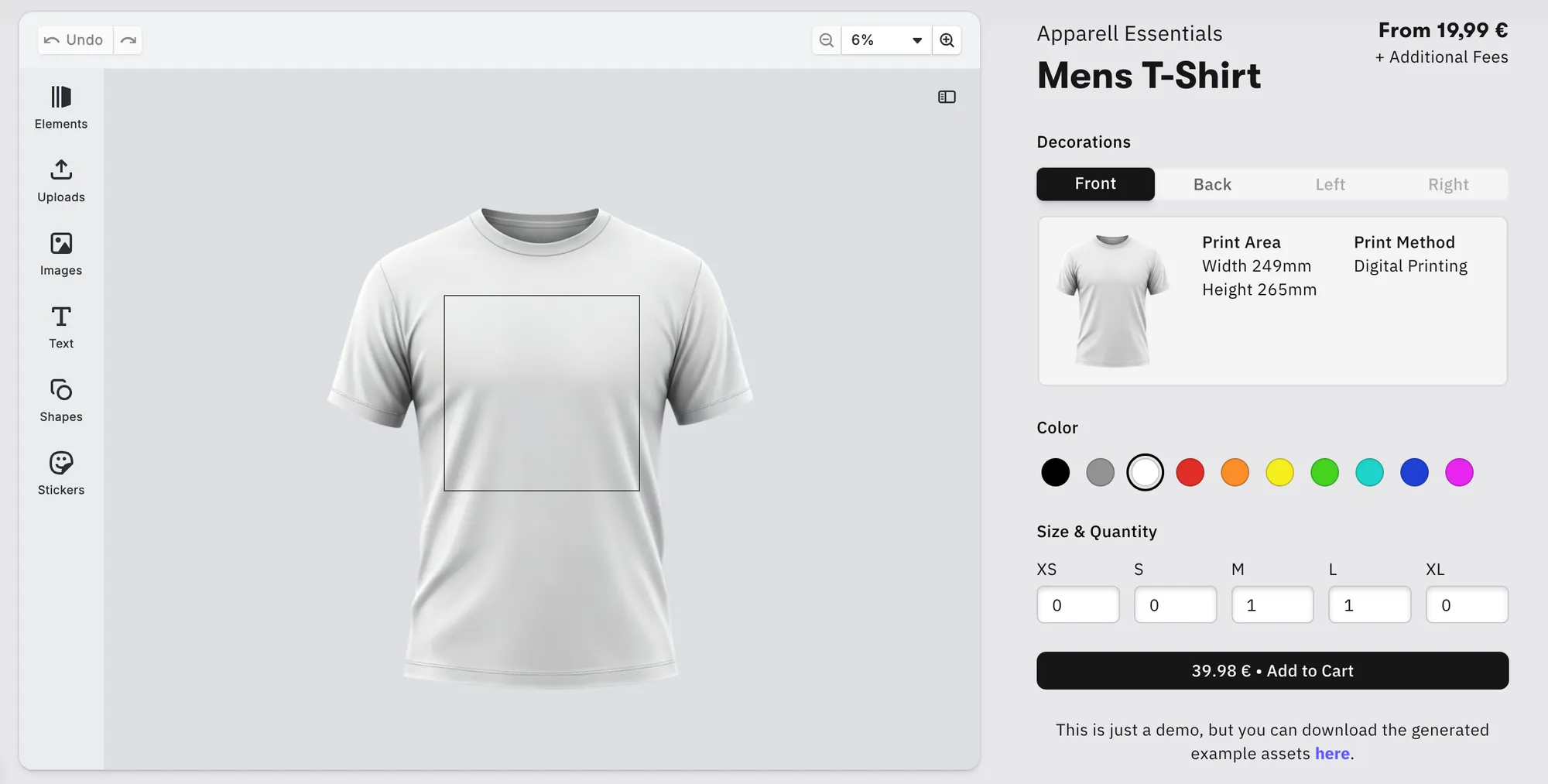
Printing workflows demand extreme fidelity with precise positioning, color correctness (CMYK, spot colors), bleed, and cut margins - at the end of the day, no one wants to pay for false prints and deal with unsatisfied customers. Hence, an editor with automated safeguards and visual mockups that reflect exactly how a design will appear on a physical product is crucial. Add an intuitive, easy-to-use UI that integrates across web, mobile, and print kiosks, and it’s a real cost and time saver.
How IMG.LY fits in:
- Full print support & advanced rendering: Proper colors and outputs are the backbone of printing. IMG.LY supports color spaces like CMYK, spot colors, cutout lines, and advanced export settings (PDF, high-res images) to meet the demands of professional print pipelines.
- Mockup Editor: No more surprises. The mockup editor lets users see their designs mapped onto products in real time - for apparel, posters, business cards, etc. Users can visually validate layout, scale, and appearance before export.
- Template constraints & variable data printing: IMG.LY lets you tag template elements like text, images, or colors to external data sources (e.g., CSV, APIs, CRM fields). This enables the generation of thousands of personalized designs automatically, such as wedding invitations, postcards, or localized marketing materials. Variable placeholders ensure every output stays on brand while adapting content (names, messages, languages, or imagery) at scale.
- Preview fidelity and proofing: The editor can show bleed, safe zones, and realistic previews or proof overlays so end users and internal QA know exactly what’s going to print, minimizing the risk of false prints.
- Cross-platform consistency: Deliver a unified editing experience across platforms - web, desktop, native mobile. Whether users design from a laptop, a tablet, or directly in a print kiosk, they get the same high-fidelity rendering, responsive UI, and access to the same templates and features. This ensures brand and production consistency across every touchpoint in your workflow.
With these capabilities, print platforms can let users design confidently and reliably, from compositing layered elements to producing production-grade exports and mockups that minimize misprints and product returns.
Learn more about how IMG.LY can integrate with your print or web-to-print workflow. Or see demos here.
E-commerce Platforms
Merchants need more than just good visuals; they need product images, banners, and mockups that are accurate, branded, and consistent, all without bouncing between multiple tools. They also often need to handle product variations (colors, sizes, personalized text), preview them, and scale creation for large catalogs.
How IMG.LY fits in:
- Mockup editor & real-time preview: The mockup editor lets merchants generate instant visualizations of designs mapped directly onto products, be it apparel, posters, or business cards. Users see changes live, making sure the design is exactly as they envisioned.
- Automated variant generation: Templates with placeholders (for product visuals, prices, ad copy, etc.) can be linked to product data to automatically generate all visual variants for large catalogs. What used to take hours per product can now be done in minutes, without touching a design tool.
- Asset libraries & API integration: IMG.LY integrates seamlessly with existing media systems and brand repositories, ensuring sellers always work with approved visuals, logos, and overlays. It keeps catalogs clean, consistent, and compliant. You can also connect external libraries like Getty Images or Unsplash through an API.
- Production-ready exports: With full support for high-resolution exports, transparent backgrounds, CMYK, and layout presets, the SDK ensures that every design, from thumbnail to packaging proof, is ready for both web and print use.
- Cross-platform editing: Users can create, preview, or customize products across desktop, web, or mobile. The editing experience is unified, fast, and fully integrated into your platform - making switching between devices seamless.
By pairing intelligent templates with real-time visualization and automation, IMG.LY helps e-commerce platforms streamline creative production, empower sellers, and deliver visually consistent product experiences across every channel.
Check out our demos or learn more about specific features and solutions for e-commerce.
Social Media Platforms
Social media is a creative heaven - or at least should feel like one. Users expect to produce visually captivating stories, reels, and posts instantly, intuitively, and without switching tools. Delivering this seamless creation experience requires an advanced editing stack that’s powerful, flexible, and performs flawlessly across millions of users.
How IMG.LY fits in:
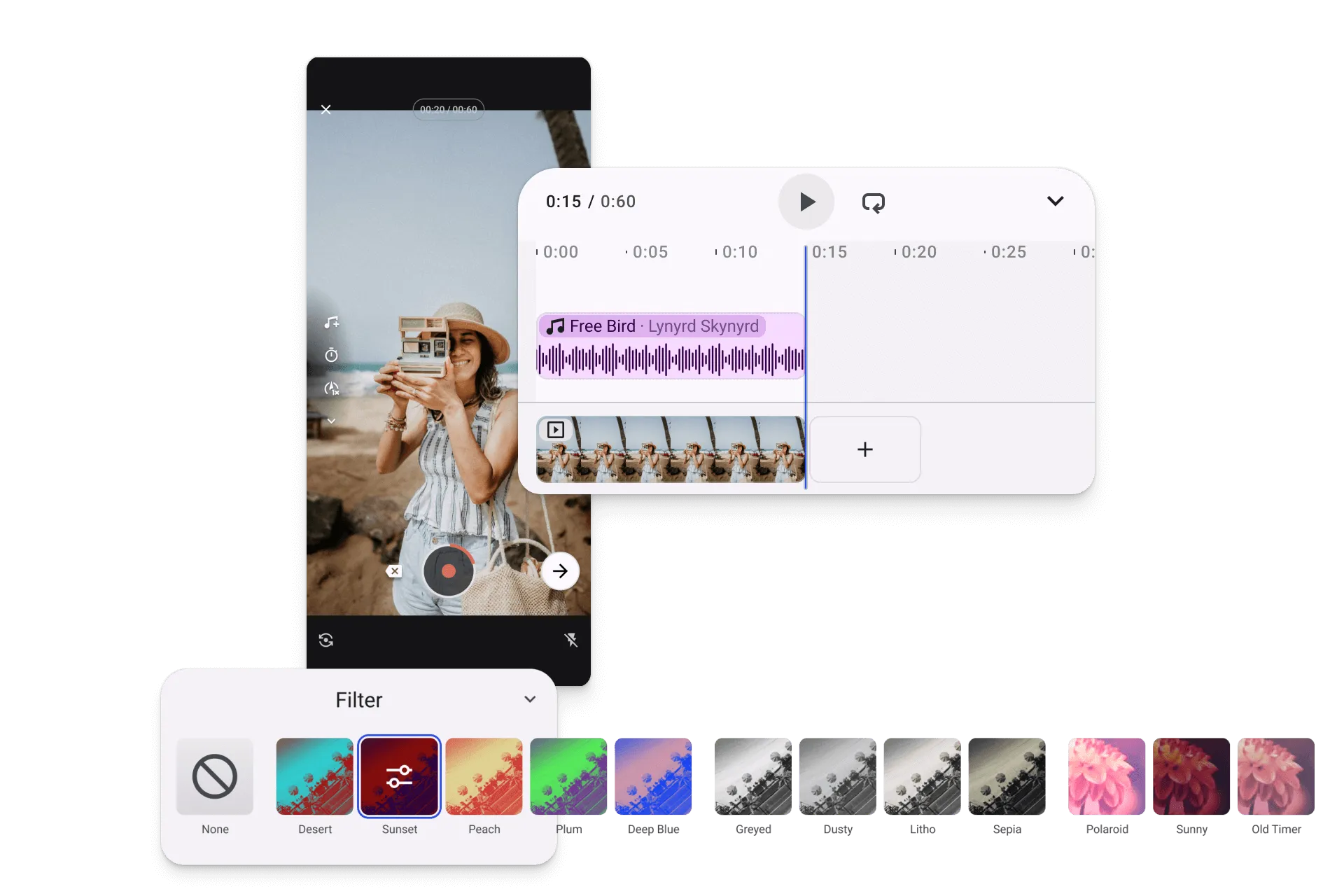
- Built-in native creative tools: IMG.LY embeds professional-grade editing directly inside your app: from photo filters and stickers to full video compositing and design layouts. Users can shoot, edit, and publish in one flow, boosting engagement and retention.
- Short-form video & story workflows: With built-in support for vertical video, trimming, transitions, multi-clip timelines, auto captions, and text overlays, users can create polished short-form content that’s instantly ready for reels, stories, or posts.
- AI-assisted editing: IMG.LY integrates advanced AI tools like background removal, smart cropping, and generative fill to make editing faster and more intuitive. The result? Eye-catching content created in seconds, right within your UI.
- Performance-first architecture: Client-side rendering and GPU acceleration ensure smooth, low-latency performance on iOS, Android, and Web. Editing runs on the client, so it continues offline once the SDK has loaded; license validation is normally remote, and offline-compatible options are available.
- Fully white-label & themeable: Every visual detail - from toolbar layout to button colors can be customized to match your platform’s look and feel, making the creative experience feel intuitive and blending into your app seamlessly.
- Integrations for publishing & analytics: APIs and event hooks connect editing workflows to your backend systems for media storage, moderation, or campaign tracking, keeping everything unified and easy to manage. With most processing handled client-side, IMG.LY helps reduce server demand and operational costs, making it easier to scale without adding backend complexity.
With IMG.LY, social platforms can empower users to create, customize, and share stunning content natively, transforming creativity into engagement while maintaining full control over brand and performance.
Explore further how IMG.LY fits into social media needs.
Brands & agencies
Brand consistency across global teams is hard to enforce without slowing creativity. Corporate brand portals need to empower users, from marketers to regional partners, to create localized, compliant materials while keeping every visual aligned with brand standards. Achieving that balance requires both structure and flexibility.
How IMG.LY fits in:
- Smart templates with constraints: Define templates with locked elements, preset fonts, and approved colors. Users can personalize safely within brand limits: adjusting text, swapping images, or localizing layouts, without breaking design integrity.
- Role-based control & approval workflows: IMG.LY provides event hooks and editor APIs that let you intercept and respond to editing actions. Version Control and Snapshots ships on Web, iOS, Android and Server, so version tracking is built in, and you integrate with your own backend to enforce role-based permissions and approval chains. Designers, managers, and agencies then collaborate within boundaries defined by your business logic.
- Integrated brand libraries: Connect directly to DAM systems or brand repositories so users always have access to approved assets, logos, and imagery, eliminating outdated or inconsistent visuals. IMG.LY provides easy API-based integration with popular asset libraries like Getty Images or Unsplash.
- White-label & fully branded UI: IMG.LY’s SDK is entirely white-label, letting enterprises embed an editor that looks and feels like a native part of their portal. Every icon, color, and layout can be customized for a seamless experience.
- Enterprise-ready deployment: With client-side rendering and flexible data control, IMG.LY fits even the strictest compliance and privacy requirements, ensuring assets stay secure and processes stay auditable.
By combining brand governance with intuitive design flexibility, IMG.LY enables organizations to move faster while maintaining complete creative and compliance control, empowering every user to design on-brand, every time.
Dive deeper into capabilities that help brands scale their workflows.
E-Learning & EdTech
Education platforms increasingly integrate multimedia creation into their user experience, from students designing presentations and posters to instructors building interactive course materials. The challenge? Delivering intuitive, distraction-free creative tools that feel native to the learning environment while keeping everything compliant, brand-aligned, and performance-optimized for classroom devices.
How IMG.LY fits in:
- Embedded creation for students & educators: With IMG.LY, learning platforms can embed professional-grade design and video tools directly into their applications. Students can craft visual assignments, infographics, or video projects without leaving the platform, and educators can design course materials, handouts, and thumbnails, all within a controlled environment.
- Simplified UI for creators & adaptors: E-learning environments often involve two distinct user groups: template creators (educators or content designers) and adaptors (students or instructors customizing existing materials). IMG.LY allows you to tailor the editor interface and available tools to each role. Template creators can access full design capabilities to build structured layouts, while adaptors interact with simplified, locked-down templates, adjusting only text, images, or placeholders within defined boundaries. This ensures creative freedom where it’s needed, and consistency where it’s required.
- Automated certificate generation & PDF rendering: With IMG.LY, you can programmatically generate certificates (e.g. course completion, achievement) by merging student data into templates and exporting directly as printed-quality PDFs, saving time while maintaining visual consistency.
- Native AI tools in workflows: The SDK supports AI features like automated image generation, text, graphics, and voiceovers integrated into e-learning flows - perfect for dynamic course visuals, enriched prompts, or media generation.
By integrating IMG.LY, e-learning providers can transform passive course platforms into interactive, creative spaces that promote engagement, creativity, and digital literacy, all while keeping control over user experience, data, and design standards.
See more of IMG.LY’s functionalities that cater to the e-learning use case.
Creative Automation
Today’s creative operations teams, from marketing departments to print providers, face mounting pressure to personalize assets at scale, adapt designs across hundreds of formats, and produce campaign-ready visuals in record time. Manual editing can’t keep up with the velocity and variety modern content demands. That’s where creative automation comes in.
How IMG.LY fits in:
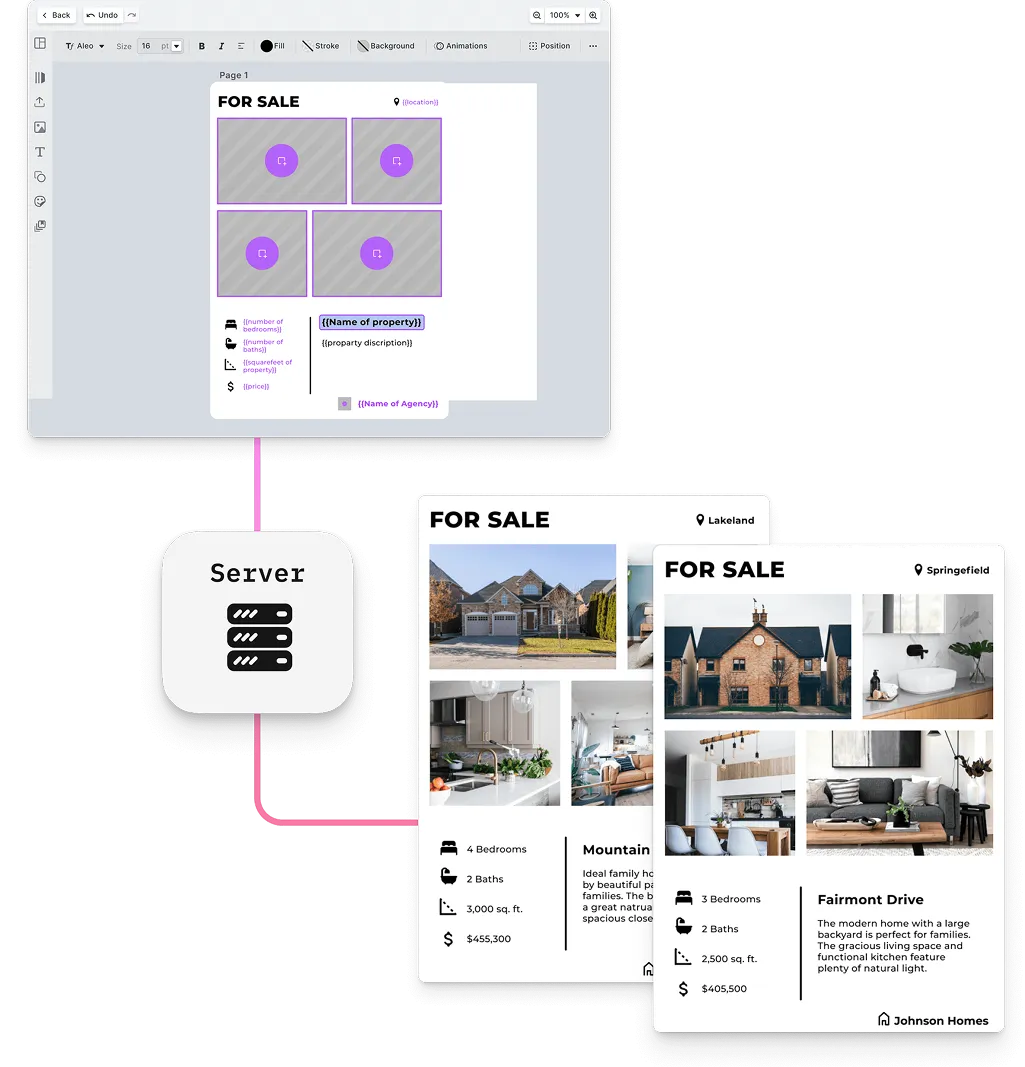
- Headless, API-driven rendering: IMG.LY’s CreativeEditor SDK can operate in headless mode, allowing you to generate thousands of assets automatically using your templates. From campaign banners to localized ads or A/B test variants, everything is rendered programmatically through API calls without manual intervention.
- Smart templates & variable data: Define template placeholders for text, images, or colors and connect them to external data sources (e.g., CSV, CRM fields, or APIs). This enables instant generation of personalized designs, such as postcards, event flyers, or dynamic social ads, with consistent layout and branding.
- Design consistency at scale: Lock critical design elements (logos, margins, colors, and typography) so that automated or user-edited outputs always remain on brand, no matter how many variants you produce.
- AI-enhanced automation: IMG.LY’s platform integrates with AI-powered capabilities such as background removal, auto-cropping, and generative fill. You can combine these with programmatic rendering to automate not just layout but also visual refinement and enhancement.
- Integrations & workflows: Embed creative automation into your existing ecosystem - DAMs, CMSs, or campaign management tools using IMG.LY’s APIs and event hooks. This ensures assets flow seamlessly from creation to publication with zero redundant steps.
By combining automation, AI, and deep customization, IMG.LY enables brands to scale creative output while maintaining full design control. What once took hours of repetitive manual work can now be generated, customized, reviewed, and delivered in minutes.
Learn more about how to power creative automation with IMG.LY. Or explore our demos here.
Customer Success Stories
IMG.LY powers the creation of millions of designs worldwide - from ad tech and automation platforms to e-commerce, print-on-demand, and social media creation. Customers across industries have found unique ways to embed IMG.LY’s SDK and tailor it perfectly to their workflows. Two great examples are Omneky and Halio, which both used IMG.LY to unlock scalable, on-brand creative experiences inside their products.
Omneky: 10× growth through AI-driven creative editing
Omneky, an AI-powered ad generation platform, needed a seamless way for users to edit AI-generated creatives without leaving their app. By embedding IMG.LY’s CE.SDK, Omneky gave users intuitive in-app editing with full creative control, all while keeping their engineering focus on AI and analytics.
The result: a smooth, unified creative workflow and a 10× increase in new signups month-over-month.
“The partnership with IMG.LY lets us focus on building the best AI, the best data-driven engine, the best advertising integrations, and the best ad generation. And then we can sleep easily that the image editing and video editing portions of the platform are well taken care of and well supported on the IMG.LY side. It’s a partnership that we continue to be excited about growing and scaling.”
Hikari Senju, CEO, Omneky
You can explore the full case study here.
Halio: Streamlining branded Social Media materials
Halio, a social media management platform for financial advisors, needed to help users produce on-brand, compliant social content quickly without relying on external tools. By embedding IMG.LY’s CE.SDK directly into their platform, Halio enabled advisors to select prebuilt templates, customize logos, colors, and text, and generate professional graphics effortlessly.
The result: content creation time dropped from hours to minutes, while maintaining brand consistency and making the editor intuitive for users with minimal design experience.
“IMG.LY’s ongoing updates and new features have been invaluable. We don’t have the resources to develop these features in-house, so having a partner that continuously improves the product is essential.”
Mark Lamb, Co-Founder, Halio
Read the full case study here or explore more customer success stories.
Conclusion
Choosing the right creative editing solution is about more than just features; it’s about control, flexibility, and how well the tool fits into your product and workflows. While Canva Connect offers a quick way to bring familiar design capabilities to users, teams that need deep integration, white-label experiences, automation, and scalable deployment often find IMG.LY to be a better fit.
With a modular SDK for web, iOS, Android, React Native, Flutter, Node.js, Electron and macOS, fully customizable interfaces, native performance, and programmatic APIs, IMG.LY allows businesses to embed professional-grade image, video, and design editing directly into their platforms. From marketing and social media tools to print-on-demand, e-commerce, and enterprise brand portals, IMG.LY empowers users to create confidently and at scale, all while keeping your brand front and center.
Explore the demos, review the documentation, or contact the team to see how IMG.LY can unlock creative possibilities within your own product ecosystem.
FAQ
Can I embed the Canva editor inside my own product? No. The Connect APIs are a server-side REST interface. You create or autofill a design over the API and receive a temporary link that opens it on canva.com, where the user edits in Canva’s own interface before returning to your product. Canva documents this as return navigation. If the editor needs to live inside your application, under your branding, you are looking for an editor SDK rather than Connect.
Does Canva Connect support automated or variable-data design generation? Yes, through the Autofill API, which fills a brand template from your data and returns a finished design. Canva’s reference scopes Autofill to integrations acting for a user on a Canva plan with access to autofill, naming Canva Pro, Canva Teams, and Canva Enterprise. Canva also documents a preview trial quota on Autofill for users below Enterprise, after which the API directs them to upgrade. The Brand Templates APIs it draws on carry the same plan requirement, and publishing a design as a brand template additionally requires a Team admin, Brand designer, Organization admin, or Organization designer role. The constraint is where it runs. Each autofill is an asynchronous job on Canva’s infrastructure, subject to their rate limits, and the resulting design lives in Canva. A headless engine you run yourself gives you control over throughput and over where the output goes.
Can Canva Connect be used in a mobile or desktop app? Canva advises against it. Their security guidelines state that Connect integrations must be associated with a web app, and that they do not support environments where credentials are difficult to store securely, including mobile apps, desktop apps, browser extensions, Progressive Web Apps without a backend, and single page apps.
Can Canva be self-hosted or deployed in our own infrastructure? No. Canva is a cloud service, so designs are created and stored on Canva’s servers. Canva’s data residency setting can pin an organization’s region to the United States or the European Union, but air-gapped environments and compliance rules about where assets are processed cannot be satisfied with a hosted platform.
Is the Canva Connect API synchronous? Not for the operations that matter most. Autofill and export both run as background jobs that you start with one request and then poll until they finish. Canva recommends exponential backoff and documents rate limits, so any integration doing volume needs job tracking and retry handling of its own.
What does IMG.LY CE.SDK offer that Canva Connect does not? A fully white-label editor that runs inside your own product rather than on canva.com, deployment on your own infrastructure including on-premise, and the same engine available headlessly through the Node.js SDK for batch rendering. It also runs natively on web, iOS, Android and desktop, rather than being a web-only integration. Designs also export as editable IDML files for InDesign and, on the server, PSD files for Photoshop, neither of which Canva’s export API offers.
Is CE.SDK a drop-in replacement for Canva? Not a drop-in, no. Canva is a finished application with a consumer audience and a template library; CE.SDK is a toolkit you integrate. The trade is engineering effort for control over branding, UI, deployment and automation. Teams that want a design feature without developers are usually better served by a hosted product.