




Short-Form Video
What Is Short-Form Video?
Short-form video is brief video, mostly vertical, made for watching on phones in a scrolling feed such as TikTok, Instagram Reels or YouTube Shorts. No length is agreed across the industry, so each platform draws its own line, and the line moves: in 2021, TikTok went from videos under 60 seconds to three-minute videos.
YouTube’s rule shows that shape counts as much as length. Since October 15, 2024, YouTube files a square or vertical upload of up to three minutes as a Short, while the same footage at 16:9, or a vertical video longer than three minutes, stays with the long-form videos.
How Long Can a Video Be in CE.SDK?
Up to two minutes is fully supported and ten minutes is the suggested maximum, according to CE.SDK’s video limitations guide, so a three-minute YouTube Short sits well inside the range. The docs also advise testing on the devices your users own before you settle on a limit, and splitting longer recordings into shorter pieces for editing.
2 min
Fully supported
Stories and reels, according to the docs
10 min
Suggested maximum
Smooth editing and an export of about a minute on modern hardware
Past 10 min
Still possible
Editing can slow down on less capable devices
When Should You Make a Short-Form Video?
Make a video short-form when one idea fits into a few minutes and people will come across it in a feed instead of searching for it. Plan for the vertical frame before filming where you can, since footage shot wide loses most of its width when it is cropped to 9:16, as our 9:16 aspect ratio diagram shows.
When one point carries the whole video
A product reveal, a single tip or a before-and-after has one thing to show, so shoot it short and vertical for the feed.
Not when the topic needs a full tutorial
A walkthrough or a tutorial with many steps stays long-form. A short clip taken from it can still point viewers to the full video.
When a long recording already exists
Cut clips from a webinar, podcast or interview instead of filming again. TikTok’s Smart Split clips and reframes uploads longer than a minute, and our AI video clipping guide builds the same idea with CE.SDK.
How Short-Form Video Works in CE.SDK
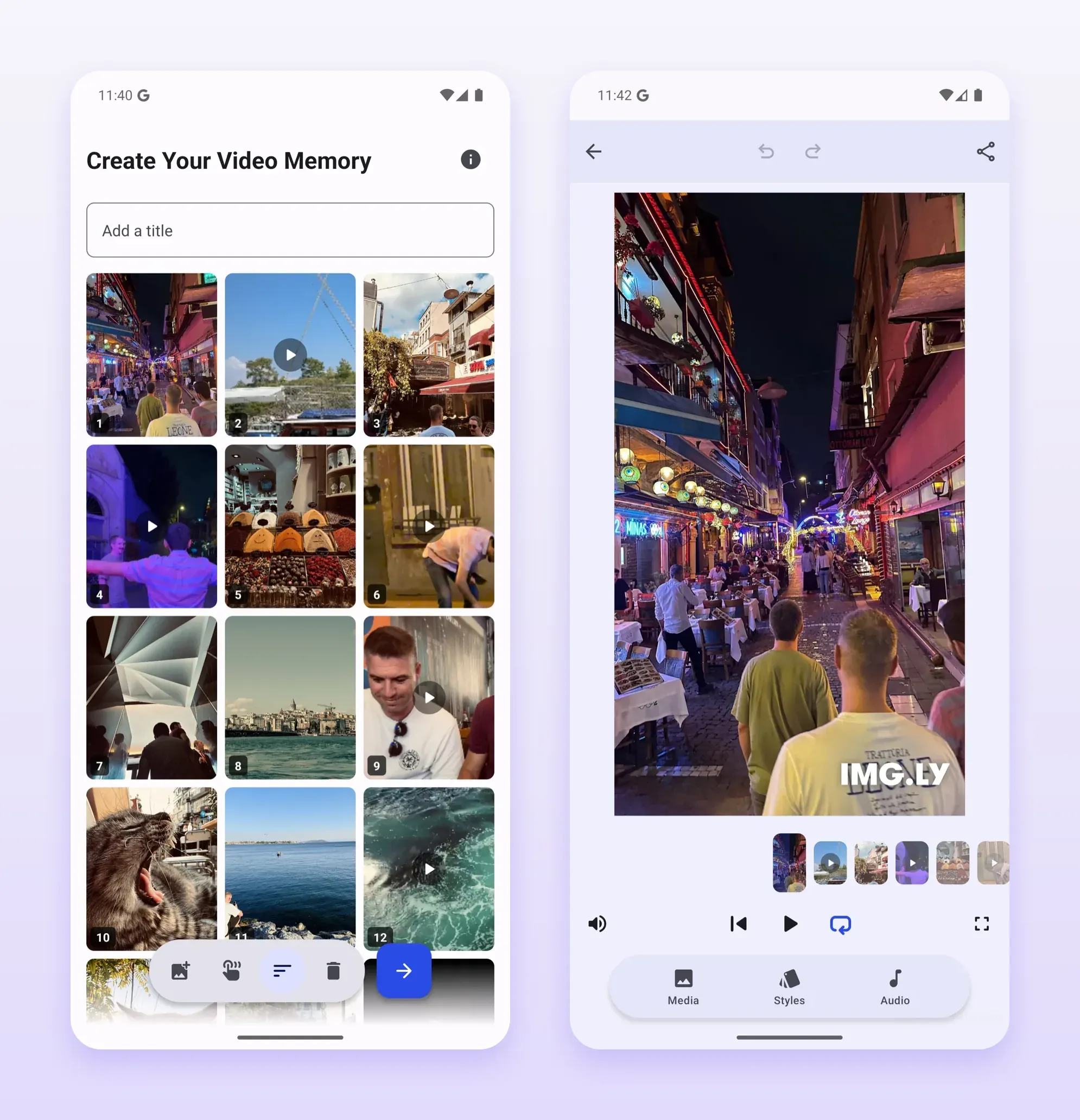
The steps below follow one video from its page size to the export, on the same timeline that CE.SDK video editing uses for any other video. Steps that run only on the web or only in the mobile editors say so in their titles, and our stories and reels use case shows the iOS and Android side. In the Memories demo for Android, users pick photos and clips from the gallery, apply a style and add audio, and the app exports the montage as an MP4.
Start from the app’s page size on the web
Page presets include TikTok, Instagram and YouTube formats, among them a 9:16 page for Shorts, so users start in the shape the app wants instead of cropping at the end.
Record a reaction on iOS and Android
In reaction mode, the IMG.LY mobile camera plays a video on half the screen and films the user on the other half, stacked or side by side. Recording stops when that video ends. On iOS, one engine call sets up the picture-in-picture video users then edit, and on Android your app places them in the scene itself.
Trim to a set length in the mobile editors
Force Trim gives the mobile editors a minimum and a maximum duration. Past the maximum, the playhead stops and the export is cut to that length, and below the minimum, the editor blocks the export with a dialog. Your app can change both limits while the editor is open.
Add royalty-free music on the web
The Soundstripe plugin adds Soundstripe’s royalty-free tracks to the editor’s audio library, using your Soundstripe API access through a proxy server. It saves each song’s ID in the scene, so your app can ask Soundstripe’s API for the code that goes in a YouTube caption or description.
Add captions from a file or from speech
Users import SRT or VTT captions through the caption panel, or the Auto Captions plugin turns speech into captions through a transcription provider your app connects. Our subtitles vs. closed captions page explains which kind a video needs.
Export in the app or on a server
In the editor, the export runs in the user’s browser or app. For long or 4K videos, the CE.SDK Renderer can take over the export on a GPU server, called from your backend.
FAQs
Not on YouTube, which files any upload wider than square as long-form, even one that runs 30 seconds. YouTube's help center recommends a wider shape like 16:9 to creators who don't want a video counted as a Short, and its guide to making Shorts tells creators to film at 9:16.
Yes. YouTube's upload page names square or vertical as the shapes for a Short, so a 1:1 video under three minutes is filed as one. CE.SDK's page presets include square Instagram posts as well as 9:16 pages.
No. YouTube left uploads from before October 15, 2024 as they were, so a two-minute vertical video posted earlier is still a long-form video. Official Artist Channels moved to the three-minute rule later, on December 8, 2025.
Yes. YouTube blocks a Short worldwide when it runs longer than one minute and has an active claim against it, manual claims included, and nothing changed for Shorts under a minute. Most songs can be used for 90 seconds of a three-minute Short, though some tracks are capped at 60 or 30 seconds.
Links
Documentation and references for this concept.
Short-Form Video Creation
See how teams add stories and reels creation to their iOS and Android apps.
Video Editor SDK
Add vertical video editing to your app, from the page size to the MP4 export.
Force Trim
Set a minimum and a maximum video length in the iOS editor and clamp the export to it.
Related Terms
9:16 Aspect Ratio
An upright frame with 16 units of height for every 9 of width, the shape of vertical video on YouTube Shorts, Reels and …
Subtitles vs. Closed Captions
Two kinds of on-screen text for a video's audio. Subtitles carry the dialogue for viewers who can hear it but don't unde…
Jump Cut
A cut that removes time from a single shot of a subject, so the person or object appears to skip ahead while the camera …