




1080p vs. 4K
What Is the Difference Between 1080p and 4K?
1080p, also called Full HD, is 1920 × 1080 pixels, and 4K UHD is 3840 × 2160: twice as wide and twice as tall, so four times the pixels. That is 8.3 million pixels in every frame against 2.1 million, in the same 16:9 shape.
The p stands for progressive scan, in which each frame is a complete picture. The illustration shows one patch of a letter’s curved edge at each resolution. 4K fits four pixels where 1080p has one, so the steps along the curve shrink.
Why Is It Called 4K and Not 2160p?
The two names measure different sides of the frame: 1080p and 2160p count rows, while 4K refers to the roughly 4,000 pixels across. 4K and 2160p describe the same 3840 × 2160 picture.
1080p and 2160p count the rows
The number is the height of the frame in lines of pixels. By that rule 4K UHD is 2160p, which is how YouTube lists it in its upload guidelines.
4K counts the pixels across
A width of 3,840 pixels is close to 4,000, and that is where the name comes from. Doubling both sides of 1080p is what gives 4K four times the pixels, a separate fact some buying guides give as the origin of the name.
Cinema 4K is 256 pixels wider
Digital cinema uses a 4096 × 2160 frame, set out in the DCI specification of 2005, which is slightly wider than the 16:9 of a TV. TVs and streaming services call the 3840 × 2160 frame 4K or Ultra HD.
When Can Viewers See the Difference Between 1080p and 4K?
Only when the screen is large or close enough for 1080p’s pixels to show. ITU, the UN agency behind the HD and 4K broadcast standards, puts the ideal viewing distance at 3.1 screen heights for 1080p and 1.5 for 4K. At those distances, one pixel is about the smallest detail normal eyesight can pick out.
On a 55-inch TV, that works out to about 2.1 m for 1080p and 1 m for 4K, by our arithmetic. ITU’s report on ultra-high definition gives about 2.1 m as a typical living-room distance, about where a 55-inch 1080p picture stops showing its pixels. In a study by Japan’s broadcaster NHK, summarized in the same report, viewers rated 4K and 8K more lifelike than 1080p when they sat closer than about three screen heights.
Does 4K Look Sharper on a Phone?
Hardly, because the screen has fewer pixels than the video. The iPhone 17’s 6.3-inch display is 2622 × 1206 pixels, about 38% of a 4K frame, even though the same phone records 4K video.
Worked out from Apple’s screen size, a 16:9 video played full screen with the phone turned sideways fills 2144 × 1206 of those pixels. A 4K clip keeps about 31% of its pixels there, only about 25% more than a 1080p picture has. The picture is about 6.7 cm tall, so from about 21 cm or farther, even 1080p’s pixels are too small to pick out, by ITU’s measure.
How Much More Data Does 4K Need Than 1080p?
At the settings that cameras, platforms and editors pair with each resolution, 4K takes roughly three to six times the data of 1080p. The bitrate and codec decide the real size, though: Sony’s α7S III records longer on one card in 4K at its 45 Mbps setting than in HD at 50 Mbps. The YouTube and Netflix figures are as of October 2026.
| 1080p | 4K | |
|---|---|---|
| Pixels in each frame | 2.1 million | 8.3 million |
| Canon EOS R8 recording, 24 to 30 fps | 30 Mbps, 216 MB a minute | 120 Mbps, 860 MB a minute |
| YouTube recommended upload, SDR, 24 to 30 fps | 8 Mbps | 35 to 45 Mbps |
| Netflix recommended internet speed | 5 Mbps | 15 Mbps |
| CE.SDK export with Auto bitrate, 30 fps | 8 Mbps | 40 Mbps |
1080p or 4K: Which Should You Use?
Use 1080p for video watched on phones and 4K when the footage has the detail and the screen is big enough to show it. A fitness app, for example, might have trainers film workouts on phones that record 4K, then send members 1080p clips and give the large screen in the gym’s lobby a 4K loop.
Use 1080p for
-
Clips watched in social feeds and on phones
A phone screen shows little more than a 1080p picture, and in our export test the 1080p file was about a fifth the size of the 4K one.
-
Footage with fewer pixels than the frame
Older phone clips and small stock videos gain file size at 4K, not detail the source never had.
-
Long edits on laptops or older phones
4K needs more GPU memory, and CE.SDK's docs suggest 1080p when an export fails. For a 4K version, render it on a server.
Use 4K for
-
Footage recorded in 4K and shown on a TV or large monitor
Viewers close to a big screen can see the extra detail.
-
Slides, captions or other text on a big screen
CE.SDK draws text at the export size, so letters stay sharp even when the footage has no more detail to give.
-
A 4K upload to YouTube
Upload well before it goes live, because YouTube shows lower resolutions first while it processes the 4K version.
How 1080p and 4K Exports Work in CE.SDK
MP4 exports from CE.SDK video editing go up to 4K UHD on Web, iOS, Android and Server, as far as each device’s GPU and memory allow. Users pick the size in the export panel, while your app decides when 4K is on offer and where long renders run.
Export at the preset that matches the page
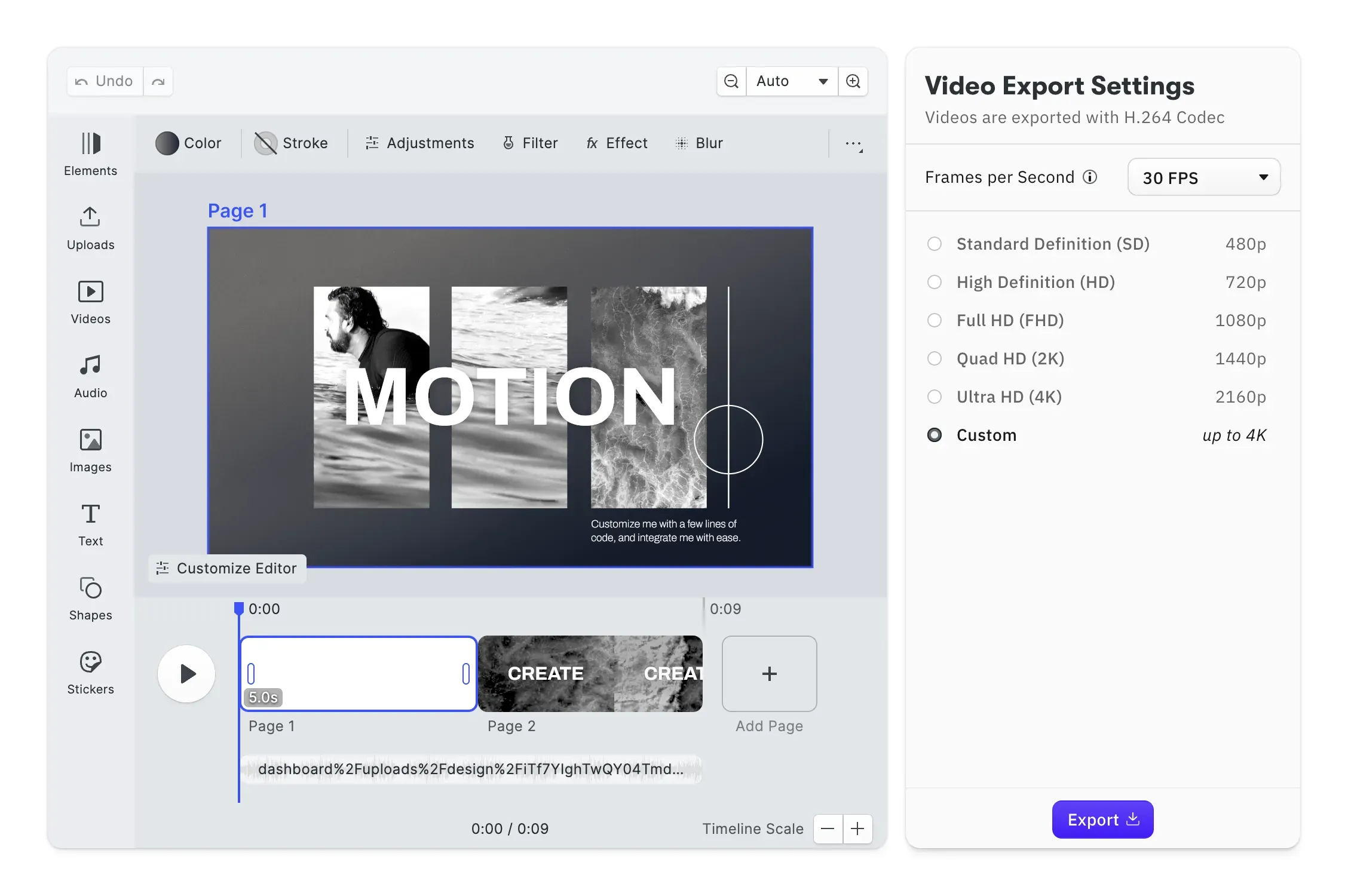
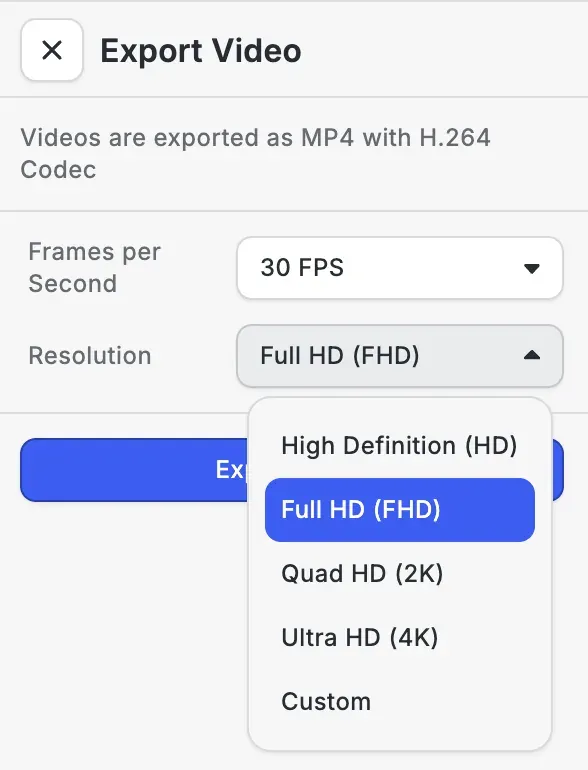
When users finish an edit in the Video Export Options starter kit, its export panel lists only sizes in the page’s shape, which for a 16:9 page means HD 720p, Full HD 1080p, Quad HD 1440p and Ultra HD 2160p, plus a custom size. It preselects the one that matches the page and sets 30 fps, and your app can replace either list. CE.SDK’s Auto bitrate pairs 8 Mbps with 1080p and 40 Mbps with 4K at 30 fps. When we tested CE.SDK 1.84, the same 9.7-second edit came out at 9.9 MB in 1080p and 48.7 MB in 4K. You can try the export options in the browser.
Offer 4K when the sources and the device can carry it
When users bring footage with enough pixels, or need text to stay sharp on a large screen, 4K is worth the larger file. In the same test, a 5-second clip whose 720 × 1280 source filled a 1920 × 1080 frame came out as the same picture in both exports, about one brightness level apart out of 255 once both were scaled to the same size. The title on top, though, gained sharper edges at 4K. Because 4K export depends on the device’s GPU and memory, check its maximum export size before offering 3840 × 2160.
Render long or 4K videos on a server
When a laptop or phone would struggle, the CE.SDK Renderer exports the same scene on a GPU server. IMG.LY’s renderer benchmarks, run on an Nvidia L4 GPU in October 2025, timed a template that plays for 20.5 seconds. Using the production pipeline, it took 12.6 seconds to export at 1080 × 1920 and 33.2 seconds at 4K, 2160 × 3840. At 4K, the render outlasts the video.
FAQs
Netflix recommends a steady connection of 15 Mbps or more for 4K and 5 Mbps for 1080p, as of October 2026. Those are connection speeds rather than the bitrate of any one stream, and older advice that asks for 25 Mbps is out of date.
Often, as long as storage and computers can keep up. A 4K frame leaves room to crop or reframe without dropping below 1080p, such as cutting a close-up and a wide shot from one camera angle. A 1080p master scaled down from 4K can also hold more detail than one recorded at 1080p. Editors such as Final Cut Pro and DaVinci Resolve ease the editing load with smaller proxy copies that stand in for the originals until export.
Only where a station uses the newer standard. In the US, the original digital broadcast standard, ATSC 1.0, tops out at 1920 × 1080, while its successor, ATSC 3.0, allows video up to 3840 × 2160 at up to 120 frames per second.
YouTube makes a low-resolution version available first and adds the higher ones as it finishes processing them, and 4K can take four times as long as 1080p to appear. YouTube's own example is a 60-minute 4K video at 30 fps taking up to four hours, with 60 fps taking longer.
8K, at 7680 × 4320, has four times the pixels of 4K and 16 times those of 1080p. An ITU report puts its ideal viewing distance at three quarters of the screen height and expects 8K to suit theaters and public venues more than homes.
Links
Documentation and references for this concept.
Video Editor SDK
Give your users MP4 export at resolutions up to 4K UHD, inside your own app.
Video Limitations
Resolution, duration and frame rate limits, and how to check the largest export a device allows.
Export to MP4
Set the output size, frame rate and bitrate of a video export.
Related Terms
Export
The process of rendering one or more pages of a CE.SDK scene to a distribution-ready file, supporting PNG, JPEG, WebP, T…
Video Editor
A CE.SDK Starter Kit for timeline-based video creation and editing, surfacing clip trimming, splitting, reordering, and …
CE.SDK Renderer
A command-line tool that runs the CreativeEngine natively on a Linux server and renders a CE.SDK scene or archive to a P…
Timeline
The time-based editing interface in CE.SDK's video editor where users sequence, trim, and synchronize all media elements…