




24fps vs. 30fps
Also known as: 24p vs. 30p
What Is the Difference Between 24fps and 30fps?
24fps shows 24 still frames every second and 30fps shows 30, so each 24fps frame stays on screen for 41.7 milliseconds and each 30fps frame for 33.3. Twenty-four has been the rate of cinema since studios settled on it for sound film between 1927 and 1930, and filmmakers still choose it for the look of film. Thirty comes from television in North America and Japan, which runs at 29.97 frames per second.
What Changes When You Export at a Different Frame Rate?
The rhythm of the motion changes, since some frames repeat or drop out to fit the new rate. We made test clips whose frames show their own number, exported them with CE.SDK 1.85.1 and read back the source frame behind every exported frame. A 24 fps clip in a 30 fps export showed one frame in four twice, so the motion stalls six times a second. A 30 fps clip in a 24 fps export skipped one frame in five, so the motion jumps ahead instead. Export at the rate most of the footage was shot at, which is also the rate YouTube asks uploads to keep.
A 60 fps export repeats 24 fps frames two and three times
A higher frame rate does not even the motion out. Each 24 fps frame filled two exported frames, then three, then two again, the same 2:3 pattern that TV transfers of film use, so the uneven step that viewers see as judder is still there.
A 25 fps clip loses one frame a second at 24 fps
Footage from cameras set to 25, the PAL rate used for TV in much of Europe, fits neither choice exactly. At 30 fps the export showed one of its frames in five twice, and at 24 fps it skipped one frame every second.
Exporting at 24 fps does not make the file smaller
With the bitrate on Auto, a 6-second 1080p export came out at 6.3 MB at both rates, because Auto chose the same 8.4 Mbps for each. At 24 fps, every frame gets about a quarter more of that data.
How Do 24fps and 30fps Compare?
At 30fps, moving subjects advance in smaller steps, while 24fps carries the look of cinema with a little more blur in every frame. The other differences follow from where each rate comes from.
| 24fps | 30fps | |
|---|---|---|
| Time on screen per frame | 41.7 ms | 33.3 ms |
| Shutter at 180 degrees | 1/48 s | 1/60 s |
| Fractional version | 23.976 | 29.97 |
| Standard for | Cinema, since sound film | TV in North America and Japan |
| Listed in iPhone 17 and Pixel 10 specs | iPhone 17 at 4K; Pixel 10 rear camera | iPhone 17 at 4K, 1080p and 720p; Pixel 10 front and rear cameras |
24fps or 30fps: Which Should You Use?
Use 24fps for a film look and for footage shot at 24, and 30fps for phone video, fast action and anything shot at 30. A hotel brand, for example, can export its brand film at 24 and the room tours its guests film on their phones at 30.
Use 24 fps for
-
Brand films, ads and stories with a film look
Audiences know 24 from cinema, and a 180 degree shutter at 1/48 s gives each frame the motion blur of film.
-
Scenes shot in low light
At 1/48 s each frame gathers light a quarter longer than at 1/60 s, and iPhones have an Auto FPS setting that lowers the rate to 24 fps in low light for a better picture.
-
Edits built from 24 fps footage
A 30 fps export shows one frame in four twice, while a 24 fps export keeps the cadence the clips were shot with.
Use 30 fps for
-
Video recorded on phones
Apple lists 30 fps for iPhone 17 video at 4K, 1080p and 720p, and Google lists 30 and 60 fps for the Pixel 10's front camera.
-
Fast action and quick pans
Each frame lasts 33.3 ms instead of 41.7, so a subject that crosses a 1080p frame in a second moves 64 pixels per frame rather than 80.
-
Edits built from 30 fps footage
A 24 fps export skips one frame in five of every 30 fps clip, which shows as small jumps in the motion.
How Frame Rate Works in CE.SDK
In CE.SDK video editing, the frame rate is chosen at export, and clips shot at other rates are fitted to it frame by frame, as in our tests above. A new scene exports at 30 fps unless the export asks for another rate.
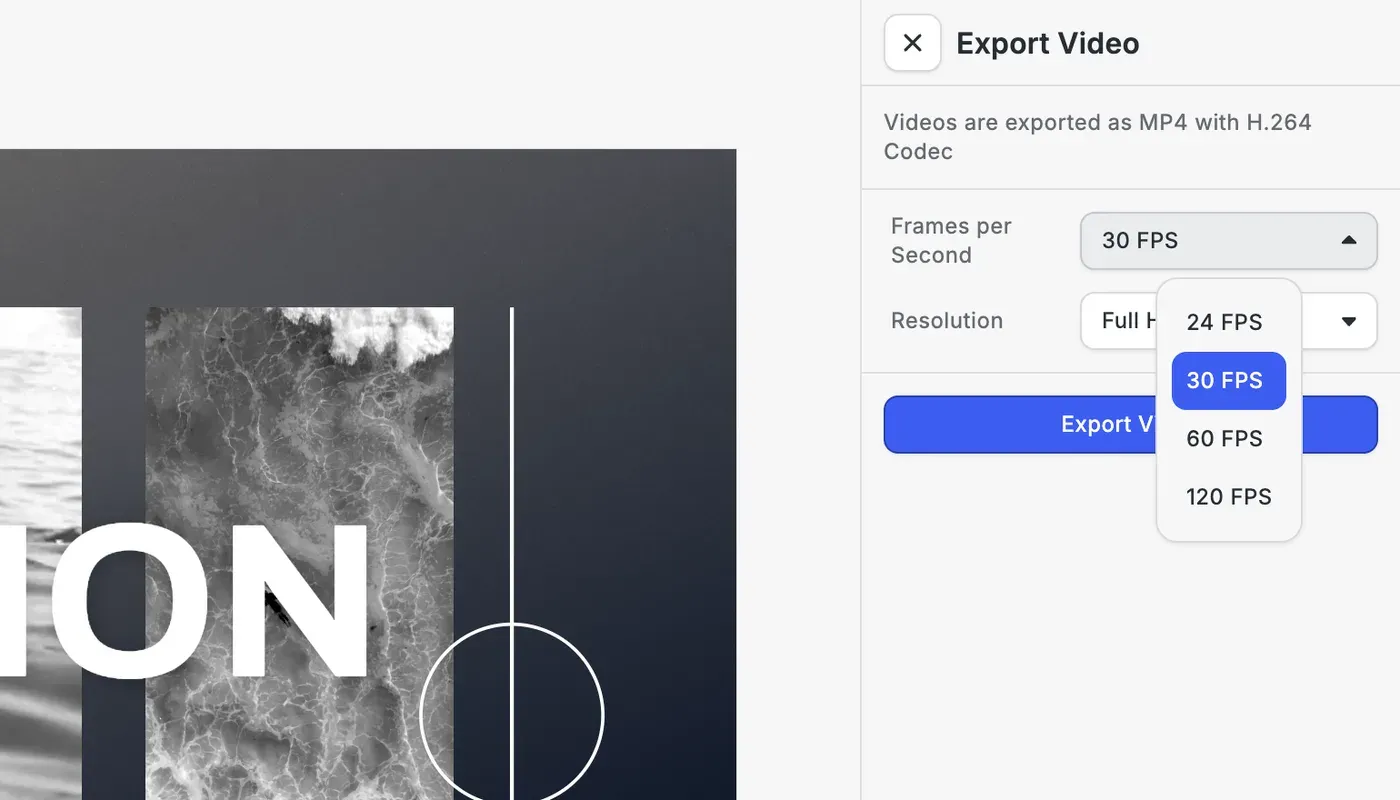
Users pick 24, 30, 60 or 120 FPS
The Video Export Options starter kit puts the choice in its export panel, next to the resolution. Each step up adds frames to render: a 10-second video is 300 frames at 30 FPS and 1,200 at 120. With a custom export panel, your app decides which rates users see.
Your app sets the rate of each export
The video export takes a frame rate above 0 and up to 240 fps on Web, iOS and Android. CE.SDK’s video limitations guide notes that 60 fps benefits from hardware acceleration, and it advises converting variable frame rate footage to a constant rate before import.
FAQs
Because of color television. When the US approved its color TV standard in 1953, the frame rate dropped by 0.1 percent, from 30 to 30/1.001, about 29.97, and film transferred to that video runs at 24000/1001, about 23.976. The ATSC broadcast standards list both next to the whole numbers 24 and 30, which is why cameras offer either. Keep whichever one the footage was recorded at.
Neither. YouTube asks for video in the frame rate it was recorded at, names 24, 25, 30, 48, 50 and 60 as common rates, and recommends the same 8 Mbps for 1080p at 24, 25 or 30 fps. A 24 fps short film and a 30 fps tutorial can both go up as they are.
Not at the same bitrate, which measures data per second. In our CE.SDK test, Auto bitrate gave a 6-second 1080p export the same 6.3 MB at 24 and 30 fps, and YouTube puts both rates in one bitrate tier.
Usually 25 fps. Where the grid runs at 50 Hz, as in Europe and much of Asia, lights pulse 100 times a second. RED's flicker guide suggests a frame rate that divides that number evenly, which 25 does and 24 and 30 do not. 25 is also the frame rate of PAL television, and YouTube lists it among its common rates.
When the footage will be slowed down, or when motion should look as fluid as possible. A 60 fps clip played at half speed still gives a 30 fps video a new frame each time, and our speed ramp page shows which rate to shoot for slower speeds. For 1080p, YouTube's recommended bitrate rises from 8 Mbps at 24 to 30 fps to 12 Mbps at 48 to 60.
Links
Documentation and references for this concept.
Related Terms
Speed Ramp
A gradual change in a clip's playback speed, typically easing one moment into slow motion and then returning to full spe…
1080p vs. 4K
Two video resolutions in the same 16:9 shape. 1080p, or Full HD, is 1920 × 1080 pixels, and 4K UHD is 3840 × 2160, twice…
Video Compression
Making a video file smaller by storing a whole frame only now and then, keeping just the changes for the frames in betwe…