If you’ve ever tried building a video editing feature from scratch, you know how quickly things can get complicated. Codecs, pipelines, formats, integrations, and performance tuning all come into play.
That’s why developers often turn to open-source SDKs that make video processing more accessible and flexible.
In this guide, we’ll break down some of the most widely used open-source and source-available video SDKs, focusing on how easy these tools are to build with, their use cases, and who they’re best for. We’ll also look at where open-source flexibility meets its limits, and how commercial SDKs like IMG.LY can save you time and complexity when building production-ready video products.
Updated September 2026.
1. FFmpeg
Let’s start the comparison with one of the most popular open source video editor SDKs. FFmpeg is a command-line multimedia framework that powers much of the modern video ecosystem. It supports everything from transcoding to advanced automation, making it one of the most widely adopted open-source solutions for video processing.
- Features & capabilities: FFmpeg includes transcoding, filtering, cropping, resizing, overlaying, color grading, audio processing, and format conversion. Its flexibility comes from its powerful command-line interface, allowing developers to script nearly any video transformation task.
- Platforms: The tool offers broad cross-platform compatibility, running natively on Windows, macOS, and Linux. Its portability allows it to integrate into a wide range of development environments.
- Building difficulty & potential roadblocks: FFmpeg is quite difficult to learn and implement for beginners. It requires strong knowledge of scripting, codecs, and CLI-based workflows. Due to its steep learning curve, debugging complex filter chains can be time-consuming, and integrating it into GUI-based environments is also challenging. Developers must also navigate potential H.264 patent licensing, which is separate from FFmpeg’s own software license.
- Use Cases: FFmpeg is best suited for server-side batch processing, video pipelines, and automated transcoding. While it excels in backend automation, it doesn’t include an interactive editor UI.
- Future-proofing, support & pricing: FFmpeg is a mature and stable project used across many industries for years, and it still ships big updates. Version 8.0 added a Whisper filter for speech-to-text, version 8.1 followed in March 2026 with more Vulkan-based codecs, and version 9.0.2 is the current stable release as of September 2026. Most developers using the tool rely on community forums and documentation for troubleshooting and setup help. It’s free and open-source under the LGPL (with some optional parts under the GPL), but encoding with certain codecs like H.264 may still require a separate patent license.
- Who it’s for: This video editor SDK is ideal for developers handling large-scale backend video processing or transcoding tasks. It’s powerful and reliable, but not beginner-friendly or suited for products needing a visual editing interface.
Comparison to IMG.LY
FFmpeg is purely backend and doesn’t include an interactive editor or UI components. However, it performs exceptionally well in large-scale automation pipelines, where speed, reliability, and format support are critical. IMG.LY CE.SDK, by contrast, gives you a fully embeddable video editor, UI components, and automation workflows in a unified SDK. All without the complexity of manual scripting.
Check out why IMG.LY is a great alternative to FFmpeg here.
2. MoviePy
The next open source video editor on the list is MoviePy. It’s a Python library for programmatic video editing. It allows developers to edit video through code, making it particularly useful for automated workflows or content prototyping.
- Features & capabilities: It supports cutting, compositing, adding text overlays, transitions, and visual effects. Developers can use Python scripts to build video sequences and automate rendering.
- Platforms: MoviePy works across all major platforms that support Python. It runs in standard Python environments without requiring extra setup, which makes it accessible for most developers.
- Building difficulty & potential roadblocks: MoviePy is easier to use than FFmpeg, but still requires scripting. It’s suitable for Python developers for prototyping, but it can struggle with performance when handling large video files. Developers often face challenges with dependency management and the absence of a real-time UI. Version 2.0 also introduced major breaking changes, so older tutorials and v1 code may need updating.
- Use cases: This tool is best for automated content generation, research, and rapid prototyping of video workflows. It’s ideal for proof-of-concept projects where scripting flexibility matters more than performance.
- Future-proofing, support & pricing: MoviePy is maintained by a small team of volunteers, and its README openly asks for more maintainers. Releases are infrequent, with the latest one (2.2.1) published in May 2025. While it serves a smaller user base compared to larger frameworks, its reliability and accessibility make it a consistent choice for Python-based video projects. You can find support through community documentation that explains most functions clearly. It’s free and open-source, which makes it especially appealing for experimentation, research, and smaller-scale automation setups.
- Who it’s for: MoviePy is a great choice if you’re a Python developer wanting automation or experimental workflows. However, it’s not ideal for production-scale or interactive use cases due to performance limits and the absence of a UI.
Comparison to IMG.LY
MoviePy is designed for scripting and backend automation. It works best for creating short automated clips or experimental workflows where developers want full control through Python code.
IMG.LY CE.SDK goes beyond backend scripting by offering ready-to-embed editors, automation APIs, and full multi-platform support for web and mobile. This makes it a more complete choice if your team needs both automation and interactive editing within products.
3. OpenShot Library and MLT Framework
The OpenShot Library (libopenshot) and the MLT Framework are two separate open-source libraries for video compositing and timeline editing. They’re often mentioned together because early versions of OpenShot were built on MLT, before the OpenShot team replaced it with its own library. Today, libopenshot is a C++ library with Python and Ruby bindings that powers the OpenShot video editor, while MLT is the framework behind Kdenlive, Shotcut, and Flowblade.
- Features & capabilities: Both provide timeline editing, transitions, effects, and audio mixing. libopenshot adds keyframe animation curves, time mapping, and effects like object detection, tracking, and stabilization. MLT includes the
meltcommand-line tool for running compositions without a GUI. Developers can implement advanced video composition features similar to traditional desktop editors. - Platforms: Both libraries are cross-platform, working reliably across major desktop operating systems, including Windows, macOS, and Linux. They can be integrated into various environments, which makes them useful if you’re building desktop editors or applications that require timeline-based video editing.
- Building difficulty & potential roadblocks: The integration complexity is medium-high. Both are typically built from source, and managing their dependencies, like FFmpeg and Qt for libopenshot, can be difficult. Integrating either library into a GUI is not straightforward, and since both are designed around desktop editors, they are less suited for scalable or cloud-based workflows.
- Use cases: OpenShot Library and MLT are suitable for you if you’re looking to build desktop-based editors, experimental timeline tools, or custom video composition applications.
- Future-proofing, support & pricing: Both projects are actively maintained: libopenshot shipped its first stable major, version 1.0.0, in August 2026, and MLT released version 7.40.0 in June 2026. They work well for desktop video editing applications, but they are not designed for large-scale cloud deployment. The support is community-driven, so the updates and fixes depend on volunteer contributions, which can affect long-term reliability for enterprise use. libopenshot is licensed under the LGPL 3.0 (with a commercial license also available) and MLT under the LGPL 2.1, though a stock build enables GPL modules by default, so both are free for anyone looking to experiment or build lightweight video editing tools.
- Who it’s for: OpenShot Library and MLT fit developers building desktop-focused editors who need timeline control and can manage build and dependency challenges. They’re less practical for cloud or mobile workflows.
Comparison to IMG.LY
While OpenShot Library and MLT excel in desktop-based timeline editing, they are better suited for applications that prioritize local processing and desktop workflows.
IMG.LY CE.SDK, on the other hand, offers embedded, cross-platform editors with built-in automation, making it a more versatile choice for SaaS and enterprise environments that need scalability, faster integration, and an intuitive editing experience for end users.
4. GStreamer
GStreamer is a multimedia framework for building video and audio pipelines. It’s a foundational tool in many streaming and broadcast systems and allows developers to create complex pipelines for capturing, processing, and outputting media in real time.
- Features & capabilities: This open source video editor supports real-time processing, filters, and complex pipelines for media processing and streaming. Developers can construct customized processing chains for advanced workflows. For editing apps, GStreamer Editing Services (GES) adds a timeline layer on top of those pipelines. Recent releases also add machine learning elements, including ONNX and LiteRT inference and Whisper-based speech-to-text.
- Platforms: GStreamer is cross-platform, supporting multiple programming languages with bindings for C, Python, Java, and Rust. You can run it on Windows, macOS, Linux, Android, and iOS, and integrate it into desktop, mobile, and server environments. This makes it flexible for building diverse media workflows.
- Building difficulty & potential roadblocks: Building with GStreamer is complex. It requires deep knowledge of pipelines and plugins, and debugging can be time-intensive. UI integration adds another layer of difficulty.
- Use cases: Despite its building difficulty, developers use GStreamer for real-time video streaming, server-side processing, and for broadcast applications requiring precise control over data flow.
- Future-proofing, support & pricing: GStreamer is mature and widely used in the media industry. It continues to be a reliable choice for building streaming and broadcast systems, but it requires significant development expertise to configure and maintain. Developers often rely on community resources, like the GStreamer forum, for support. It’s free and open-source under the LGPL, which makes it accessible for experimentation and custom media workflows, though some plugins, such as the x264 encoder, are GPL and only build when you enable the gpl option.
- Who it’s for: The tool is ideal for developers who need real-time video pipelines or streaming capabilities. But it may not be a fit for applications requiring easy embedding or interactive UIs.
Comparison to IMG.LY
GStreamer operates at the infrastructure level, ideal for backend media processing where you need precise control over data flow and performance. It gives you the flexibility to build custom video pipelines, but doing so requires significant technical effort and time.
IMG.LY provides a ready-to-embed, interactive editor with automation and multi-platform support, so you can focus on building user experiences rather than managing low-level media infrastructure.
5. Remotion
Remotion enables developers to create videos programmatically using React components. Developers can define video scenes, transitions, and animations directly in React. While it’s a flexible approach, building long or high-resolution videos can demand careful optimization to ensure smooth performance.
- Features & capabilities: It supports timeline-based video composition, text overlays, animations, audio integration, and programmatic transitions, all rendered through React. Developers can create videos entirely with code, defining scenes and effects inside React components.
- Platforms: Remotion is built for Node.js and browser-based environments. You can render videos directly in the browser, on a Node.js server, or across AWS Lambda functions, which gives developers flexibility in how they deploy and automate video creation.
- Building difficulty & potential roadblocks: Building difficulty using Remotion is at a medium level because it requires React and JavaScript proficiency. The potential issues you might face while using this include debugging challenges with high-resolution or long-duration renders. Rendering in the browser also needs WebCodecs support, which limits it to recent browser versions.
- Use cases: Remotion is well-suited for automated video generation, marketing content, and dynamic SaaS video templates. You can use it to create personalized videos or promotional content at scale, using data or user inputs to generate customized output.
- Future-proofing, support & pricing: The tool is actively maintained and is built with a modern web stack using React and TypeScript, which ensures long-term stability and adaptability. You can find help through detailed documentation, GitHub issues, and an engaged developer community on Discord. Remotion doesn’t guarantee support, but Company License holders get their questions prioritized. Unlike the open-source tools we’ve discussed so far, Remotion is source-available. Its code is public, but it uses its own Remotion License, which is free for individuals, for-profit companies with up to three employees, non-profits, and anyone still evaluating whether Remotion is a good fit and not yet using it commercially, while larger for-profit companies need a paid Company License.
- Who it’s for: Based on its features and capabilities, it’s best for React developers who want to generate videos programmatically. The core library doesn’t include an interactive editor, but Remotion sells an Editor Starter template with a timeline and canvas that you can build on.
If your project needs a permissive open-source license, two MIT-licensed projects cover similar ground. Revideo is a TypeScript rendering engine with a headless render API and a React player, now developed at midrender/revideo and originally forked from Motion Canvas. Motion Canvas itself pairs an animation library with an editor for real-time previews, but it has not shipped a stable release since December 2024, and its repository is still open with its last commit in July 2026.
Comparison to IMG.LY
Remotion excels in programmatic video creation, allowing you to build videos entirely through code with precision and flexibility. However, its interactive editor comes as a separately purchased template that you build on and maintain, and Remotion doesn’t document native mobile SDKs.
IMG.LY CE.SDK, by comparison, gives you both automation capabilities and user-facing editors across platforms, helping teams build complete video experiences without maintaining separate systems. You can find more information on how IMG.LY compares to Remotion here.
6. Twick
Twick is one of the newer projects in this space. It’s a React and TypeScript SDK for building timeline-based video editors, and it comes with a complete editor UI you can drop into a web app.
- Features & capabilities: Twick includes a timeline with undo and redo, an interactive canvas, a live player synced to the timeline, WebGL-based video effects, and AI caption generation using Google Vertex AI (Gemini). Its Studio package combines these into a full editor with export built in.
- Platforms: Twick runs in the browser as part of a React app. You can export MP4 files in the browser through WebCodecs (Chrome and Edge only) or on the server with FFmpeg, including serverless export on AWS Lambda.
- Building difficulty & potential roadblocks: Building with Twick is at a medium level if you already know React. You can start from the Studio editor or compose your own UI from individual packages. The project is still pre-1.0 (version 0.15 at the time of writing), so breaking changes between releases are possible, and it doesn’t document native mobile SDKs.
- Use cases: Twick is well-suited for web-based video editors, caption tools, and SaaS products that want an editing UI without building a timeline from scratch.
- Future-proofing, support & pricing: Twick is young and has a much smaller community than the other tools on this list. Its last npm release was May 2026, so check current activity before depending on it. You can reach the maintainers through the project’s community channels. Its code is public under the Sustainable Use License, which allows commercial use. You’ll need a separate commercial agreement to offer it as a hosted service or SaaS platform, or if you generate substantial revenue from its functionality.
- Who it’s for: Twick is a good fit for React teams that want a ready-made web video editor to start from. If your product is a hosted service, check the license terms before you commit.
Comparison to IMG.LY
Twick is the closest tool on this list to an embeddable editor, but it’s web-only and still maturing. IMG.LY CE.SDK offers ready-to-embed editors across web and mobile, along with server-side automation, dedicated support, and a commercial license.
7. IMG.LY CE.SDK
A commercial solution that offers enterprise-grade functionality and developer-friendly implementation.
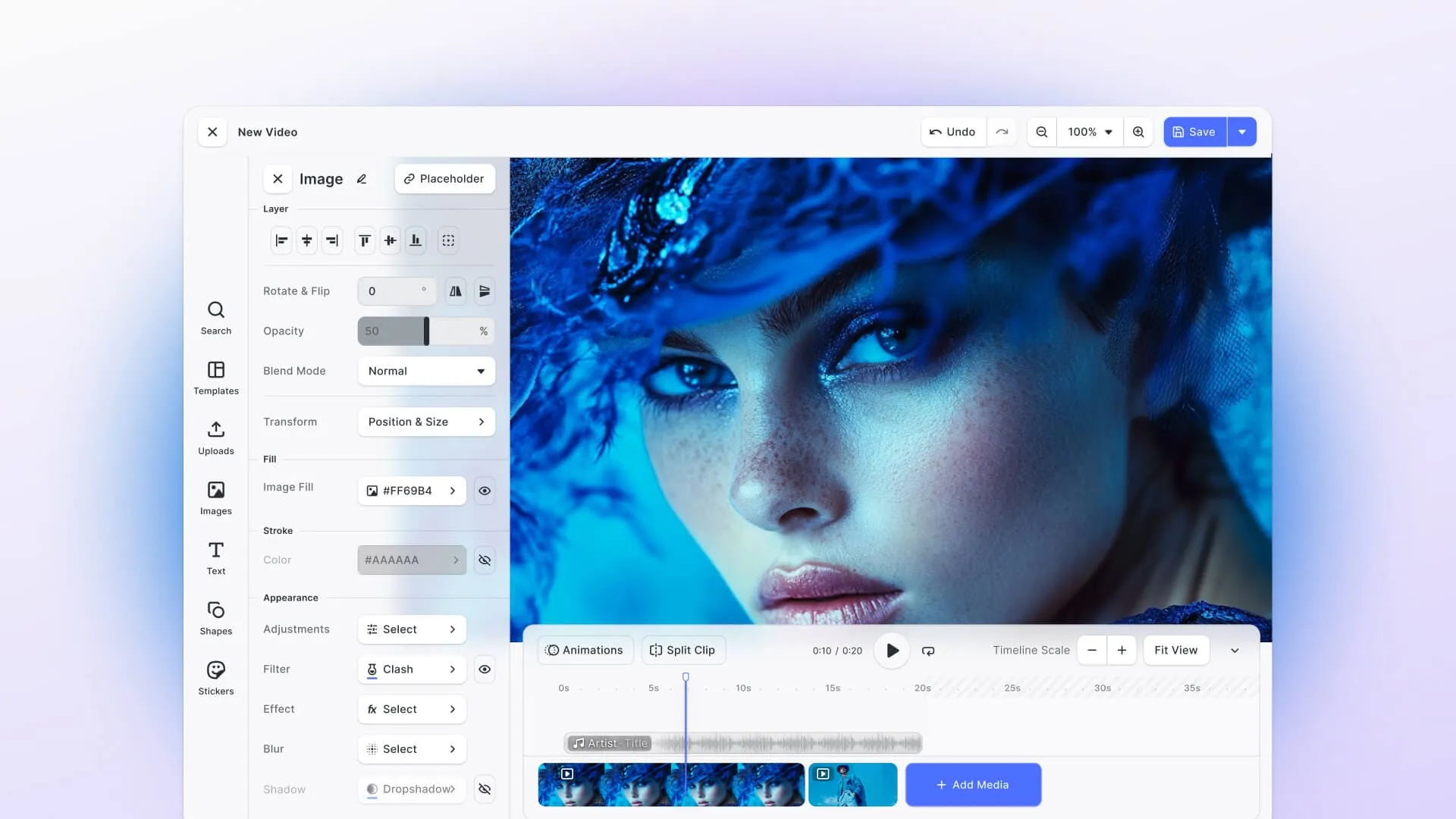
IMG.LY CreativeEditor SDK is built for interactive video editing and automation. It gives developers the tools to build powerful, embeddable video editors without the complexity of starting from scratch. It balances the flexibility developers expect from open-source frameworks with the stability and support of a commercial-grade platform.
- Features & capabilities: It includes timeline editing, multi-layer video composition, templates, transitions, video export, and server-side automation, plus AI-assisted editing on the web, with AI image generation and auto-captions also documented for iOS, Android, Flutter and React Native. The SDK simplifies complex workflows by offering prebuilt editors and APIs for integration.
- Platforms: Available on Web, iOS, Android, React Native, Flutter, macOS, Mac Catalyst, Electron, and Node.js. This broad platform support allows developers to build consistent video editing experiences across desktop, mobile, and web environments. Whether you’re integrating into an existing app or launching a new product, the IMG.LY CE SDK ensures a unified editing interface and workflow across all platforms.
- Building difficulty & potential roadblocks: Integration is straightforward, with minimal setup required, making it the easiest SDK to build with among all the tools we compared in this list. Most implementation effort lies in customizing workflows rather than solving technical barriers. This simplicity comes from well-documented APIs, prebuilt UI components, and consistent cross-platform behavior, which together reduce the development time. Potential roadblocks are minimal, allowing you to focus on building product features instead of managing infrastructure or compatibility issues.
- Use cases: IMG.LY is best suited for SaaS apps, marketing automation, social content tools, and video personalization platforms that need seamless interactive editing.
- Future-proofing, support & pricing: Frequent releases, an expanding AI roadmap, and a scalable engine ensure long-term reliability for developers and enterprises. You get access to dedicated onboarding engineers, solution architects, and enterprise SLAs that make implementation and scaling easier. Pricing follows a custom licensing model based on the platforms, components, and AI features you use, offering flexibility for different business needs. But you can take a free trial to get started.
- Who it’s for: IMG.LY is designed for companies that need scalable, interactive video editing and automation in one package. It’s ideal for teams seeking low development overhead and enterprise-grade reliability.
Why IMG.LY stands out among these video editor SDKs
IMG.LY combines interactive editing, server-side automation, and multi-platform SDKs in one stack, giving you everything needed to build scalable, modern video products. You can create, edit, and automate workflows within the same ecosystem without relying on separate tools. None of the other options on this list deliver this level of integration and consistency across web, mobile, and desktop environments.
Check out how IMG.LY has helped over 600 innovative startups, government entities, and Fortune 500 companies to streamline their design, video, and photo editing workflows. Read our case studies here.
Overview table
Here’s a brief overview of all the video editor SDKs we’ve discussed to help you choose the right one.
| Feature / Use Case | FFmpeg | MoviePy | OpenShot / MLT | GStreamer | Remotion | Twick | IMG.LY CE.SDK |
|---|---|---|---|---|---|---|---|
| Timeline editing | ❌ No GUI timeline; timeline-like operations only possible via scripting in CLI. | ⚠️ Timeline functionality simulated through Python scripts; suitable for small-scale projects. | ✅ Timeline-based composition in both libraries; the GUI comes from apps like OpenShot, Kdenlive, and Shotcut. | ⚠️ Pipeline-centric; GStreamer Editing Services adds a timeline API, but no native GUI timeline. | ✅ Timeline created programmatically using React components; interactive timeline sold separately. | ✅ Interactive timeline editor with undo/redo, built in React | ✅ Full-featured interactive timeline, multi-layer support, drag-and-drop UI |
| Filters & Effects | ✅ Supports CLI-based filters, overlays, color correction; requires manual configuration | ✅ Python effects library; scripting needed to combine filters | ✅ Built-in video effects and transitions; limited prebuilt UI | ✅ Plugin-based filters; flexible but requires pipeline setup | ✅ Animations, text overlays, audio effects via scripting; programmatic transitions | ⚠️ WebGL effects (sepia, vignette, pixelate, warp) with more planned; text and captions | ✅ AI-enhanced effects, transitions, multi-layer composition, background removal |
| Server-side automation | ✅ Excellent for backend batch processing and transcoding; CLI automation is robust | ✅ Python scripting enables automated content generation | ⚠️ melt CLI runs MLT compositions without a GUI; otherwise library-level | ✅ Suitable for large-scale pipelines and streaming | ✅ Automated video rendering via Node.js or AWS Lambda; works with server-side scripts | ✅ Server-side MP4 export with FFmpeg or AWS Lambda | ✅ Full automation APIs; combines server-side rendering + interactive editing in one SDK |
| Ease of embedding | ❌ CLI and C libraries; no UI to embed | ⚠️ Python scripts can be integrated, but no GUI | ⚠️ Library-only; integration requires custom UI | ⚠️ Complex pipelines; requires deep development knowledge | ⚠️ Player embeds in React apps; editor UI must be custom-built or bought as a template | ✅ React components plus a full Studio editor; web only | ✅ Ready-to-embed SDKs for Web, iOS, Android, React Native, Flutter; includes prebuilt editors |
| Difficulty building / integration | High: complex CLI usage, codec handling, and scripting required | Medium: Python knowledge required, scripting-intensive | Medium-High: built from source, dependencies must be managed | High: pipeline setup and plugin management are challenging | Medium: React knowledge needed; performance optimization may be required | Medium: React knowledge needed; pre-1.0 API | Low: SDK provides prebuilt editor components and APIs for easy integration |
| Potential roadblocks | CLI complexity, H.264 patent licensing, debugging pipelines, no GUI | Large videos may be slow, performance issues, dependency management, v2 breaking changes | Building from source, dependency management, integration with UI requires effort | Steep learning curve, pipeline debugging, plugin version conflicts | Rendering performance for long/high-resolution videos, Company License needed for larger companies | Young project, license limits on hosted SaaS use, browser export limited to Chrome and Edge | Minimal; most challenges relate to workflow decisions during integration |
| Cross-platform support | ✅ Desktop/server; Windows, macOS, Linux | ✅ Desktop/server; cross-platform Python | ✅ Desktop; Windows, macOS, Linux | ✅ Desktop/server/mobile; Windows, macOS, Linux, Android, iOS | ⚠️ Node.js, browser, and AWS Lambda; no native mobile SDKs documented | ⚠️ Web only; runs inside React apps | ✅ Web + mobile + desktop; consistent UI across platforms |
| AI / Automation | ⚠️ Whisper filter for speech-to-text | ❌ None | ⚠️ Object detection and tracking effects in libopenshot | ⚠️ ML inference elements (ONNX, LiteRT) and Whisper transcription | ⚠️ Programmatic automation via scripting | ✅ AI caption generation with Google Vertex AI (Gemini) | ✅ AI-assisted editing, automation workflows, plugin ecosystem |
| Scalability | ✅ Excellent for batch and server pipelines | ⚠️ Limited; performance depends on scripting and hardware | ⚠️ Medium; suitable for desktop-scale apps | ✅ Large-scale pipelines, real-time streaming | ⚠️ Scales with Remotion Lambda; Cloud Run support is experimental | ⚠️ Serverless export on AWS Lambda; young project | ✅ Enterprise-grade; cloud-ready, multi-platform, high-volume video workflows |
| License | LGPL 2.1+ (optional GPL parts); H.264 may need a patent license | MIT | LGPL 3.0 for libopenshot (commercial license available); LGPL 2.1 for MLT, though a stock build enables GPL modules by default | LGPL (GPL plugins behind a build option) | Remotion License: free for individuals, small companies, non-profits, and evaluation before commercial use; Company License for larger companies | Sustainable Use License: commercial agreement needed for hosted SaaS use | Commercial license based on platforms, components, and AI features |
| Best For | Developers building automation pipelines, server-side video processing, or streaming workflows | Python developers building scripted video content and automation | Developers building desktop-focused video apps with timeline editing | Developers needing real-time pipelines or advanced streaming | Developers using React for programmatic video generation and templating | React teams wanting a ready-made web video editor to start from | Companies needing interactive, embedded video editing + AI automation + multi-platform SDK |
Choosing the right video SDK: How to make the right choice
When choosing the right video SDK, the best option depends on what you’re building and who it’s for.
Choose open-source SDKs like FFmpeg, MoviePy, OpenShot Library, MLT, and GStreamer if you prefer flexibility and complete control. These tools are free, customizable, and well-suited for automation, research, or proof-of-concept projects. However, they often require significant development time, scripting knowledge, and ongoing maintenance, which can slow down production or scaling.
Source-available tools like Remotion and Twick sit somewhere in between. Their code is public and free for many teams, but their licenses add conditions for larger companies or hosted products, so review the terms before you build on them.
For teams building commercial or enterprise-ready video products, commercial SDKs offer a more practical route. They save you time on integration, provide dedicated support, and come with consistent updates to ensure reliability across platforms.
That’s why developers choose IMG.LY SDK.
It combines interactive editing, automation, and cross-platform SDKs in a single stack, something open-source solutions can’t fully replicate. It’s designed for SaaS, social, and enterprise use cases where scalability, ease of use, and performance matter most. You can embed editors, automate workflows, and scale confidently without managing multiple systems.
So if you want a complete, production-ready platform with AI features, automation, and an intuitive editing experience, IMG.LY is the right choice.
Get in touch with our team to see how it fits into your product.
Start a free trial or book your call today!
FAQ
Is Remotion open source? Not in the strict sense. Remotion’s source code is public, but it uses its own Remotion License. It’s free for individuals, for-profit companies with up to three employees, non-profits, and anyone still evaluating whether Remotion is a good fit and not yet using it commercially, while larger for-profit companies need a paid Company License.
Does the LGPL let me ship FFmpeg inside a paid product? Yes. FFmpeg is licensed under the LGPL 2.1 or later, which allows commercial use as long as you follow its terms, for example by linking to its libraries dynamically. If you build it with GPL parts enabled, the GPL applies instead. Codecs like H.264 are also covered by patents, which is a separate question from FFmpeg’s software license.
Is OpenShot built on the MLT Framework? No. Early versions of OpenShot used MLT, but OpenShot 2.0 and later run on libopenshot, the team’s own C++ library. MLT is a separate project that powers editors like Kdenlive and Shotcut.
Which open source video SDK comes with an editor UI? None of the fully open-source libraries on this list ship an embeddable editor UI. OpenShot, Kdenlive, and Shotcut are complete desktop apps built on libopenshot and MLT, but you’d build your own interface on top of the libraries. Twick ships a React editor under the Sustainable Use License, and IMG.LY CE.SDK offers ready-to-embed editors for web and mobile under a commercial license.
Is MoviePy still maintained? Yes, by a small team of volunteers. Version 2.0 introduced major breaking changes, and the latest release, 2.2.1, came out in May 2025. The project’s README asks for more maintainers to help with issues and pull requests.
Which of these video SDKs work on mobile? GStreamer provides official binaries for Android and iOS, and IMG.LY CE.SDK has native SDKs for iOS and Android, plus React Native and Flutter. FFmpeg can run on mobile if you compile and package it yourself. MoviePy, OpenShot Library, MLT, Remotion, and Twick are built for desktop, server, or browser use.
Which is best for server-side video automation? FFmpeg and GStreamer are the most proven choices for backend processing and transcoding. Remotion works well if your team writes React and wants to render templated videos at scale. IMG.LY CE.SDK fits when you need the same templates to work in an interactive editor and in automated server-side rendering.