

Seating charts on paper or acrylic, in your stationery shop
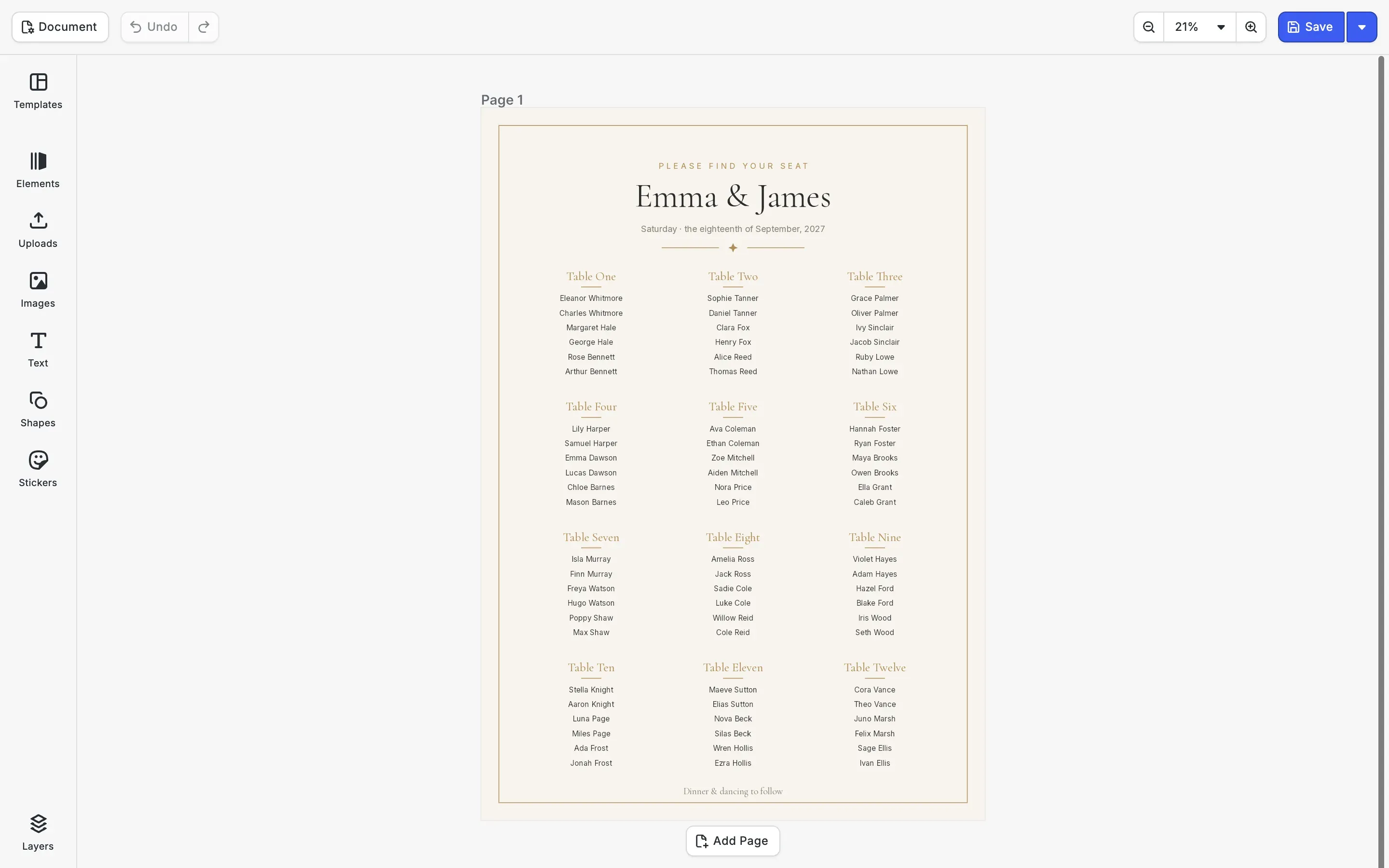
A wedding poster editor for stationery shops and print portals. Couples arrange their guests in twelve tables, then choose a paper print or a sheet of clear acrylic, with a white ink layer behind the type.
Trusted by 100+
industry leaders














Integrating IMG.LY’s editor meant we didn’t have to build or maintain a complex editing layer ourselves. That kept our team focused on our core AI ad engine and saved us countless development hours — while still giving our customers the ability to polish and customize creatives at scale.
Hikari Senju
CEO, Omneky

With IMG.LY we built a central creative portal that now powers over 140 dealer campaigns across multiple automotive brands. Before this, asset creation was slow and inconsistent.
Martin Röhr
Product Owner, Digitas

By embedding IMG.LY’s editor we were able to hit key RFP requirements and deliver a template-based creative experience that now serves 1,000+ customers. It helped us win more deals and exceed enterprise expectations without needing to hire dedicated design teams.
Rob Driscoll
Director of PM, Optimizely

Since integrating IMG.LY’s editor, we now deliver 30,000+ ad creatives per month, dramatically shorten time-to-launch, and help our clients cut design spend by up to $10,000 per month.
Logan Welbaum
Founder, Plai

Our customers create over a million personalized postcards each year choosing from over hundreds of templates with IMG.LY’s SDK. It’s the only solution that allows us to build our own specialized, on-brand UI that integrates seamlessly with our platform.
Jeanine Zaalberg
Product Manager, SwissPost

From a developer’s perspective, the most powerful feature of the photo editor is the integration process. It was completely flawless, quick, and easy to integrate.
Stefano Fornari
CTO, Funambol

We compared IMG.LY SDK with other solutions and found that it would be the best fit for us since it provides all the features that are crucial for our use case.
Carem Pereira
SCRUM Manager, HP
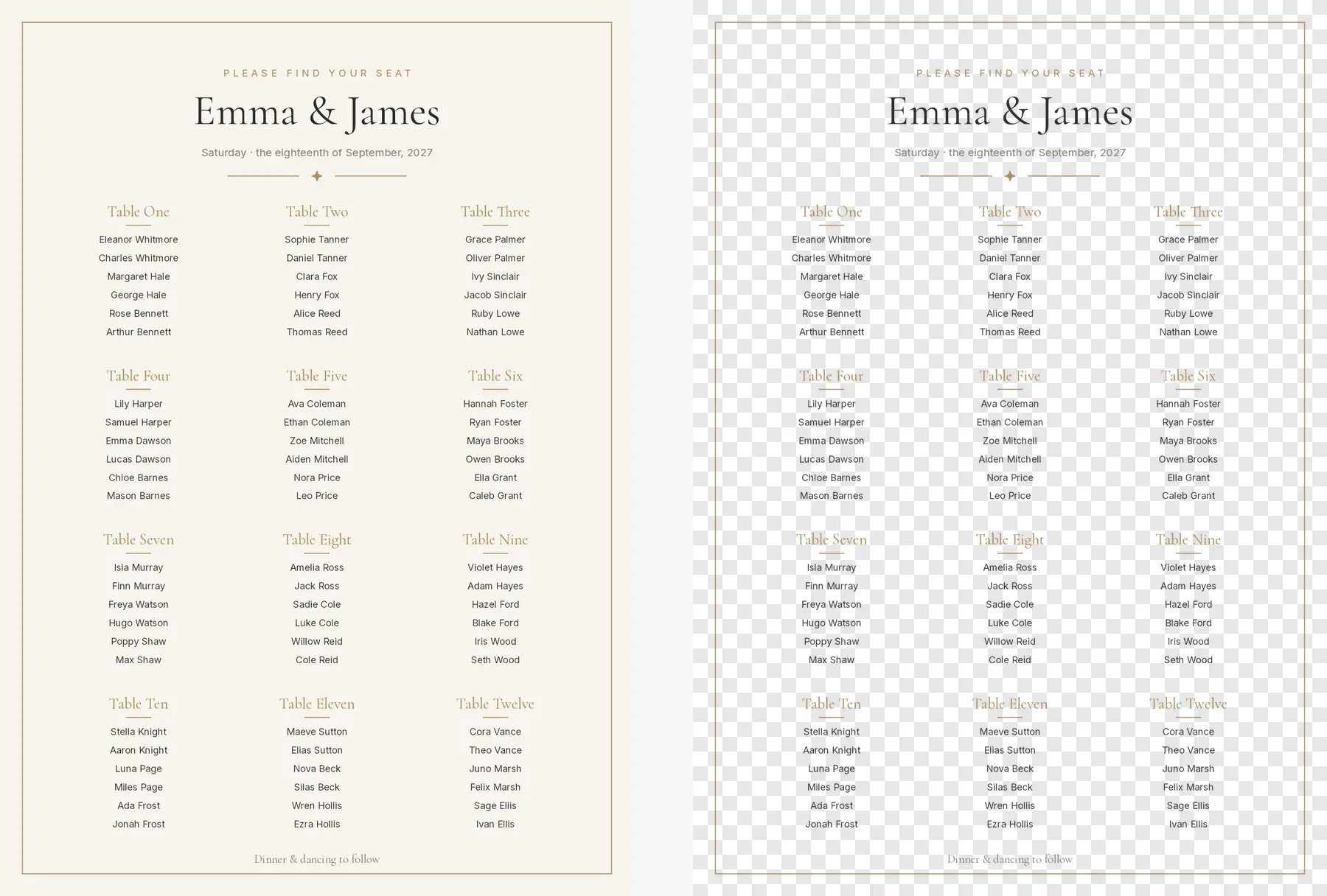
Paper or clear acrylic
For a chart on clear acrylic, the cream background is switched off, so only the type and the gold lines print and the easel or the wall shows through.
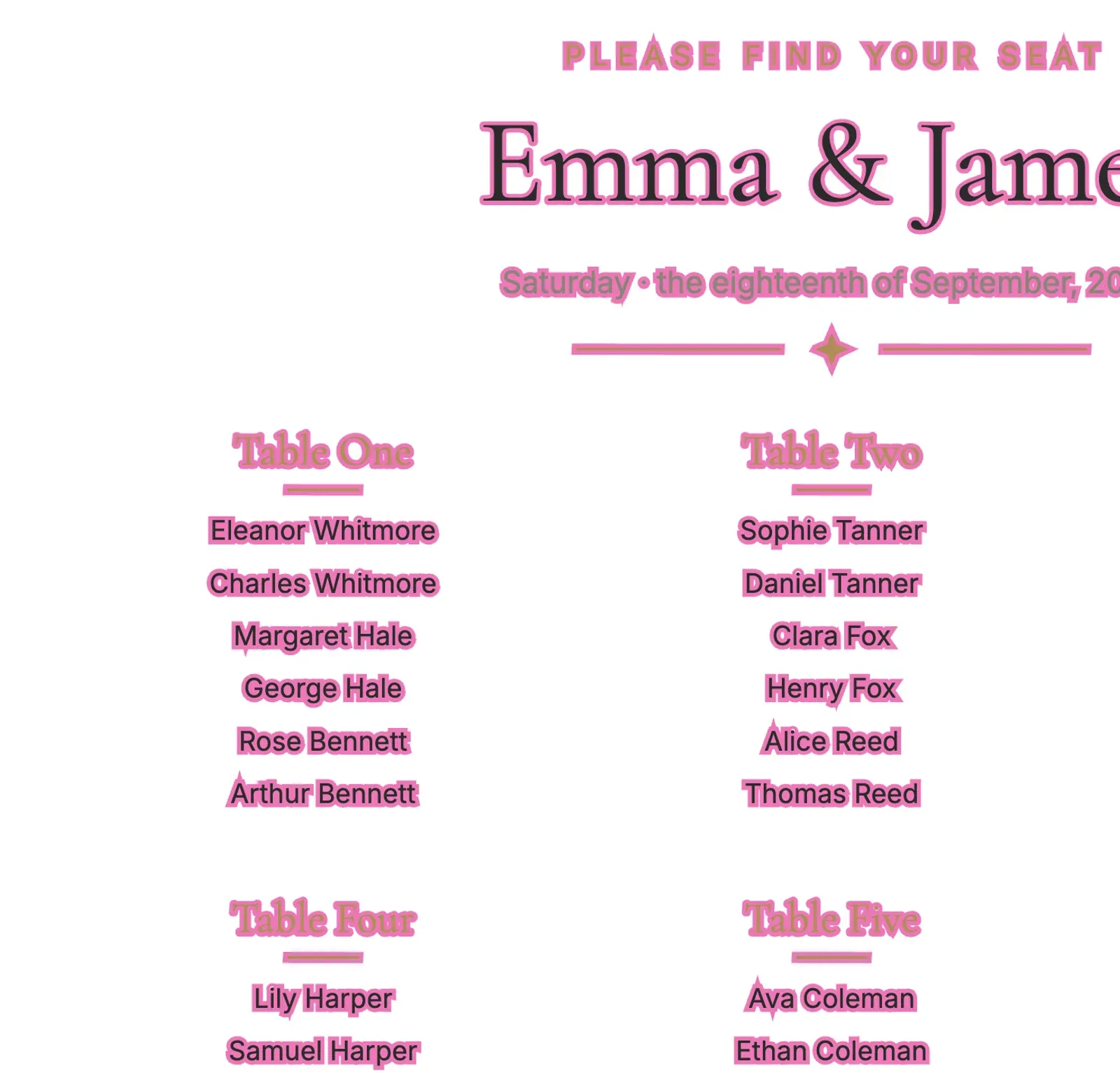
White ink behind the type
On clear acrylic, colored ink alone looks faint. The PDF export can add an underlayer: a white plate in the shape of every letter and line, which the printer lays down under the colors. In the PDF shown, the white is previewed in pink and set wider than the type so it can be seen.
The ink name your printer expects
Printers name their white ink differently. Your platform sets the spot color name and the margin of the underlayer in the export options, once for each acrylic product.
Paper and acrylic from one design
Both versions come from the same chart. The acrylic one switches the background off, and the underlayer is only added when the file is exported for acrylic.
How The Print Bar Turned Its Editor Into Its Best Salesperson

Five-figure
self-service order with zero sales contact
4 weeks
live before peak Christmas season
2-person
dev team, editor maintenance outsourced
The Print Bar is an Australian custom-apparel and print-on-demand company. Founded in a garage in 2011, it now runs production campuses in Brisbane and Melbourne, letting customers design and order custom merchandise online.
Pretty much nothing went wrong for our launch. We demolished our expectations.
The Print Bar

Challenge
The Print Bar’s customers are overwhelmingly non-designers, yet its design tool, built in 2012 and barely touched since, fought them at every step. Simple actions like resizing text meant digging through settings panels, and customers were abandoning mid-design, during the creative step that should have been the most enjoyable part of the journey.
Solution
The Print Bar rebuilt its design experience on IMG.LY’s CE.SDK: self-hosted, developer-first, and configurable to disappear into its own branding. The editor deliberately removes options for its non-designer audience and quietly enforces print-production requirements (resolution, formats, bleed) in the background, so first-time buyers create production-ready files without ever thinking about DPI.
- One customer placed a five-figure order entirely self-serve, with no calls or quotes.
- The relaunch shipped four weeks before peak Christmas season with effectively zero launch issues.
- A two-person dev team offloaded editor maintenance and refocused on the business.
Offer seating charts in every material you print
Tell us which materials your shop prints on and what your printer needs for white ink, and we’ll get back to you with a custom quote for your use case.
Wedding poster FAQs
The matching invitations, with gold foil, are on the wedding invitation editor SDK page. Sizes and bleed for every poster are on the poster editor SDK page.
It gives couples a place to make their seating chart, welcome sign or reception poster inside a stationery shop or a print portal. The shop builds CE.SDK into its site, and the chart goes to print on paper, foam board or acrylic.
Yes. Your platform can write the names into the tables through the engine API from the spreadsheet a couple uploads, and the couple fixes single names by hand in the editor.
No. The underlayer is added when the PDF is exported, so the chart looks the same on screen and only the print file carries the white plate.
On the web, in your iOS and Android apps and on your servers. Your platform turns it on in the export options and names the spot color your printer uses for white.
Yes, as a spot color for the foil. The wedding invitation page shows how the gold parts of a design become their own plate.