



Travel collages filled stop by stop, in your photo app
A travel collage editor where your users fill the page one stop at a time. Your app passes the place and the time with each trip photo, and the library in the web editor shows a section for each place with its photos in the order they were taken. Users fill the Lisbon column from the Lisbon photos, then move on to Sintra.
Trusted by 100+
industry leaders















Integrating IMG.LY’s editor meant we didn’t have to build or maintain a complex editing layer ourselves. That kept our team focused on our core AI ad engine and saved us countless development hours — while still giving our customers the ability to polish and customize creatives at scale.
Hikari Senju
CEO, Omneky

With IMG.LY we built a central creative portal that now powers over 140 dealer campaigns across multiple automotive brands. Before this, asset creation was slow and inconsistent.
Martin Röhr
Product Owner, Digitas

By embedding IMG.LY’s editor we were able to hit key RFP requirements and deliver a template-based creative experience that now serves 1,000+ customers. It helped us win more deals and exceed enterprise expectations without needing to hire dedicated design teams.
Rob Driscoll
Director of PM, Optimizely

Since integrating IMG.LY’s editor, we now deliver 30,000+ ad creatives per month, dramatically shorten time-to-launch, and help our clients cut design spend by up to $10,000 per month.
Logan Welbaum
Founder, Plai

Our customers create over a million personalized postcards each year choosing from over hundreds of templates with IMG.LY’s SDK. It’s the only solution that allows us to build our own specialized, on-brand UI that integrates seamlessly with our platform.
Jeanine Zaalberg
Product Manager, SwissPost

From a developer’s perspective, the most powerful feature of the photo editor is the integration process. It was completely flawless, quick, and easy to integrate.
Stefano Fornari
CTO, Funambol

We compared IMG.LY SDK with other solutions and found that it would be the best fit for us since it provides all the features that are crucial for our use case.
Carem Pereira
SCRUM Manager, HP

What your app sends with each photo
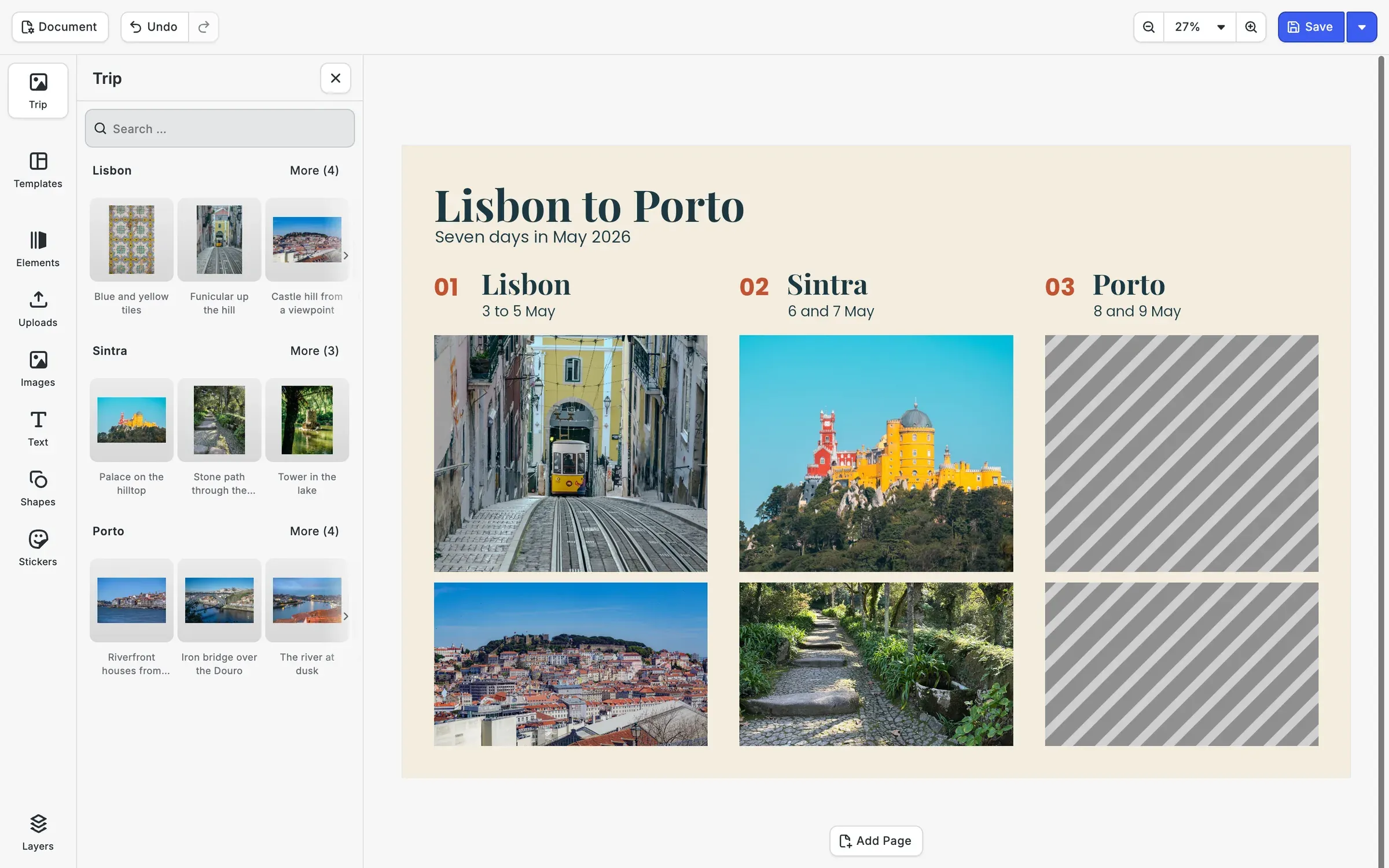
Your app hands the album to CE.SDK one photo at a time. Four values on each photo decide where it appears in the web editor’s library panel, once your developers set the panel to show groups and sort by time.
-
The place it was taken
The place becomes the photo's group. The panel shows one section per place, in the order your app first adds a photo from each, so Lisbon sits above Sintra because its photos went in first.
-
The time it was taken
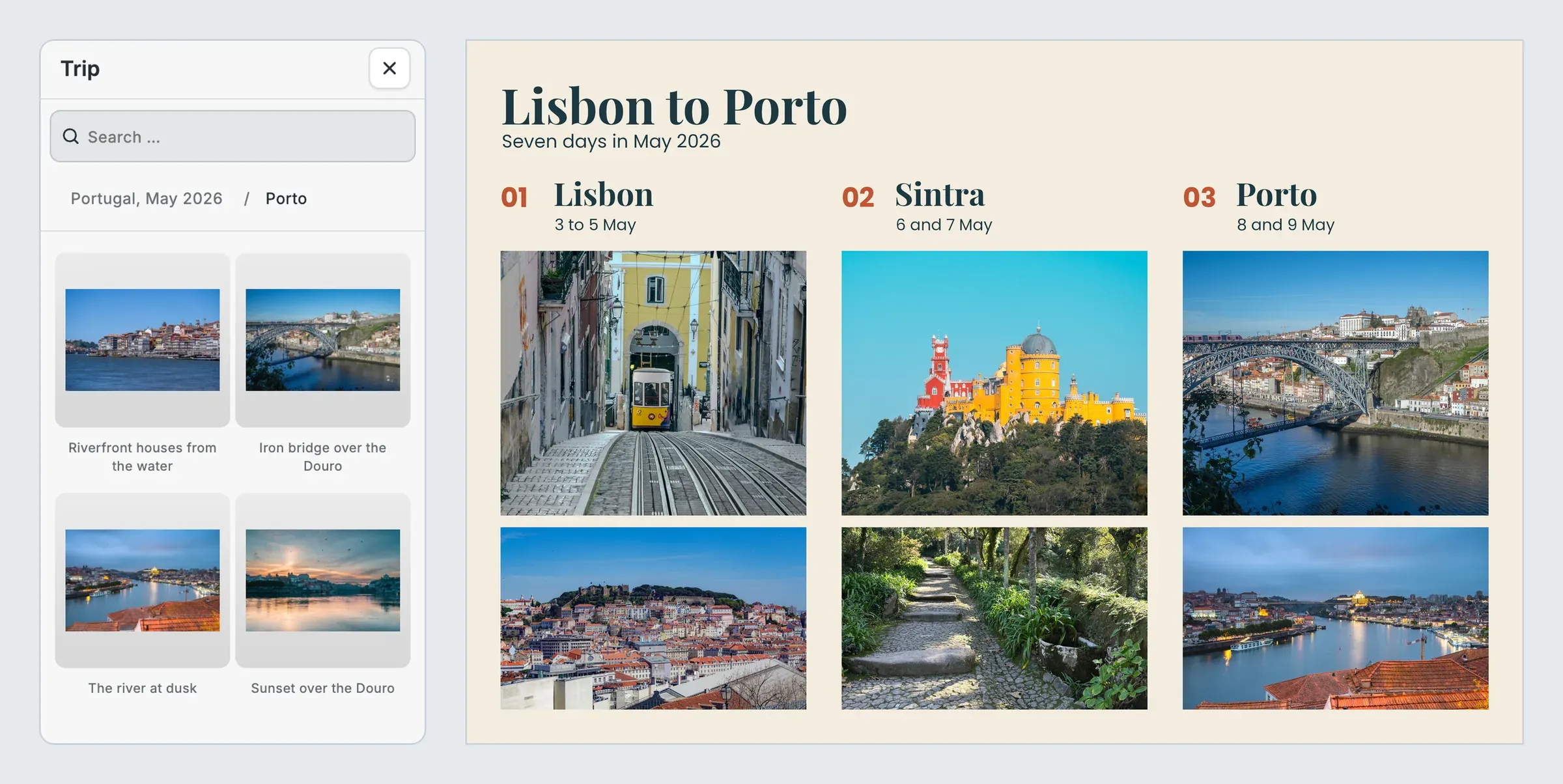
It travels with the photo as a custom value the library sorts on, so the four Porto photos run from the riverfront in the afternoon to the sunset over the Douro the next evening.
-
A label and tags
The label names the photo in the panel, and the search box matches labels and tags but not place names. Your app can add the place as a tag, so users find Porto by typing it.
-
A thumbnail and the full photo
The panel loads only the small thumbnail. The full-size file loads when a user puts the photo on the page, and both addresses can point at your own storage.
Each stop opens on its own photos
Clicking More next to a place opens only that place’s photos, in the order they were taken. To fill an empty Porto frame, users select it and choose Replace. Once your developers point Replace at the trip album, it opens on the same sections, and the photo users pick fills the frame at its size.
Sort each trip by place in your collage editor
Tell us where your app keeps the place and date of each trip photo, and we’ll get back to you with a custom quote for your use case.
Travel collage FAQs
Family photo collages add a one-click fix for dark photos, and the collage editor SDK page covers switching a page to another layout.
A travel photo collage editor SDK puts a collage editor inside your own travel or photo app, where users arrange the pictures from a trip on a page to print or share. IMG.LY's editor for this is CE.SDK, whose library can list the trip's album by place and by the time each picture was taken.
Your app passes both with each photo when it adds the album to the editor, for example from the photo's own metadata or from the trip it already stores. The editor groups and sorts on the values it receives.
Yes. The search box in the panel matches each photo's label and tags, so a search for tram finds the Lisbon funicular through its tags. Place names aren't searched on their own, so when your app adds the place to each photo's tags, a search for Porto lists the Porto photos.
Through Replace, with the frame selected, which keeps the frame's size and fit. A click on a photo in the Trip panel adds it to the page as a new image instead, even while a frame is selected.
In the web editor, your developers add the album with each photo's place, time, label, thumbnail and full-size file. They then set up a library panel that groups the photos by place and sorts them by time, name its sections, add a Trip button to the dock and make the album what Replace opens.
The grouped Trip panel is part of the web editor, so it runs in browser apps built with the web frameworks listed above and in Electron. The iOS and Android editors can show your own photos as library sections too, set up in Swift or Kotlin, as the asset library guide for each platform shows.