



Family collages with one-click photo fixes, in your print shop
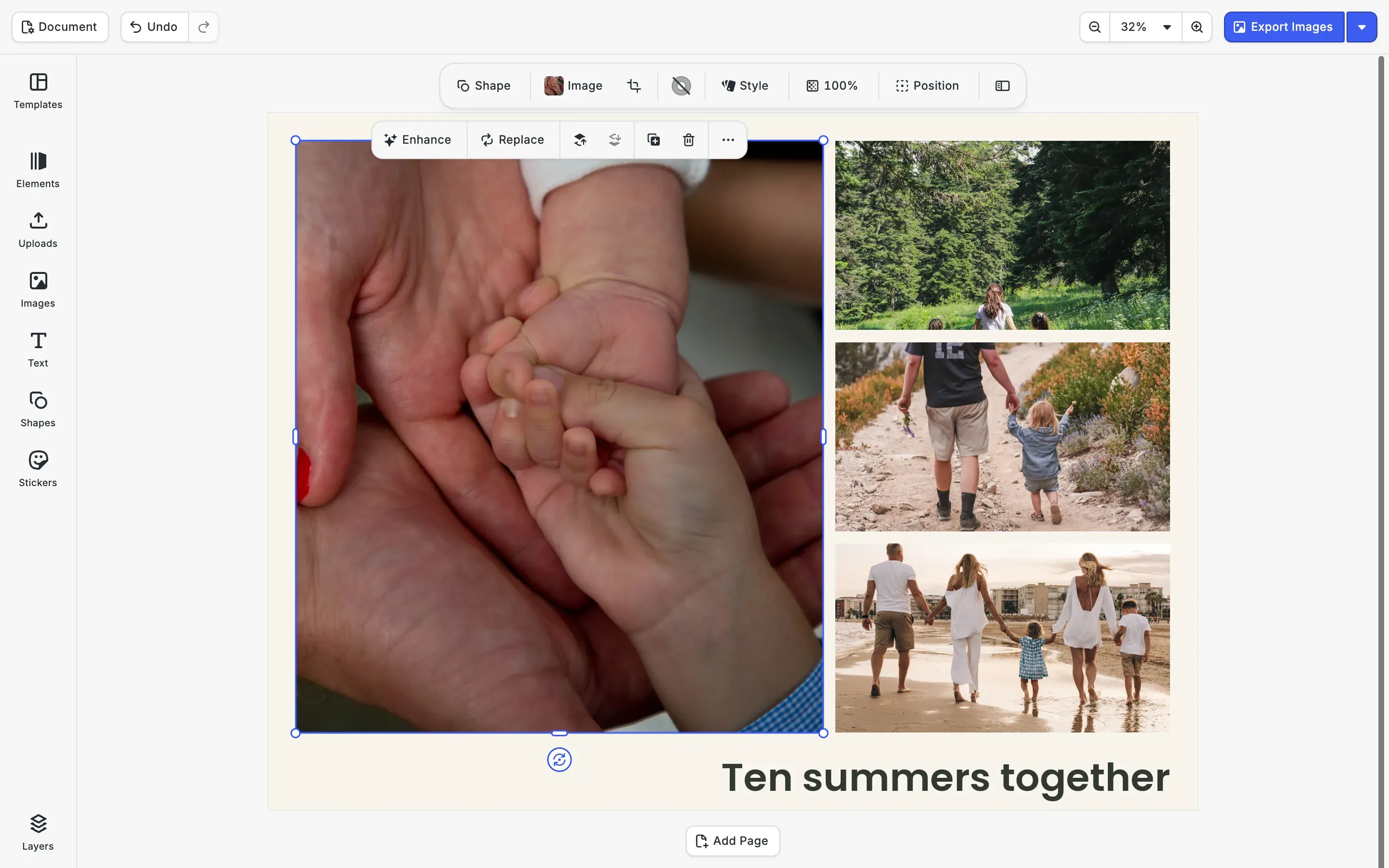
Family photos come from many phones over many years, and some of them arrive dark or tinted. With the Perfectly Clear plugin in CE.SDK, your users select one photo in the collage and click Enhance to correct it right where it sits.
Trusted by 100+
industry leaders















Integrating IMG.LY’s editor meant we didn’t have to build or maintain a complex editing layer ourselves. That kept our team focused on our core AI ad engine and saved us countless development hours — while still giving our customers the ability to polish and customize creatives at scale.
Hikari Senju
CEO, Omneky

With IMG.LY we built a central creative portal that now powers over 140 dealer campaigns across multiple automotive brands. Before this, asset creation was slow and inconsistent.
Martin Röhr
Product Owner, Digitas

By embedding IMG.LY’s editor we were able to hit key RFP requirements and deliver a template-based creative experience that now serves 1,000+ customers. It helped us win more deals and exceed enterprise expectations without needing to hire dedicated design teams.
Rob Driscoll
Director of PM, Optimizely

Since integrating IMG.LY’s editor, we now deliver 30,000+ ad creatives per month, dramatically shorten time-to-launch, and help our clients cut design spend by up to $10,000 per month.
Logan Welbaum
Founder, Plai

Our customers create over a million personalized postcards each year choosing from over hundreds of templates with IMG.LY’s SDK. It’s the only solution that allows us to build our own specialized, on-brand UI that integrates seamlessly with our platform.
Jeanine Zaalberg
Product Manager, SwissPost

From a developer’s perspective, the most powerful feature of the photo editor is the integration process. It was completely flawless, quick, and easy to integrate.
Stefano Fornari
CTO, Funambol

We compared IMG.LY SDK with other solutions and found that it would be the best fit for us since it provides all the features that are crucial for our use case.
Carem Pereira
SCRUM Manager, HP

What one click does to a dim photo
A dark photo of hands with a red cast comes back from Enhance brighter, with lighter and less red skin. A forest walk shot in daylight changes less: a little more light in the shade under the trees and stronger greens in the grass.




Move the cursor over any image: all panels magnify the same spot at 3× so letterforms and fine detail compare directly.
Enhance on the photos that need it
Enhance works on the photo users select rather than on the whole page, so they decide photo by photo which pictures need help and which already look the way they remember them.
One photo at a time
The Enhance button appears when a single photo is selected. Selecting two photos together, or a text layer like the caption, hides it, so the photos that already look right stay untouched.
Undo brings the original back
Each fix goes on the editor’s undo stack. Undo puts back the original photo exactly and Redo the enhanced one, so users can flip between the two before they order.
The fix is saved with the design
Saving the design as an archive stores the enhanced photo inside it. Reopened, the archive shows the photo exactly as it looked after Enhance, so a saved order prints with the fix.
Three things to set up before launch
The IMG.LY plugin runs Perfectly Clear, an image correction engine from eyeQ, inside the editor you already have. Your developers need a key, a place for the button and a home for the runtime.
An API key for each domain
The runtime checks the page’s hostname against your eyeQ API key, so the key has to be authorized for production, staging and local development before anyone tests the button.
A place for the Enhance button
The plugin leaves the placement to your developers, who add the Enhance button to the menu above a selected photo, to the dock, or to the inspector, navigation or canvas bar.
A home for the runtime
The first click loads the runtime and its models, about 170 MB, so the first photo takes longer than the ones after it. The IMG.LY CDN serves a copy for prototyping, and the plugin guide lists the cross-origin headers your own CDN needs for production.
Give dim family photos a one-click fix
Tell us which collage layouts you sell and what kind of photos your users upload, and we’ll get back to you with a custom quote for your use case.
Family collage FAQs
Shops that print family reunion shirts can see how one organizer sets up a design for every branch of the family on the family reunion T-shirt editor SDK page.
Your print shop or family photo app gets an editor where users arrange family photos into a collage before they order the print. With the Perfectly Clear plugin, CE.SDK adds an Enhance button for the selected photo, so a dark or tinted picture gets corrected before the order goes in.
The photos stay on the device, because the correction runs in the browser through WebAssembly and the plugin guide states that no image data leaves the client. What the browser downloads is the runtime and its models, either from the IMG.LY CDN or from a server you run.
Not in the starter kit, where a full-size photo comes back from Enhance at the same pixel size, so it supports the same print size after the fix as before it.
The plugin guide covers the web editor in plain JavaScript, React, Angular, Vue, Svelte and SvelteKit, Next.js and Nuxt, plus Electron on the desktop. It is not documented for the iOS or Android editors, so plan this feature for your web shop.
Besides your CE.SDK license, the plugin needs a Perfectly Clear API key from eyeQ, and the key has to be authorized for every domain the editor runs on, including staging and local development.