

Scrapbook pages decorated from your sticker library, in your photo lab
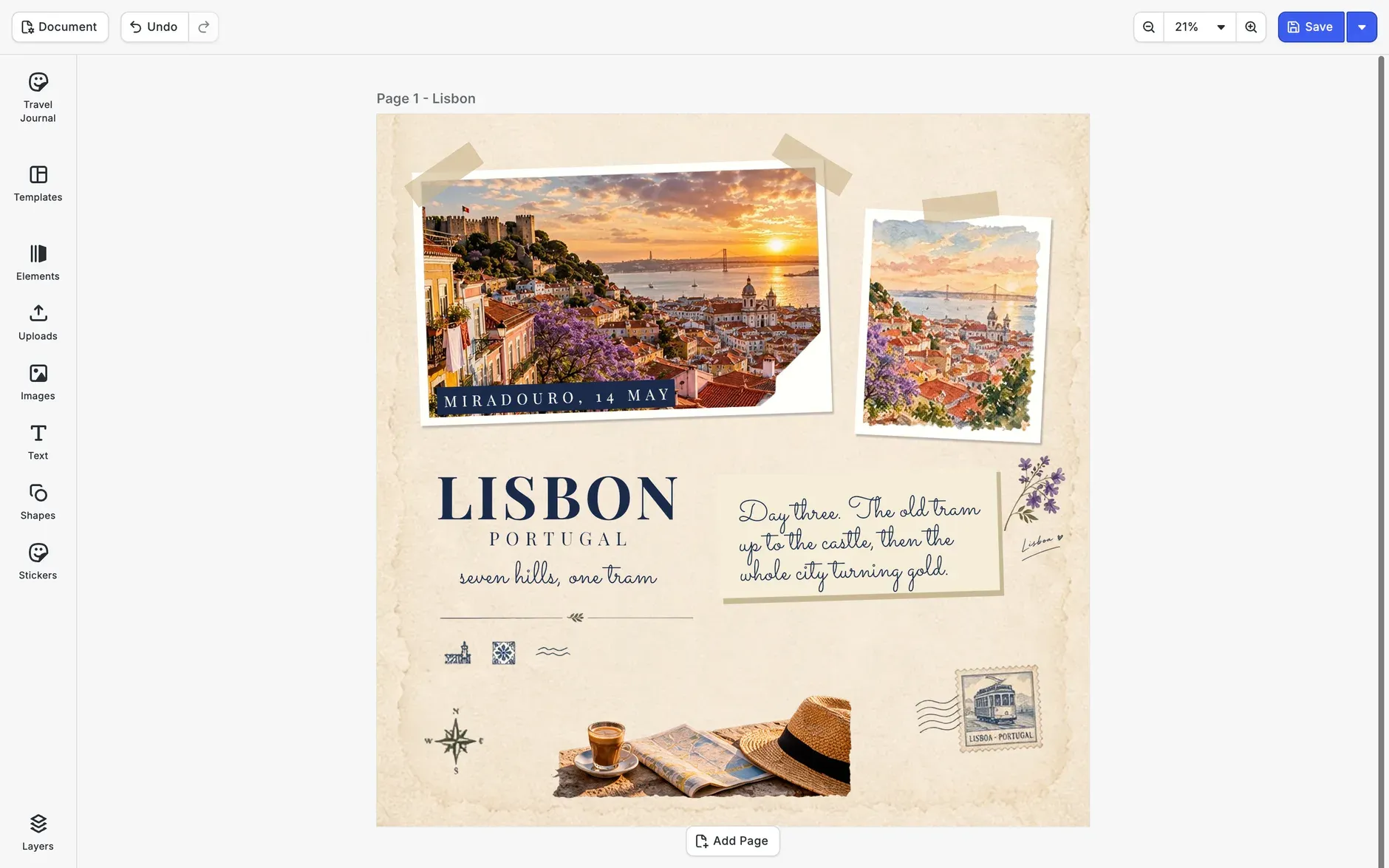
An embeddable scrapbook editor for photo labs and memory-keeping apps. Users arrange their photos on a page, decorate it with the stickers, tape and paper your shop provides, and write captions and journaling in the fonts you pick.
Trusted by 100+
industry leaders














Integrating IMG.LY’s editor meant we didn’t have to build or maintain a complex editing layer ourselves. That kept our team focused on our core AI ad engine and saved us countless development hours — while still giving our customers the ability to polish and customize creatives at scale.
Hikari Senju
CEO, Omneky

With IMG.LY we built a central creative portal that now powers over 140 dealer campaigns across multiple automotive brands. Before this, asset creation was slow and inconsistent.
Martin Röhr
Product Owner, Digitas

By embedding IMG.LY’s editor we were able to hit key RFP requirements and deliver a template-based creative experience that now serves 1,000+ customers. It helped us win more deals and exceed enterprise expectations without needing to hire dedicated design teams.
Rob Driscoll
Director of PM, Optimizely

Since integrating IMG.LY’s editor, we now deliver 30,000+ ad creatives per month, dramatically shorten time-to-launch, and help our clients cut design spend by up to $10,000 per month.
Logan Welbaum
Founder, Plai

Our customers create over a million personalized postcards each year choosing from over hundreds of templates with IMG.LY’s SDK. It’s the only solution that allows us to build our own specialized, on-brand UI that integrates seamlessly with our platform.
Jeanine Zaalberg
Product Manager, SwissPost

From a developer’s perspective, the most powerful feature of the photo editor is the integration process. It was completely flawless, quick, and easy to integrate.
Stefano Fornari
CTO, Funambol

We compared IMG.LY SDK with other solutions and found that it would be the best fit for us since it provides all the features that are crucial for our use case.
Carem Pereira
SCRUM Manager, HP

Scrapbook pages that fit the albums your lab sells
12 x 12 and 8.5 x 11 inch pages
These are the two common scrapbook page sizes. Each template sets its page size in inches, so users who start from a 12 x 12 layout design on a 12 x 12 inch page.
Pages saved and reopened over months
Your platform saves a page as a scene with every photo, sticker and caption in it and loads it again when the user returns to the album. Your developers keep the uploaded photos on your servers, so the reopened page still finds them.
Loose pages or a bound book
A single page prints as a loose sheet for a post-bound album. When users add more pages to the same document, one PDF export carries all of them for a book your lab binds.
Your embellishment packs in their own library
Your developers add each pack to the asset library as its own entry, grouped into sets such as travel marks or tape and paper, with a button of its own in the web editor’s dock. Packs described in a file on your server load at runtime, so a new one reaches users without a new release of your web or mobile app.
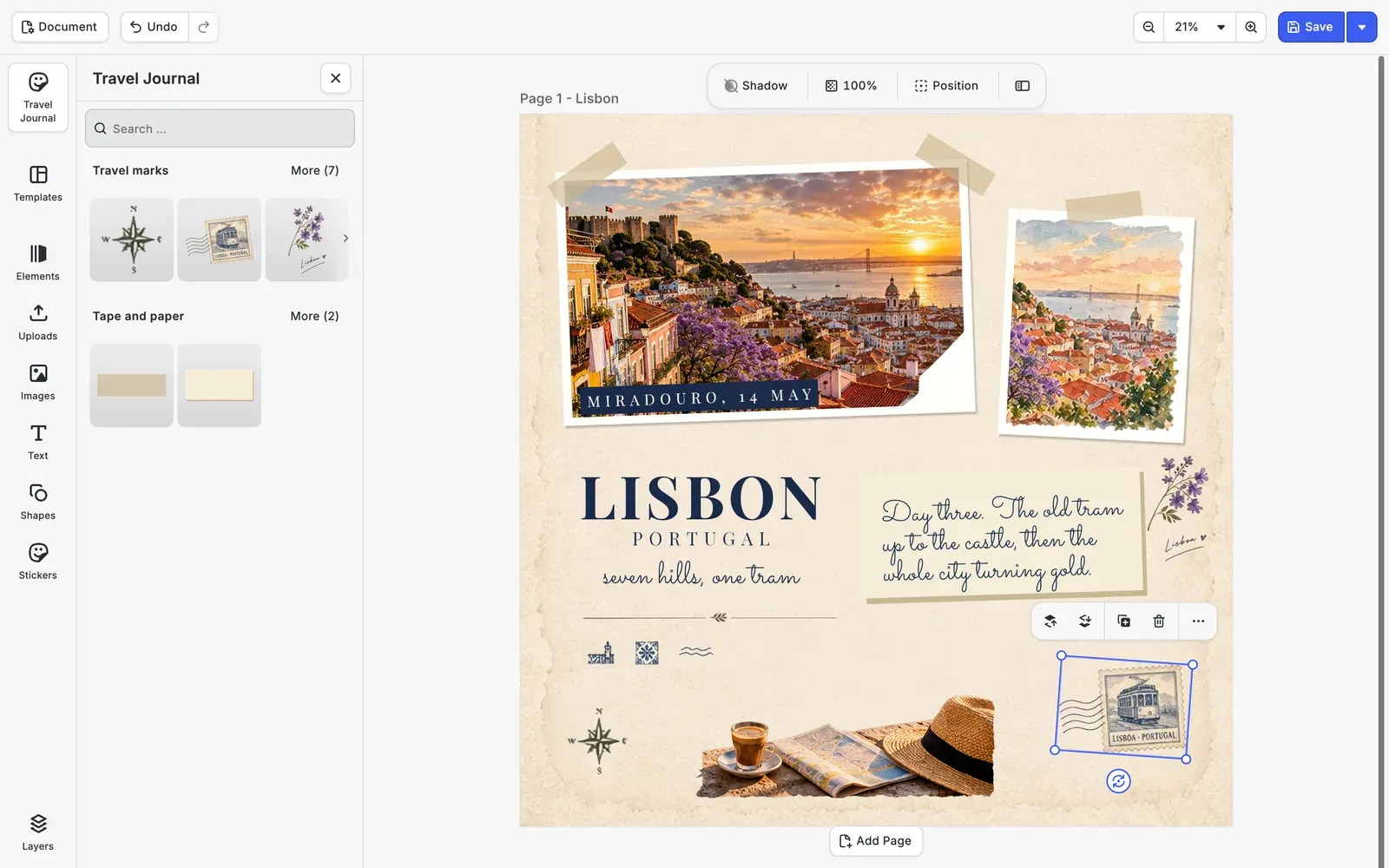
Journaling, tape and caption labels on one page
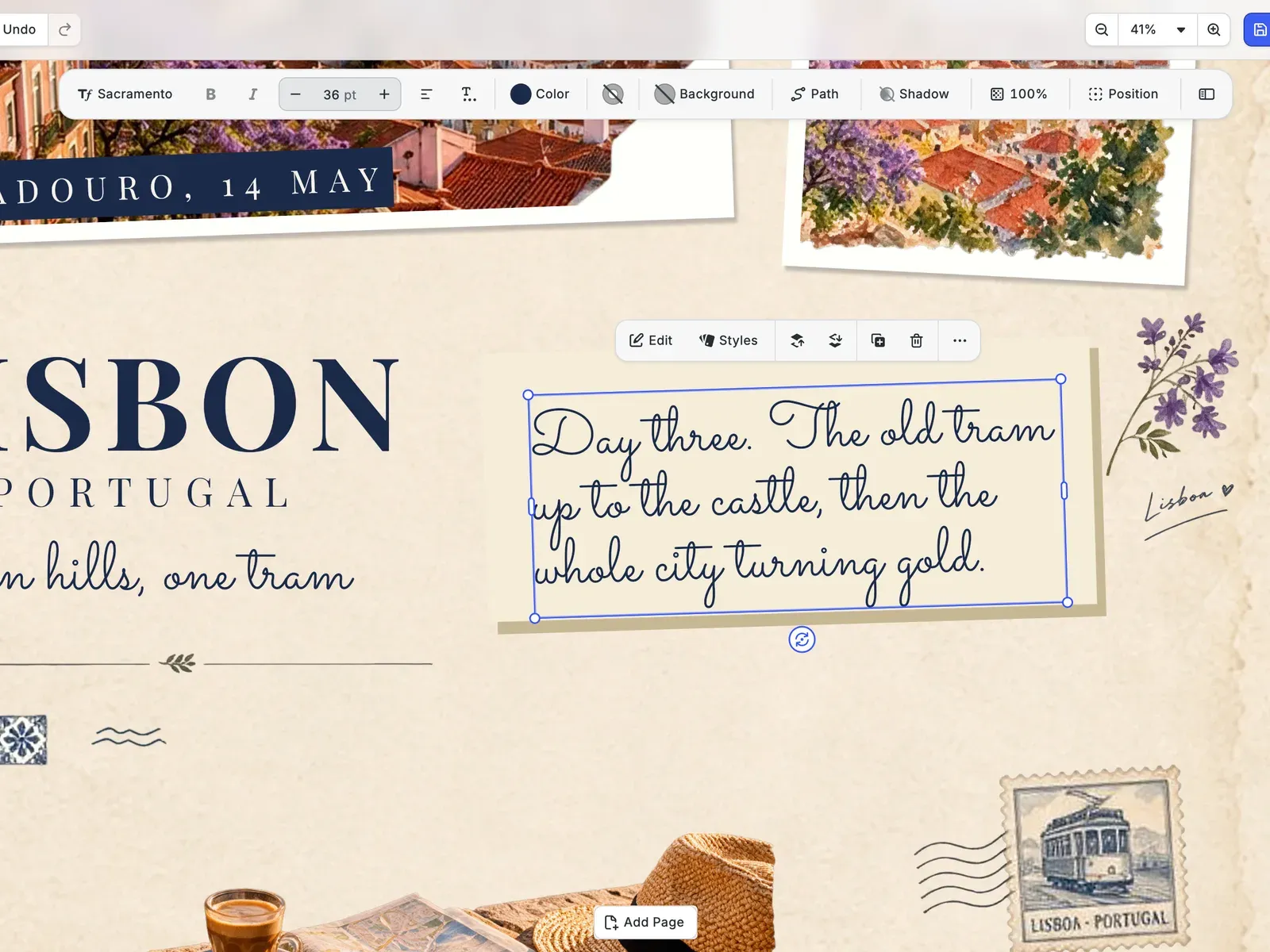
Journaling in a script font you add.
Your developers load TTF, OTF or WOFF files as typefaces, and users pick them from the font list in the text toolbar, so a travel note can be written in a handwriting script.
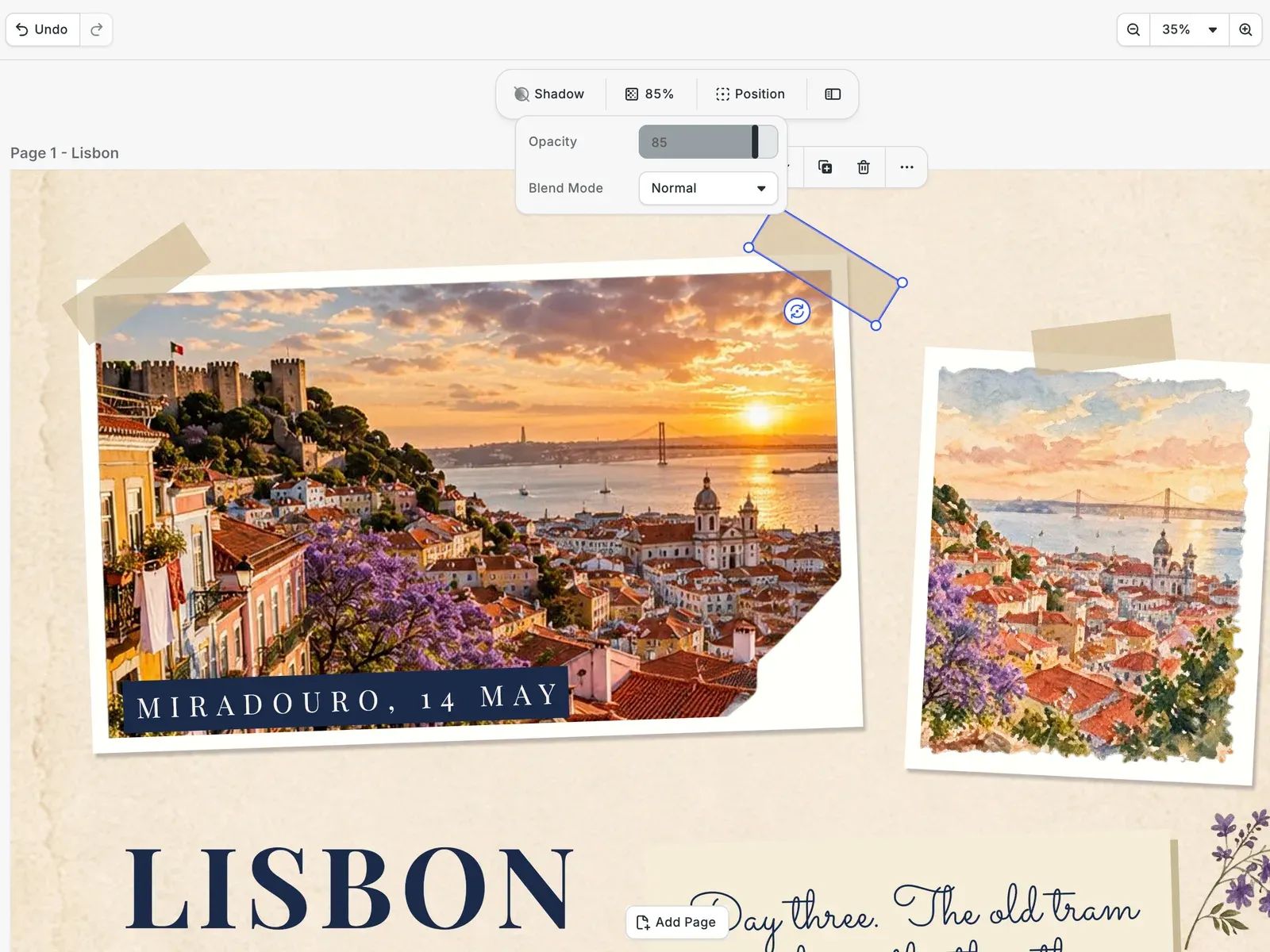
Tape strips the photo shows through.
PNG stickers keep their transparency, so a strip of tape across a photo corner lets the picture show through. The Opacity setting lightens any sticker further, and Blend Mode controls how it mixes with the photo under it.
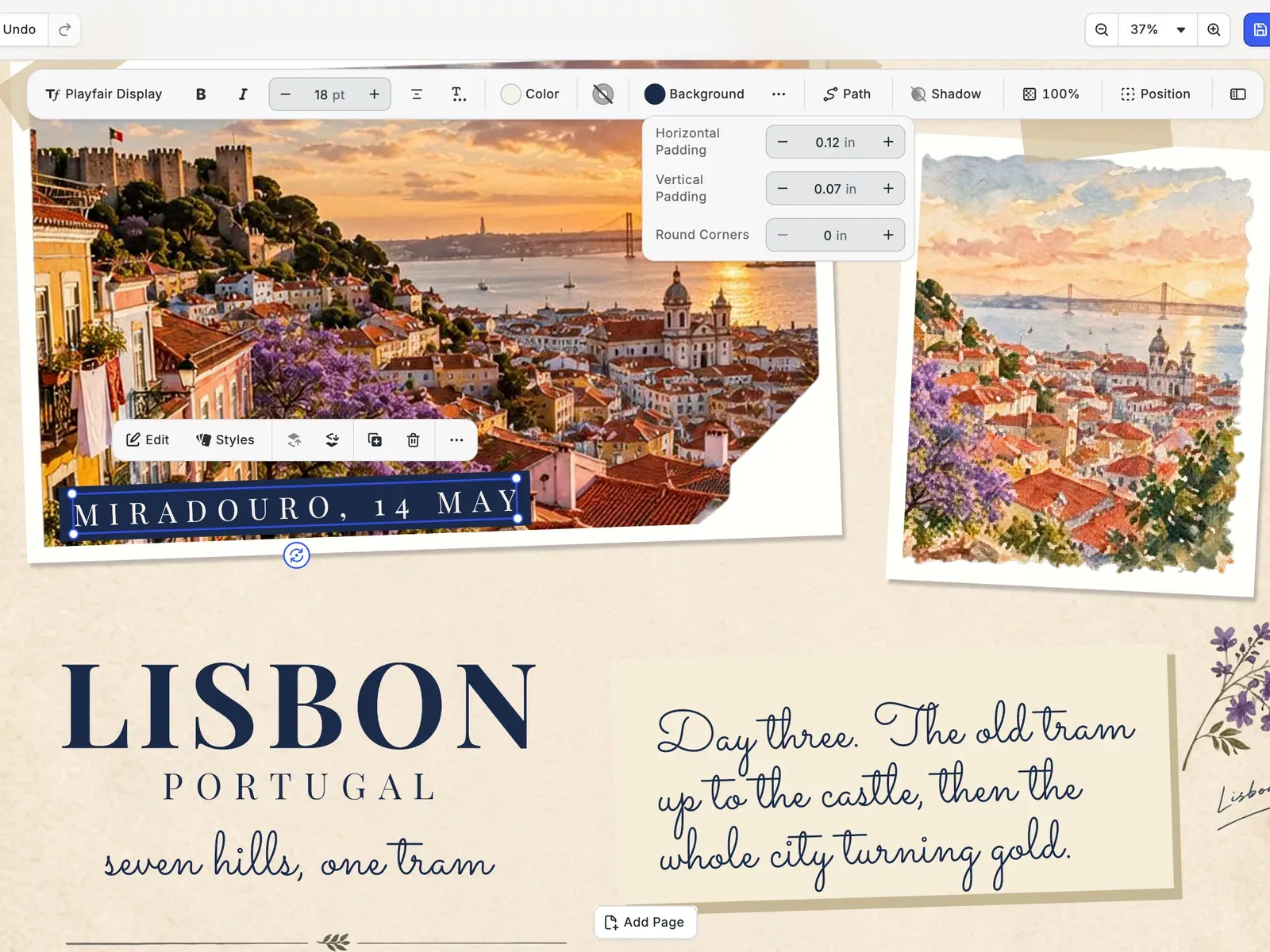
A band of color behind each caption.
A text background puts a color band behind a caption, with its own padding and rounded corners, so a place name and date in light type can be read over a busy part of the photo. Text backgrounds are also supported in the iOS and Android SDKs and in server-side renders.
How The Print Bar Turned Its Editor Into Its Best Salesperson

Five-figure
self-service order with zero sales contact
4 weeks
live before peak Christmas season
2-person
dev team, editor maintenance outsourced
The Print Bar is an Australian custom-apparel and print-on-demand company. Founded in a garage in 2011, it now runs production campuses in Brisbane and Melbourne, letting customers design and order custom merchandise online.
Pretty much nothing went wrong for our launch. We demolished our expectations.
The Print Bar

Challenge
The Print Bar’s customers are overwhelmingly non-designers, yet its design tool, built in 2012 and barely touched since, fought them at every step. Simple actions like resizing text meant digging through settings panels, and customers were abandoning mid-design, during the creative step that should have been the most enjoyable part of the journey.
Solution
The Print Bar rebuilt its design experience on IMG.LY’s CE.SDK: self-hosted, developer-first, and configurable to disappear into its own branding. The editor deliberately removes options for its non-designer audience and quietly enforces print-production requirements (resolution, formats, bleed) in the background, so first-time buyers create production-ready files without ever thinking about DPI.
- One customer placed a five-figure order entirely self-serve, with no calls or quotes.
- The relaunch shipped four weeks before peak Christmas season with effectively zero launch issues.
- A two-person dev team offloaded editor maintenance and refocused on the business.
An embeddable scrapbook editor with your stickers and fonts built in
Tell us the page sizes your lab prints and how you would like to sell sticker packs, and we’ll get back to you with a custom quote for your use case.
Scrapbook editor FAQs
The same editor makes covers too: the book covers overview lists them, among them travel guide covers and children’s picture books.
It is a page editor that photo labs and memory-keeping apps embed, so users design scrapbook pages around their own photos inside your site or app. With CE.SDK, users place the photos, decorate the page from your sticker packs and add captions, and your lab receives a PDF of every page.
Purchases and billing stay with your platform. CE.SDK lets your developers choose which sticker sources and library entries each user's editor loads, so a pack someone has bought can show up in their library without appearing for anyone else.
Yes. A PNG uploaded from their device keeps its transparent background, so a drawing or a cut-out graphic saved that way sits on the page like one of your stickers.
Fonts in TTF, OTF and WOFF format. Your developers add them as typefaces, and they can list them next to the default fonts or replace the defaults with only your selection.
Yes. CE.SDK runs in native iOS and Android apps, and your developers can load your sticker packs there from the same server files as on the web. Users pick photos with the system picker or take them with the camera, and caption bands are available on both.