


Custom Photobook UI
Custom UI for building photo books focusing on theming, page layouts, and managing photo assets.
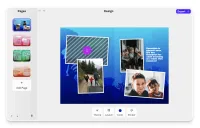
Exploring Custom Photobook UI
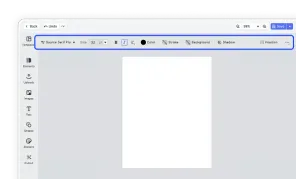
Create a custom photo book UI using the CE.SDK headless API. This example focuses the UI on a few key editing options to guide the user through customizing their photo book.
At the heart of the toolbar is the option to choose a theme. This is where you can tailor the photo book to a specific occasion such as a wedding, a holiday, or a special event. The theme color can be changed individually for every page. Once a user has selected a theme, they can choose a layout for their page. The layouts are created by using the placeholder API and locking image elements.
A sticker library integration enables quick embellishments and can be connected to any asset source.
The most essential features for building a photo book are the ability to add new pages and personal photos to those pages. As opposed to a toolbar the sidebar in this example shows a preview of pages in the photo book and a prominent button for adding a new page. Similarly adding images to a page is possible by clicking on the placeholder which opens a context menu for uploading and selecting images.
Note that users are not presented with just a blank page. But with a few initial pages with different layouts giving an optimal starting point for making their own customizations.
Exploring Custom Photobook UI
Create a custom photo book UI using the CE.SDK headless API. This example focuses the UI on a few key editing options to guide the user through customizing their photo book.
At the heart of the toolbar is the option to choose a theme. This is where you can tailor the photo book to a specific occasion such as a wedding, a holiday, or a special event. The theme color can be changed individually for every page. Once a user has selected a theme, they can choose a layout for their page. The layouts are created by using the placeholder API and locking image elements.
A sticker library integration enables quick embellishments and can be connected to any asset source.
The most essential features for building a photo book are the ability to add new pages and personal photos to those pages. As opposed to a toolbar the sidebar in this example shows a preview of pages in the photo book and a prominent button for adding a new page. Similarly adding images to a page is possible by clicking on the placeholder which opens a context menu for uploading and selecting images.
Note that users are not presented with just a blank page. But with a few initial pages with different layouts giving an optimal starting point for making their own customizations.
Related Demos
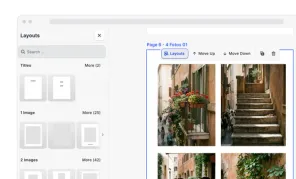
Photobook Editor
A photobook editor for print: pick a size and style, auto-fill photos into ready-made layouts, catch print issues as you edit, and export a PDF/X-4 photo book.
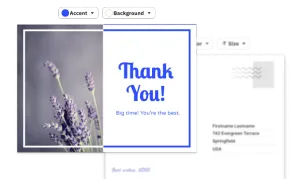
Custom Postcard UI
Built to facilitate optimal post- & greeting- card design, from changing accent colors and selecting fonts to custom messages and pictures.
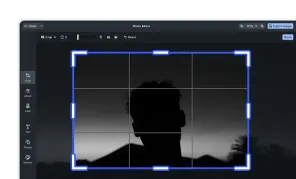
Photo Editor UI
This CE.SDK editor configuration is equipped with the essentials for photo editing and includes advanced tools such as background removal.
Design Editor UI
Our easy to use editor variant focused on layout, text, and images is ideal for adapting existing templates.