



Text Animation
What Is Text Animation?
Text animation is motion given to the words on screen, so a title can fade in or a headline can type itself out letter by letter. It can move a whole block of text at once or split it by line, word or letter, and editors usually group the effects into entrances, emphasis loops and exits.
When the text is split, the parts share the animation’s duration. The clip, rendered in CE.SDK, splits one 2 second typewriter entrance three ways: by word, by letter on the same line and by letter on a short one. All three rows finish together.
Which Text Animation Should You Use?
Split the text by how it should be read. A product launch clip, for example, might bring the headline in word by word, show the price as one block with a slow pulse, and clear all text before the end card. Whichever style you pick, keep the text up long enough to read, as the lower thirds guide explains.
Use the whole block for
-
A price or a discount
The number lands complete, so nobody reads half of it.
-
A call to action
Viewers can act on the line the moment it appears.
Split by line for
-
A two-line title
Each line arrives whole and in reading order.
-
A quote
Viewers never see half a line, so the phrasing holds.
Split by word for
-
A short hook at the start of a clip
Each word gets its own beat. Keep it to a few words, since a long sentence rushes past.
-
Captions that follow the speech
Words can appear in step with the voice.
Split by letter for
-
A brand name or a one-word title
With few letters, each one gets a visible share of the time.
-
A chat message or a search box
The typewriter style shows each letter at once, with no fade, like keys being pressed.
Why Does Longer Text Animate Faster?
Because the duration belongs to the whole text, and CE.SDK shares it out evenly across the characters, every extra character shortens each one’s share. We timed this in the CE.SDK 1.84 and 1.85 video editors, running in Google Chrome on a Mac and exporting a frame every 0.04 seconds and noting when each letter appeared. Spaces count as characters, so a line typed letter by letter paused briefly between words.
A fade split by letter shares its time the same way. In PowerPoint you set a delay between letters instead, so a longer line takes longer to appear.
37/s
Typewriter on 22 characters at 0.6 s
MAKE EVERY FRAME COUNT types in the same time as a single word
12/s
Typewriter on 7 characters at 0.6 s
GO LIVE types about a third as fast as the long line
0.76 s
Per letter in a 2 s fade at the default overlap
Letters start 0.06 s apart, so up to 13 fade at once
How Text Animations Work in CE.SDK
Text blocks take an entrance, a loop and an exit animation, and CE.SDK supports text animations on iOS, Android, the server and the web. The presets are there to try in our video editor demo, which runs CE.SDK video editing in the browser.
Users pick a preset and its settings
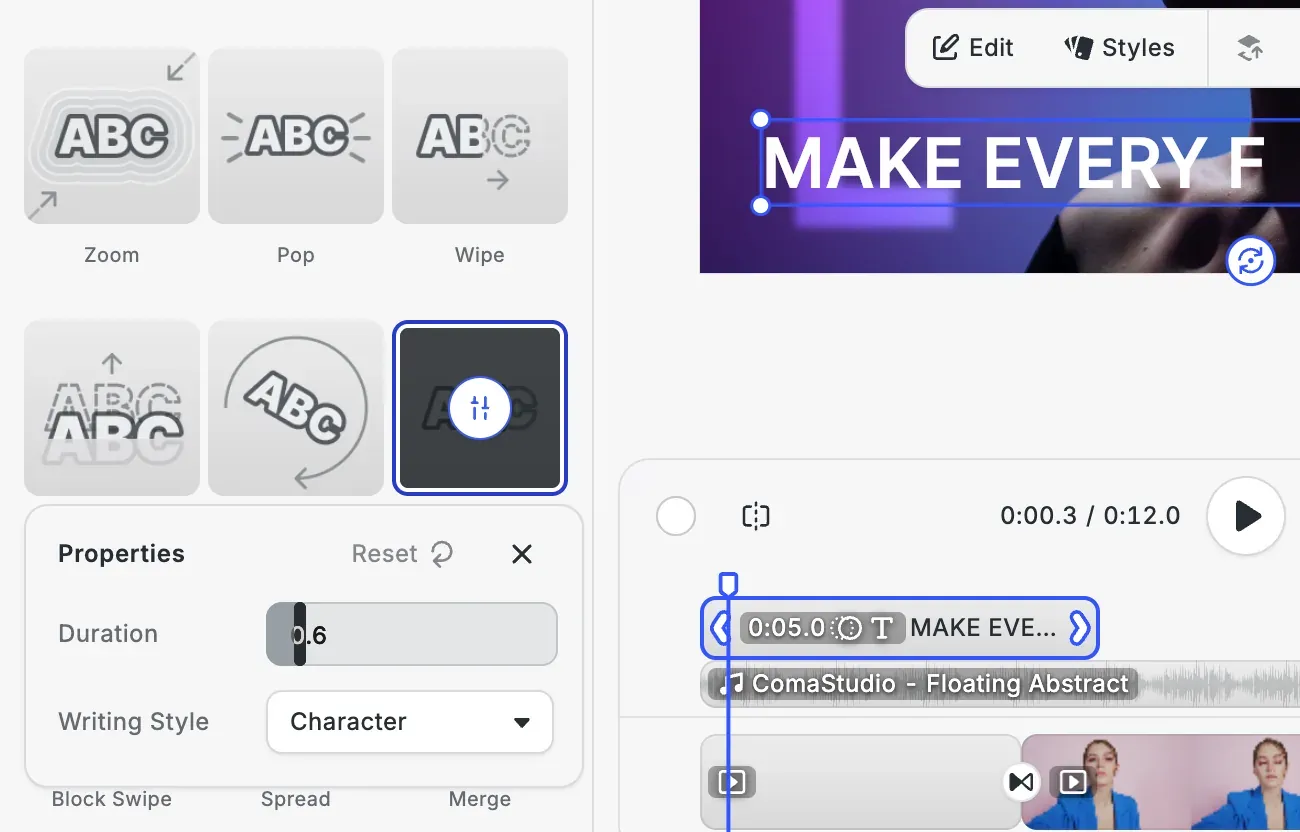
To animate a headline, users select the text and open Animations in the inspector bar. The In tab holds 14 entrances, from Fade and Slide to Typewriter, Block Swipe, Spread and Merge, and the Loop tab nine loops such as Pulsating and Sway. Clicking the chosen tile again opens its settings, such as a duration from 0.1 to 5 seconds, the easing and the writing style: block, line, word or character.
Your app keeps the typing speed steady
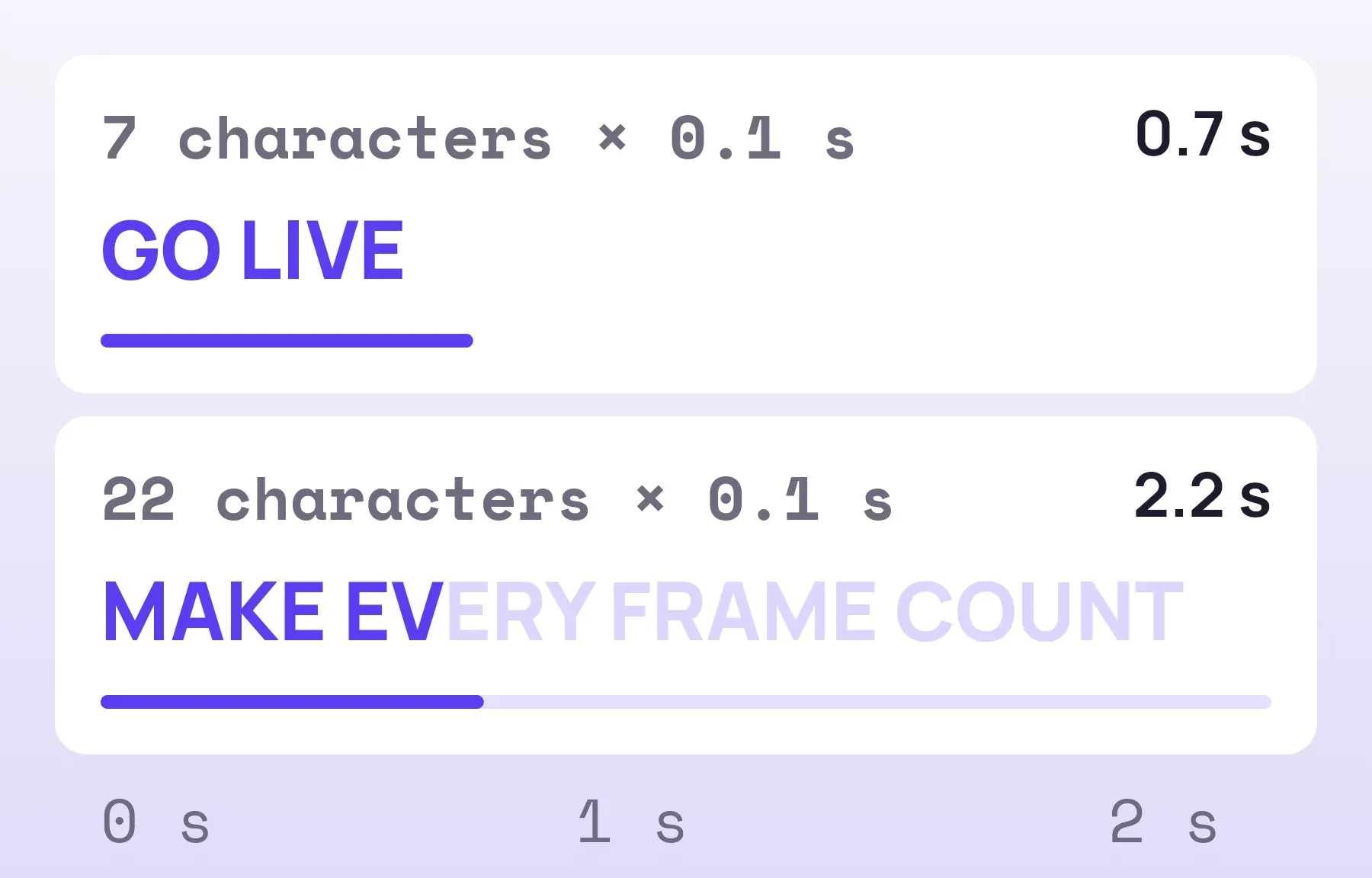
When users type their own words into a template, a longer headline would animate faster. Your app can set the animation’s duration from the new length through the engine API. At 0.1 seconds a character, GO LIVE gets 0.7 seconds and MAKE EVERY FRAME COUNT 2.2 seconds, so both type at the same speed. The same API sets the overlap between the parts, from 0 for one after another up to 1.
FAQs
Kinetic typography is a kind of text animation in which the motion helps carry the meaning or mood of the words. Wikipedia's history of the form names North by Northwest (Hitchcock, 1959) as the earliest feature to use it at length, in opening titles by Saul Bass where the credits come flying in from the edges of the screen. A plain fade-in on a caption is text animation too, but it rarely gets that name.
That varies by tool. After Effects lets you base a text animator on characters or on characters excluding spaces. When we timed CE.SDK, its presets counted spaces, so the line paused between words.
A typewriter effect reveals text character by character, and each one appears at full strength with no fade, as if someone were typing it. CE.SDK's Typewriter preset can also type word by word, showing each word whole. In our test it spread the characters or words evenly across its duration.
Links
Documentation and references for this concept.
Video Editor SDK
Animate the text in your users' videos as it enters, loops and exits, on web and mobile.
Text Animations
Animate text by line, word or character, with writing style, overlap, duration and easing.
Supported Animation Types
The entrance, exit and loop animations in CE.SDK and the settings each one takes.
Related Terms
Lower Thirds
Text graphics over the bottom of a video frame that name the person speaking, the place or the source of the footage, us…
Caption
A timeline-synchronized text overlay in CE.SDK's video editor for adding subtitles or on-screen text, imported from subt…
Timeline
The time-based editing interface in CE.SDK's video editor where users sequence, trim, and synchronize all media elements…