


Photoshop Template Import
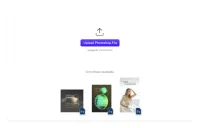
Transform your existing Photoshop templates for use in the CE.SDK with our Importer. Preserve design elements and streamline the transition between platforms.
Photoshop Template Import
The Photoshop Importer for the CE.SDK allows you to seamlessly integrate Photoshop files into the editor while retaining essential design attributes.
Quickstart:
- Save your Adobe Photoshop File as regular PSD file
- Import your file into the Creative Editor
Features:
The main features include:
- File Format Translation: The importer converts .PSD files from Adobe Photoshop into the CE.SDK scene archive format. The resulting scene archive includes all required assets for immediate use.
- Bulk Importing: The codebase is adaptable for bulk importing, streamlining large-scale projects.
Design Elements:
The following Photoshop design elements will be preserved by the import:
- Positioning and Rotation: Elements’ positioning and rotation are accurately transferred.
- Image Elements: Images are embedded into the scene.
- Text Elements: Font family continuity is maintained, with options to supply font URIs or use Google fonts.
- Shapes: Rect, Oval, Polygon, and Line shapes are supported, along with custom shapes that might experience minor distortion. Vector shapes with a single path retain it’s ability to assign colors or gradients. Vector shapes with more than one path are added as SVG.
- Colors and Strokes: Gradient and solid colors, stroke weight, color, and alignment are faithfully reproduced.
- Transparency: Transparency is preserved for seamless integration.
Your input is invaluable as we continue to refine and improve the importer’s capabilities. If you run into any issues, please let us know by sending an email to support@img.ly and include example .PSD files.
Photoshop Template Import
The Photoshop Importer for the CE.SDK allows you to seamlessly integrate Photoshop files into the editor while retaining essential design attributes.
Quickstart:
- Save your Adobe Photoshop File as regular PSD file
- Import your file into the Creative Editor
Features:
The main features include:
- File Format Translation: The importer converts .PSD files from Adobe Photoshop into the CE.SDK scene archive format. The resulting scene archive includes all required assets for immediate use.
- Bulk Importing: The codebase is adaptable for bulk importing, streamlining large-scale projects.
Design Elements:
The following Photoshop design elements will be preserved by the import:
- Positioning and Rotation: Elements’ positioning and rotation are accurately transferred.
- Image Elements: Images are embedded into the scene.
- Text Elements: Font family continuity is maintained, with options to supply font URIs or use Google fonts.
- Shapes: Rect, Oval, Polygon, and Line shapes are supported, along with custom shapes that might experience minor distortion. Vector shapes with a single path retain it’s ability to assign colors or gradients. Vector shapes with more than one path are added as SVG.
- Colors and Strokes: Gradient and solid colors, stroke weight, color, and alignment are faithfully reproduced.
- Transparency: Transparency is preserved for seamless integration.
Your input is invaluable as we continue to refine and improve the importer’s capabilities. If you run into any issues, please let us know by sending an email to support@img.ly and include example .PSD files.
Related Demos
Indesign Template Import
Transform your existing InDesign templates for use in the CE.SDK with our Importer. Preserve design elements and streamline the transition between platforms.

Design Validation
Reduce the risk of misprints and speed-up validation process thanks to design validation. Automatic error notifications will let you know if the design is not print-ready.
Design Editor UI
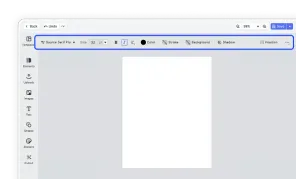
Our easy to use editor variant focused on layout, text, and images is ideal for adapting existing templates.
PPTX Template Import
Transform PowerPoint slides into editable CE.SDK designs. All formatting preserved.