Product Editor UI
Product Editor for customizing any product with print-ready designs.
Build custom product personalization experiences with CE.SDK’s flexible configuration system.
What It Does
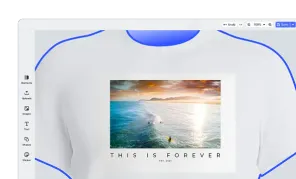
This demo demonstrates a complete product customization editor—the kind you’d find on print-on-demand platforms, promotional merchandise stores, or e-commerce sites offering personalized products.
Users can:
- Select products from a catalog (t-shirts, caps, mugs, phone cases, tote bags, signage)
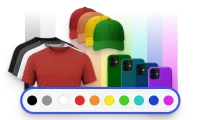
- Choose colors from a visual palette that instantly updates the product mockup
- Switch between printable areas (e.g., front/back of a t-shirt) with a single click
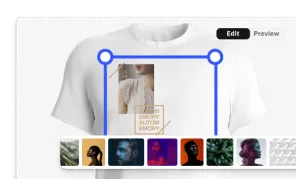
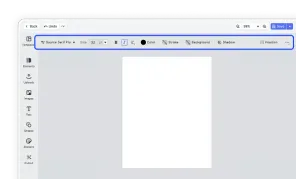
- Design freely while seeing exactly how their artwork will appear on the final product
Real-Time Product Visualization
Dynamic mockup images update instantly as users switch colors or product areas. The design canvas is precisely positioned over the printable region, giving users an accurate preview of the final result.
Multi-Area Support
Products with multiple printable surfaces (like front and back of apparel) are handled through a multi-page scene. Users switch between areas via canvas bar controls, with designs persisting independently on each surface.
Print-Ready Export
Exports are optimized for production workflows:
- PDF output for print fulfillment
- Thumbnails for order confirmations and cart previews
Flexible Product Configuration
Each product is defined through a simple configuration object specifying:
- Printable area dimensions (in real-world units like inches)
- Mockup image positioning
- Available colors and sizes
- Optional masking for irregular shapes (like the arrow sign)
Use This As a Starting Point For
- Print-on-demand storefronts (Printful, Printify-style experiences)
- Corporate merchandise builders (branded swag customization)
- E-commerce product personalization (custom gifts, promotional items)
- Signage and display design tools
- Any application requiring product visualization with user-created artwork
Technical Highlights
- Canvas bar UI integration for area switching
- Programmatic mockup management via the engine API
- Design unit support (inches) for print-accurate sizing
- Automatic content clipping to printable boundaries
- Scene metadata for persisting product state
Build custom product personalization experiences with CE.SDK’s flexible configuration system.
What It Does
This demo demonstrates a complete product customization editor—the kind you’d find on print-on-demand platforms, promotional merchandise stores, or e-commerce sites offering personalized products.
Users can:
- Select products from a catalog (t-shirts, caps, mugs, phone cases, tote bags, signage)
- Choose colors from a visual palette that instantly updates the product mockup
- Switch between printable areas (e.g., front/back of a t-shirt) with a single click
- Design freely while seeing exactly how their artwork will appear on the final product
Real-Time Product Visualization
Dynamic mockup images update instantly as users switch colors or product areas. The design canvas is precisely positioned over the printable region, giving users an accurate preview of the final result.
Multi-Area Support
Products with multiple printable surfaces (like front and back of apparel) are handled through a multi-page scene. Users switch between areas via canvas bar controls, with designs persisting independently on each surface.
Print-Ready Export
Exports are optimized for production workflows:
- PDF output for print fulfillment
- Thumbnails for order confirmations and cart previews
Flexible Product Configuration
Each product is defined through a simple configuration object specifying:
- Printable area dimensions (in real-world units like inches)
- Mockup image positioning
- Available colors and sizes
- Optional masking for irregular shapes (like the arrow sign)
Use This As a Starting Point For
- Print-on-demand storefronts (Printful, Printify-style experiences)
- Corporate merchandise builders (branded swag customization)
- E-commerce product personalization (custom gifts, promotional items)
- Signage and display design tools
- Any application requiring product visualization with user-created artwork
Technical Highlights
- Canvas bar UI integration for area switching
- Programmatic mockup management via the engine API
- Design unit support (inches) for print-accurate sizing
- Automatic content clipping to printable boundaries
- Scene metadata for persisting product state