


Mockup Editor
Easily visualize the final product with the Mockup Editor. Suitable for apparel, postcards, posters, business cards, and social media product designs.
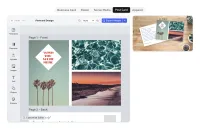
Generate instant visualizations with design mapped directly onto products.
With a preview function, you and your user can better understand how the final product will look like and easily spot any mistakes or errors.
Versions
Currently, the Mockup Editor is available for:
- Apparel
- Business card
- Postcard
- Poster
- Social media
Each view is customized to best visualize each final product.
How to use Mockup Editor
The preview automatically refreshes and reflects all changes made. Once the design is ready, you can click on the preview to access it in full screen and see the final effect. The mockup can be exported using the download button in the top right corner.
Editing mockup
If you would like to make any design changes to the mockup preview, you can do so by clicking edit inside the preview window. The editor will display the same editing functions, allowing you to adjust the position, background, size, and other mockup elements.
Mockup Editor is a great feature for Print-on-demand and E-commerce companies moving into product personalization, allowing users to quickly and easily visualize the final product.
Generate instant visualizations with design mapped directly onto products.
With a preview function, you and your user can better understand how the final product will look like and easily spot any mistakes or errors.
Versions
Currently, the Mockup Editor is available for:
- Apparel
- Business card
- Postcard
- Poster
- Social media
Each view is customized to best visualize each final product.
How to use Mockup Editor
The preview automatically refreshes and reflects all changes made. Once the design is ready, you can click on the preview to access it in full screen and see the final effect. The mockup can be exported using the download button in the top right corner.
Editing mockup
If you would like to make any design changes to the mockup preview, you can do so by clicking edit inside the preview window. The editor will display the same editing functions, allowing you to adjust the position, background, size, and other mockup elements.
Mockup Editor is a great feature for Print-on-demand and E-commerce companies moving into product personalization, allowing users to quickly and easily visualize the final product.
Related Demos
3D Mockup Editor
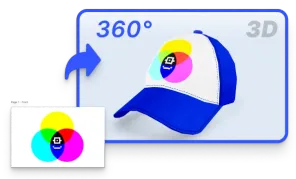
Integrate CE.SDK with 3D libraries for real-time, interactive design previews on products. Enhance accuracy and boost conversions with lifelike visuals.
Multi Image Generation
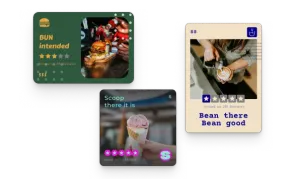
Generate multiple image variants for a single data point.
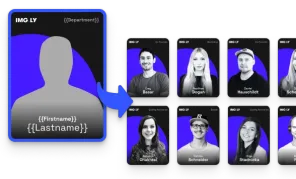
Image Set Generation
Generate a batch of images from a set of data, for instance team cards.