


Automatic Design Generation
Automatically generate ready-to-use designs from a set of input parameters.
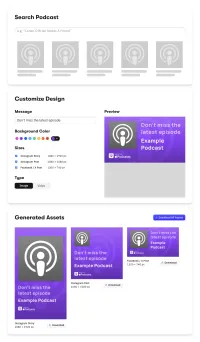
Automatic Design Generation with CE.SDK
IMG.LY’s demo demonstrates the power and flexibility of CreativeEditor SDK’s (CE.SDK) headless API to create dynamic, automated designs. By providing a set of input parameters, users can generate both static and video assets tailored to their needs. Here’s how it works:
- User Input and Data Integration:
- Users begin by searching for a podcast through the Apple Podcast library integrated into the demo.
- After selecting a podcast, they input parameters such as text content, primary and background colors, and the desired asset sizes (e.g., Instagram Story, Facebook Post).
- Automatic Asset Generation:
- The demo programmatically creates a CE.SDK scene based on the input parameters.
- It generates designs that incorporate the provided text, overlays it using specified fonts, applies selected colors, and adjusts layouts to fit the chosen formats.
- Customization and Flexibility:
- Users can refine the results by editing the automatically generated assets within the CreativeEditor’s UI.
- Alternatively, they can download the assets directly for immediate use.
- Real-World Applications:
- While the demo uses a simple example, such as podcast-themed designs, the underlying API can handle complex, real-world use cases.
- Businesses could leverage predefined or user-defined templates to generate multiple design variations programmatically, optimizing workflows and saving time.
This demo highlights the robust capabilities of CE.SDK, empowering developers and designers to deliver scalable, creative solutions through seamless automation.
Automatic Design Generation with CE.SDK
IMG.LY’s demo demonstrates the power and flexibility of CreativeEditor SDK’s (CE.SDK) headless API to create dynamic, automated designs. By providing a set of input parameters, users can generate both static and video assets tailored to their needs. Here’s how it works:
- User Input and Data Integration:
- Users begin by searching for a podcast through the Apple Podcast library integrated into the demo.
- After selecting a podcast, they input parameters such as text content, primary and background colors, and the desired asset sizes (e.g., Instagram Story, Facebook Post).
- Automatic Asset Generation:
- The demo programmatically creates a CE.SDK scene based on the input parameters.
- It generates designs that incorporate the provided text, overlays it using specified fonts, applies selected colors, and adjusts layouts to fit the chosen formats.
- Customization and Flexibility:
- Users can refine the results by editing the automatically generated assets within the CreativeEditor’s UI.
- Alternatively, they can download the assets directly for immediate use.
- Real-World Applications:
- While the demo uses a simple example, such as podcast-themed designs, the underlying API can handle complex, real-world use cases.
- Businesses could leverage predefined or user-defined templates to generate multiple design variations programmatically, optimizing workflows and saving time.
This demo highlights the robust capabilities of CE.SDK, empowering developers and designers to deliver scalable, creative solutions through seamless automation.
Related Demos
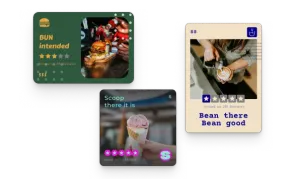
Multi Image Generation
Generate multiple image variants for a single data point.

Image Set Generation
Generate a batch of images from a set of data, for instance team cards.

Automated Resizing
Automatically generate size variations of your design and easily scale your marketing materials across different platforms.
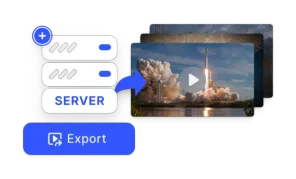
Export using CE.SDK Renderer
The Renderer brings CE.SDK's design engine to your backend—fast, compliant, enterprise-ready export for images, PDFs, and video at scale.