
PPTX Template Import
Transform PowerPoint slides into editable CE.SDK designs. All formatting preserved.
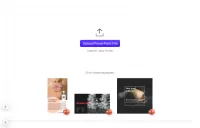
The PPTX Importer for the CE.SDK allows you to seamlessly integrate PowerPoint presentations into the editor while retaining essential design attributes.
Further, numerous design tools like e.g Canva allow you to export your designs into .pptx files which can be imported into a Creative Editor scene.
Quickstart
- Save your Microsoft PowerPoint file as a standard .PPTX file
- Import your file into the Creative Editor
Features
The main features include:
- File Format Translation: The importer converts .PPTX files from Microsoft PowerPoint into the CE.SDK scene archive format. The resulting scene archive includes all required assets for immediate use.
- Multi-Slide Support: Import entire presentations with multiple slides, each converted to a separate page block.
- Platform Agnostic: Works in both browser and Node.js environments with no file system dependencies.
Design Elements
The following PowerPoint design elements will be preserved by the import:
- Positioning and Rotation - Elements’ positioning and rotation are accurately transferred with precise EMU to pixel conversion.
- Image Elements - PNG, JPEG, GIF, BMP, and WebP images are embedded into the scene with proper sizing.
- Text Elements - Font family, size, colors, bold, italic, character spacing, and line height are maintained. Font resolution uses Google Fonts with fallback options.
- Shapes - Rectangles (with corner radius), ellipses/circles, and custom vector shapes are supported. Vector shapes are converted to SVG paths when necessary.
- Gradient Fills - Linear and radial gradients on shapes and slide backgrounds are fully supported. Path and rectangular gradients fall back to radial gradients.
- Shadow Effects - Outer drop shadows with blur, offset, and transparency are preserved. Inner shadows are converted to outer shadows.
- Colors and Strokes - Solid colors, theme colors, stroke weight and color are faithfully reproduced.
- Backgrounds - Solid color and gradient backgrounds on slides are fully supported.
- Groups - Grouped elements maintain their hierarchy and z-order.
- Transparency - Alpha transparency is preserved across all elements.
Limitations
The following elements are not currently supported:
- Animations and transitions
- Slide masters and layouts
- Charts and SmartArt graphics
- Audio and video elements
- Background images (solid colors and gradients are supported)
- Tables (partial support)
Your input is invaluable as we continue to refine and improve the importer’s capabilities. If you run into any issues, please let us know by sending an email to support@img.ly and include example .PPTX files.
The PPTX Importer for the CE.SDK allows you to seamlessly integrate PowerPoint presentations into the editor while retaining essential design attributes.
Further, numerous design tools like e.g Canva allow you to export your designs into .pptx files which can be imported into a Creative Editor scene.
Quickstart
- Save your Microsoft PowerPoint file as a standard .PPTX file
- Import your file into the Creative Editor
Features
The main features include:
- File Format Translation: The importer converts .PPTX files from Microsoft PowerPoint into the CE.SDK scene archive format. The resulting scene archive includes all required assets for immediate use.
- Multi-Slide Support: Import entire presentations with multiple slides, each converted to a separate page block.
- Platform Agnostic: Works in both browser and Node.js environments with no file system dependencies.
Design Elements
The following PowerPoint design elements will be preserved by the import:
- Positioning and Rotation - Elements’ positioning and rotation are accurately transferred with precise EMU to pixel conversion.
- Image Elements - PNG, JPEG, GIF, BMP, and WebP images are embedded into the scene with proper sizing.
- Text Elements - Font family, size, colors, bold, italic, character spacing, and line height are maintained. Font resolution uses Google Fonts with fallback options.
- Shapes - Rectangles (with corner radius), ellipses/circles, and custom vector shapes are supported. Vector shapes are converted to SVG paths when necessary.
- Gradient Fills - Linear and radial gradients on shapes and slide backgrounds are fully supported. Path and rectangular gradients fall back to radial gradients.
- Shadow Effects - Outer drop shadows with blur, offset, and transparency are preserved. Inner shadows are converted to outer shadows.
- Colors and Strokes - Solid colors, theme colors, stroke weight and color are faithfully reproduced.
- Backgrounds - Solid color and gradient backgrounds on slides are fully supported.
- Groups - Grouped elements maintain their hierarchy and z-order.
- Transparency - Alpha transparency is preserved across all elements.
Limitations
The following elements are not currently supported:
- Animations and transitions
- Slide masters and layouts
- Charts and SmartArt graphics
- Audio and video elements
- Background images (solid colors and gradients are supported)
- Tables (partial support)
Your input is invaluable as we continue to refine and improve the importer’s capabilities. If you run into any issues, please let us know by sending an email to support@img.ly and include example .PPTX files.
Related Demos
Indesign Template Import
Transform your existing InDesign templates for use in the CE.SDK with our Importer. Preserve design elements and streamline the transition between platforms.
Photoshop Template Import
Transform your existing Photoshop templates for use in the CE.SDK with our Importer. Preserve design elements and streamline the transition between platforms.
Illustrator Template Import
Learn how to convert Adobe Illustrator files to .PSD files for import into CE.SDK. Use our example files to validate your workflow.