Customize crop presets to provide users with aspect ratio options tailored to your application’s needs.
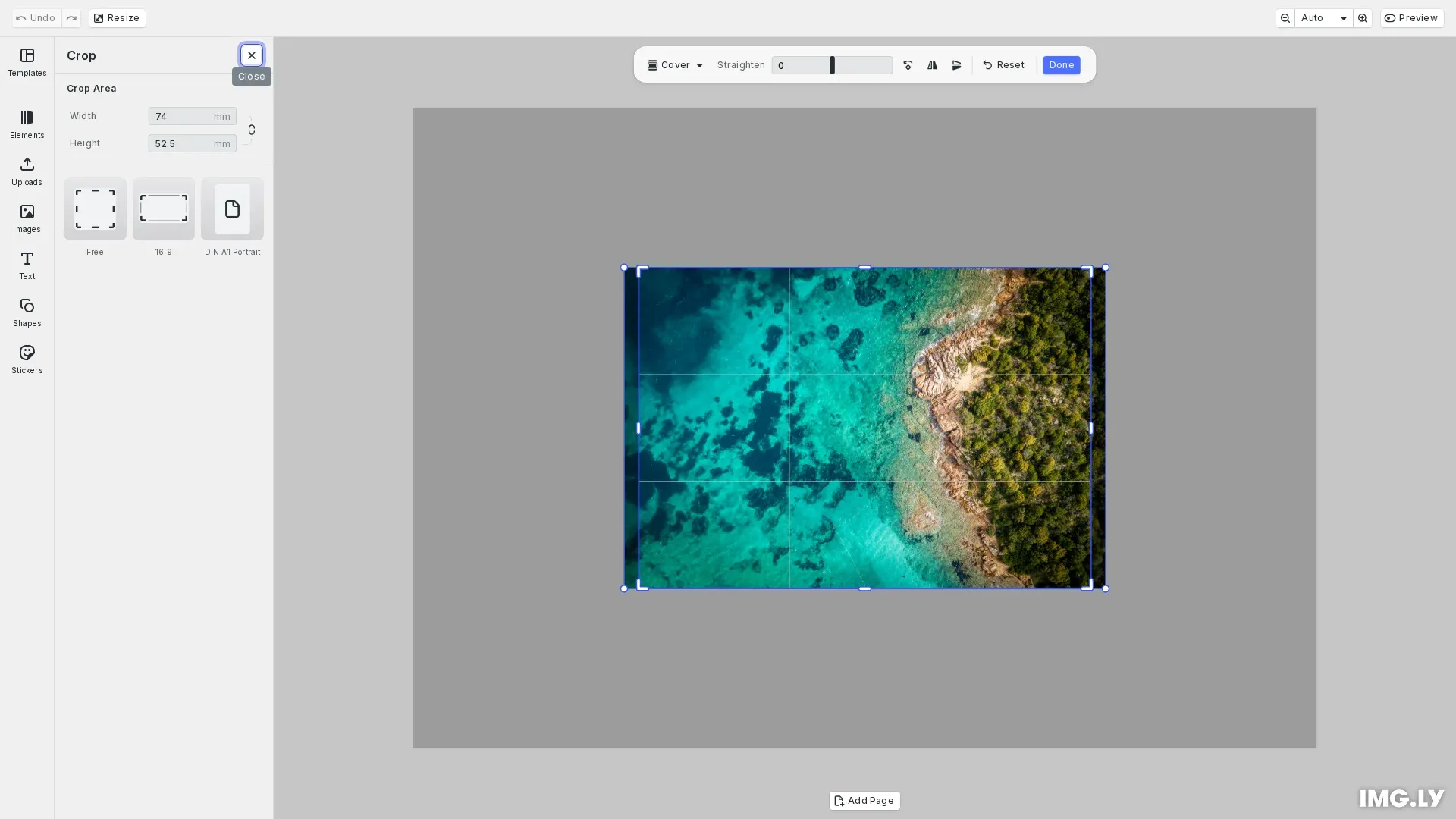
Crop presets define the aspect ratios and dimensions users can select when cropping images or pages. CE.SDK includes a default set of common ratios (1:1, 16:9, 4:3, etc.), and you can replace or extend these with custom presets through asset sources.
This guide covers how to use the built-in crop UI, understand default presets, create custom crop preset sources, and configure which presets appear in the interface.
Using the Built-in Crop UI#
The crop interface displays preset options when users enter crop mode. Presets appear as selectable thumbnails with aspect ratio labels. Users click a preset to constrain the crop frame to that ratio, or select the free preset for unconstrained cropping.
To enable the default crop presets, we load them using the CropPresetsAssetSource plugin:
import { CropPresetsAssetSource } from '@cesdk/cesdk-js/plugins';
await instance.addPlugin(new CropPresetsAssetSource());
This loads the ly.img.crop.presets asset source, which contains common ratios including free, 1:1, 9:16, 16:9, 4:3, and others.
Creating Custom Crop Preset Sources#
We can define custom crop presets by creating a local asset source and adding preset assets to it. Each preset requires a payload.transformPreset property that defines the crop behavior.
First, we create a local asset source to hold our custom presets:
instance.engine.asset.addLocalSource('my-custom-crop-presets');Free Aspect Ratio#
A free aspect ratio preset enables unconstrained cropping, allowing users to drag the crop frame sides independently.
{ id: 'aspect-ratio-free', label: { en: 'Free' }, meta: { width: 80, height: 120, thumbUri: `${window.location.protocol}//${window.location.host}/ratio-free.png` }, payload: { transformPreset: { type: 'FreeAspectRatio' } }}The type: 'FreeAspectRatio' setting removes aspect ratio constraints from the crop frame.
Fixed Aspect Ratio#
A fixed aspect ratio preset constrains the crop frame to a specific ratio. When applied, the crop frame maintains the width to height proportion.
{ id: 'aspect-ratio-16-9', label: { en: '16:9' }, meta: { width: 80, height: 120, thumbUri: `${window.location.protocol}//${window.location.host}/ratio-16-9.png` }, payload: { transformPreset: { type: 'FixedAspectRatio', width: 16, height: 9 } }}The width and height values define the ratio (16:9 in this example), not absolute dimensions.
Fixed Size#
A fixed size preset sets exact pixel dimensions for the crop area. This resizes the selected block to match the specified width and height.
{ id: 'din-a1-portrait', label: { en: 'DIN A1 Portrait' }, meta: { width: 80, height: 120, thumbUri: `${window.location.protocol}//${window.location.host}/din-a1-portrait.png` }, payload: { transformPreset: { type: 'FixedSize', width: 594, height: 841, designUnit: 'Millimeter' } }}The designUnit property specifies the measurement unit. Valid options are 'Pixel', 'Millimeter', or 'Inch'.
Configuring the Crop Presets Library#
We control which presets appear in the crop interface by updating the ly.img.cropPresets asset library entry.
Replace Default Presets#
To show only custom presets, we set sourceIds to our custom source:
instance.ui.updateAssetLibraryEntry('ly.img.cropPresets', { sourceIds: ['my-custom-crop-presets']});Add Presets Alongside Defaults#
To add custom presets while keeping the defaults, we use a callback to append our source:
instance.ui.updateAssetLibraryEntry('ly.img.cropPresets', { sourceIds: ({ currentIds }) => [...currentIds, 'my-custom-crop-presets']});Localization#
Each preset requires a label object with at least an en key for the English label. You can add additional language keys for localization:
label: { en: '16:9', de: '16:9'}Troubleshooting#
Presets Not Appearing#
Verify the asset source exists by checking registered sources:
const sources = await instance.engine.asset.findAllSources();console.log(sources); // Should include your custom source IDInvalid Preset Type#
Ensure the type value is one of:
'FreeAspectRatio'- for unconstrained cropping'FixedAspectRatio'- for ratio-locked cropping'FixedSize'- for exact dimension cropping
Missing Labels#
Each preset must have a label object. Missing labels cause presets to display without text.
API Reference#
| Method | Description |
|---|---|
engine.asset.addLocalSource(sourceId) | Create a local asset source for custom presets |
engine.asset.addAssetToSource(sourceId, asset) | Add a crop preset asset to the source |
engine.asset.findAllSources() | List all registered asset sources |
cesdk.ui.updateAssetLibraryEntry(entryId, config) | Configure which sources appear in a library entry |
cesdk.addPlugin(new CropPresetsAssetSource()) | Load crop preset asset source plugin |