Combine multiple shapes using boolean operations to create custom compound designs programmatically.
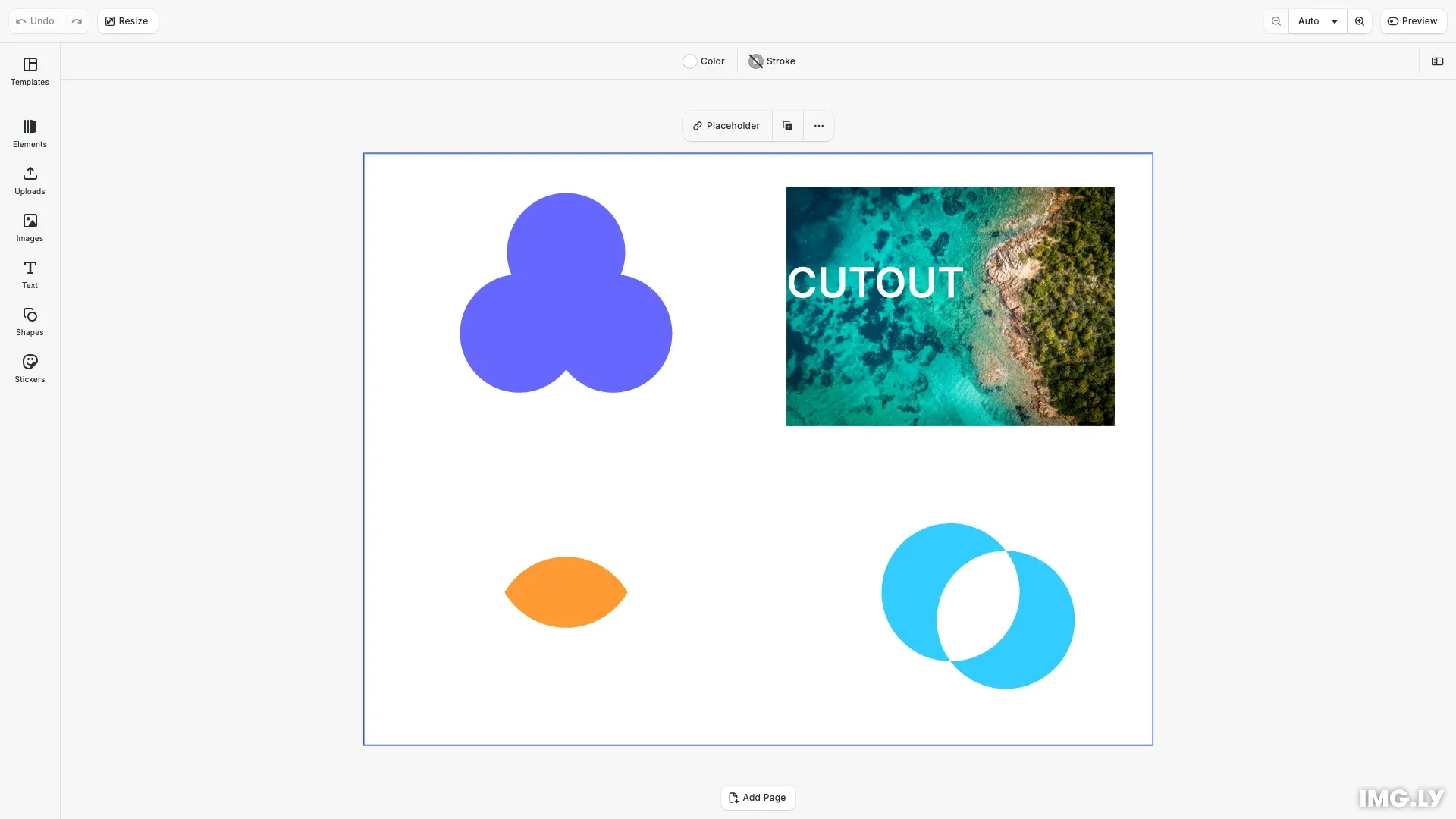
CE.SDK provides four boolean operations for combining shapes: Union, Difference, Intersection, and XOR. These operations work with graphic blocks and text blocks, allowing you to build complex designs from simple primitives.
This guide covers checking combinability, applying the four boolean operations, understanding fill inheritance, and troubleshooting common combination issues.
Understanding Boolean Operations#
CE.SDK offers four boolean operations for combining blocks into new shapes. Each operation applies geometric transformations to create unique compound designs.
Union merges all blocks into a single shape, adding their areas together. Difference subtracts overlapping areas from a base block, creating cutouts. Intersection keeps only the overlapping regions. XOR removes overlaps while preserving non-overlapping parts.
The operations use engine.block.combine(ids, operation) where ids is an array of blocks and operation is one of: 'Union', 'Difference', 'Intersection', or 'XOR'.
Combining blocks with the 'Union', 'Intersection', or 'XOR' operation results in a new block whose fill is that of the top-most block. The operation is applied pair-wise from the top-most block to the bottom-most block.
Combining blocks with the 'Difference' operation results in a new block whose fill is that of the bottom-most block. The operation is applied pair-wise from the bottom-most block to the top-most block.
The combined blocks will be destroyed if the 'lifecycle/destroy' scope is enabled.
Checking Combinability#
Before combining blocks, verify they can be combined using engine.block.isCombinable(ids). Only graphic blocks and text blocks with the 'lifecycle/duplicate' scope enabled can be combined.
// Check if blocks can be combined before attempting operationsconst canCombineUnion = engine.block.isCombinable([ unionCircle1, unionCircle2, unionCircle3]);const canCombineDiff = engine.block.isCombinable([imageBlock, textBlock]);const canCombineIntersect = engine.block.isCombinable([ intersectCircle1, intersectCircle2]);const canCombineXor = engine.block.isCombinable([xorCircle1, xorCircle2]);The check returns true if all blocks meet the requirements. Attempting to combine incompatible blocks will fail.
Combining with Union#
Union merges multiple shapes into one compound outline. The result inherits the fill from the top-most block in the z-order.
// Combine three circles using Union operationif (canCombineUnion) { engine.block.combine([unionCircle1, unionCircle2, unionCircle3], 'Union');}We create three circles with different colors. Union combines them into a single block with the blue fill (from the top-most circle).
Use Union for merging logos, creating compound icons, and building complex shapes from simple primitives.
Combining with Difference#
Difference subtracts overlapping shapes from a base block, creating cutout effects. The result inherits the fill from the bottom-most block.
// Create punch-out effect using Difference operation// Ensure image is at the bottom (will be the base block)if (canCombineDiff) { engine.block.sendToBack(imageBlock); engine.block.combine([imageBlock, textBlock], 'Difference');}We position an image as the bottom block and text above it. Difference removes the text shape from the image, creating a punch-out effect where the text was.
Use Difference for text punch-outs, logo cutouts, and mask effects. Ensure the base block is at the bottom using engine.block.sendToBack().
Combining with Intersection#
Intersection keeps only the overlapping areas of all blocks. The result inherits the fill from the bottom-most block.
// Extract overlapping area using Intersection operationif (canCombineIntersect) { engine.block.combine( [intersectCircle1, intersectCircle2], 'Intersection' );}We create two overlapping circles. Intersection extracts only the area where they overlap, discarding the rest.
Use Intersection for lens effects, overlapping patterns, and extracting geometric intersections.
Combining with XOR#
XOR (exclusive OR) keeps non-overlapping parts while removing intersections, creating an exclusion or donut effect. The result inherits the fill from the top-most block.
// Create exclusion pattern using XOR operationif (canCombineXor) { engine.block.combine([xorCircle1, xorCircle2], 'XOR');}We create two overlapping circles. XOR removes the overlapping area while preserving the non-overlapping parts.
Use XOR for donut shapes, exclusion patterns, and inverted overlaps.
Understanding Fill Inheritance#
Combined blocks inherit properties from a prioritized block based on the operation.
Union, Intersection, XOR: The new block inherits the fill from the top-most block. Operations are applied pair-wise from highest to lowest sort order.
Difference: The new block inherits the fill from the bottom-most block. Operations are applied pair-wise from lowest to highest sort order.
Original blocks are destroyed after combination if the 'lifecycle/destroy' scope is enabled. Control which fill is inherited by reordering blocks with engine.block.bringToFront() and engine.block.sendToBack().
Scope Requirements#
Combining blocks requires specific scopes:
'lifecycle/duplicate': Required on all blocks. Checked by engine.block.isCombinable(). If missing, combination fails.
'lifecycle/destroy': Required for destroying original blocks. If disabled, original blocks remain after combination.
Check scopes with engine.block.isScopeEnabled(id, scope) and enable with engine.block.setScopeEnabled(id, scope, true).
Troubleshooting#
Combination Fails Silently#
Verify blocks are combinable using engine.block.isCombinable(ids) before attempting operations. Only graphic blocks and text blocks can be combined. Check that the 'lifecycle/duplicate' scope is enabled on all blocks.
Original Blocks Not Destroyed#
Ensure the 'lifecycle/destroy' scope is enabled on input blocks. If disabled, blocks remain after combination. Check with engine.block.isScopeEnabled(id, 'lifecycle/destroy').
Wrong Fill on Result#
For Union/Intersection/XOR, the top-most block’s fill is inherited. For Difference, the bottom-most block’s fill is inherited. Reorder blocks before combining using engine.block.bringToFront() or engine.block.sendToBack().
Unexpected Shape Result#
Boolean operations are applied pair-wise in specific order. Union/Intersection/XOR start with the highest sort order (top-most). Difference starts with the lowest sort order (bottom-most). Control order with z-order methods.
Full Code#
Here’s the complete implementation showing all four boolean operations:
import CreativeEditorSDK from '@cesdk/cesdk-js';import {  BlurAssetSource,  ImageColorsAssetSource,  ColorPaletteAssetSource,  CropPresetsAssetSource,  DemoAssetSources,  EffectsAssetSource,  FiltersAssetSource,  PagePresetsAssetSource,  StickerAssetSource,  TextAssetSource,  TextComponentAssetSource,  TypefaceAssetSource,  UploadAssetSources,  VectorShapeAssetSource,} from '@cesdk/cesdk-js/plugins';
const config = {  license: 'YOUR_CESDK_LICENSE_KEY',  callbacks: {    onUpload: 'local'  }};
const cesdk = await CreativeEditorSDK.create('#cesdk_container', config);
// Add default asset source pluginsawait cesdk.addPlugin(new BlurAssetSource());await cesdk.addPlugin(new ImageColorsAssetSource());await cesdk.addPlugin(new ColorPaletteAssetSource());await cesdk.addPlugin(new CropPresetsAssetSource());await cesdk.addPlugin(new EffectsAssetSource());await cesdk.addPlugin(new FiltersAssetSource());await cesdk.addPlugin(new PagePresetsAssetSource());await cesdk.addPlugin(new StickerAssetSource());await cesdk.addPlugin(new TextAssetSource());await cesdk.addPlugin(new TextComponentAssetSource());await cesdk.addPlugin(new TypefaceAssetSource());await cesdk.addPlugin(new VectorShapeAssetSource());
// Add demo and upload sourcesawait cesdk.addPlugin(new UploadAssetSources({ include: ['ly.img.image.upload'] }));await cesdk.addPlugin(  new DemoAssetSources({    include: [      'ly.img.templates.blank.*',      'ly.img.templates.presentation.*',      'ly.img.templates.print.*',      'ly.img.templates.social.*',      'ly.img.image.*'    ]  }));await cesdk.actions.run('scene.create');
const engine = cesdk.engine;const page = engine.block.findByType('page')[0];
engine.block.setWidth(page, 800);engine.block.setHeight(page, 600);
const pageWidth = engine.block.getWidth(page);const pageHeight = engine.block.getHeight(page);const quadrantWidth = pageWidth / 2;const quadrantHeight = pageHeight / 2;
// Union: Combine three circles in top-left quadrant (20% larger, centered)const circle1 = engine.block.create('graphic');engine.block.setShape(circle1, engine.block.createShape('//ly.img.ubq/shape/ellipse'));const fill1 = engine.block.createFill('color');engine.block.setColor(fill1, 'fill/color/value', { r: 1.0, g: 0.4, b: 0.4, a: 1.0 });engine.block.setFill(circle1, fill1);engine.block.setWidth(circle1, 96);  // 80 * 1.2 = 96engine.block.setHeight(circle1, 96);engine.block.setPositionX(circle1, quadrantWidth / 2 - 48);engine.block.setPositionY(circle1, quadrantHeight / 2 - 48);engine.block.appendChild(page, circle1);
const circle2 = engine.block.create('graphic');engine.block.setShape(circle2, engine.block.createShape('//ly.img.ubq/shape/ellipse'));const fill2 = engine.block.createFill('color');engine.block.setColor(fill2, 'fill/color/value', { r: 0.4, g: 1.0, b: 0.4, a: 1.0 });engine.block.setFill(circle2, fill2);engine.block.setWidth(circle2, 96);  // 80 * 1.2 = 96engine.block.setHeight(circle2, 96);engine.block.setPositionX(circle2, quadrantWidth / 2 + 24);engine.block.setPositionY(circle2, quadrantHeight / 2 - 48);engine.block.appendChild(page, circle2);
const circle3 = engine.block.create('graphic');engine.block.setShape(circle3, engine.block.createShape('//ly.img.ubq/shape/ellipse'));const fill3 = engine.block.createFill('color');engine.block.setColor(fill3, 'fill/color/value', { r: 0.4, g: 0.4, b: 1.0, a: 1.0 });engine.block.setFill(circle3, fill3);engine.block.setWidth(circle3, 120);  // 100 * 1.2 = 120engine.block.setHeight(circle3, 120);engine.block.setPositionX(circle3, quadrantWidth / 2 - 12);engine.block.setPositionY(circle3, quadrantHeight / 2 - 12);engine.block.appendChild(page, circle3);
// Check combinability and perform Unionif (engine.block.isCombinable([circle1, circle2, circle3])) {  const unionResult = engine.block.combine([circle1, circle2, circle3], 'Union');}
// Difference: Create punch-out text effect in top-right quadrantconst imageWidth = 360;  // 300 * 1.2 = 360const imageHeight = 240;  // 200 * 1.2 = 240const imageBlock = engine.block.create('graphic');engine.block.setShape(imageBlock, engine.block.createShape('//ly.img.ubq/shape/rect'));const imageFill = engine.block.createFill('image');engine.block.setString(imageFill, 'fill/image/imageFileURI',  'https://img.ly/static/ubq_samples/sample_1.jpg');engine.block.setFill(imageBlock, imageFill);engine.block.setWidth(imageBlock, imageWidth);engine.block.setHeight(imageBlock, imageHeight);engine.block.setPositionX(imageBlock, quadrantWidth + (quadrantWidth - imageWidth) / 2);engine.block.setPositionY(imageBlock, (quadrantHeight - imageHeight) / 2);engine.block.appendChild(page, imageBlock);
const textBlock = engine.block.create('text');engine.block.replaceText(textBlock, 'CUTOUT');engine.block.setFloat(textBlock, 'text/fontSize', 170);const textWidth = 300;const textHeight = 120;engine.block.setWidth(textBlock, textWidth);engine.block.setHeight(textBlock, textHeight);// Center text on the imageengine.block.setPositionX(textBlock, quadrantWidth + (quadrantWidth - textWidth) / 2);engine.block.setPositionY(textBlock, (quadrantHeight - textHeight) / 2);engine.block.appendChild(page, textBlock);
// Ensure image is at bottom for Difference operationengine.block.sendToBack(imageBlock);
if (engine.block.isCombinable([imageBlock, textBlock])) {  const differenceResult = engine.block.combine([imageBlock, textBlock], 'Difference');}
// Zoom to see all resultsawait engine.scene.zoomToBlock(page, { padding: 40 });
API Reference#
| Method | Category | Purpose |
|---|---|---|
engine.block.isCombinable(ids) |
Validation | Check if blocks can be combined |
engine.block.combine(ids, op) |
Combination | Perform boolean operation on blocks |
engine.block.create('graphic') |
Creation | Create graphic block for shapes |
engine.block.create('text') |
Creation | Create text block |
engine.block.createShape(type) |
Shapes | Create shape (ellipse, rect, etc.) |
engine.block.setShape(id, shape) |
Shapes | Apply shape to graphic block |
engine.block.createFill(type) |
Fills | Create fill (color, image, etc.) |
engine.block.setFill(id, fill) |
Fills | Apply fill to block |
engine.block.setPositionX/Y(id, val) |
Transform | Position blocks before combining |
engine.block.setWidth/Height(id, val) |
Transform | Size blocks before combining |
engine.block.appendChild(parent, child) |
Hierarchy | Add blocks to scene |
engine.block.isScopeEnabled(id, scope) |
Scope | Check if scope is enabled |
engine.block.setScopeEnabled(id, scope, enabled) |
Scope | Enable/disable scope |
engine.block.bringToFront(id) |
Order | Control stacking order |
engine.block.sendToBack(id) |
Order | Control stacking order |