Open a Figma file in the editor as an editable scene, one Figma canvas at a time.
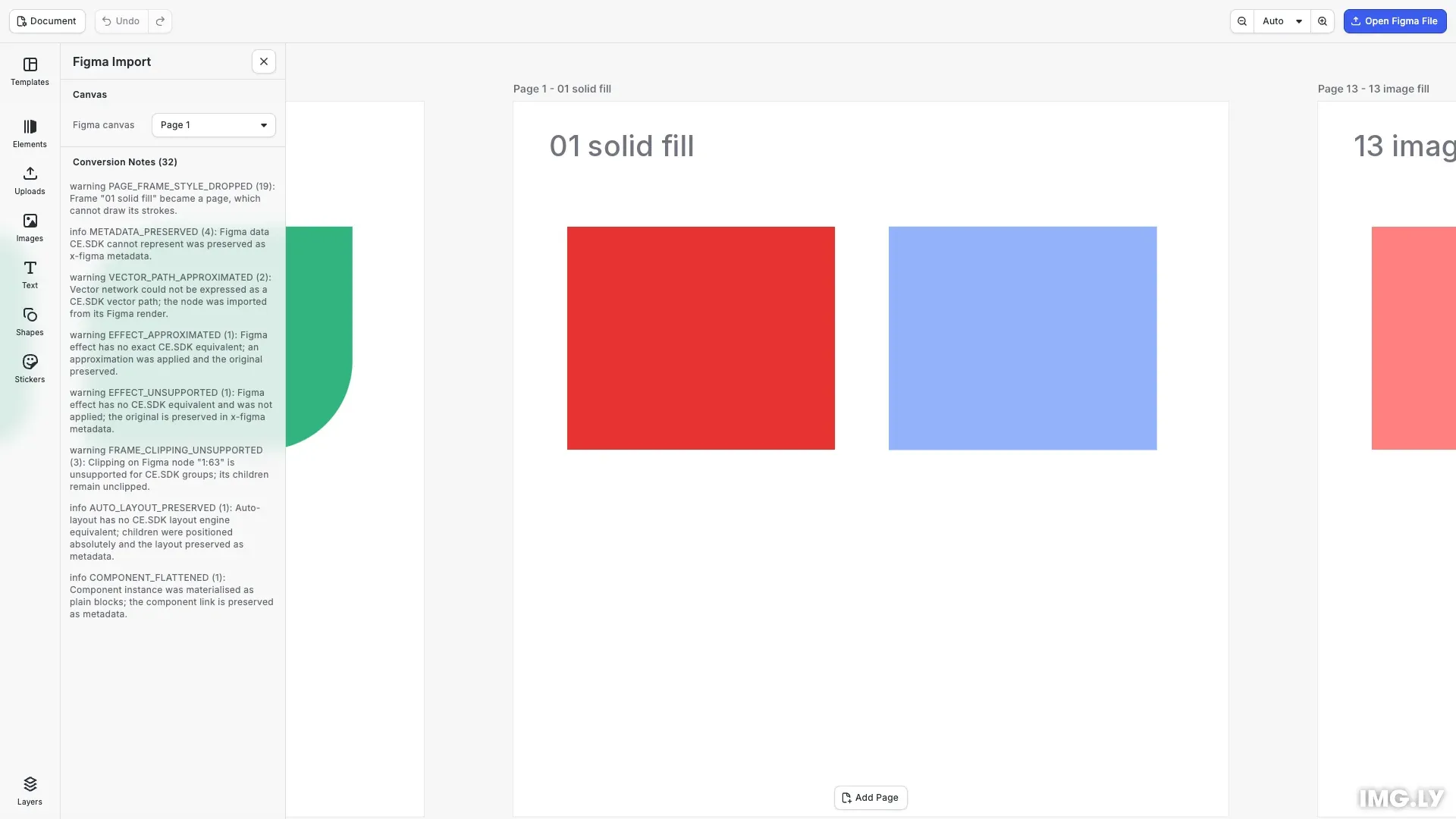
The @imgly/figma-importer package converts one Figma canvas into a CE.SDK scene with editable text, shapes and images. In the browser, it runs on the editor’s own engine, so the file the user picks stays in the page. To convert files on a server, see the Node.js guide. To hand a design back to Figma, see Export to Figma.
This guide covers how to import a .fig file into the editor, let users pick their own file, show the conversion notes, switch between canvases and import through Figma’s REST API.
Install the Packages#
Install CE.SDK and the Figma importer. The importer has its own version numbers, so we do not pin it to the CE.SDK version.
npm install @cesdk/cesdk-js@1.87.0 @imgly/figma-importerThe importer exports importFig() for local files and importFigmaFile() for the REST API. Both take the editor’s cesdk.engine.
import { importFig, importFigmaFile, type ImportResult, type LogMessage} from '@imgly/figma-importer';Import a Local Copy#
In Figma, choose File → Save local copy to get a .fig file. importFig() takes the engine, the file bytes and the canvas to load, and replaces the editor’s scene with a new scene for that canvas. We then zoom to the first page.
// The file is decoded before the editor's scene is replaced, so a// file that is not a `.fig` leaves the current design in place.const result = await importFig(engine, bytes, { canvas: index });fileBytes = bytes;// The default padding reads the camera size, which the new scene's// camera does not have yet, so pass a padding.await cesdk.actions.run('zoom.toPage', { page: 'first', padding: 40, autoFit: true});The importer decodes the file, checks the canvas and loads the font catalog before it replaces the scene. A file that is not a .fig, or a font catalog that does not load, leaves the user’s design in place. The importer matches text fonts against a Google Fonts catalog that it downloads when none is registered, so importing a file with text needs a network connection. In production, serve your own fonts: register typeface asset sources under the ids ly.img.gfonts and ly.img.gfonts-fallbacks before the first import. The importer does not replace a source that already exists, and it falls back to Roboto, so your sources must include it.
Let Users Pick a File#
A button in the navigation bar opens the file picker. cesdk.utils.loadFile() returns the chosen file as an ArrayBuffer. We wrap it in a Uint8Array and import the first canvas.
cesdk.ui.registerComponent('figma.openFile', ({ builder }) => { builder.Button('figma.openFile', { label: 'Open Figma File', icon: '@imgly/Upload', variant: 'regular', color: 'accent', onClick: async () => { let buffer: ArrayBuffer; try { buffer = await cesdk.utils.loadFile({ accept: '.fig', returnType: 'arrayBuffer' }); } catch { // `loadFile()` rejects when the user cancels the dialog. return; } await importCanvas(new Uint8Array(buffer), 0); } });});cesdk.ui.setComponentOrder({ in: 'ly.img.navigation.bar' }, [ ...cesdk.ui.getComponentOrder({ in: 'ly.img.navigation.bar' }), 'figma.openFile']);Open a Sample at Start#
The example bundles assets/sample.fig and imports it when the editor starts. The companion exporter wrote this file, and Figma saved it again with two canvases. It shows the file format, not the full range of designs made in Figma.
const response = await fetch(SAMPLE_URL);if (!response.ok) throw new Error('Could not load the sample .fig file');await importCanvas(new Uint8Array(await response.arrayBuffer()), 0);Review Conversion Notes#
result.logger.getMessages() lists what the import changed. Each message has a type of info, warning or error, a stable code and a readable message. We log the warnings to the console, show a notification, and pass the messages to the panel described in the next section.
const showConversionNotes = (result: ImportResult, index: number) => { // Each message has a `type`, a stable `code` and a readable `message`. const messages = result.logger.getMessages(); const warnings = messages.filter((message) => message.type !== 'info'); for (const message of warnings) { console.warn(`[${message.code}] ${message.message}`); } if (warnings.length > 0) { cesdk.ui.showNotification({ type: 'warning', message: `Imported "${result.canvas}" with ${warnings.length} warning(s). See the Figma Import panel.` }); } const payload: FigmaPanelPayload = { canvases: result.canvases, index, messages }; cesdk.ui.openPanel(PANEL_ID, { payload });};Supported text, shapes, images, gradients, strokes, effects, blend modes and corner radii become editable CE.SDK content. Some Figma behavior has no CE.SDK equivalent:
- Layout: auto-layout becomes absolute placement (
AUTO_LAYOUT_PRESERVED). Constraints do not become live behavior. - Components: instances become independent groups (
COMPONENT_FLATTENED). Supported local text and style overrides are applied, including nested instances. - Pages: each top-level frame becomes a page with its name, size, fill and clipping, in reading order. Layers beside the frames go on one extra page named after the canvas (
CANVAS_CONTENT_OUTSIDE_FRAMES). PassframesAsPages: falseto import the canvas as one page with each frame as a group. A.figcanvas with one frame named after the canvas, or with one row of frames and no other top-level content, still becomes pages. - Clipping: frames below the top level become groups, which cannot clip their children. Overflowing children stay visible, and the importer reports
FRAME_CLIPPING_UNSUPPORTED. - Fonts: a font that is not in the catalog is replaced, and the importer reports
FONT_UNAVAILABLE. Text can reflow even when the family matches, because Figma and the available font files can have different metrics.
The importer keeps Figma data that CE.SDK has no property for as x-figma/… block metadata, so Export to Figma can restore it. Pass preserveFigmaData: false for a scene that will not go back to Figma. Preservation is best effort and does not guarantee an identical Figma file.
Switch Canvases#
A Figma canvas is a scene, not a page, and the engine holds one scene at a time. result.canvases lists every canvas name, and the canvas option takes a name or a zero-based index. Use the index when two canvases share a name. A name that is not in the file throws an error.
The example registers a panel with cesdk.ui.registerPanel(). It lists the canvases in a Select, and choosing one imports the same bytes again with that index. The panel also lists the conversion notes, grouped by code, because one code can repeat for many layers.
cesdk.i18n.setTranslations({  en: { [`panel.${PANEL_ID}`]: 'Figma Import' }});cesdk.ui.registerPanel<FigmaPanelPayload>(  PANEL_ID,  ({ builder, payload }) => {    if (!payload) return;    const { canvases, index, messages } = payload;
    builder.Section('figma.canvas', {      title: 'Canvas',      children: () => {        builder.Select('figma.canvas.select', {          inputLabel: 'Figma canvas',          values: canvases.map((name, i) => ({            id: String(i),            label: name          })),          value: { id: String(index), label: canvases[index] },          isDisabled: canvases.length < 2,          setValue: ({ id }) => {            if (fileBytes) void importCanvas(fileBytes, Number(id));          }        });      }    });
    // Group the notes by code, since one code can repeat for many layers.    const notesByCode = new Map<string, LogMessage[]>();    for (const message of messages) {      notesByCode.set(message.code, [        ...(notesByCode.get(message.code) ?? []),        message      ]);    }    builder.Section('figma.notes', {      title: `Conversion Notes (${messages.length})`,      children: () => {        if (messages.length === 0) {          builder.Text('figma.notes.none', {            content: 'This canvas imported without conversion notes.'          });        }        for (const [code, notes] of notesByCode) {          builder.Text(`figma.notes.${code}`, {            content: `${notes[0].type} ${code} (${notes.length}): ${notes[0].message}`          });        }      }    });  });
Each import replaces the scene, including the user’s edits. Save the design first, for example with engine.scene.saveToArchive(). See From Archive to open the archive again.
Import Through the REST API#
importFigmaFile() reads a file through Figma’s REST API. It needs the file key from the file URL and a token with access to that file. Figma’s API accepts requests from browsers, but a token in a page is visible to everyone who uses the page. In the browser, pass only a token that the user supplies, such as their own personal access token. Keep your own tokens on a server and import there, as the Node.js guide shows.
// Optional: import through Figma's REST API. A token in a page is visible to// everyone who uses the page, so pass only a token that the user supplies,// such as their own personal access token.export async function importFromFigmaApi( engine: CreativeEngine, fileKey: string, token: string, canvas: number | string = 0): Promise<ImportResult> { return importFigmaFile(engine, { fileKey, token, canvas, // Report a rate limit at once: Figma's Retry-After can outlast the page. maxRetries: 0 });}The example exports this function and does not call it. In the browser, always pass token: only Node.js falls back to the FIGMA_TOKEN environment variable. The options also take nodeIds to import selected subtrees, a custom fetch, and concurrency and retry settings. By default, the importer retries a rate-limited request after its Retry-After delay. Figma’s delay can last longer than a user waits, so the example sets maxRetries: 0 and the import fails at once with the rate-limit error. An image fill that cannot be downloaded keeps a placeholder, and the importer reports IMAGE_UNAVAILABLE.
API Reference#
| API | Description |
|---|---|
importFig(engine, bytes, options?) |
Imports one canvas of a local .fig file and replaces the current scene. |
importFigmaFile(engine, options) |
Imports one canvas through the REST API. Takes fileKey, token, nodeIds and the client settings. |
options.canvas |
The canvas to load, by name or zero-based index. Defaults to 0. |
options.preserveFigmaData |
Keeps unmapped Figma data as x-figma/… metadata. Defaults to true. |
options.framesAsPages |
Imports each top-level frame as a page. Defaults to true. |
result.canvases / result.canvas |
All canvas names, and the name of the loaded canvas. |
result.logger.getMessages() |
The conversion notes, each with type, code and message. |
cesdk.utils.loadFile(options) |
Opens the file picker and returns the file, here as an ArrayBuffer. |
cesdk.ui.registerPanel(id, render) / cesdk.ui.openPanel(id, options) |
Registers the canvas panel and opens it with the latest result. |
Troubleshooting#
- The import fails with a Content Security Policy error: the page blocks WebAssembly compilation, generated code, Figma’s API or the font catalog. For a
.figimport, add'wasm-unsafe-eval'and'unsafe-eval'toscript-src. For a REST import, addhttps://api.figma.comtoconnect-src. Add the origin of your font catalog toconnect-srcin both cases. - “Cannot load the Zstandard WebAssembly codec”: the browser has no WebAssembly SIMD, such as Safari before 16.4, or the page blocks WebAssembly. Use a newer browser, or add
'wasm-unsafe-eval'toscript-src. - The import fails with “Not a readable .fig file”: the file is not a
.figsaved by Figma, or it is damaged. In Figma, save a local copy again. - The import fails with “no canvas … in …”: the canvas name is not in the file. Pick a name from
result.canvases, or pass an index. - The import fails with a “limit exceeded” error: the file exceeds a decoding limit, such as 64 MiB of compressed input or 100,000 nodes. The error names the limit. Split the file in Figma.
- A REST import fails with a 403 or 404 status: the token has no access to the file, or the file key is wrong. Check both in Figma.
- A REST import has no images: the page blocks the downloads, and the importer reports
IMAGE_UNAVAILABLE. Add the host of Figma’s image URLs toconnect-src. - Text uses a different font or wraps differently: the font is not in the catalog, or its metrics differ from Figma’s. Check the
FONT_UNAVAILABLEnotes. - A child extends beyond its frame: a top-level frame keeps its clipping as a page, but CE.SDK groups cannot clip like Figma frames. Check the
FRAME_CLIPPING_UNSUPPORTEDnotes and adjust the design. - The design imports as one large page: the canvas has no top-level frame that can become a page, or the import passes
framesAsPages: false. - The previous design is gone: each import replaces the scene. Save the design before the next import.
Next Steps#
- Export to Figma hands the edited design back to Figma.
- Import From Figma in Node.js converts files on a server and keeps the token there.
- From Archive opens a saved design again.