



IMG.LY Codesign vs. Canva Magic Studio

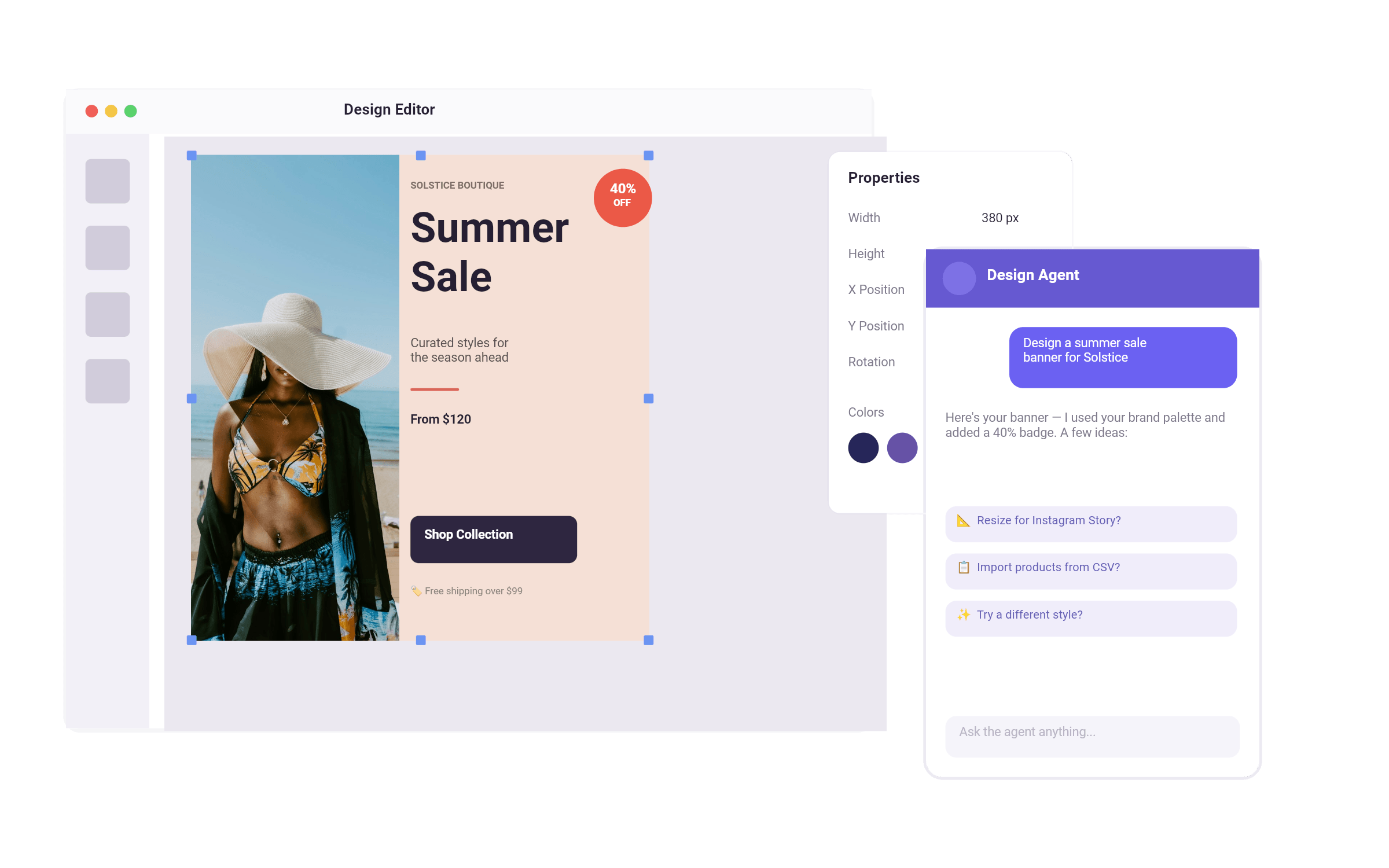
Canva Magic Studio is a collection of AI tools built into a template editor. Codesign is an AI companion built around a real design engine. One assists you through the process. The other handles it.

500M+

video and photo creations are powered by IMG.LY every month
Digitas
Omneky
the print bar
Brandwatch
Planoly
HP
Shopify
Reuters
Hootsuite
Semrush
Shutterfly
Sprout Social
One.com
Constant Contact
Your partner in crime

What makes IMG.LY Codesign the best Canva Magic Studio alternative?

Brand rules that run themselves

Load your guidelines once. Codesign applies them to every output, whether you're making one post or a hundred campaign variants.

One conversation, full workflows

Describe the campaign. Get the design. Ask for every format. Request an animated version. All in the same conversation without switching tools.

The editor builds itself around your work

Ask for a pricing slider, a theme switcher, a custom asset panel - and it builds it, using the same engine that powers the product. The tool becomes whatever the work requires.

A real design, not a flat image

Codesign generates outputs you can immediately work with - every element is editable from the start. Move a headline, swap a font, change a colour. No regenerating, no starting over.

IMG.LY Codesign vs. Canva Magic Studio at a Glance

Features

IMG.LY Codesign

Canva Magic Studio

Notes

Primary Use Case

AI design companion for marketeers, designers, and everyone in between who needs brand-consistent, fully editable output without the bottlenecks.

AI-powered creative suite for individuals and teams creating social content, presentations, and marketing materials.

Both products help teams create faster. Codesign does it through a single AI companion that handles the full workflow from a description. Canva Magic Studio does it through AI tools that assist within a template-based workflow.

Target Audience

Marketeers, designers, and non-designers who need to produce any type of graphic - social posts, ads, event materials, animated content - without a designer in the loop at every step.

Individuals, small businesses, and enterprise teams across all skill levels.

Both products serve marketeers and non-designers. Codesign goes further by also targeting designers looking to offload repetitive work and move faster.

Technical Approach

Web-based studio. Everything happens through conversation with an AI companion. Team logins and shared workspaces.

Web-based platform with ~15 discrete AI tools accessible from the editor toolbar and sidebar.

Codesign is a single conversational companion. Canva is a modular suite of tools the user orchestrates.

Output Format

Every generation lands as structured, editable elements on a real canvas. Not pixels.

Generates flat images by default. Magic Layers (beta) can reverse-engineer a finished image into editable layers as a separate step.

Codesign outputs are editable by design. Canva is closing the gap, but editability remains a post-processing step.

Brand Enforcement

Load guidelines once. Applied automatically to every output, from the first generation.

Brand Kit sets colors, fonts, and logos. Applied when selected — not enforced by default across all AI outputs.

Codesign enforces brand rules automatically. Canva applies them on request.

Workflow Scope

Handles the full creative brief end-to-end in one conversation — from first prompt to final multi-format output.

Improves individual steps across the workflow, but connecting them requires the user to move between tools.

Codesign covers the full workflow. Canva enhances individual steps within one.

Design Iteration

Refine in the same conversation. The canvas updates as you talk — no need to re-trigger tools or start over.

AI tools are mostly one-shot. Changing something means returning to the relevant tool and regenerating.

Codesign treats iteration as part of the workflow. Canva treats it as a series of discrete tool actions.

Starting Point

Describe what you need. No template required.

Template-first by design, with prompt-to-design available via Magic Design.

Codesign starts from a brief. Canva starts from a template, with AI assistance layered on top.

Multi-format Output

Describe the campaign once. Every format and channel generated in the same conversation.

Magic Switch converts designs between formats and translates content with one click.

Both support multi-format output. Codesign handles it in conversation; Canva requires a separate tool trigger per format.

Content Sources

Point it at your website or existing content. Codesign scrapes and fills designs automatically.

Works with content added manually inside the canvas. No external source ingestion.

Codesign connects to your existing content. Canva works with what you bring in manually.

Editor Extensibility

Ask Codesign to build UI elements inside the editor — dropdowns, sliders, theme pickers — using the same engine that powers the product.

Canva Code generates interactive widgets (HTML/CSS/JS) that render inside slides or web pages.

Codesign reshapes the editor itself. Canva Code generates widgets within a design. Different scope.

Static to Animated

Ask for an animated version in the same conversation. No toolchain switch.

Magic Animate applies animations to existing designs.

Both support animation.

Collaboration

Team logins and shared workspaces. Run multiple workspaces simultaneously to scale output in parallel.

Real-time collaboration across teams. Mature, well-established.

Both support team collaboration. Codesign adds parallel workspaces for scaling output.

IMG.LY

Canva

Customizability

Fully modular, white-label solution with plugin support for tailored workflows.

Limited customization; primarily integrates Canva's existing features into external platforms.

Notes

IMG.LY allows deep customization; Canva Connect API offers limited UI customization options.

White-labeling

Completely white-label, allowing seamless integration with your branding.

Canva branding is mandatory, limiting white-labeling.

Templating & Dynamic Editing

Versatile API to modify templates programmatically, allowing dynamic text, image replacement, resizing.

No programmatic template modification, templates are static.

Custom Workflows

Fully customizable workflows; integrate with any CMS, DAM, PIM, e-commerce platforms.

Fixed workflows tied to Canva’s ecosystem; no ability to modify the editing process or integrate deeply with external systems.

Creative Automation

Supports dynamic content insertion, batch processing, and generative AI for automation.

Limited support via Autofill API which populates templates with form data.

Extensibility

Fully extendable via a plugin system to add unique features.

Limited / no support for custom plugin outside of Canva’s platform.

Platform Support

Cross-platform support for Web, iOS, Android, and server-side; includes offline capabilities.

Web-based, online-only, no offline support.

Privacy

Client side processing and offline support ensures data control and privacy compliance.

Requires hosting data on Canva’s servers, no on-premise option.

Openness & File Compatibility

Can import Photoshop (PSD), InDesign (INDD), and Illustrator (AI) files, and export scene files for saving work-in-progress.

No ability to import external design files (e.g., PSD, AI, INDD). Only exports finished designs as PDFs, PNGs, etc.

Storage & Data Ownership

Full control over design storage, can be hosted on your servers or infrastructure, ensuring data privacy and ownership.

User designs are stored on Canva’s servers; users must have a Canva account to create or edit designs.

And there’s more

Check Out Other Use Cases

Learn more about related social media solutions.
Web2Print Designer

Web2Print Designer

Elevate your Web2Print application with best-in-class Design Editor.
Creative Automation

Creative Automation

Automate & scale content creation with ease.
Variable Data Printing

Variable Data Printing

Enable mass-personalization in your design & print workflows.
Photo Prints

Photo Prints

Provide seamless design experience and inspire users with easily personalized templates.
Print Personalization

Print Personalization

Streamline personalization for your print products.
Apparel Designer

Apparel Designer

Whether t-shirts, hoodies or caps, build for any use case, deploy on any platform.

More from IMG.LY

IMG.LY for Brands & Agencies

Automate design processes and generate on-brand marketing materials with ease.

IMG.LY for Marketing Tech

Scale and automate any creative workflow.

Camera SDK

Make in-app recording easy with our Camera SDK.

Photo Editor SDK

Bring beautiful photo editing to your applications.

Creative Editor SDK

Empower your users with an easy-to-use design editor.

IMG.LY for Social Media

Unleash your users' creativity & leverage user generated content.

IMG.LY for DAM

Empower users to create, collaborate , and automate design tasks in your app.

Video Editor SDK

Powerful video editor for your iOS, Android, and web applications.

More to discover

Explore Our Demos

See how IMG.LY looks and feels.
Check out our
demos

Get in Touch

Contact our sales team to learn more about licensing options and get access to our AI plugins for CE.SDK.

FAQs

How is Codesign different from Canva Magic Studio?

Canva Magic Studio adds AI assistance to a template-based workflow - you still start from a template and move between tools to get to a finished result. Codesign replaces that process. Describe what you need, and it builds a fully editable design on a real canvas — brand rules applied, every format available — in one conversation.

Do I need design experience to use IMG.LY Codesign?

No. Codesign is built for marketeers, designers, and people with no design background alike. If you can describe what you need, Codesign can build it. The output lands on a real canvas where you can make final adjustments yourself - without relying on a designer to finish the job.

Can I edit what Codesign generates?

Yes - and that's the point. Every output lands as structured, editable elements on a real canvas. Move a headline, swap a font, change a colour. You are never stuck with what the AI produced. Unlike flat image outputs, you don't need to regenerate to make a change.

How does brand consistency work in Codesign?

Load your brand guidelines once. Codesign applies them automatically to every output from the first generation — whether you're making one post or a hundred campaign variants. It's not a setting you have to remember to apply or a QA step someone forgets to run.

Can Codesign handle multiple formats and languages?

Yes. Describe the campaign once and ask for every size, channel, or language in the same conversation. Codesign generates each format and auto-adapts layouts for text expansion across languages — without switching tools or handing off to a designer.

What kind of graphics can Codesign produce?

Social posts, ad variants, event graphics, posters, animated content, and custom UI elements like sliders, dropdowns, and theme pickers — all from conversation. Codesign is not limited to a specific content type. If you can describe it, it can build it.