Load and configure custom fonts in CE.SDK to match brand guidelines or provide users with a curated font selection.
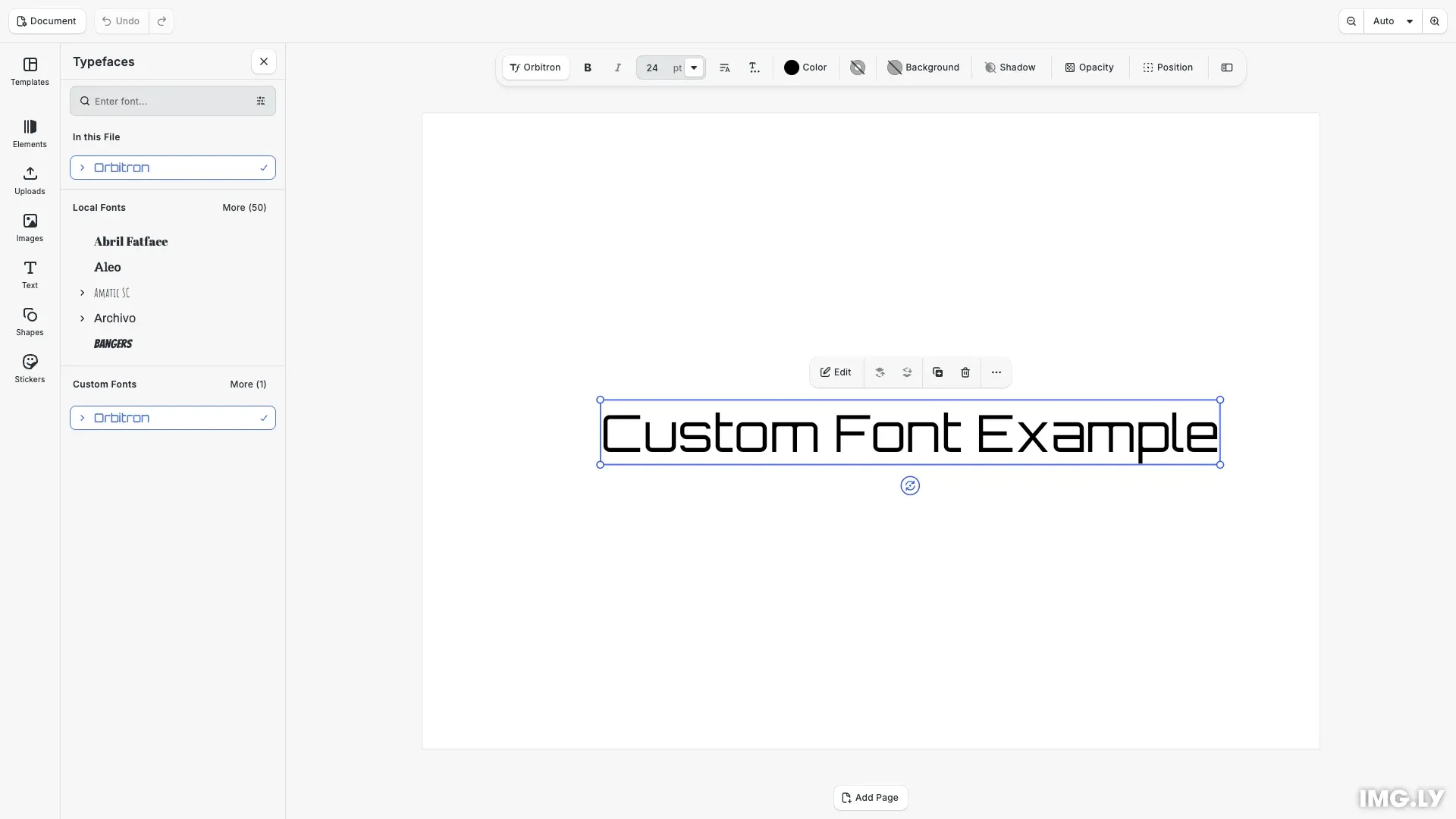
CE.SDK includes a set of default typefaces, but you can customize the available fonts by creating custom asset sources with your own typeface definitions. Fonts are managed through the asset system and displayed in the editor UI via the typeface library.
This guide covers how to:
- Define typefaces with multiple font weights and styles
- Create a custom typeface asset source
- Register an uploaded font file
- Update the typeface library in the editor UI
- Apply fonts programmatically to text blocks
Typeface and Font Structure#
A typeface in CE.SDK represents a font family containing multiple font variants. Each typeface has a name property displayed in the UI and a fonts array containing individual font definitions.
Each font in the array requires:
uri- Path to the font file (TTF, OTF, WOFF, or WOFF2)subFamily- Display name for this font variant (e.g., “Regular”, “Bold”, “Italic”)weight- Font weight:thin,extraLight,light,normal,medium,semiBold,bold,extraBold, orheavystyle- Font style:normaloritalic
interface TypefaceFont {  uri: string;  subFamily: string;  weight:    | 'thin'    | 'extraLight'    | 'light'    | 'normal'    | 'medium'    | 'semiBold'    | 'bold'    | 'extraBold'    | 'heavy';  style: 'normal' | 'italic';}
interface Typeface {  name: string;  fonts: TypefaceFont[];}
Create a Custom Typeface Asset Source#
To make custom fonts available in the editor, we create a local asset source and add typeface assets to it. Each asset must include a payload.typeface property containing the typeface definition.
We first create the source with engine.asset.addLocalSource(), then add typeface assets with engine.asset.addAssetToSource():
const sourceId = 'my-custom-typefaces';engine.asset.addLocalSource(sourceId);
await engine.asset.addAssetToSource(sourceId, {  id: 'orbitron',  meta: { languages: 'latin' },  payload: {    typeface: orbitronTypeface  }});
The name property defines how the typeface appears in the typeface library:
name: 'Orbitron',The fonts array defines each available font variant. Here we add both Regular and Bold weights:
fonts: [ { uri: buildFontUri('Orbitron-Regular.ttf'), subFamily: 'Regular', weight: 'normal', style: 'normal' }, { uri: buildFontUri('Orbitron-Bold.ttf'), subFamily: 'Bold', weight: 'bold', style: 'normal' }]Register an Uploaded Font#
When a user uploads a font file, you do not know its family name, weight or style in advance. engine.editor.getFontInfo() reads them from the file. It takes the URI of a TTF, OTF, WOFF or WOFF2 file and resolves to a FontInfo object.
We build the typeface asset from that info alone and add it to the custom typeface source:
async function addFontFileToSource(  engine: CreativeEngine,  sourceId: string,  fontUri: string): Promise<void> {  const info = await engine.editor.getFontInfo(fontUri);
await engine.asset.addAssetToSource(sourceId, { id: fontUri, meta: { languages: 'latin' }, payload: { typeface: { name: info.family, fonts: [ { uri: fontUri, subFamily: info.subFamily, weight: info.fontWeight, style: info.style } ] } } });}familyis the typographic family name of the font. We use it as the typefacename.subFamilyandstylefill the font entry directly.fontWeightis the named weight that is closest to the numericweightof the file.- We use the font file URI as the asset ID, so each file gets its own asset.
The example registers the Codystar Regular file from Google Fonts this way.
For a variable font, isVariable is true and variationAxes lists each axis with its tag, minValue, defaultValue and maxValue. The other fields describe the default instance of the font. The promise rejects with EDITOR.FONT_INFO_EXTRACT_FAILED when the file is not a font, and with EDITOR.FONT_LOAD_FAILED when the URI is not reachable.
Update the Typeface Library#
After creating the custom typeface source, we update the typeface library entry to control which fonts appear in the editor’s typeface library. Use cesdk.ui.updateAssetLibraryEntry() with the ly.img.typefaces entry ID.
To show your custom fonts alongside the default typefaces, include both source IDs:
cesdk.ui.updateAssetLibraryEntry('ly.img.typefaces', { sourceIds: ['ly.img.typeface', 'my-custom-typefaces']});Keeping the default ly.img.typeface source next to your own shows both in the panel and is what surfaces the library’s source and language filters.
To replace the default typefaces entirely with only your custom fonts, list just your source:
cesdk.ui.updateAssetLibraryEntry('ly.img.typefaces', { sourceIds: ['my-custom-typefaces']});The order in sourceIds determines the display order in the UI.
Group Typefaces by Language#
Each typeface asset declares the subsets it covers with a meta.languages string—a comma-separated list of subset names. The Orbitron asset created earlier uses 'latin'. The typeface library reads meta.languages to populate its language filter, letting users narrow the list to the subset they need.
Built-in subsets such as latin, cyrillic, greek, and hebrew show localized labels in the filter, and other tokens appear as written. A typeface without meta.languages still appears by default. It only drops out once a user selects a specific subset in the filter, so set meta.languages on your custom fonts to keep them discoverable.
By default each source renders as a flat, filterable list. To show a grouped overview with one section per subset instead, enable showGroupOverview on the entry:
cesdk.ui.updateAssetLibraryEntry('ly.img.typefaces', { sourceIds: ['ly.img.typeface', 'my-custom-typefaces'], showGroupOverview: true});Apply Fonts Programmatically#
You can apply fonts to text blocks without relying on the UI using the block API. CE.SDK provides two methods with different behaviors:
setFont - Sets the font for an entire text block and resets all text formatting:
engine.block.setFont(textBlock, fontFileUri, typeface);setTypeface - Applies a typeface to a text range while preserving existing formatting:
engine.block.setTypeface(textBlock, typeface, from, to);To query the current font applied to a text block:
// Get the base typeface of a text blockconst typeface = engine.block.getTypeface(textBlock);
// Get unique typefaces within a text rangeconst typefaces = engine.block.getTypefaces(textBlock, from, to);
With an existing page block, create text and apply a custom font:
const textBlock = engine.block.create('text');engine.block.appendChild(page, textBlock);
// Set the text contentengine.block.replaceText(textBlock, 'Custom Font Example');
// Configure auto-sizing so the block adjusts to contentengine.block.setWidthMode(textBlock, 'Auto');engine.block.setHeightMode(textBlock, 'Auto');
// Apply the custom font to the text blockconst fontUri = orbitronTypeface.fonts[0].uri;engine.block.setFont(textBlock, fontUri, orbitronTypeface);
// Set font sizeengine.block.setTextFontSize(textBlock, 24);
// Center the text block on the pagecenterBlockOnPage(engine, textBlock, page);
// Select the text blockengine.block.select(textBlock);
Saved Content and Reader Compatibility#
The first concrete typeface definition for a family keeps the family name as its asset ID. If another definition uses that name with different font files or cuts, the engine saves it under a separate ID. Font requests also use their own identity keys. This applies to scenes, archives and saved blocks.
text/typeface can hold an ID that is not the family name. Read the name with block.getTypeface(id).name.
Earlier engines can render text from its stored font files, but cannot read a typeface or change its weight and style when the saved ID differs from the family name. Content with one concrete definition per family and no font requests stays editable in earlier engines.
Upgrade engines that must edit content with these separate identities. The updated reader still accepts older content. Keep original files before re-saving content that older applications must continue to edit.
Change the Fonts of a Registered Typeface#
When a font family changes, register its typeface again in your local asset source: remove the old asset, then add one with the current fonts. A typeface counts as registered again when it has the same name and at least one of the same font files.
A weight or style that the new typeface no longer has stays in the scene while text uses it, so that text keeps its look. Once no text uses it, the scene drops it, the font style menu stops offering it, and saved scenes no longer store it. To move text off a removed weight, set an available weight or style on that text.
A typeface with the same name but other font files, such as one that a template brings, keeps all its fonts.
Preserve Requested Font Identity#
const font = orbitronTypeface.fonts[0];engine.editor.setTypefaceResolver(async (request) => { if (request.family !== orbitronTypeface.name) return undefined; return { typeface: orbitronTypeface, font };});engine.block.setFontRequest(textBlock, { family: orbitronTypeface.name, subFamily: font.subFamily, weight: font.weight, style: font.style, assetSourceId: sourceId, assetId: 'orbitron'});await engine.block.forceLoadResources([textBlock]);console.log('Stored requests:', engine.block.getFontRequests(textBlock));// Restore resolution through registered typeface asset sources.engine.editor.setTypefaceResolver(undefined);A font request preserves the intended family, cut, weight, style and optional asset identity through scene and archive round trips, even when that font is unavailable. setFontRequest() stores this identity and starts asynchronous resolution. getFontRequests() returns the unique stored requests in source order, rather than the fonts currently used for rendering.
The request fields below use TypeScript names. Swift uses assetSourceID and assetID for the asset identifiers.
| Field | Purpose and default |
|---|---|
family |
Required, nonempty family name. |
subFamily |
Optional cut name; defaults to an empty string. |
weight |
Requested weight; defaults to normal. |
style |
Requested style; defaults to normal. |
postScriptName |
Optional exact identity checked against the loaded font’s PostScript name. |
assetSourceId |
Optional source identifier that limits asset lookup. |
assetId |
Optional asset identifier within that source; requires assetSourceId. |
Returned requests include the default subfamily, weight and style. Supplied optional identifiers must be nonempty.
Calling the setter without a range replaces the request for the whole block, even when text is selected. Calling the getter without a range reads the current selection, or the whole text when there is no selection. Explicit ranges follow the platform’s editable-text convention. These ranges can differ from the rendered UTF-16 ranges returned by diagnostics after case conversion or template substitution.
By default, the engine searches registered local asset sources for matching typeface definitions, reading at most 100 pages of each source. Identical requests share a pending lookup. Other sources are queried only when the request names an assetSourceId; an assetId selects one asset directly. To retry unresolved requests after registering a source, call editor.setTypefaceResolver() again. Applications with an external font catalog can also install editor.setTypefaceResolver(). The provider returns the concrete typeface and chosen font, or no result when unavailable. Configure it on each engine before loading a scene that needs it; the callback itself is not saved in the scene.
When the provider returns no result, throws or rejects, the engine uses the default font, and the request reports substituted. It reports unresolved only when the default font cannot load either. Replacing the provider starts resolution again; completions from replaced providers, superseded requests or disposed engines are ignored. Removing the provider restores registered-source resolution.
Await block.forceLoadResources() when subsequent work needs settled font resources. A new request or provider replacement can move a ready text block back to pending. Block-state subscriptions let your application observe readiness changes; read the current state when notified. Resource failure rejects the resource-loading call and can still leave a fallback layout to inspect.
getTextRenderDiagnostics() retains the stored request alongside the actual loaded font and effective size. A fallback does not replace the stored identity, and substitution can change line breaks and dimensions. A resolved request alone does not guarantee that every glyph is present.
Existing setFont() and setTypeface() calls continue to apply concrete font choices and clear requests for the affected text. Use them when you already have the concrete definition. Use a font request when the design should retain its intended identity while availability changes.
Verify Text Rendering#
Use getTextRenderDiagnostics() to inspect the current rendered text after applying fonts. The result combines font usage with missing glyphs and layout measurements.
await engine.block.forceLoadResources([textBlock]);const diagnostics = engine.block.getTextRenderDiagnostics(textBlock);const substitutedRuns = diagnostics.fontUsage.runs.filter( (run) => run.status === 'substituted');if (diagnostics.layout) { console.log({ substitutedRuns, missingGlyphRanges: diagnostics.missingGlyphRanges, overshoot: diagnostics.layout.overshoot, totalLineCount: diagnostics.layout.totalLineCount, visibleLineCount: diagnostics.layout.visibleLineCount, clippedLineCount: diagnostics.layout.clippedLineCount, requiredHeight: diagnostics.layout.requiredHeight, fontScale: diagnostics.layout.fontScale, effectiveFontSizes: diagnostics.fontUsage.runs.map( (run) => run.effectiveFontSize ) });} else { console.log('Layout unavailable', diagnostics.fontUsage.state);}The call updates pending layout and returns a snapshot without waiting for font downloads. Call it again after resources finish loading.
fontUsage contains the rendered text, its block state, and font runs. Each run names the requested font file and the loaded font file, when available.
| Run status | Meaning |
|---|---|
resolved |
The requested font loaded for the run. |
substituted |
A different font loaded, including fallback or emoji fonts. |
unresolved |
No usable font loaded for the run. |
Each run’s effectiveFontSize reports the shaped size in the scene’s font unit. It includes automatic fitting and superscript or subscript scaling.
The block state separately reports resource loading or failure. A failed font can produce a current fallback layout. Pending resources produce no runs or layout. If no current shape exists after a loading failure, the snapshot omits stale text and measurements.
A resolved run does not guarantee that every glyph is available. These diagnostics describe shaped text; they do not confirm that a frame was drawn or exported.
All ranges use half-open UTF-16 offsets into fontUsage.text, after case conversion and template substitution. Font runs return from and exclusive to values on every platform. Missing-glyph ranges use the same endpoints; Swift represents these ranges as Range<Int>. These offsets can differ from offsets used to edit the original text.
missingGlyphRanges identifies glyphs that remain missing after fallback. Ignored controls and trailing whitespace do not count as missing glyphs. This field remains available for curved text.
When present, layout contains:
totalLineCount: All laid-out lines, including hidden lines.visibleLineCount: Lines visible with the block’s clipping configuration, independent of temporary editing visibility.clippedLineCount: Lines hidden by that clipping configuration.requiredHeight: The full Auto-height result at the current effective sizes, even when no line fits the frame.fontScale: The common automatic fitting scale applied to authored font sizes.overshoot: Nonnegative distances that glyph ink extends beyond the frame’s left, top, right, and bottom edges.
requiredHeight and overshoot use local scene design units before block transformations, stroke, effects, or animations. Overshoot includes ink on hidden lines. Intentional glyph overhang can produce nonzero overshoot; choose limits that suit your design.
Curved text omits planar layout measurements. An absent layout means those measurements are unavailable; it does not mean the text passed verification.
To wait for font resources first, call await engine.block.forceLoadResources([textBlock]). This promise rejects if a resource fails. You can still inspect diagnostics after handling that error.
Troubleshooting#
Font not appearing in UI: Verify the asset source is registered with engine.asset.addLocalSource() and that updateAssetLibraryEntry is called with the correct source ID.
Font not loading: Check that the font file URI is accessible and returns a valid font file with the correct MIME type. Use browser developer tools to verify the network request.
Font weight/style not available: Ensure the typeface definition includes font entries for the requested weight and style combinations. If you only define Regular and Bold, Italic variants won’t be available.
Uploaded font file is rejected: getFontInfo() rejects with EDITOR.FONT_INFO_EXTRACT_FAILED when the file is not a TTF, OTF, WOFF or WOFF2 font. Ask the user for a different file.
Font info does not load: getFontInfo() rejects with EDITOR.FONT_LOAD_FAILED when the font URI is not reachable. Check the URI and the network request.
getTypeface() throws error: New text blocks don’t have an explicit typeface until setFont() is called. Handle this case in your code.
API Reference#
| Method | Purpose |
|---|---|
engine.asset.addLocalSource(sourceId) |
Create a local asset source for custom typefaces |
engine.asset.addAssetToSource(sourceId, asset) |
Add a typeface asset to the source |
engine.editor.getFontInfo(fontFileUri, options) |
Read the family, subfamily, weight, style and variation axes of a font file |
cesdk.ui.updateAssetLibraryEntry(entryId, options) |
Update which sources appear in the typeface library |
engine.block.setFont(block, fontUri, typeface) |
Set font for entire text block, resets formatting |
engine.block.setTypeface(block, typeface, from, to) |
Apply typeface to text range, preserves formatting |
engine.block.getTypeface(block) |
Get the base typeface of a text block |
engine.block.getTypefaces(block, from, to) |
Get unique typefaces within a text range |
engine.block.setFontRequest(block, request, from?, to?) |
Store font identity for later resolution. |
engine.block.getFontRequests(block, from?, to?) |
Read unique stored font requests. |
engine.editor.setTypefaceResolver(resolver?) |
Supply an application font provider or restore registered-source resolution. |
engine.block.getTextRenderDiagnostics(block) |
Inspect rendered fonts, missing glyphs, and layout overflow |
engine.block.forceLoadResources(blocks) |
Wait for font and other block resources |