Format ranges of text as subscript or superscript for prices, formulas, footnotes, and technical notation.
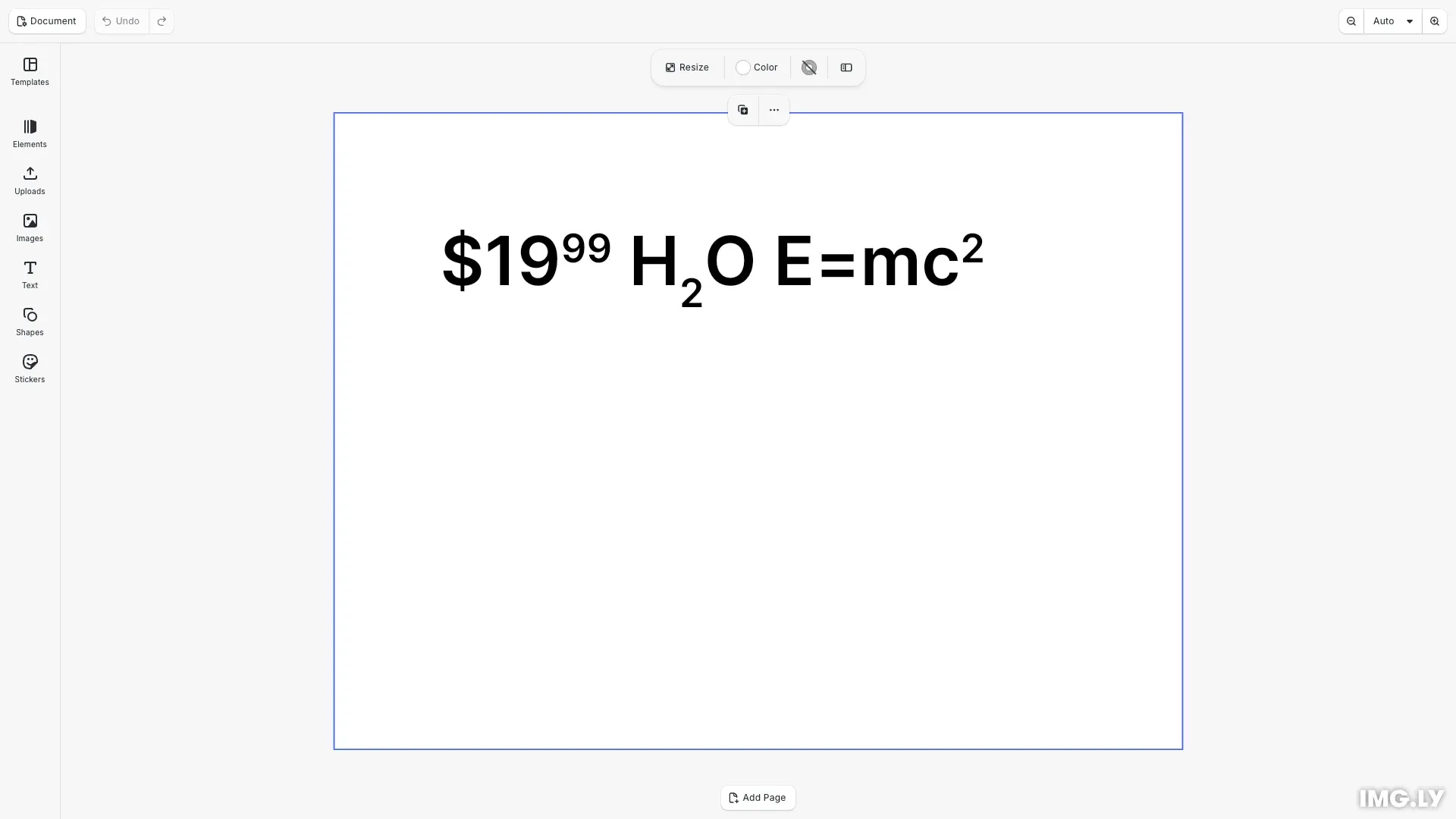
CE.SDK formats superscript and subscript synthetically: the affected range is scaled down to 58.3% of its font size and shifted up or down by 33.3% of the unscaled font size. These defaults match common design applications, so the feature works with every font, and block properties let you adjust the scale and shift. Lines grow automatically when a shifted range needs more room, and exports include the shifted glyphs. Superscript and subscript combine with text decorations, text on a path, and text animations.
This guide covers applying superscript and subscript to character ranges, querying the current script styles, reading the script style of each text run, and resetting text back to normal.
Create a Text Block#
We create a text block whose content mixes a price, a chemical formula, and a mathematical expression.
// Create a text block to demonstrate subscript and superscriptconst text = engine.block.create('text');engine.block.appendChild(page, text);engine.block.setPositionX(text, 100);engine.block.setPositionY(text, 100);engine.block.setWidthMode(text, 'Auto');engine.block.setHeightMode(text, 'Auto');engine.block.setFloat(text, 'text/fontSize', 64);engine.block.replaceText(text, '$1999 H2O E=mc2');Apply Superscript#
We raise a range above the rest of the line using engine.block.setTextScriptStyle() with 'Superscript' and UTF-16 indices [from, to). Without a range, the whole text or the current selection is changed.
// Raise the cents of the price above the rest of the line, using UTF-16 indices.// Superscript text is scaled down and raised automatically.engine.block.setTextScriptStyle(text, 'Superscript', 3, 5);
// Raise the exponent of the formulaengine.block.setTextScriptStyle(text, 'Superscript', 14, 15);
Apply Subscript#
We lower a range below the rest of the line with 'Subscript'.
// Lower the "2" of the water formula below the rest of the lineengine.block.setTextScriptStyle(text, 'Subscript', 7, 8);Query Script Styles#
We query the script styles using engine.block.getTextScriptStyles(). It returns the ordered list of unique values in the range: 'Normal', 'Superscript', or 'Subscript'.
// Query the unique script styles in a range, in document orderconst scriptStyles = engine.block.getTextScriptStyles(text);// e.g. ['Normal', 'Superscript', 'Subscript']
// Query a specific rangeconst centsScriptStyle = engine.block.getTextScriptStyles(text, 3, 5);// ['Superscript']
Text Runs#
Each entry returned by engine.block.getTextRuns() reports the scriptStyle of that run alongside its other formatting properties.
// Each text run reports its script styleconst runs = engine.block.getTextRuns(text);// e.g. runs[1].scriptStyle === 'Superscript'Adjust Size and Position#
Four block properties control how superscript and subscript are rendered. The font scale is a factor of the font size, the vertical shift is a fraction of the unscaled font size. The properties apply to all shifted ranges in the block.
// Adjust the size and position of shifted text for the whole block.// The scale is a factor of the font size. The shift is a fraction of// the unscaled font size.engine.block.setFloat(text, 'text/superscriptFontScale', 0.65);engine.block.setFloat(text, 'text/superscriptVerticalShift', 0.4);engine.block.setFloat(text, 'text/subscriptFontScale', 0.65);engine.block.setFloat(text, 'text/subscriptVerticalShift', 0.25);Reset to Normal#
We reset a range back to regular text with 'Normal'.
// Reset a range back to regular textengine.block.setTextScriptStyle(text, 'Superscript', 0, 1);engine.block.setTextScriptStyle(text, 'Normal', 0, 1);API Reference#
| Method | Purpose |
|---|---|
engine.block.setTextScriptStyle() |
Set the script style for entire text or range |
engine.block.getTextScriptStyles() |
Get ordered list of unique script styles in range |
engine.block.getTextRuns() |
Read the scriptStyle of each text run |
text/superscriptFontScale |
Font scale of superscript text, default 0.583 |
text/superscriptVerticalShift |
Upward shift of superscript text, default 0.333 |
text/subscriptFontScale |
Font scale of subscript text, default 0.583 |
text/subscriptVerticalShift |
Downward shift of subscript text, default 0.333 |
Troubleshooting#
Shifted text looks too small: Raise text/superscriptFontScale or text/subscriptFontScale with engine.block.setFloat(), or increase the font size of the range with engine.block.setTextFontSize().
Lines move apart after applying superscript: This is intended. A line grows when a raised or lowered range needs more room, so shifted glyphs do not overlap neighboring lines.