Edit text content programmatically with range-based APIs for replacing, formatting, and querying text.
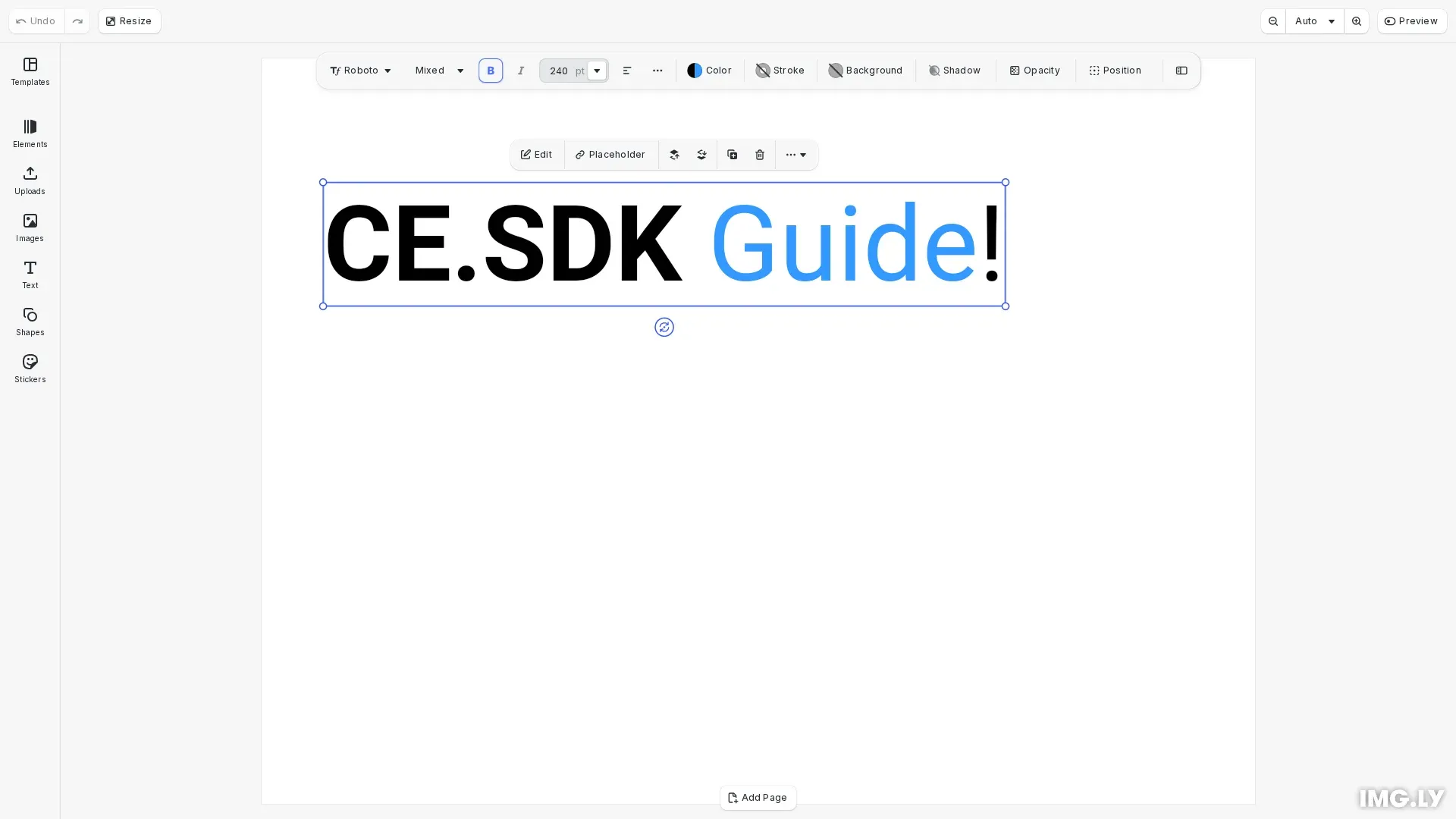
CE.SDK provides text editing through two approaches: interactive canvas editing where users type directly into text blocks, and programmatic editing through range-based APIs. This guide focuses on the programmatic approach, covering how to replace text, apply formatting to specific ranges, and query text properties.
This guide covers creating text blocks, replacing and removing text content, applying formatting to character ranges, and querying line information.
Creating a Text Block#
We first create a text block and position it on the page. Text blocks support automatic sizing based on content using the Auto width and height modes.
// Create a text blockconst text = engine.block.create("text");engine.block.appendChild(page, text);engine.block.setPositionX(text, 50);engine.block.setPositionY(text, 100);engine.block.setWidthMode(text, "Auto");engine.block.setHeightMode(text, "Auto");The text block is appended to the page and positioned with explicit X and Y coordinates. Setting width and height modes to Auto allows the block to resize based on its content.
Setting a Typeface#
We define a typeface with font variants to enable formatting options like bold. The typeface must include variants for each weight or style you want to apply.
// Define a typeface with bold variant supportconst typeface = {  name: "Roboto",  fonts: [    {      uri: "https://cdn.img.ly/assets/v2/ly.img.typeface/fonts/Roboto/Roboto-Regular.ttf",      subFamily: "Regular",    },    {      uri: "https://cdn.img.ly/assets/v2/ly.img.typeface/fonts/Roboto/Roboto-Bold.ttf",      subFamily: "Bold",      weight: "bold" as const,    },  ],};
// Set the font (required for bold weight support)engine.block.setFont(text, typeface.fonts[0].uri, typeface);
The setFont() method sets the font and typeface for the text block. Once set, the block supports all formatting options defined in the typeface’s font variants.
Replacing and Removing Text#
We modify text content using engine.block.replaceText() and engine.block.removeText(). Text positions use UTF-16 indices where [from, to) defines the range.
// Replace the entire text contentengine.block.replaceText(text, "Hello World!");
// Replace "World" with "CE.SDK" (positions 6-11)engine.block.replaceText(text, "CE.SDK", 6, 11);
// Insert " Guide" before the exclamation mark (position 12)engine.block.replaceText(text, " Guide", 12, 12);
The replaceText() method can replace all text (when no indices provided), insert at a position (when from equals to), or replace a range. Here we start with a full replacement, insert text, then replace a portion.
// Remove "Hello " to get "CE.SDK Guide!" (positions 0-6)engine.block.removeText(text, 0, 6);The removeText() method deletes characters in the specified range. When we omit indices, operations apply to the entire text content.
Applying Text Formatting#
We apply formatting to specific character ranges using setter methods. Each method accepts optional from and to parameters to target specific ranges.
// Apply bold formatting to "CE.SDK" (positions 0-6)engine.block.setTextFontWeight(text, "bold", 0, 6);
// Apply color to "Guide" (positions 7-12)engine.block.setTextColor(text, { r: 0.2, g: 0.6, b: 1.0, a: 1.0 }, 7, 12);
// Set font size for the entire blockengine.block.setTextFontSize(text, 240);
The setTextFontWeight() method applies bold or normal weight. The setTextColor() method accepts RGBA color objects. The setTextFontSize() method sets the font size in design units.
Querying Text Properties#
We retrieve formatting information using getter methods that return arrays of unique values found in the specified range.
// Query formatting propertiesconst colors = engine.block.getTextColors(text);const weights = engine.block.getTextFontWeights(text);const sizes = engine.block.getTextFontSizes(text);
console.log("Text colors:", colors);console.log("Font weights:", weights);console.log("Font sizes:", sizes);
The getter methods return arrays because text blocks can contain mixed formatting. For example, getTextColors() returns all unique colors applied within the queried range.
Line Information#
We query information about rendered text lines including count, content, and bounding boxes.
// Query line informationconst lineCount = engine.block.getTextVisibleLineCount(text);console.log("Line count:", lineCount);
if (lineCount > 0) {  const lineContent = engine.block.getTextVisibleLineContent(text, 0);  console.log("First line content:", lineContent);
  const lineBounds = engine.block.getTextVisibleLineGlobalBoundingBoxXYWH(    text,    0  );  console.log("First line bounds:", lineBounds);}
The getTextVisibleLineCount() returns the number of rendered lines. For each line, getTextVisibleLineContent() returns the text content and getTextVisibleLineGlobalBoundingBoxXYWH() returns the bounding box in scene coordinates.
Font Metrics#
We retrieve raw font metrics from a font file URI. The returned values are in the font’s design units coordinate space.
// Get raw font metrics from a font file URIconst fontFileUri = typeface.fonts[0].uri;const metrics = await engine.editor.getFontMetrics(fontFileUri);console.log("Ascender:", metrics.ascender);console.log("Descender:", metrics.descender);console.log("Units per em:", metrics.unitsPerEm);console.log("Line Gap:", metrics.lineGap);console.log("Cap Height:", metrics.capHeight);console.log("x-Height:", metrics.xHeight);console.log("Underline Offset:", metrics.underlineOffset);console.log("Underline Size:", metrics.underlineSize);console.log("Strikeout Offset:", metrics.strikeoutOffset);console.log("Strikeout Size:", metrics.strikeoutSize);The getFontMetrics() method returns the font’s ascender, descender, unitsPerEm, lineGap, capHeight, xHeight, underlineOffset, underlineSize, strikeoutOffset, and strikeoutSize values. These metrics are useful for precise text layout calculations, such as computing line heights, aligning text across different fonts, or positioning text decorations. The capHeight and xHeight values are useful for optical alignment of text elements. If the font is not yet loaded, it will be fetched asynchronously.
Troubleshooting#
Text not updating: Verify the text block ID is valid using engine.block.isValid().
Range indices incorrect: Remember indices are UTF-16 code units. Multi-byte characters (emojis, some Unicode) occupy multiple indices.
Formatting not applied: Check that the range [from, to) is valid and within the text length. Also ensure the typeface includes a font variant for the requested weight or style.
Line count is zero: Ensure the text block has content and is rendered. Empty text blocks return zero lines.
API Reference#
| Method | Purpose |
|---|---|
engine.block.setFont() | Set font and typeface for the text block |
engine.block.replaceText() | Replace or insert text at specified indices |
engine.block.removeText() | Remove text at specified indices |
engine.block.setTextColor() | Set color for entire text or specific range |
engine.block.getTextColors() | Get unique colors in text range |
engine.block.setTextFontWeight() | Set font weight for text range |
engine.block.getTextFontWeights() | Get unique font weights in range |
engine.block.setTextFontSize() | Set font size for text range |
engine.block.getTextFontSizes() | Get unique font sizes in range |
engine.block.getTextVisibleLineCount() | Get number of rendered lines |
engine.block.getTextVisibleLineContent() | Get text content of a specific line |
engine.block.getTextVisibleLineGlobalBoundingBoxXYWH() | Get line bounds in scene coordinates |
Text Type#
A block for displaying text content.
This section describes the properties available for the Text Type (//ly.img.ubq/text) block type.
| Property | Type | Default | Description |
|---|---|---|---|
alwaysOnBottom | Bool | false | If true, this element’s global sorting order is automatically adjusted to be lower than all other siblings. |
alwaysOnTop | Bool | false | If true, this element’s global sorting order is automatically adjusted to be higher than all other siblings. |
backgroundColor/color | Color | {"r":0.667,"g":0.667,"b":0.667,"a":1} | The color of the background. |
backgroundColor/cornerRadius | Float | 0 | The corner radius of the background. |
backgroundColor/enabled | Bool | false | Whether the background color is enabled. |
backgroundColor/paddingBottom | Float | 0 | The bottom padding of the background. |
backgroundColor/paddingLeft | Float | 0 | The left padding of the background. |
backgroundColor/paddingRight | Float | 0 | The right padding of the background. |
backgroundColor/paddingTop | Float | 0 | The top padding of the background. |
blend/mode | Enum | "Normal" | The blend mode to use when compositing the block., Possible values: "PassThrough", "Normal", "Darken", "Multiply", "ColorBurn", "LinearBurn", "DarkenColor", "Lighten", "Screen", "ColorDodge", "LinearDodge", "LightenColor", "Overlay", "SoftLight", "HardLight", "VividLight", "LinearLight", "PinLight", "HardMix", "Difference", "Exclusion", "Subtract", "Divide", "Hue", "Saturation", "Color", "Luminosity" |
clipped | Bool | false | This component is used to identify elements whose contents and children should be clipped to their bounds. |
contentFill/mode | Enum | "Cover" | Defines how content should be resized to fit its container (e.g., Crop, Cover, Contain)., Possible values: "Crop", "Cover", "Contain" |
dropShadow/blurRadius/x | Float | 1 | The horizontal blur radius of the drop shadow. |
dropShadow/blurRadius/y | Float | 1 | The vertical blur radius of the drop shadow. |
dropShadow/clip | Bool | false | Whether the drop shadow should be clipped to the block’s bounds. |
dropShadow/color | Color | {"r":0,"g":0,"b":0,"a":0.25} | The color of the drop shadow. |
dropShadow/enabled | Bool | false | Whether the drop shadow is enabled. |
dropShadow/offset/x | Float | 1.76777 | The horizontal offset of the drop shadow. |
dropShadow/offset/y | Float | 1.76777 | The vertical offset of the drop shadow. |
fill/enabled | Bool | true | Whether the fill should be rendered or not. |
fill/solid/color | Color | "-" | The fill color. |
flip/horizontal | Bool | "-" | Whether the block is flipped horizontally. |
flip/vertical | Bool | "-" | Whether the block is flipped vertically. |
globalBoundingBox/height | Float | "-" | The height of the block’s axis-aligned bounding box in world coordinates., (read-only) |
globalBoundingBox/width | Float | "-" | The width of the block’s axis-aligned bounding box in world coordinates., (read-only) |
globalBoundingBox/x | Float | "-" | The x-coordinate of the block’s axis-aligned bounding box in world coordinates., (read-only) |
globalBoundingBox/y | Float | "-" | The y-coordinate of the block’s axis-aligned bounding box in world coordinates., (read-only) |
height | Float | 100 | The height of the block’s frame. |
height/mode | Enum | "Absolute" | A mode describing how the height dimension may be interpreted (Absolute, Percent, Auto)., Possible values: "Absolute", "Percent", "Auto" |
highlightEnabled | Bool | true | Show highlighting when selected or hovered |
lastFrame/height | Float | "-" | The height of the block’s frame from the previous layout pass., (read-only) |
lastFrame/width | Float | "-" | The width of the block’s frame from the previous layout pass., (read-only) |
lastFrame/x | Float | "-" | The x-coordinate of the block’s frame from the previous layout pass., (read-only) |
lastFrame/y | Float | "-" | The y-coordinate of the block’s frame from the previous layout pass., (read-only) |
opacity | Float | 1 | The opacity of the block. Valid range is 0.0 to 1.0. |
placeholder/enabled | Bool | false | Whether the placeholder behavior is enabled or not. |
placeholderBehavior/enabled | Bool | false | Whether the placeholder behavior is enabled or not. |
playback/duration | Double | 5 | The duration in seconds for which this block should be visible. |
playback/timeOffset | Double | 0 | The time in seconds relative to its parent at which this block should first appear. |
position/x | Float | 0 | The x-coordinate of the block’s origin. |
position/x/mode | Enum | "Absolute" | A mode describing how the x-position may be interpreted., Possible values: "Absolute", "Percent", "Auto" |
position/y | Float | 0 | The y-coordinate of the block’s origin. |
position/y/mode | Enum | "Absolute" | A mode describing how the y-position may be interpreted., Possible values: "Absolute", "Percent", "Auto" |
rotation | Float | 0 | The rotation of the block in radians. |
selected | Bool | false | Indicates if the block is currently selected. |
stroke/color | Color | {"r":0.67,"g":0.67,"b":0.67,"a":1} | The color of the stroke. |
stroke/cornerGeometry | Enum | "Miter" | The geometry of the stroke at corners (e.g., Miter, Round, Bevel)., Possible values: "Bevel", "Miter", "Round" |
stroke/enabled | Bool | false | Whether the stroke is enabled. |
stroke/position | Enum | "Center" | The position of the stroke relative to the shape’s edge (Center, Inner, Outer)., Possible values: "Center", "Inner", "Outer" |
stroke/style | Enum | "Solid" | The style of the stroke (e.g., Solid, Dotted, Dashed)., Possible values: "Dashed", "DashedRound", "Dotted", "LongDashed", "LongDashedRound", "Solid" |
stroke/width | Float | 4.72441 | The width of the stroke. |
text/automaticFontSizeEnabled | Bool | false | Whether the font size should be automatically determined to fit the entire text within the block’s frame. |
text/clipLinesOutsideOfFrame | Bool | true | Whether or not to display lines outside the frame. |
text/externalReference | String | "" | An external reference that may hint at the source that was used to populate fontFileURI. |
text/fontFileUri | String | "" | The URI of a font file. |
text/fontSize | Float | 10 | The font size in points. |
text/hasClippedLines | Bool | false | A tag indicating that text lines are outside the block’s frame and are hidden., (read-only) |
text/horizontalAlignment | Enum | "Left" | The horizontal text alignment., Possible values: "Left", "Right", "Center" |
text/letterSpacing | Float | 0 | The letter spacing relative to the original spacing. |
text/lineHeight | Float | 1 | The line height relative to the font size. |
text/maxAutomaticFontSize | Float | -1 | The upper font size limit if the font size is automatically calculated. |
text/minAutomaticFontSize | Float | -1 | The lower font size limit if the font size is automatically calculated. |
text/paragraphSpacing | Float | 0 | The additional spacing between paragraphs relative to the font size. |
text/text | String | "Text" | The text content. |
text/typeface | String | "" | The typeface of the font. |
text/verticalAlignment | Enum | "Top" | The vertical text alignment., Possible values: "Top", "Bottom", "Center" |
transformLocked | Bool | false | DesignBlocks with this tag can’t be transformed (moved, rotated, scaled, cropped, or flipped). |
visible | Bool | true | If the block is visible in the editor. |
width | Float | 100 | The width of the block’s frame. |
width/mode | Enum | "Absolute" | A mode describing how the width dimension may be interpreted (Absolute, Percent, Auto)., Possible values: "Absolute", "Percent", "Auto" |