Understand how CE.SDK positions and renders text by exploring font metrics—ascenders, descenders, baselines, and line height—and see these concepts visualized directly on the canvas.
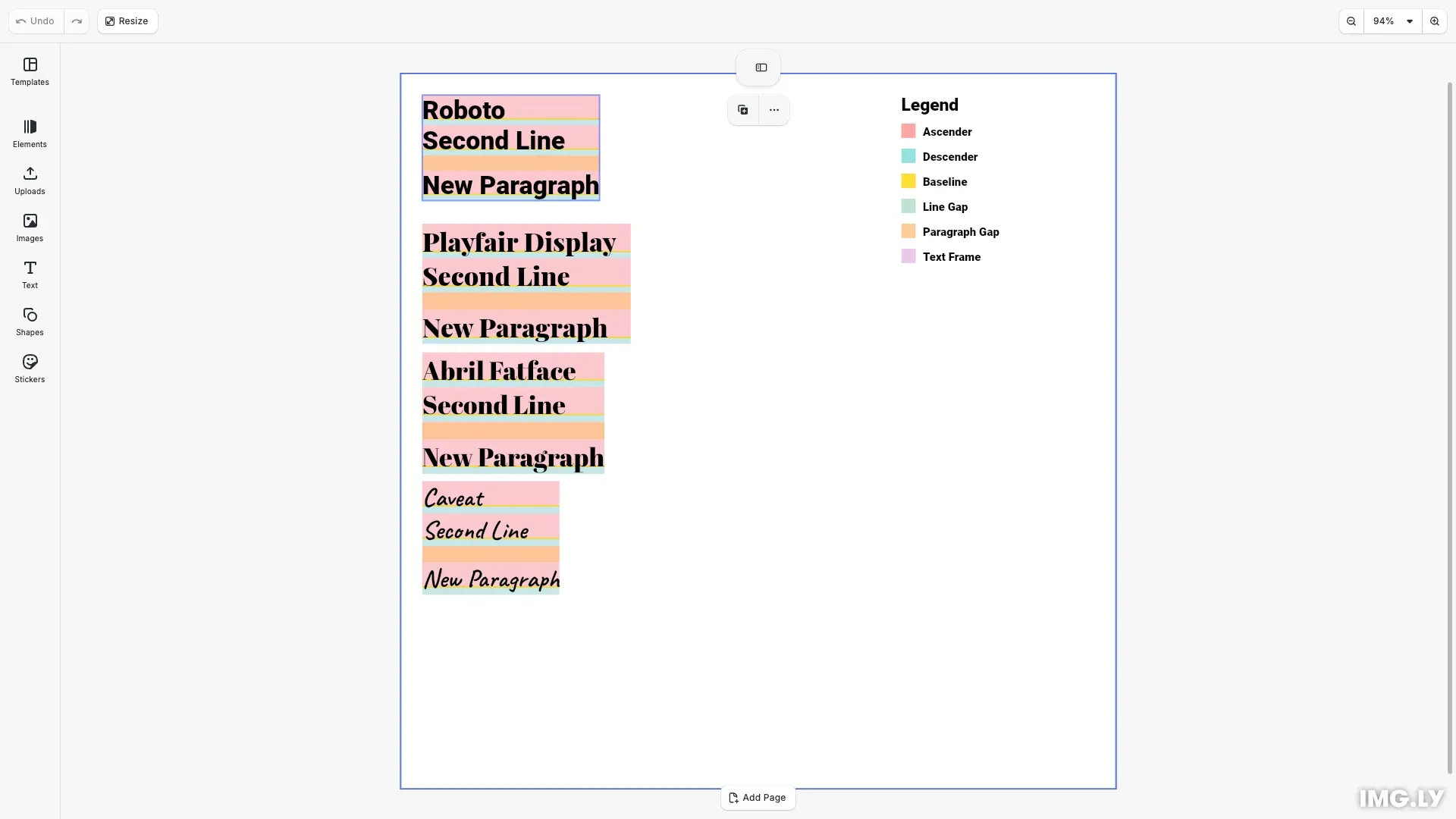
Every font defines metrics that determine how text is positioned vertically. Understanding these metrics helps you debug text layout issues, align text precisely with other design elements, and comprehend why fonts at the “same size” can appear different heights.
This guide covers how font metrics determine text positioning, how CE.SDK converts font sizes to design units, and how the line height and paragraph spacing properties affect multiline layout.
Font Metrics Fundamentals#
Use getFontMetrics() to read a font’s metrics in its design units:
// Returns FontMetrics in font design units, e.g. for Roboto:// { ascender: 1900, descender: -500, unitsPerEm: 2048, lineGap: 0,// capHeight: 1456, xHeight: 1082, underlineOffset: -200,// underlineSize: 100, strikeoutOffset: 528, strikeoutSize: 102 }let metrics: FontMetrics;try { metrics = await engine.editor.getFontMetrics(fontUri);} catch (error) { console.error(`Failed to load font metrics for ${fontUri}:`, error); return;}Typography positions text relative to the baseline—the invisible line characters sit on. Every font defines these key measurements:
- Ascender: Distance above the baseline to the top of tall characters (b, d, h, l)
- Descender: Distance below the baseline where characters like g, p, y extend
- Line Gap: Extra leading the font recommends between consecutive lines (many fonts set this to 0)
- EM Square: The design space containing all glyphs, typically 1000 or 2048 units
- Line Height: Total vertical space allocated for a line, calculated from ascender + descender + line gap
These values are stored in font units relative to the EM square. When you set a font size of 36pt, CE.SDK scales these proportionally:
lineHeight = fontSize × (ascender + |descender| + lineGap) / unitsPerEm × designUnitsPerPointCE.SDK distributes the font’s line gap as half-leading: half is added above the ascender and half below the descender. This behavior is controlled by the features/fontLineGapEnabled setting, which defaults to true. Set it to false to restore the pre-1.73 text layout that ignored the font’s line gap metric, for scenes or templates authored against the older layout:
engine.editor.setSettingBool('features/fontLineGapEnabled', false);Design Units and Point Conversion#
CE.SDK supports three design unit types. Font sizes are always specified in typographic points (72 pt = 1 inch), then converted:
| Design Unit | Conversion Factor | Example: 36pt Font |
|---|---|---|
| Millimeter | 25.4 / 72 ≈ 0.3528 mm/pt | ~12.7 mm line height |
| Inch | 1 / 72 ≈ 0.0139 in/pt | ~0.5 inch line height |
| Pixel | 1.0 (at 72 DPI) | 36 px line height |
Use engine.scene.getDesignUnit() to retrieve the current design unit for correct positioning.
Line Height and the lineHeight Multiplier#
The text/lineHeight property is a multiplier that controls spacing between lines. A value of 1.0 means lines touch (no gap); 2.0 doubles the spacing.
Ascender and descender heights are constant for a given font and size. The multiplier only affects the gap between lines—not the glyph regions themselves.
At lineHeight = 1.0:
- Line spacing equals the natural line height
- Lines touch with no gap
At lineHeight = 2.0:
- Line spacing doubles
- A gap appears between descender of one line and ascender of the next
Line Breaks vs Paragraph Breaks#
CE.SDK distinguishes between two types of line breaks, each with different spacing behavior:
| Break Type | Key | Character | Triggers Paragraph Spacing |
|---|---|---|---|
| Paragraph Break | Enter | \n (U+000A) |
Yes |
| Line Separator | Shift+Enter | U+2028 | No |
When users press Enter, CE.SDK inserts a paragraph break (\n). This triggers paragraph spacing—extra vertical space controlled by the text/paragraphSpacing property.
When users press Shift+Enter, CE.SDK inserts a line separator (U+2028). This creates a new line but does not add paragraph spacing, keeping lines closer together within the same logical paragraph.
Paragraph Spacing#
The text/paragraphSpacing property controls extra space added after paragraph breaks. It’s a multiplier applied to the line height:
paragraphGap = paragraphSpacing × lineHeightThis gap appears only after lines ending with \n (paragraph breaks), not after lines ending with U+2028 (line separators).
const paragraphSpacingMultiplier = engine.block.getFloat(  textBlock,  'text/paragraphSpacing');const paragraphGap = paragraphSpacingMultiplier * lineHeight;
const linesEndingWithParagraphBreak = this.findParagraphBreakLines(  engine,  textBlock,  lineCount);
Use cases:
- Set
paragraphSpacing = 0to have paragraph breaks behave like line breaks - Set
paragraphSpacing = 0.5for subtle paragraph separation - Set
paragraphSpacing = 1.0for full line spacing between paragraphs
Why Fonts Look Different at the Same Size#
Different fonts allocate the EM square differently. A serif font like Playfair Display may have taller ascenders than a sans-serif like Roboto, even at the same point size. Each typeface has unique proportions—this is normal.
Troubleshooting Text Layout#
Text appears cut off: Check if your text block’s frame height is sufficient. Use getTextVisibleLineCount() to verify how many lines are rendering.
Fonts look different sizes: This is expected—fonts have different ascender/descender ratios. Set frames based on measured line heights rather than assumed pixel values.
Text not aligning with other elements: Different fonts have different baselines. For precise alignment, calculate baseline position using the font’s ascender height.
Line gap not appearing: The gap only shows when text/lineHeight > 1.0. At 1.0, lines touch directly.
Paragraph spacing not appearing after Shift+Enter: Shift+Enter inserts a line separator (U+2028), not a paragraph break (\n). Only paragraph breaks trigger text/paragraphSpacing. Use Enter for paragraph breaks with extra spacing.
How to insert a line break without paragraph spacing: Use Shift+Enter to insert a line separator (U+2028). This creates a visual line break but keeps the content within the same paragraph, without triggering paragraph spacing.
API Reference#
| Method | Purpose |
|---|---|
engine.editor.getFontMetrics(fontUri) |
Get font metrics (ascender, descender, lineGap, unitsPerEm) in font design units |
engine.editor.setSettingBool('features/fontLineGapEnabled', value) |
Include (default) or ignore the font’s line gap metric in text layout |
engine.scene.getDesignUnit() |
Get current design unit (Millimeter, Inch, or Pixel) |
engine.block.getTextFontSizes(id) |
Get current font sizes |
engine.block.getFloat(id, 'text/lineHeight') |
Get line height multiplier |
engine.block.getFloat(id, 'text/paragraphSpacing') |
Get paragraph spacing multiplier |
engine.block.getString(id, 'text/fontFileUri') |
Get current font file URI |
engine.block.getTextVisibleLineContent(id, lineIndex) |
Get rendered text content for a specific visual line |
engine.block.getTextVisibleLineCount(id) |
Get number of rendered text lines |
engine.block.getTextCharacterInkBoxes(id, from, to) |
Get tight ink bounding boxes per grapheme in global scene coordinates |
engine.block.getPositionX/Y(id) |
Get block position in design units |
engine.block.getFrameWidth/Height(id) |
Get block frame dimensions |
engine.asset.findAssets('ly.img.typeface', options) |
Query typeface asset source by name |