Apply distortion effects to warp, shift, and transform images and videos for dynamic artistic visuals.
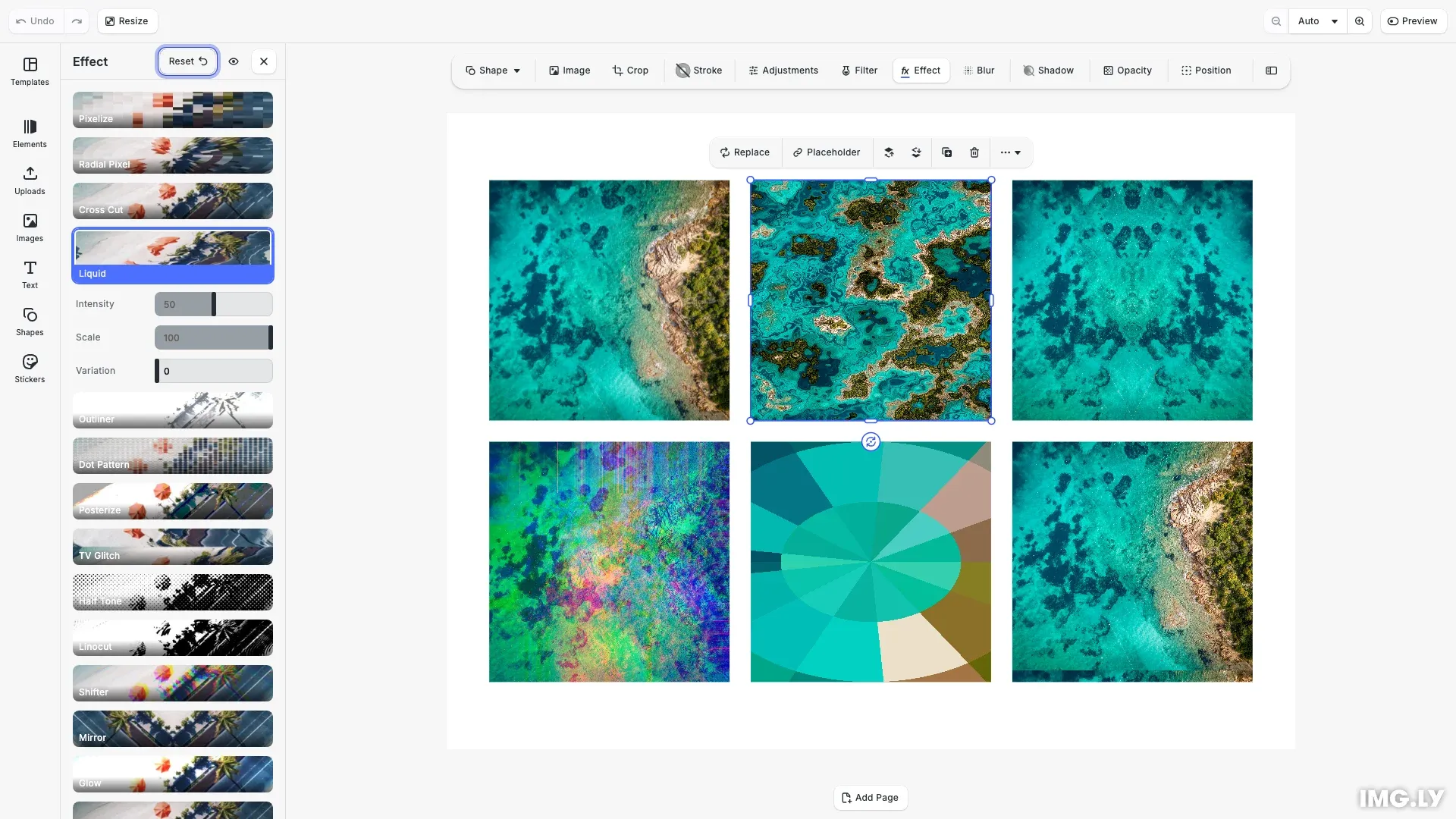
Distortion effects differ from color filters in that they modify the geometry and spatial arrangement of pixels rather than their color values. CE.SDK provides several distortion effect types: liquid warping, mirror reflections, color channel shifting, radial pixelation, and TV glitch. Each effect offers configurable parameters to control the intensity and style of the distortion.
This guide covers how to enable distortion effects in the built-in UI and how to apply and configure them programmatically using the block API.
Using the Built-in Distortion UI#
To enable distortion effects in the inspector panel, use the Feature API:
// Enable effects in the inspector panel using the Feature APIcesdk.feature.enable('ly.img.effect');Once enabled, users can access distortion effects from the inspector when selecting an image or video block. The effects panel displays available distortions with real-time preview as parameters are adjusted.
Check Effect Support#
Before applying distortion effects, verify the block supports them. Graphic blocks with image or video fills support effects, while scene blocks do not.
// Create a sample block to demonstrate effect support checkingconst sampleBlock = await engine.block.addImage(imageUri, {  size: blockSize});engine.block.appendChild(page, sampleBlock);
// Check if a block supports effects before applying themconst supportsEffects = engine.block.supportsEffects(sampleBlock);console.log('Block supports effects:', supportsEffects);
Apply Liquid Effect#
The liquid effect creates organic, flowing distortions that warp the image as if viewed through water. We can configure the intensity and scale of the warping.
// Create an image block for liquid distortion demonstrationconst liquidBlock = await engine.block.addImage(imageUri, {  size: blockSize});engine.block.appendChild(page, liquidBlock);
// Create and apply liquid effect - creates flowing, organic warpingconst liquidEffect = engine.block.createEffect('liquid');engine.block.setFloat(liquidEffect, 'effect/liquid/amount', 0.5);engine.block.setFloat(liquidEffect, 'effect/liquid/scale', 1.0);engine.block.setFloat(liquidEffect, 'effect/liquid/time', 0.0);engine.block.appendEffect(liquidBlock, liquidEffect);
The liquid effect parameters:
- amount (0.0 to 1.0) - Controls the intensity of the warping
- scale - Adjusts the size of the liquid pattern
- time - Animation time offset for animated liquid distortions
Apply Mirror Effect#
The mirror effect reflects the image along a configurable side, creating symmetrical compositions.
// Create an image block for mirror effect demonstrationconst mirrorBlock = await engine.block.addImage(imageUri, {  size: blockSize});engine.block.appendChild(page, mirrorBlock);
// Create and apply mirror effect - reflects image along a sideconst mirrorEffect = engine.block.createEffect('mirror');// Side values: 0 = Left, 1 = Right, 2 = Top, 3 = Bottomengine.block.setInt(mirrorEffect, 'effect/mirror/side', 0);engine.block.appendEffect(mirrorBlock, mirrorEffect);
The side parameter uses integer values: 0 (Left), 1 (Right), 2 (Top), or 3 (Bottom) to specify the reflection axis.
Apply Shifter Effect#
The shifter effect displaces color channels at an angle, creating chromatic aberration commonly seen in glitch art and retro visuals.
// Create an image block for shifter effect demonstrationconst shifterBlock = await engine.block.addImage(imageUri, {  size: blockSize});engine.block.appendChild(page, shifterBlock);
// Create and apply shifter effect - displaces color channelsconst shifterEffect = engine.block.createEffect('shifter');engine.block.setFloat(shifterEffect, 'effect/shifter/amount', 0.3);engine.block.setFloat(shifterEffect, 'effect/shifter/angle', 0.785);engine.block.appendEffect(shifterBlock, shifterEffect);
The shifter effect parameters:
- amount (0.0 to 1.0) - Controls the displacement distance
- angle - Sets the direction of the shift in radians
Apply Radial Pixel Effect#
The radial pixel effect pixelates the image in a circular pattern emanating from the center, useful for focus effects or stylized treatments.
// Create an image block for radial pixel effect demonstrationconst radialPixelBlock = await engine.block.addImage(imageUri, {  size: blockSize});engine.block.appendChild(page, radialPixelBlock);
// Create and apply radial pixel effect - pixelates in circular patternconst radialPixelEffect = engine.block.createEffect('radial_pixel');engine.block.setFloat(radialPixelEffect, 'effect/radial_pixel/radius', 0.5);engine.block.setFloat(  radialPixelEffect,  'effect/radial_pixel/segments',  0.5);engine.block.appendEffect(radialPixelBlock, radialPixelEffect);
The radial pixel effect parameters:
- radius (0.0 to 1.0) - Controls the size of the pixelation effect
- segments (0.0 to 1.0) - Controls the angular segmentation intensity
Apply TV Glitch Effect#
The TV glitch effect simulates analog television interference with horizontal distortion and rolling effects, popular for retro and digital aesthetics.
// Create an image block for TV glitch effect demonstrationconst tvGlitchBlock = await engine.block.addImage(imageUri, {  size: blockSize});engine.block.appendChild(page, tvGlitchBlock);
// Create and apply TV glitch effect - simulates analog TV interferenceconst tvGlitchEffect = engine.block.createEffect('tv_glitch');engine.block.setFloat(tvGlitchEffect, 'effect/tv_glitch/distortion', 0.4);engine.block.setFloat(tvGlitchEffect, 'effect/tv_glitch/distortion2', 0.2);engine.block.setFloat(tvGlitchEffect, 'effect/tv_glitch/speed', 0.5);engine.block.setFloat(tvGlitchEffect, 'effect/tv_glitch/rollSpeed', 0.1);engine.block.appendEffect(tvGlitchBlock, tvGlitchEffect);
The TV glitch effect parameters:
- distortion - Primary horizontal distortion intensity
- distortion2 - Secondary distortion layer
- speed - Animation speed for the glitch effect
- rollSpeed - Vertical roll speed simulating signal sync issues
List Applied Effects#
Retrieve all effects applied to a block to inspect or iterate over them.
// Get all effects applied to a blockconst effects = engine.block.getEffects(tvGlitchBlock);console.log('Applied effects:', effects);
// Get the type of each effecteffects.forEach((effect, index) => {  const effectType = engine.block.getType(effect);  console.log(`Effect ${index}: ${effectType}`);});
This returns an array of effect IDs in the order they were applied.
Enable and Disable Effects#
Toggle effects on and off without removing them from the block. This preserves all effect parameters while controlling visibility.
// Check if an effect is enabledconst isEnabled = engine.block.isEffectEnabled(liquidEffect);console.log('Liquid effect enabled:', isEnabled);
// Disable an effect without removing itengine.block.setEffectEnabled(liquidEffect, false);console.log(  'Liquid effect now disabled:',  !engine.block.isEffectEnabled(liquidEffect));
// Re-enable the effectengine.block.setEffectEnabled(liquidEffect, true);
Disabled effects remain attached to the block but won’t be rendered until re-enabled. This is useful for before/after comparisons or performance optimization.
Remove Effects#
Remove effects from a block when they’re no longer needed. Always destroy removed effects to free memory.
// To remove an effect, get its index and use removeEffectconst shifterEffects = engine.block.getEffects(shifterBlock);const effectIndex = shifterEffects.indexOf(shifterEffect);if (effectIndex !== -1) {  // Remove effect at the specified index  engine.block.removeEffect(shifterBlock, effectIndex);
  // Destroy the removed effect to free memory  engine.block.destroy(shifterEffect);}
// Re-add the effect for display purposesconst newShifterEffect = engine.block.createEffect('shifter');engine.block.setFloat(newShifterEffect, 'effect/shifter/amount', 0.3);engine.block.setFloat(newShifterEffect, 'effect/shifter/angle', 0.785);engine.block.appendEffect(shifterBlock, newShifterEffect);
Discover Effect Properties#
Use findAllProperties() to discover all available properties for any effect type.
// Find all available properties for an effectconst tvGlitchProperties = engine.block.findAllProperties(tvGlitchEffect);console.log('TV glitch properties:', tvGlitchProperties);This returns an array of property paths that can be used with setFloat(), setInt(), or setEnum().
API Reference#
| Method | Description |
|---|---|
engine.block.supportsEffects(id) | Check if a block supports effects |
engine.block.createEffect(type) | Create a new effect instance |
engine.block.appendEffect(id, effectId) | Add an effect to a block |
engine.block.getEffects(id) | Get all effects applied to a block |
engine.block.setEffectEnabled(effectId, enabled) | Enable or disable an effect |
engine.block.isEffectEnabled(effectId) | Check if an effect is enabled |
engine.block.removeEffect(id, index) | Remove an effect at a specific index |
engine.block.findAllProperties(id) | Discover all properties of an effect |
engine.block.setFloat(id, property, value) | Set a float property value |
engine.block.setInt(id, property, value) | Set an integer property value |
engine.block.destroy(id) | Destroy a block to free memory |
engine.block.getType(id) | Get the type of a block |
Available Distortion Effects#
| Effect Type | Description | Key Properties |
|---|---|---|
liquid | Flowing, organic warping | amount, scale, time |
mirror | Reflection along a side | side (0=Left, 1=Right, 2=Top, 3=Bottom) |
shifter | Chromatic aberration | amount, angle |
radial_pixel | Circular pixelation | radius, segments |
tv_glitch | Analog TV interference | distortion, distortion2, speed, rollSpeed |
Next Steps#
- Apply Filters and Effects - Learn the foundational effect APIs
- Blur Effects - Apply blur techniques for depth and focus effects