Learn how CE.SDK’s rules system enforces design constraints and controls editing permissions through the scopes mechanism.
In CE.SDK, “rules” refer to design constraints and guardrails that control what editing operations are permitted. The primary mechanism for enforcing rules is the scopes system—permission flags that enable you to create guided editing experiences maintaining brand consistency, ensuring design quality, and preventing unauthorized modifications.
This guide covers the scopes system conceptually, including global vs block-level scopes, available scope categories, and how scopes integrate with the UI. For detailed implementation of specific use cases, see the Next Steps section.
What Are Scopes#
Scopes are permission flags that control specific editing capabilities. Each scope maps to a particular operation category. When a scope is denied for a block, the corresponding editing controls become unavailable in the UI.
CE.SDK organizes scopes into four main categories:
Layer operations — Control positioning and transformation:
layer/move,layer/resize,layer/rotate,layer/fliplayer/crop,layer/opacity,layer/blendModelayer/visibility,layer/clipping
Appearance — Control visual effects and adjustments:
appearance/adjustments,appearance/filter,appearance/effectappearance/blur,appearance/shadow,appearance/animation
Content editing — Control content modifications:
text/edit,text/characterfill/change,fill/changeTypestroke/change,shape/change
Lifecycle — Control block management:
lifecycle/destroy,lifecycle/duplicateeditor/add,editor/select
Setting Global Scopes#
Global scopes set editor-wide defaults that apply to all blocks. Use engine.editor.setGlobalScope() to configure them with three permission levels:
'Allow'— Operation always permitted for all blocks'Deny'— Operation always blocked for all blocks'Defer'— Defer to each block’s individual scope setting
// Set global scopes to Defer - this allows block-level control// Layer operationsengine.editor.setGlobalScope('layer/move', 'Defer');engine.editor.setGlobalScope('layer/resize', 'Defer');engine.editor.setGlobalScope('layer/rotate', 'Defer');engine.editor.setGlobalScope('layer/flip', 'Defer');engine.editor.setGlobalScope('layer/crop', 'Defer');engine.editor.setGlobalScope('layer/opacity', 'Defer');engine.editor.setGlobalScope('layer/blendMode', 'Defer');engine.editor.setGlobalScope('layer/visibility', 'Defer');engine.editor.setGlobalScope('layer/clipping', 'Defer');
// Appearanceengine.editor.setGlobalScope('appearance/adjustments', 'Defer');engine.editor.setGlobalScope('appearance/filter', 'Defer');engine.editor.setGlobalScope('appearance/effect', 'Defer');engine.editor.setGlobalScope('appearance/blur', 'Defer');engine.editor.setGlobalScope('appearance/shadow', 'Defer');
// Content editingengine.editor.setGlobalScope('fill/change', 'Defer');engine.editor.setGlobalScope('fill/changeType', 'Defer');engine.editor.setGlobalScope('stroke/change', 'Defer');
// Lifecycleengine.editor.setGlobalScope('lifecycle/destroy', 'Defer');engine.editor.setGlobalScope('lifecycle/duplicate', 'Defer');engine.editor.setGlobalScope('editor/add', 'Defer');engine.editor.setGlobalScope('editor/select', 'Defer');
When set to 'Defer', the global scope defers control to block-level settings, enabling fine-grained permissions per element.
Setting Block-Level Scopes#
Block-level scopes override deferred global settings for specific elements. Use engine.block.setScopeEnabled() to enable or disable operations on individual blocks:
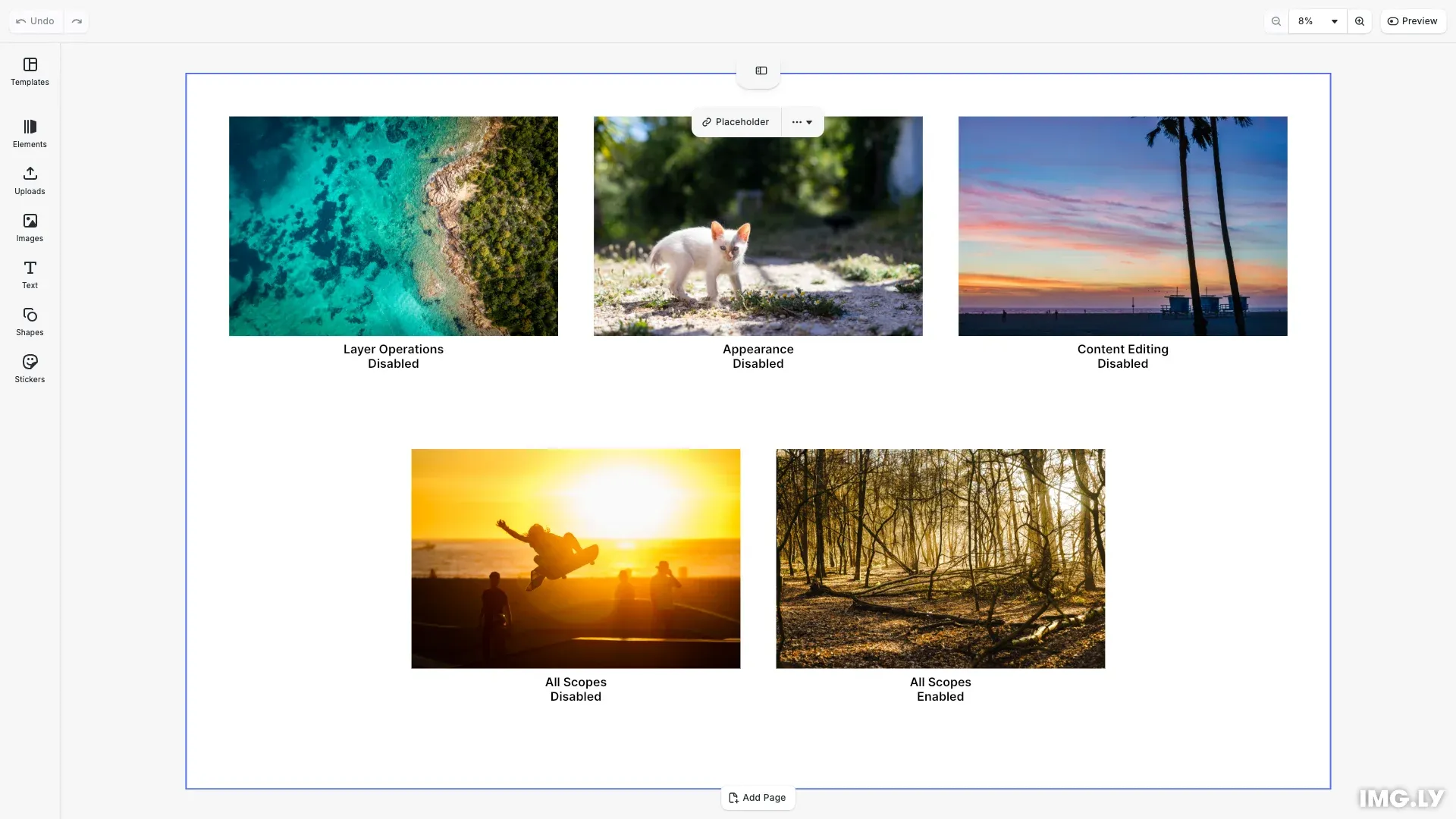
// Block 1: Disable all layer operationsengine.block.setScopeEnabled(layerBlock, 'layer/move', false);engine.block.setScopeEnabled(layerBlock, 'layer/resize', false);engine.block.setScopeEnabled(layerBlock, 'layer/rotate', false);engine.block.setScopeEnabled(layerBlock, 'layer/flip', false);engine.block.setScopeEnabled(layerBlock, 'layer/crop', false);engine.block.setScopeEnabled(layerBlock, 'layer/opacity', false);engine.block.setScopeEnabled(layerBlock, 'layer/blendMode', false);engine.block.setScopeEnabled(layerBlock, 'layer/visibility', false);engine.block.setScopeEnabled(layerBlock, 'layer/clipping', false);// Keep other scopes enabledengine.block.setScopeEnabled(layerBlock, 'appearance/adjustments', true);engine.block.setScopeEnabled(layerBlock, 'appearance/filter', true);engine.block.setScopeEnabled(layerBlock, 'fill/change', true);engine.block.setScopeEnabled(layerBlock, 'lifecycle/destroy', true);engine.block.setScopeEnabled(layerBlock, 'lifecycle/duplicate', true);engine.block.setScopeEnabled(layerBlock, 'editor/select', true);This creates differentiated editing experiences — some elements remain fully editable while others have specific categories locked. In the example above, we configure five blocks with different scope categories:
- Layer Operations Disabled — Cannot move, resize, rotate, flip, crop, or adjust opacity/blend mode
- Appearance Disabled — Cannot apply adjustments, filters, effects, blur, or shadows
- Content Editing Disabled — Cannot change fills, fill types, or strokes
- All Scopes Disabled — Completely locked with no editing capabilities, including selection
- All Scopes Enabled — Full editing capabilities across all categories
Checking Scope Permissions#
Before performing operations, verify if they’re allowed using engine.block.isAllowedByScope(). This method considers both global and block-level settings:
// Check if operations are allowed for each blockconst canMoveLayer = engine.block.isAllowedByScope(  layerBlock,  'layer/move');const canMoveEnabled = engine.block.isAllowedByScope(  enabledBlock,  'layer/move');const canMoveLocked = engine.block.isAllowedByScope(  lockedBlock,  'layer/move');
console.log(`Layer block - can move: ${canMoveLayer}`); // falseconsole.log(`Enabled block - can move: ${canMoveEnabled}`); // trueconsole.log(`Locked block - can move: ${canMoveLocked}`); // false
When the global scope is set to 'Deny', operations are blocked regardless of block-level settings:
// Demonstrate global Deny - would block all operations regardless of block settings// Example: engine.editor.setGlobalScope('layer/flip', 'Deny');// This would prevent flipping on ALL blocks, even the fully enabled oneCommon Use Cases#
The scopes system supports various rule enforcement scenarios:
- Lock content — Prevent modifications to specific elements like logos or legal text
- Define safe zones — Mark areas where content must remain for proper trimming
- Enforce brand guidelines — Restrict fonts, colors, and styles to approved options
For content appropriateness checking, see the Moderate Content guide which covers integrating external moderation services.
API Reference#
| Method | Category | Purpose |
|---|---|---|
engine.editor.setGlobalScope(scope, value) | Global | Set editor-wide scope permission |
engine.editor.getGlobalScope(scope) | Global | Get current global scope value |
engine.block.setScopeEnabled(id, scope, enabled) | Block | Enable/disable scope for specific block |
engine.block.isScopeEnabled(id, scope) | Block | Check if scope is enabled for block |
engine.block.isAllowedByScope(id, scope) | Block | Check if operation is allowed |