Learn how to restrict users to approved brand assets—specific colors, fonts, and images—while preventing unauthorized modifications to brand elements like logos and legal text.
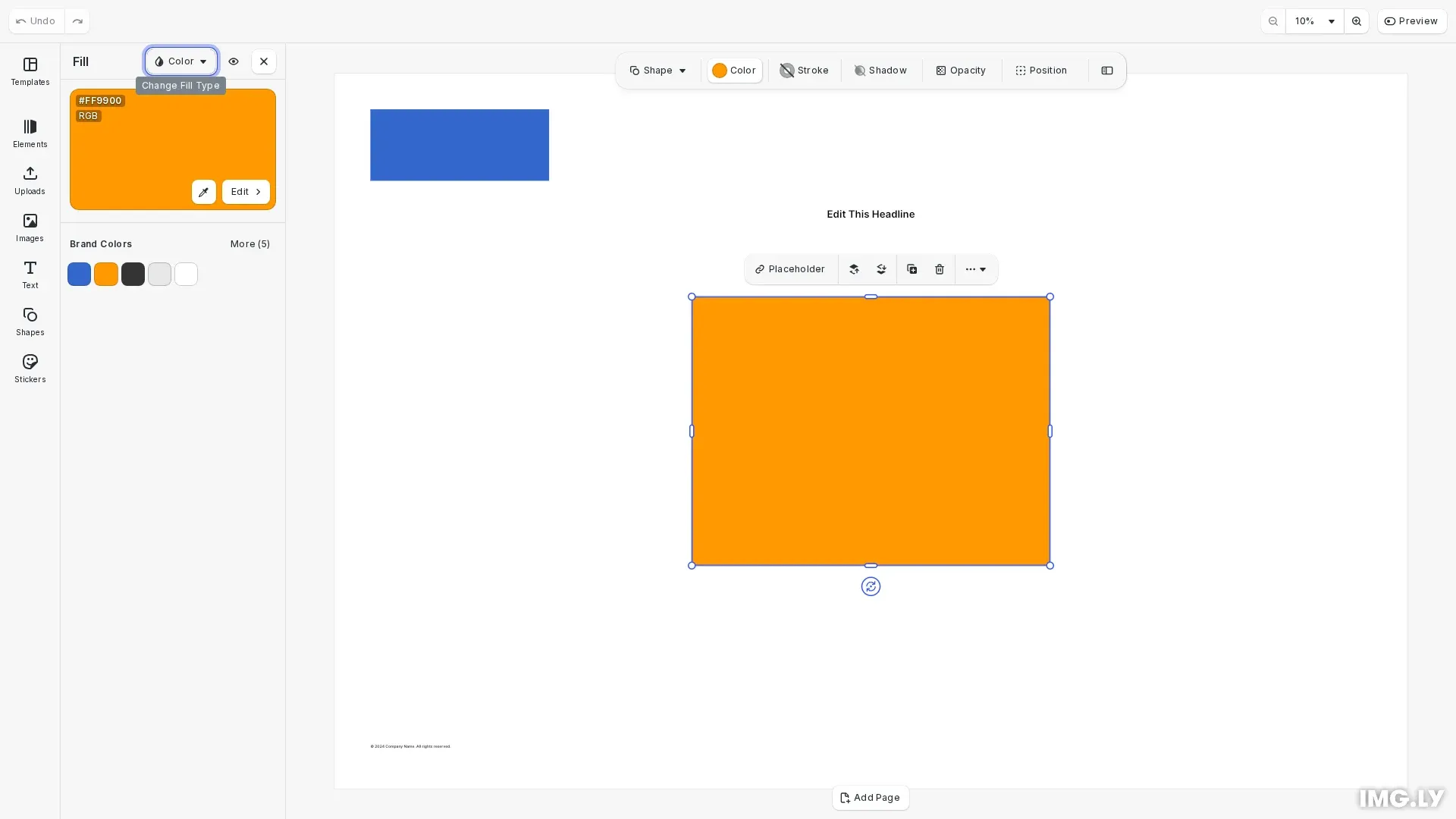
Brand guidelines enforcement in CE.SDK combines two complementary approaches: restricting which assets users can access (colors, fonts, images) and controlling what editing operations are permitted on brand elements. Asset restrictions work through custom asset sources that replace default libraries, while editing constraints use the scopes system to lock specific elements.
Restricting Colors to Brand Palette#
Create a custom color library containing only approved brand colors and replace the default palette in the UI.
Creating Brand Color Sources#
Use engine.asset.addLocalSource() to create a custom asset source, then add color assets with engine.asset.addAssetToSource():
// Create brand color source with approved colors onlyengine.asset.addLocalSource('brandColors');
engine.asset.addAssetToSource('brandColors', {  id: 'brand-primary',  label: { en: 'Brand Blue' },  payload: {    color: { colorSpace: 'sRGB', r: 0.2, g: 0.4, b: 0.8 }  }});
engine.asset.addAssetToSource('brandColors', {  id: 'brand-secondary',  label: { en: 'Brand Orange' },  payload: {    color: { colorSpace: 'sRGB', r: 1.0, g: 0.6, b: 0.0 }  }});
engine.asset.addAssetToSource('brandColors', {  id: 'brand-neutral-dark',  label: { en: 'Dark Gray' },  payload: {    color: { colorSpace: 'sRGB', r: 0.2, g: 0.2, b: 0.2 }  }});
engine.asset.addAssetToSource('brandColors', {  id: 'brand-neutral-light',  label: { en: 'Light Gray' },  payload: {    color: { colorSpace: 'sRGB', r: 0.9, g: 0.9, b: 0.9 }  }});
engine.asset.addAssetToSource('brandColors', {  id: 'brand-white',  label: { en: 'White' },  payload: {    color: { colorSpace: 'sRGB', r: 1.0, g: 1.0, b: 1.0 }  }});
Each color asset specifies an id, optional label for display, and a payload containing the color definition. Colors use the sRGB color space with r, g, b values from 0 to 1.
Replacing the Default Color Palette#
Configure the color library to display only brand colors using cesdk.ui.updateAssetLibraryEntry():
// Replace default color palette with brand colors onlycesdk.ui.updateAssetLibraryEntry('ly.img.colors', { sourceIds: ['brandColors']});By omitting the default color palette source ID (ly.img.color.palette), users can only select from your approved brand colors.
Restricting Fonts to Brand Typefaces#
Limit font selection to brand-approved typefaces by creating a custom font asset source.
Creating Brand Font Sources#
Register brand fonts as assets with typeface payloads containing font family names and available variants:
// Create brand font source with approved typefacesengine.asset.addLocalSource('brandFonts');
engine.asset.addAssetToSource('brandFonts', {  id: 'brand-heading-font',  label: { en: 'Montserrat' },  payload: {    typeface: {      name: 'Montserrat',      fonts: [        {          uri: 'https://cdn.img.ly/assets/v2/ly.img.typeface/fonts/Montserrat/Montserrat-Regular.ttf',          subFamily: 'Regular',          weight: 'normal',          style: 'normal'        },        {          uri: 'https://cdn.img.ly/assets/v2/ly.img.typeface/fonts/Montserrat/Montserrat-Bold.ttf',          subFamily: 'Bold',          weight: 'bold',          style: 'normal'        }      ]    }  }});
engine.asset.addAssetToSource('brandFonts', {  id: 'brand-body-font',  label: { en: 'Open Sans' },  payload: {    typeface: {      name: 'Open Sans',      fonts: [        {          uri: 'https://cdn.img.ly/assets/v2/ly.img.typeface/fonts/OpenSans/OpenSans-Regular.ttf',          subFamily: 'Regular',          weight: 'normal',          style: 'normal'        },        {          uri: 'https://cdn.img.ly/assets/v2/ly.img.typeface/fonts/OpenSans/OpenSans-Bold.ttf',          subFamily: 'Bold',          weight: 'bold',          style: 'normal'        }      ]    }  }});
Each font in the typeface array specifies a uri pointing to the font file, plus weight and style properties.
Replacing the Default Font Library#
Configure the font library to show only brand fonts:
// Replace default font library with brand fonts onlycesdk.ui.updateAssetLibraryEntry('ly.img.typefaces', { sourceIds: ['brandFonts']});Locking Brand Elements#
Protect brand assets like logos and legal text from modification using the scopes system.
Setting Global Scopes to Defer#
First, set global scopes to 'Defer' to enable block-level control:
// Set global scopes to Defer for block-level controlengine.editor.setGlobalScope('layer/move', 'Defer');engine.editor.setGlobalScope('layer/resize', 'Defer');engine.editor.setGlobalScope('fill/change', 'Defer');engine.editor.setGlobalScope('fill/changeType', 'Defer');engine.editor.setGlobalScope('lifecycle/destroy', 'Defer');engine.editor.setGlobalScope('lifecycle/duplicate', 'Defer');engine.editor.setGlobalScope('text/edit', 'Defer');Creating and Locking a Logo#
Create a brand element and disable all relevant scopes to lock it:
// Create a locked logo block that cannot be modifiedconst logoBlock = engine.block.create('graphic');const logoShape = engine.block.createShape('rect');engine.block.setShape(logoBlock, logoShape);engine.block.setWidth(logoBlock, 200);engine.block.setHeight(logoBlock, 80);engine.block.setPositionX(logoBlock, 40);engine.block.setPositionY(logoBlock, 40);
const logoFill = engine.block.createFill('color');engine.block.setColor(logoFill, 'fill/color/value', {  r: 0.2,  g: 0.4,  b: 0.8,  a: 1.0});engine.block.setFill(logoBlock, logoFill);engine.block.setName(logoBlock, 'Company Logo');engine.block.appendChild(page, logoBlock);
Lock the logo by disabling editing scopes:
// Lock all editing capabilities on the logoengine.block.setScopeEnabled(logoBlock, 'layer/move', false);engine.block.setScopeEnabled(logoBlock, 'layer/resize', false);engine.block.setScopeEnabled(logoBlock, 'fill/change', false);engine.block.setScopeEnabled(logoBlock, 'fill/changeType', false);engine.block.setScopeEnabled(logoBlock, 'lifecycle/destroy', false);engine.block.setScopeEnabled(logoBlock, 'lifecycle/duplicate', false);With these scopes disabled, the logo cannot be moved, resized, recolored, or deleted.
Locking Legal Text#
Similarly, protect legal text from modification:
// Create locked legal textconst legalText = engine.block.create('text');engine.block.setWidth(legalText, pageWidth - 80);engine.block.setHeight(legalText, 30);engine.block.setPositionX(legalText, 40);engine.block.setPositionY(legalText, pageHeight - 50);engine.block.replaceText(  legalText,  '\u00A9 2024 Company Name. All rights reserved.');engine.block.setFloat(legalText, 'text/fontSize', 36);engine.block.setName(legalText, 'Legal Text');engine.block.appendChild(page, legalText);
// Lock the legal textengine.block.setScopeEnabled(legalText, 'layer/move', false);engine.block.setScopeEnabled(legalText, 'layer/resize', false);engine.block.setScopeEnabled(legalText, 'text/edit', false);engine.block.setScopeEnabled(legalText, 'lifecycle/destroy', false);
Creating Editable Content Areas#
While brand elements are locked, other areas can remain fully editable. Create content blocks with all scopes enabled:
// Create an editable content area where users can work with brand assetsconst contentBlock = engine.block.create('graphic');const contentShape = engine.block.createShape('rect');engine.block.setShape(contentBlock, contentShape);engine.block.setWidth(contentBlock, 400);engine.block.setHeight(contentBlock, 300);engine.block.setPositionX(contentBlock, (pageWidth - 400) / 2);engine.block.setPositionY(contentBlock, (pageHeight - 300) / 2);
const contentFill = engine.block.createFill('color');engine.block.setColor(contentFill, 'fill/color/value', {  r: 1.0,  g: 0.6,  b: 0.0,  a: 1.0});engine.block.setFill(contentBlock, contentFill);engine.block.setName(contentBlock, 'Editable Content');engine.block.appendChild(page, contentBlock);
// Enable all editing for the editable content blockengine.block.setScopeEnabled(contentBlock, 'layer/move', true);engine.block.setScopeEnabled(contentBlock, 'layer/resize', true);engine.block.setScopeEnabled(contentBlock, 'fill/change', true);engine.block.setScopeEnabled(contentBlock, 'fill/changeType', true);engine.block.setScopeEnabled(contentBlock, 'lifecycle/destroy', true);engine.block.setScopeEnabled(contentBlock, 'lifecycle/duplicate', true);
For text blocks that should be editable but restricted to brand fonts:
// Create editable text that uses brand fontsconst editableText = engine.block.create('text');engine.block.setWidth(editableText, 300);engine.block.setHeight(editableText, 60);engine.block.setPositionX(editableText, (pageWidth - 300) / 2);engine.block.setPositionY(editableText, 150);engine.block.replaceText(editableText, 'Edit This Headline');engine.block.setFloat(editableText, 'text/fontSize', 64);engine.block.setEnum(editableText, 'text/horizontalAlignment', 'Center');engine.block.setName(editableText, 'Editable Headline');engine.block.appendChild(page, editableText);
// Enable text editing with brand font restrictionsengine.block.setScopeEnabled(editableText, 'layer/move', true);engine.block.setScopeEnabled(editableText, 'layer/resize', true);engine.block.setScopeEnabled(editableText, 'text/edit', true);engine.block.setScopeEnabled(editableText, 'lifecycle/destroy', true);
Validating Brand Compliance#
Check that brand constraints are properly enforced using engine.block.isAllowedByScope():
// Validate brand complianceconst isLogoLocked = !engine.block.isAllowedByScope(  logoBlock,  'layer/move');const isLegalLocked = !engine.block.isAllowedByScope(  legalText,  'text/edit');const isContentEditable = engine.block.isAllowedByScope(  contentBlock,  'fill/change');
console.log(`Logo is locked: ${isLogoLocked}`);console.log(`Legal text is locked: ${isLegalLocked}`);console.log(`Content block is editable: ${isContentEditable}`);
This method considers both global and block-level scope settings to determine if an operation is permitted.
Troubleshooting#
- Colors still editable: Ensure the default color palette source is omitted from the
sourceIdsarray inupdateAssetLibraryEntry() - Fonts not restricted: Verify the font library configuration targets
'ly.img.typefaces'and excludes default sources - Locked elements still movable: Check that global scopes are set to
'Defer'before setting block-level restrictions - Brand elements deletable: Confirm
lifecycle/destroyscope is disabled on the specific blocks
API Reference#
| Method | Category | Purpose |
|---|---|---|
engine.asset.addLocalSource(id) | Asset | Create a custom asset source for brand assets |
engine.asset.addAssetToSource(sourceId, asset) | Asset | Add an asset to a local source |
cesdk.ui.updateAssetLibraryEntry(libraryId, config) | UI | Configure which sources appear in asset libraries |
engine.editor.setGlobalScope(scope, value) | Scope | Set editor-wide scope permission to 'Defer' |
engine.block.setScopeEnabled(id, scope, enabled) | Scope | Enable or disable a scope for a specific block |
engine.block.isAllowedByScope(id, scope) | Scope | Check if an operation is allowed |