Add visual depth and emphasis to design elements using drop shadows and glow effects in CE.SDK.
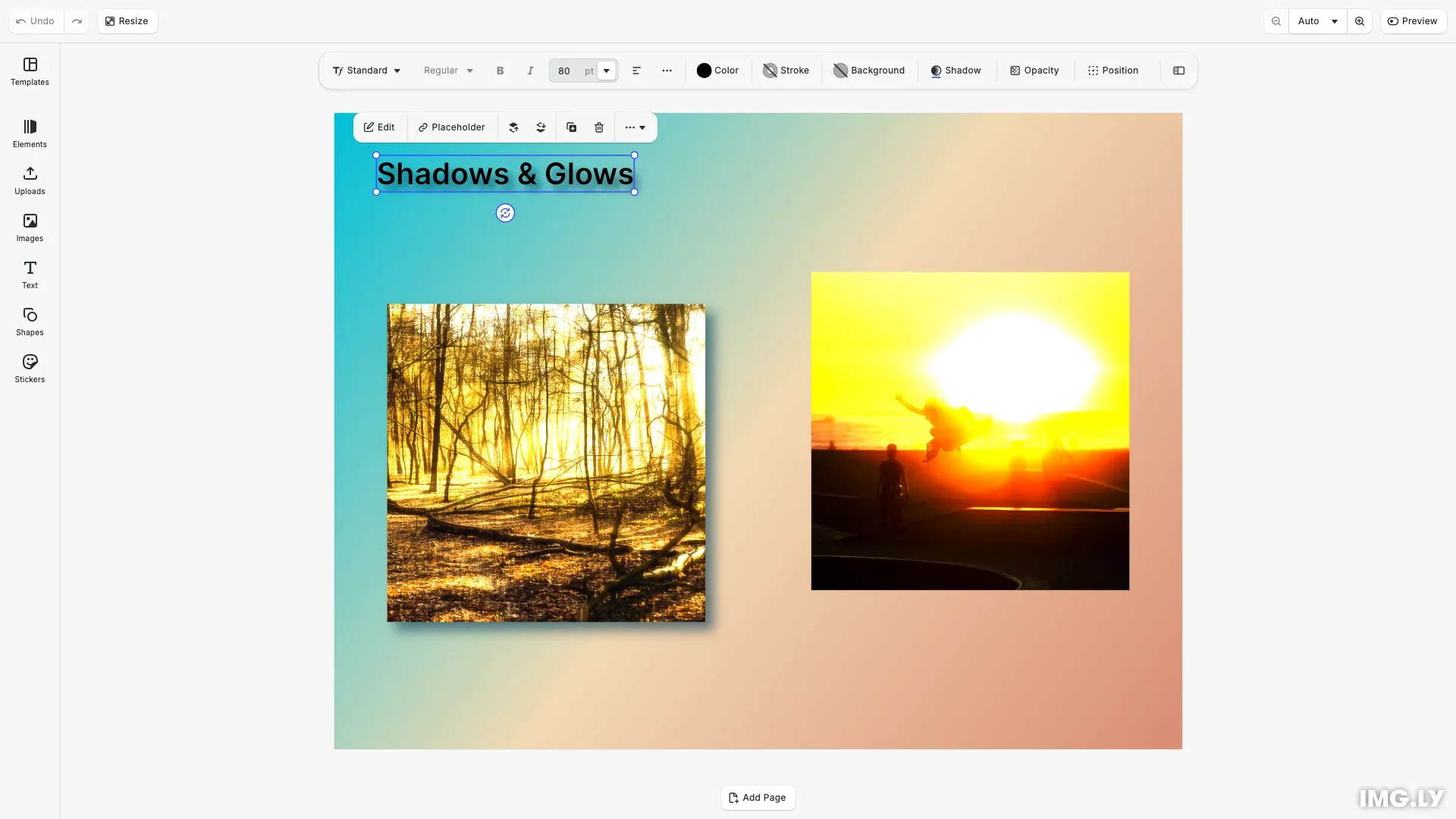
Drop shadows create the illusion of elements floating above the canvas, while glow effects add luminous halos that make elements stand out. CE.SDK provides two approaches: drop shadows as native block properties and glow effects through the effects system. Both can be applied to graphic blocks, text, and shapes.
This guide covers configuring drop shadows with dedicated API methods and applying glow effects through the effects system.
Using the Built-in UI#
The CE.SDK editor provides shadow controls in the inspector panel when you select a supported block. The UI includes:
- Enable toggle - Turn shadows on or off
- Color picker - Choose shadow color with RGBA support
- Offset controls - Adjust horizontal and vertical shadow position
- Blur controls - Set shadow softness
Select any text, shape, or image block and access the shadow settings through the inspector panel.
Drop Shadow Configuration#
Drop shadows are native block properties configured directly through dedicated API methods.
Check Support and Enable#
Before configuring drop shadows, verify the block supports them using supportsDropShadow(). Enable the shadow with setDropShadowEnabled().
await cesdk.addPlugin(new DesignEditorConfig());
// Add asset source pluginsawait cesdk.addPlugin(new BlurAssetSource());await cesdk.addPlugin(new ColorPaletteAssetSource());await cesdk.addPlugin(new CropPresetsAssetSource());await cesdk.addPlugin(new UploadAssetSources({ include: ['ly.img.image.upload'] }));await cesdk.addPlugin(  new DemoAssetSources({    include: [      'ly.img.templates.blank.*',      'ly.img.templates.presentation.*',      'ly.img.templates.print.*',      'ly.img.templates.social.*',      'ly.img.image.*'    ]  }));await cesdk.addPlugin(new EffectsAssetSource());await cesdk.addPlugin(new FiltersAssetSource());await cesdk.addPlugin(new PagePresetsAssetSource());await cesdk.addPlugin(new StickerAssetSource());await cesdk.addPlugin(new TextAssetSource());await cesdk.addPlugin(new TextComponentAssetSource());await cesdk.addPlugin(new TypefaceAssetSource());await cesdk.addPlugin(new VectorShapeAssetSource());
await cesdk.actions.run('scene.create', {  page: { width: 800, height: 600, unit: 'Pixel' }});
Use supportsDropShadow() to check if the block supports shadows:
// Check if block supports drop shadowsconst canHaveDropShadow = engine.block.supportsDropShadow(textBlock);console.log('Block supports drop shadow:', canHaveDropShadow);Once verified, enable the drop shadow:
// Enable drop shadow on the blockengine.block.setDropShadowEnabled(textBlock, true);const shadowIsEnabled = engine.block.isDropShadowEnabled(textBlock);console.log('Drop shadow enabled:', shadowIsEnabled);Set Shadow Color#
Configure the shadow color using setDropShadowColor() with an RGBA color object. Color values range from 0.0 to 1.0.
// Set drop shadow color to a deep tealengine.block.setDropShadowColor(textBlock, { r: 0.0, g: 0.3, b: 0.4, a: 0.8});const shadowColor = engine.block.getDropShadowColor(textBlock);console.log('Drop shadow color:', shadowColor);Set Shadow Position#
Control horizontal and vertical offset using setDropShadowOffsetX() and setDropShadowOffsetY(). Positive values move the shadow right and down, negative values move left and up.
// Set shadow offset (positive values move right/down)engine.block.setDropShadowOffsetX(textBlock, 6);engine.block.setDropShadowOffsetY(textBlock, 6);const offsetX = engine.block.getDropShadowOffsetX(textBlock);const offsetY = engine.block.getDropShadowOffsetY(textBlock);console.log('Drop shadow offset:', offsetX, offsetY);Configure Blur Radius#
Set shadow softness with setDropShadowBlurRadiusX() and setDropShadowBlurRadiusY(). Higher values create softer shadows.
// Set blur radius for soft shadow edgesengine.block.setDropShadowBlurRadiusX(textBlock, 12);engine.block.setDropShadowBlurRadiusY(textBlock, 12);const blurX = engine.block.getDropShadowBlurRadiusX(textBlock);const blurY = engine.block.getDropShadowBlurRadiusY(textBlock);console.log('Drop shadow blur:', blurX, blurY);Glow Effect Configuration#
Glow effects are created through the effects system and attached to blocks that support effects.
Check Support and Create Glow#
Verify the block supports effects using supportsEffects(), then create a glow effect with createEffect('glow') and attach it using appendEffect().
// Check if block supports effects (including glow)const canHaveEffects = engine.block.supportsEffects(imageBlock);console.log('Block supports effects:', canHaveEffects);Create the glow effect and attach it to the block:
// Create and apply a glow effectconst glowEffect = engine.block.createEffect('glow');engine.block.appendEffect(imageBlock, glowEffect);Configure Glow Parameters#
Adjust glow appearance using setFloat() with glow-specific properties:
effect/glow/size- Controls the spread of the gloweffect/glow/amount- Controls glow intensity (0.0 to 1.0)effect/glow/darkness- Controls the darkness/opacity of the glow
// Configure glow parametersengine.block.setFloat(glowEffect, 'effect/glow/size', 25);engine.block.setFloat(glowEffect, 'effect/glow/amount', 0.7);engine.block.setFloat(glowEffect, 'effect/glow/darkness', 0.25);console.log('Glow effect applied');Combining Shadows and Glows#
Drop shadows and glow effects can both be applied to the same block. Drop shadows render independently of the effects stack, so both appear simultaneously.
// Apply both drop shadow and glow to the same blockif (engine.block.supportsDropShadow(combinedBlock)) {  engine.block.setDropShadowEnabled(combinedBlock, true);  engine.block.setDropShadowColor(combinedBlock, {    r: 0.0,    g: 0.2,    b: 0.3,    a: 0.6  });  engine.block.setDropShadowOffsetX(combinedBlock, 8);  engine.block.setDropShadowOffsetY(combinedBlock, 8);  engine.block.setDropShadowBlurRadiusX(combinedBlock, 20);  engine.block.setDropShadowBlurRadiusY(combinedBlock, 20);}
if (engine.block.supportsEffects(combinedBlock)) {  const combinedGlow = engine.block.createEffect('glow');  engine.block.appendEffect(combinedBlock, combinedGlow);  engine.block.setFloat(combinedGlow, 'effect/glow/size', 15);  engine.block.setFloat(combinedGlow, 'effect/glow/amount', 0.5);  engine.block.setFloat(combinedGlow, 'effect/glow/darkness', 0.15);}console.log('Combined shadow and glow applied');
Managing Shadow and Glow State#
Toggle Drop Shadows#
Enable or disable drop shadows with setDropShadowEnabled(). Query the current state with isDropShadowEnabled().
// Toggle drop shadow visibilityconst wasEnabled = engine.block.isDropShadowEnabled(textBlock);engine.block.setDropShadowEnabled(textBlock, false);console.log( 'Shadow disabled:', !engine.block.isDropShadowEnabled(textBlock));engine.block.setDropShadowEnabled(textBlock, wasEnabled);console.log( 'Shadow re-enabled:', engine.block.isDropShadowEnabled(textBlock));Toggle Glow Effects#
Enable or disable glow effects with setEffectEnabled(). Query the state with isEffectEnabled().
// Toggle glow effect visibilityconst effects = engine.block.getEffects(imageBlock);if (effects.length > 0) { const glowEffect = effects[0]; engine.block.setEffectEnabled(glowEffect, false); console.log('Glow disabled:', !engine.block.isEffectEnabled(glowEffect)); engine.block.setEffectEnabled(glowEffect, true); console.log('Glow re-enabled:', engine.block.isEffectEnabled(glowEffect));}Troubleshooting#
Shadow Not Visible#
- Verify the block supports drop shadows using
supportsDropShadow() - Check that drop shadow is enabled with
isDropShadowEnabled() - Ensure offset values are non-zero to see the shadow
- Verify the shadow color has sufficient opacity (alpha channel)
Glow Not Appearing#
- Verify the block supports effects using
supportsEffects() - Check that the effect is enabled with
isEffectEnabled() - Ensure glow amount and size are greater than 0
Performance Issues#
- Limit the number of effects per block on mobile devices
- Consider disabling shadows/glows during intensive editing operations
- Use reasonable blur radius values to maintain performance
API Reference#
| Method | Description |
|---|---|
block.supportsDropShadow(block) | Check if block supports drop shadows |
block.setDropShadowEnabled(block, enabled) | Enable or disable drop shadow |
block.isDropShadowEnabled(block) | Check if drop shadow is enabled |
block.setDropShadowColor(block, color) | Set shadow color (RGBA) |
block.getDropShadowColor(block) | Get current shadow color |
block.setDropShadowOffsetX(block, offset) | Set horizontal shadow offset |
block.setDropShadowOffsetY(block, offset) | Set vertical shadow offset |
block.getDropShadowOffsetX(block) | Get horizontal offset |
block.getDropShadowOffsetY(block) | Get vertical offset |
block.setDropShadowBlurRadiusX(block, radius) | Set horizontal blur radius |
block.setDropShadowBlurRadiusY(block, radius) | Set vertical blur radius |
block.getDropShadowBlurRadiusX(block) | Get horizontal blur radius |
block.getDropShadowBlurRadiusY(block) | Get vertical blur radius |
block.supportsEffects(block) | Check if block supports effects |
block.createEffect('glow') | Create a glow effect instance |
block.appendEffect(block, effect) | Attach glow to a block |
block.setFloat(effect, property, value) | Set glow parameters |
block.setEffectEnabled(effect, enabled) | Enable or disable glow |
block.isEffectEnabled(effect) | Check if glow is enabled |
block.getEffects(block) | Get all effects on a block |
Next Steps#
Using Strokes - Add border outlines to elements
Apply Filters and Effects - Explore additional visual effects
Blur Effects - Apply blur effects to elements