Import an EPS logo into an existing design as one group that users can move and scale, or replace a named artwork placeholder.
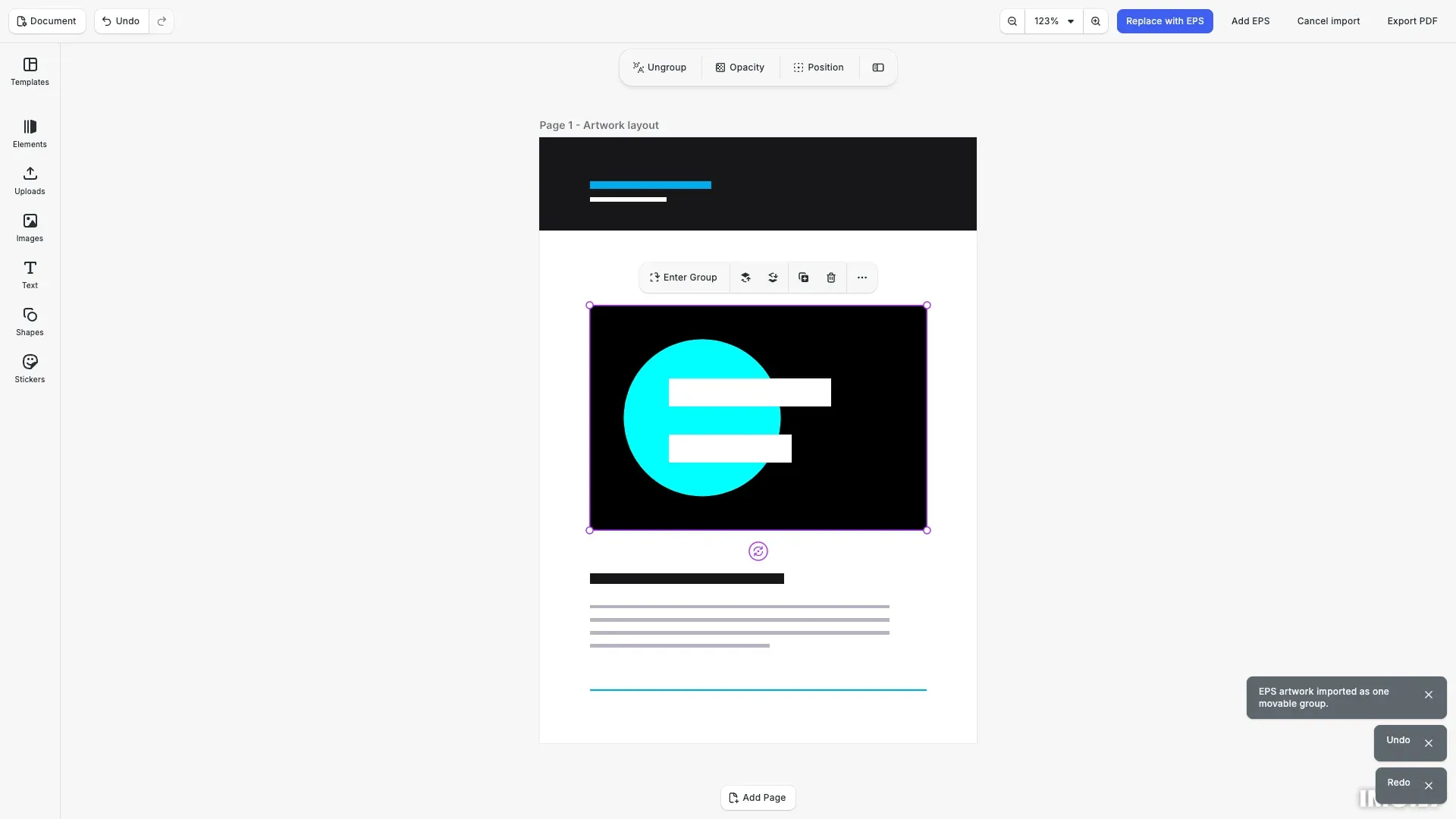
We load a saved template, then expose explicit Replace with EPS, Add EPS, Cancel import, and Export PDF actions. Ordinary image upload is not extended by this example.
The example demonstrates lazy conversion, proportional placement, cancellation, diagnostics, and standard PDF export.
Install the Packages#
Install the editor, EPS importer, and shared conversion runtime:
npm install @cesdk/cesdk-js@1.82.2 @imgly/eps-importer@0.1.0 @imgly/pdf-conversion-utils@0.1.0CE.SDK 1.82 or later is required. The importer includes the compatible PDF importer as a dependency. The runnable example includes a Vite configuration that serves the conversion assets and PDF standard fonts; copy that configuration when adapting the example to your project.
Set Up the Editor and Template#
We configure the design editor and its asset sources, then load the included serialized template. The template contains one rectangular block named Artwork.
await cesdk.addPlugin(new DesignEditorConfig());await cesdk.addPlugin(new ColorPaletteAssetSource());await cesdk.addPlugin(new VectorShapeAssetSource());const engine = cesdk.engine;Loading the template preserves its header, footer, and surrounding layout. We use its page as the parent for new artwork.
const templateURL = new URL( `${import.meta.env.BASE_URL}template.scene`, document.baseURI);const templateResponse = await fetch(templateURL);if (!templateResponse.ok) throw new Error('Could not load the template');await engine.scene.loadFromString(await templateResponse.text());let page = engine.block.findByType('page')[0];engine.scene.enableZoomAutoFit(page, 'Both', 40, 100, 40, 100);Host and Share the Conversion Runtime#
We create one runtime after loading the template. Construction makes no Ghostscript requests; assets load on the first import. Call runtime.preload() only when you intentionally want to warm it after the editor becomes usable.
const runtime = createConversionRuntime({ assetBaseURL: new URL( `${import.meta.env.BASE_URL}pdf-conversion/`, document.baseURI )});// No worker or WASM request is made until the first import.// Call await runtime.preload() here only if you intend to warm it eagerly.The example’s Vite plugin serves and copies worker.browser.js, gs.js, and gs.wasm from the matching runtime package into pdf-conversion/. Host all three together and preserve their filenames. Keep COPYING.AGPL-3.0, LICENSE.md, PROVENANCE.md and THIRD_PARTY_NOTICES.md from the same runtime build alongside them. These include the full AGPL text, third-party notices and matching Ghostscript build sources and runtime wrapper sources. The plugin also copies the PDF importer’s standard fonts for built deployments.
For same-origin hosting, the runtime works with script-src 'self' 'wasm-unsafe-eval', worker-src 'self', and connect-src 'self'. Cross-origin assets require CORS and their origin in script-src and connect-src. Pass a same-origin workerURL when assetBaseURL points elsewhere. A cross-origin worker URL uses a blob bootstrap and also requires blob: and the worker origin in worker-src.
Reuse one runtime for repeated EPS imports in the same application, and let its owner manage disposal.
Capture the Placeholder#
We resolve exactly one block named Artwork and capture its ID before fetching the EPS. Replacement preserves supported target metadata and scopes while retaining the surrounding scene.
const matches = engine.block.findByName('Artwork');if (replace && matches.length !== 1) { throw new Error( 'The template must contain exactly one Artwork placeholder. Undo the replacement to try again.' );}const target = matches[0];if (replace) { let ancestor: number | null = target; while ( ancestor !== null && engine.block.getType(ancestor) !== '//ly.img.ubq/page' ) { ancestor = engine.block.getParent(ancestor); } if (ancestor === null) throw new Error('Artwork must belong to a page'); page = ancestor;}// Capture the target before fetching or converting the file.The resulting group keeps the artwork name. To replace the original rectangular placeholder again in this example, first undo the replacement.
Import or Place Artwork#
We pass the bytes, runtime, and cancellation signal to replaceEPS(). Add EPS instead calls placeEPS() with the page and a destination frame.
const response = await fetch( new URL(`${import.meta.env.BASE_URL}artwork.eps`, document.baseURI), { signal: controller.signal });if (!response.ok) throw new Error('Could not load the EPS artwork');const bytes = new Uint8Array(await response.arrayBuffer());const options = { runtime, signal: controller.signal };const result = replace ? await replaceEPS(engine, bytes, { ...options, target }) : await placeEPS(engine, bytes, { ...options, parent: page, frame: { x: 54, y: 180, width: 360, height: 240 } });engine.block.select(result.group);Placement scales the artwork proportionally to contain it within the frame and centers it. Frame coordinates use the scene’s design unit; the returned sourceBounds uses PostScript points. Users can move or scale the resulting group using the normal editor controls.
Cancel and Inspect Diagnostics#
The cancel action aborts the active operation. After cancellation, the same runtime can process another import. Successful imports can still contain warnings, so inspect result.diagnostics as well as errors.
for (const diagnostic of result.diagnostics) { console.info(`[${diagnostic.stage}] ${diagnostic.message}`); } cesdk.ui.showNotification('EPS artwork imported as one movable group.');} catch (error) { if (controller.signal.aborted) { cesdk.ui.showNotification('Import cancelled. You can retry.'); } else { if (error instanceof EPSImportError) console.error(error.code, error.diagnostics); cesdk.ui.showNotification( error instanceof Error ? error.message : 'EPS import failed' ); }Export the Page#
We export the containing page with DeviceCMYK output enabled. This produces a standard PDF, not a PDF/X compliance guarantee. Validate print output through the approved print-ready workflow.
const exportPDF = async () => { const pdf = await engine.block.export(page, { mimeType: 'application/pdf', exportPdfWithDeviceCMYK: true }); const url = URL.createObjectURL(pdf); const link = document.createElement('a'); link.href = url; link.download = 'eps-artwork.pdf'; link.click(); URL.revokeObjectURL(url);};Normal scene serialization retains the group. The editor also supports undo and redo of the placement or replacement.
Dispose Owned Resources#
The example owns its runtime and editor and releases both on page exit. When your application supplies a shared runtime, dispose it from that owner after all consumers finish.
window.addEventListener( 'pagehide', () => { active?.abort(); runtime.dispose(); cesdk.dispose(); }, { once: true });Supported Artwork and Colors#
EPS input must contain an EPSF header and finite bounding box, and produce one PDF page. CE.SDK 1.82 or later is required. This example uses synthetic cyan, K-only black, and white artwork.
Imported vectors become native scene blocks inside one group. Embedded images remain images; the importer does not offer a whole-artwork raster fallback. Missing fonts can be substituted during conversion, so embed or outline fonts when exact typography matters.
Supported process-color and named-spot paths can retain their color information. Gradients and other unsupported vector operations can become sampled RGB; inspect diagnostics and validate the output for your artwork. If a spot name already exists, the scene’s existing definition is retained with a warning.
Troubleshooting#
Inspect EPSImportError.code and its diagnostics when import fails. Correct malformed headers or bounding boxes before retrying. For missing fonts, supply an EPS with embedded fonts or outlined text.
Replacement accepts a rectangular graphic with a solid fill and no crop, effects, animations, or children. Use a supported placeholder if validation rejects the target. If the scene or target changes during conversion, resolve the target again and retry. A failed replacement leaves the original target intact.
The defaults limit input to 20 MiB, converted PDF output to 100 MiB, conversion time to 30 seconds, dimensions to 14,400 PostScript points, and imported blocks to 10,000. These limits do not bound every parsing cost or peak memory allocation. Apply your own input and concurrency policy for untrusted files.