Draw a brush stroke along the masks of a block with the stroke effect.
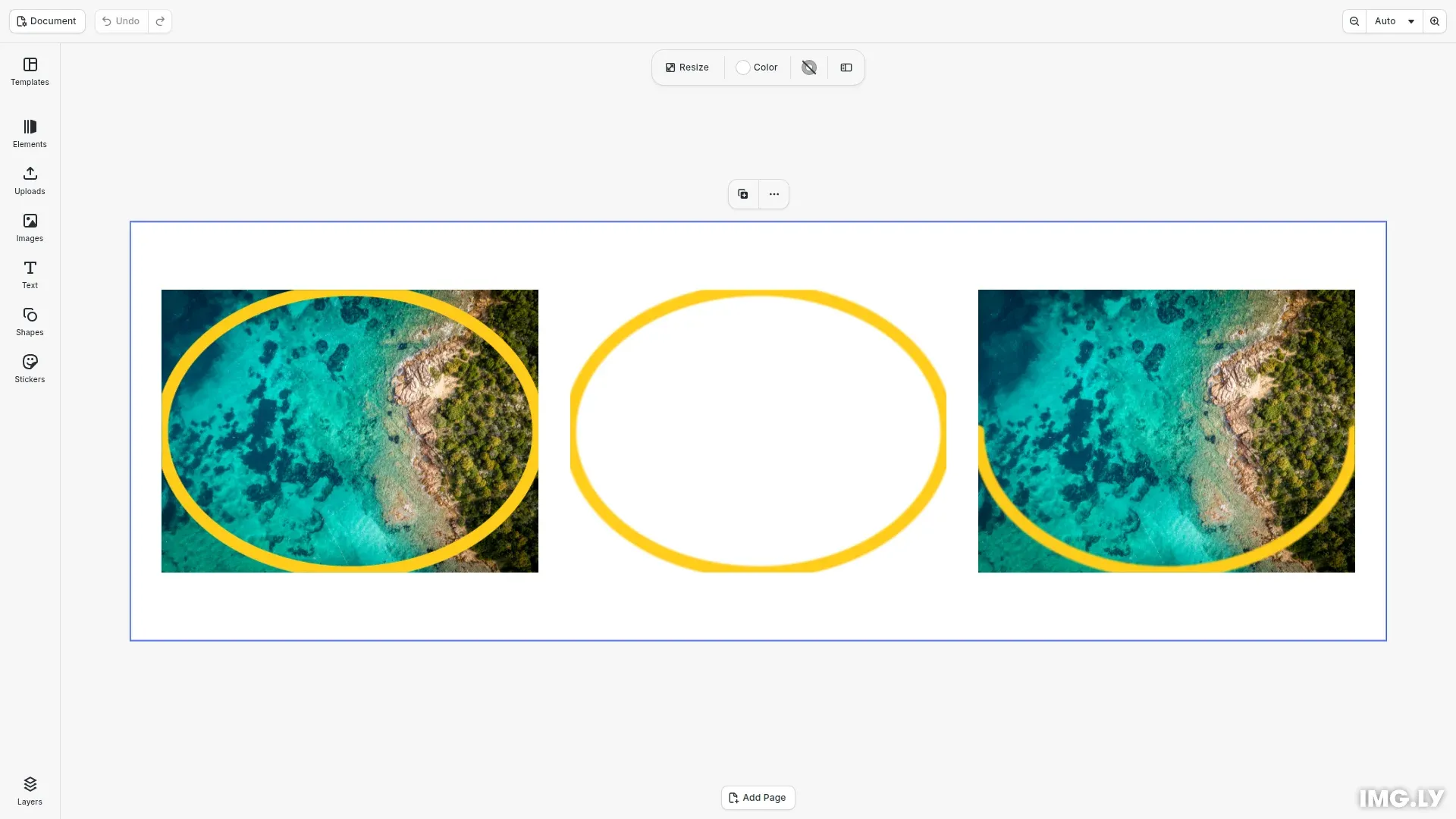
The stroke effect draws a brush stroke along a mask path of a block, so the block needs a mask first. It uses the same effect API as all other effects: you create an effect with createEffect(), set its properties and add it to a block with appendEffect(). Scenes that use this effect do not open in earlier versions of CE.SDK. For the general effect API, see Apply a Filter or Effect.
This guide covers the mask that gives the stroke its path, the brush, the mask and paint style options and trimming the stroke.
Creating the Image Blocks#
A helper adds an image block at a position. We put three copies of one image on the page.
// Adds a 360 x 270 image block to the page at a positionconst imageUri = 'https://img.ly/static/ubq_samples/sample_1.jpg';const addImageBlock = async (x: number, y: number) => {  const block = await engine.block.addImage(imageUri, {    size: { width: 360, height: 270 }  });  engine.block.appendChild(page, block);  engine.block.setPositionX(block, x);  engine.block.setPositionY(block, y);  return block;};
const originalBlock = await addImageBlock(30, 65);const transparentBlock = await addImageBlock(420, 65);const trimmedBlock = await addImageBlock(810, 65);
Adding a Mask#
A mask normally cuts the block to its shape. We create a mask with createMask(), give it an ellipse shape with setShape() and set mask/mode to 'None'. In this mode the mask keeps the whole block and only gives the stroke its path. appendMask() attaches the mask to the block. For the other mask modes and properties, see Masks and Mattes.
// An ellipse mask in the 'None' mode gives the stroke a path// and keeps the whole blockconst addEllipseMask = (block: number) => {  const mask = engine.block.createMask();  engine.block.setShape(mask, engine.block.createShape('ellipse'));  engine.block.setEnum(mask, 'mask/mode', 'None');  engine.block.appendMask(block, mask);};
addEllipseMask(originalBlock);addEllipseMask(transparentBlock);addEllipseMask(trimmedBlock);
A mask in the default 'Add' mode cuts the block to the inside of the ellipse. It also cuts the outer half of the stroke.
Drawing the Stroke#
effect/stroke/color sets the color of the stroke. brushSize is the brush radius in design units, so the line is twice as wide. hardness sets how sharp the edge is, from 0 (soft) to 1 (hard).
// A hard yellow brush with a radius of 6 design units, so 12 wideconst strokeColor = { r: 1, g: 0.8, b: 0.1, a: 1 };const stroke = engine.block.createEffect('stroke');engine.block.setColor(stroke, 'effect/stroke/color', strokeColor);engine.block.setFloat(stroke, 'effect/stroke/brushSize', 6);engine.block.setFloat(stroke, 'effect/stroke/hardness', 1);engine.block.appendEffect(originalBlock, stroke);Choosing the Mask and the Paint Style#
maskIndex picks the mask to stroke in the mask list of the block, and 0 is the first mask. Set allMasks to true to stroke every mask. paintStyle is 'OnOriginalImage' to draw over the block, or 'OnTransparent' to draw only the stroke. The second block shows only the ring.
// Stroke the first mask and draw only the stroke, not the imageconst transparentStroke = engine.block.createEffect('stroke');engine.block.setInt(transparentStroke, 'effect/stroke/maskIndex', 0);engine.block.setBool(transparentStroke, 'effect/stroke/allMasks', false);engine.block.setEnum( transparentStroke, 'effect/stroke/paintStyle', 'OnTransparent');engine.block.setColor( transparentStroke, 'effect/stroke/color', strokeColor);engine.block.setFloat(transparentStroke, 'effect/stroke/brushSize', 6);engine.block.appendEffect(transparentBlock, transparentStroke);Trimming the Stroke#
start and end draw a part of each mask path, as a fraction of its length from 0 to 1. A start after end swaps the two. The third block shows half a ring.
// Draw only the first half of the mask pathconst trimmedStroke = engine.block.createEffect('stroke');engine.block.setFloat(trimmedStroke, 'effect/stroke/start', 0);engine.block.setFloat(trimmedStroke, 'effect/stroke/end', 0.5);engine.block.setColor(trimmedStroke, 'effect/stroke/color', strokeColor);engine.block.setFloat(trimmedStroke, 'effect/stroke/brushSize', 6);engine.block.appendEffect(trimmedBlock, trimmedStroke);Troubleshooting#
- The stroke does not show: add a mask to the block, and check that
maskIndexpoints to it. An index outside the mask list draws nothing. - The block shows only the inside of the mask: set
mask/modeto'None'. - The stroke is twice as wide as expected:
brushSizeis the radius, so set half of the line width.
API Reference#
| Method | Description |
|---|---|
block.createMask() |
Create a mask |
block.createShape(type) |
Create a shape, such as 'ellipse', for the mask path |
block.setShape(mask, shape) |
Give a mask its shape |
block.appendMask(block, mask) |
Attach a mask to a block |
block.createEffect('stroke') |
Create a stroke effect |
block.appendEffect(block, effect) |
Add an effect to the end of the effect list of a block |
block.setColor(effect, property, color) |
Set the stroke color |
block.setFloat(effect, property, value) |
Set brushSize, hardness, start or end |
block.setInt(effect, property, value) |
Set effect/stroke/maskIndex |
block.setBool(effect, property, value) |
Set effect/stroke/allMasks |
block.setEnum(block, property, value) |
Set effect/stroke/paintStyle or mask/mode |
Next Steps#
- Apply a Filter or Effect: insert, disable and remove effects.
- Supported Filters and Effects: look up the properties of every effect type.
- Masks and Mattes: combine masks and change their modes.
- Color Effects: remap the colors of a block.
- Wipe Effects: hide parts of a block.