Attach custom key-value metadata to design blocks in CE.SDK for tracking asset origins, storing application state, or linking to external systems.
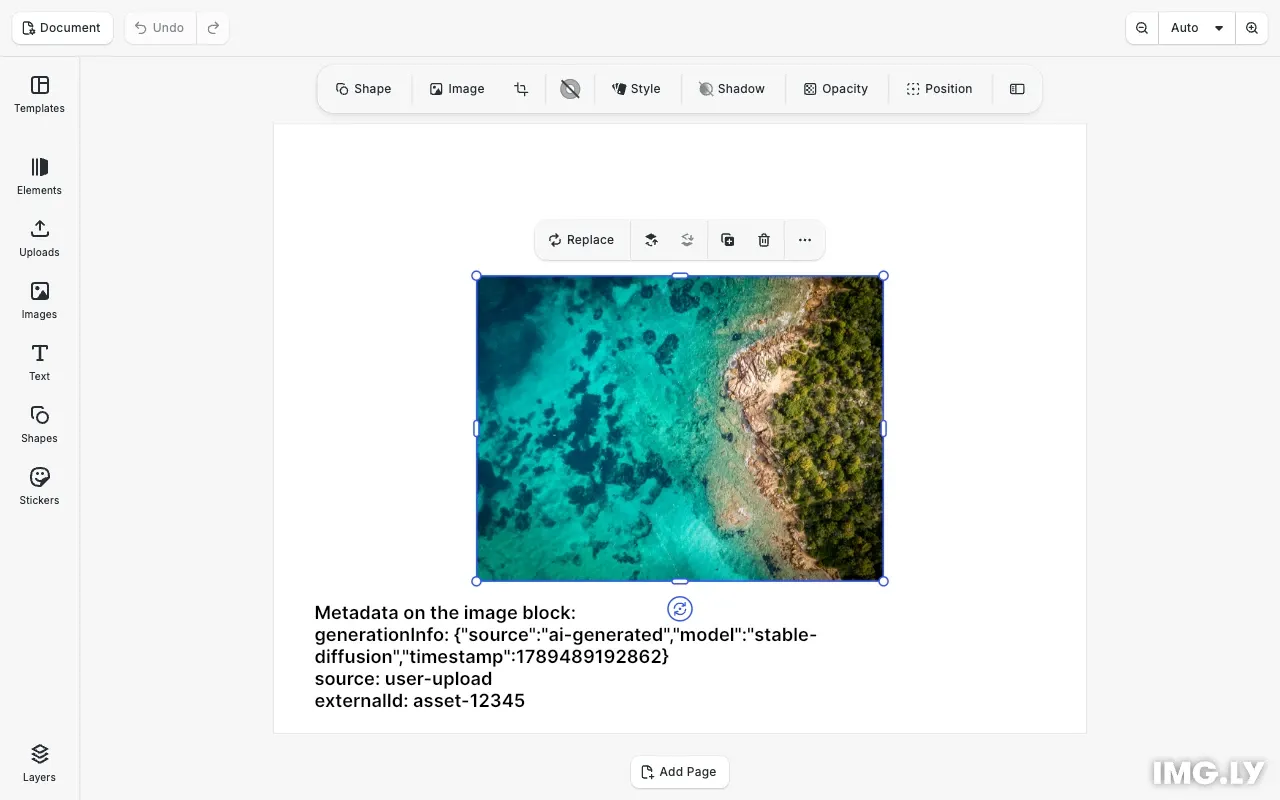
Metadata lets you attach arbitrary string key-value pairs to any design block. This data is invisible to end users but persists with the scene through save/load operations. Common use cases include tracking asset origins, storing application-specific state, and linking blocks to external databases or content management systems.
This guide covers how to set, retrieve, list, and remove metadata on blocks, as well as how to store structured data as JSON strings.
Initialize CE.SDK#
We start by initializing CE.SDK with a basic configuration. The metadata APIs are available on the engine.block namespace.
Metadata is invisible on the canvas, so we also add a text block below the image and a showMetadata() helper. The helper reads the block’s current metadata back with findAllMetadata() and getMetadata() and writes it into that text block. The example runs every step in one pass, so the canvas settles on the final set of entries.
await cesdk.addPlugin(new DesignEditorConfig());
// Add asset source pluginsawait cesdk.addPlugin(new BlurAssetSource());await cesdk.addPlugin(new ImageColorsAssetSource());await cesdk.addPlugin(new ColorPaletteAssetSource());await cesdk.addPlugin(new CropPresetsAssetSource());await cesdk.addPlugin(  new UploadAssetSources({ include: ['ly.img.image.upload'] }));await cesdk.addPlugin(  new DemoAssetSources({    include: [      'ly.img.templates.blank.*',      'ly.img.templates.presentation.*',      'ly.img.templates.print.*',      'ly.img.templates.social.*',      'ly.img.image.*'    ]  }));await cesdk.addPlugin(new EffectsAssetSource());await cesdk.addPlugin(new FiltersAssetSource());await cesdk.addPlugin(new PagePresetsAssetSource());await cesdk.addPlugin(new StickerAssetSource());await cesdk.addPlugin(new TextAssetSource());await cesdk.addPlugin(new TextComponentAssetSource());await cesdk.addPlugin(new TypefaceAssetSource());await cesdk.addPlugin(new VectorShapeAssetSource());
await cesdk.actions.run('scene.create', {  page: { width: 800, height: 600, unit: 'Pixel' }});
const engine = cesdk.engine;const page = engine.block.findByType('page')[0];
// Create an image block to attach metadata toconst imageBlock = await engine.block.addImage(  'https://img.ly/static/ubq_samples/sample_1.jpg',  { size: { width: 400, height: 300 } });engine.block.appendChild(page, imageBlock);engine.block.setPositionX(imageBlock, 200);engine.block.setPositionY(imageBlock, 150);
// Create a text block below the image to display the metadata on the canvasconst metadataDisplay = engine.block.create('text');engine.block.appendChild(page, metadataDisplay);engine.block.setPositionX(metadataDisplay, 40);engine.block.setPositionY(metadataDisplay, 470);engine.block.setWidthMode(metadataDisplay, 'Absolute');engine.block.setWidth(metadataDisplay, 720);engine.block.setHeightMode(metadataDisplay, 'Auto');engine.block.setFloat(metadataDisplay, 'text/fontSize', 18);
// Read the metadata back and render it into the text blockconst showMetadata = () => {  const lines = ['Metadata on the image block:'];  for (const key of engine.block.findAllMetadata(imageBlock)) {    lines.push(`${key}: ${engine.block.getMetadata(imageBlock, key)}`);  }  engine.block.replaceText(metadataDisplay, lines.join('\n'));};
Set Metadata#
Use engine.block.setMetadata() to attach a key-value pair to a block. Both the key and value must be strings. If the key already exists, the value is overwritten.
// Set metadata key-value pairs on the blockengine.block.setMetadata(imageBlock, 'externalId', 'asset-12345');engine.block.setMetadata(imageBlock, 'source', 'user-upload');engine.block.setMetadata(imageBlock, 'uploadedBy', 'user@example.com');
// Refresh the on-canvas display with the current metadatashowMetadata();
You can attach multiple metadata entries to a single block. Each entry is independent and can be accessed, modified, or removed separately. Calling showMetadata() afterwards writes the current entries into the text block.
Get Metadata#
Use engine.block.getMetadata() to retrieve a value by its key. This method throws an error if the key doesn’t exist, so always check with hasMetadata() first for conditional access.
// Retrieve a metadata value by keyif (engine.block.hasMetadata(imageBlock, 'externalId')) { const externalId = engine.block.getMetadata(imageBlock, 'externalId'); console.log('External ID:', externalId);}The hasMetadata() method returns true if the block has metadata for the specified key, and false otherwise. This pattern prevents runtime errors when accessing metadata that may not be set.
List All Metadata Keys#
Use engine.block.findAllMetadata() to get an array of all metadata keys stored on a block.
// List all metadata keys on the blockconst allKeys = engine.block.findAllMetadata(imageBlock);console.log('All metadata keys:', allKeys);
// Log all key-value pairsfor (const key of allKeys) {  const value = engine.block.getMetadata(imageBlock, key);  console.log(`  ${key}: ${value}`);}
This is useful for iterating through all metadata on a block or debugging what metadata is attached.
Store Structured Data#
Since metadata values must be strings, you can store structured data by serializing it to JSON. Parse the JSON when retrieving the data.
// Store structured data as JSONconst generationInfo = {  source: 'ai-generated',  model: 'stable-diffusion',  timestamp: Date.now()};engine.block.setMetadata(  imageBlock,  'generationInfo',  JSON.stringify(generationInfo));
// Retrieve and parse structured dataconst retrievedJson = engine.block.getMetadata(  imageBlock,  'generationInfo');const parsedInfo = JSON.parse(retrievedJson);console.log('Parsed generation info:', parsedInfo);
// Refresh again: the serialized JSON is now one of the entriesshowMetadata();
This pattern lets you store complex objects like configuration settings, generation parameters, or any structured information that can be serialized to JSON. The serialized string appears on the canvas with the other entries.
Remove Metadata#
Use engine.block.removeMetadata() to delete a key-value pair from a block. This method throws an error if the key doesn’t exist, so guard with hasMetadata() whenever the key may be absent.
// Remove a metadata keyengine.block.removeMetadata(imageBlock, 'uploadedBy');console.log('Removed metadata key: uploadedBy');After removal, you can verify the key was deleted by checking with hasMetadata(). Refreshing the display one last time shows the remaining entries, with uploadedBy gone.
// Verify the key was removedconst hasUploadedBy = engine.block.hasMetadata(imageBlock, 'uploadedBy');console.log('Has uploadedBy after removal:', hasUploadedBy);
// List remaining keysconst remainingKeys = engine.block.findAllMetadata(imageBlock);console.log('Remaining metadata keys:', remainingKeys);
// Refresh a final time: uploadedBy is gone from the canvasshowMetadata();
Metadata Persistence#
Metadata is automatically preserved when saving scenes with engine.scene.saveToString() or engine.scene.saveToArchive(). When loading a saved scene, all metadata is restored to the blocks.
Troubleshooting#
getMetadata Throws Error#
If getMetadata() throws an error, the key doesn’t exist on the block. Always use hasMetadata() to check before retrieving:
if (engine.block.hasMetadata(block, 'myKey')) { const value = engine.block.getMetadata(block, 'myKey');}Metadata Lost After Load#
Ensure you’re saving with saveToString() or saveToArchive(), not exporting to image/video formats. Only scene saves preserve metadata.
Large Metadata Values#
Metadata is designed for small strings. Very large values may impact performance during save/load operations. For large data, consider storing a reference (like a URL or ID) rather than the data itself.
API Reference#
| Method | Description |
|---|---|
engine.block.setMetadata(block, key, value) |
Set a metadata key-value pair on a block |
engine.block.getMetadata(block, key) |
Get the value for a metadata key |
engine.block.hasMetadata(block, key) |
Check if a metadata key exists |
engine.block.findAllMetadata(block) |
List all metadata keys on a block |
engine.block.removeMetadata(block, key) |
Remove a metadata key-value pair |