Show only part of a block with shape masks, or with a track matte that uses the rendering of another block.
A mask is a shape that cuts its block down. A block can have more than one mask, and the masks combine in their order. A track matte masks a block with the rendered alpha or luminance of another block. Masks and mattes render on the canvas and in raster and PDF export. The editor has no mask or matte controls, so you set them with the block API. The Lottie importer also creates masks and mattes from Lottie files.
This guide covers masks, the mask properties and modes, the mask stack, track mattes, the matte source rules and the export limits.
Creating a Mask#
Graphic, text and group blocks accept masks. supportsMasks() returns true for them. createMask() creates a mask block. Give it a shape with setShape() and attach it with appendMask().
const purple = engine.block.createFill('color');engine.block.setColor(purple, 'fill/color/value', {  r: 0.5,  g: 0.2,  b: 0.9,  a: 1});const ringBlock = addSquare(50, purple);
console.log(engine.block.supportsMasks(ringBlock)); // trueconsole.log(engine.block.supportsMasks(page)); // false
// The ellipse fills the frame of the masked blockconst outerMask = engine.block.createMask();engine.block.setShape(outerMask, engine.block.createShape('ellipse'));engine.block.appendMask(ringBlock, outerMask);
The engine evaluates the mask shape in the frame of the masked block, so an ellipse shape fills the whole square. Any shape works, for example an ellipse, a star or a vector path. For the shape types, see Create Shapes. A mask without a shape has no effect.
Mask Properties#
Each mask has five properties. Set them with setEnum(), setFloat() and setBool() on the mask block.
| Property | Type | Default | Effect |
|---|---|---|---|
mask/mode |
Enum | 'Add' |
How the mask combines with the masks before it |
mask/opacity |
Float | 1 |
The coverage of the mask, from 0 to 1 |
mask/feather |
Float | 0 |
The softness of the edge, in design units |
mask/expansion |
Float | 0 |
Grows the shape with a positive value and shrinks it with a negative value, in design units |
mask/inverted |
Bool | false |
Covers the area outside the shape instead of the area inside |
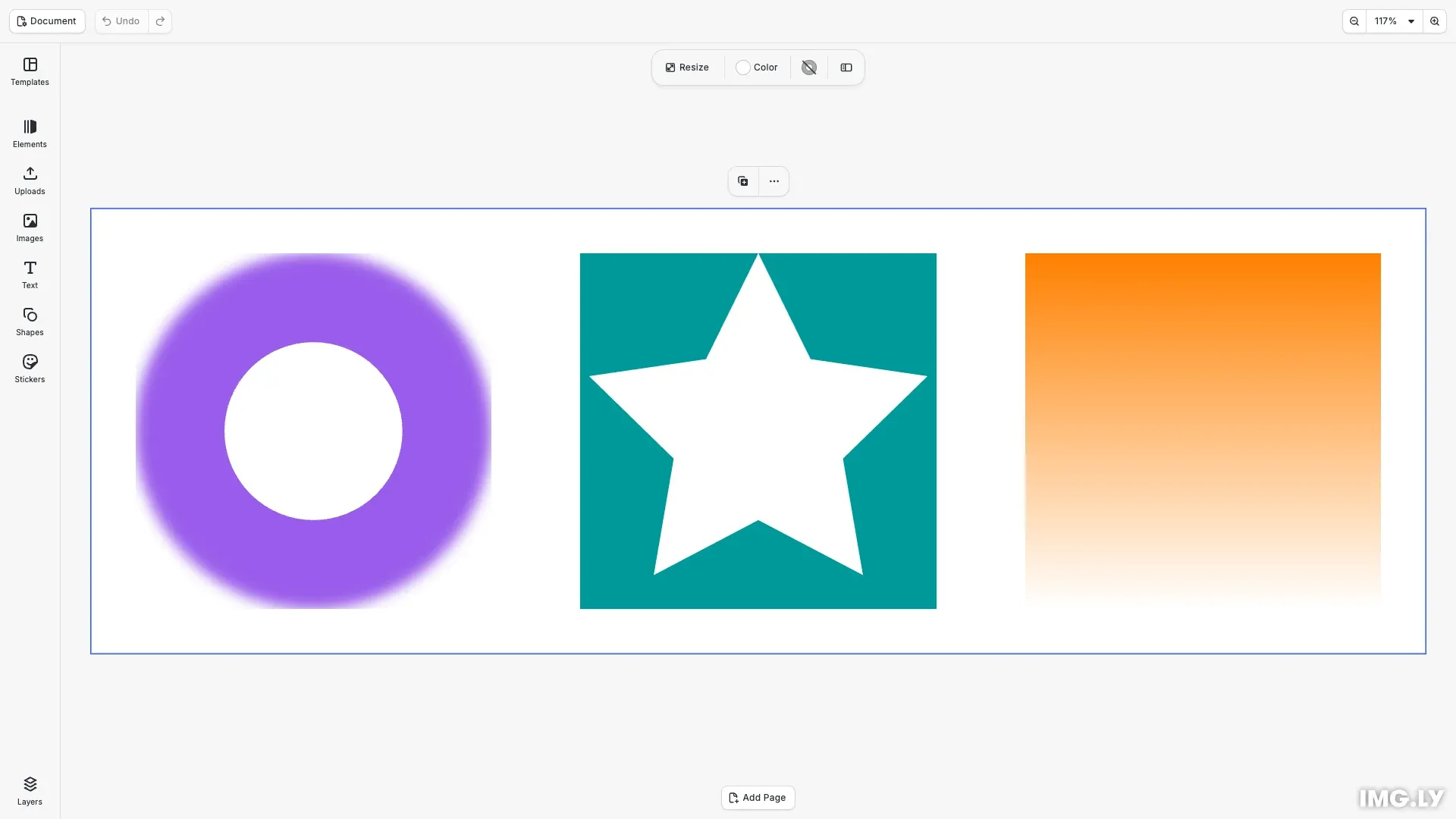
We soften the edge of the ellipse and let 80 percent of the block show through it.
// Soften the edge by 20 units and let 80% of the block show throughengine.block.setFloat(outerMask, 'mask/feather', 20);engine.block.setFloat(outerMask, 'mask/opacity', 0.8);You can animate mask/opacity, mask/feather and mask/expansion with keyframes.
Combining Masks#
The masks of a block combine in the order of the stack. The mask/mode of each mask sets how it combines with the result of the masks before it.
| Mode | Result |
|---|---|
'Add' |
Adds the shape |
'Subtract' |
Removes the shape |
'Intersect' |
Keeps only the area where the shape and the result overlap |
'Lighten' |
Keeps the higher coverage of the shape and the result |
'Darken' |
Keeps the lower coverage of the shape and the result |
'Difference' |
Adds the shape and removes the area where both overlap |
'None' |
Has no effect |
We shrink a second ellipse by 100 units on each side and subtract it from the first ellipse. The result is a ring.
// Shrink a second ellipse by 100 units and subtract it to cut a ringconst innerMask = engine.block.createMask();engine.block.setShape(innerMask, engine.block.createShape('ellipse'));engine.block.setFloat(innerMask, 'mask/expansion', -100);engine.block.setEnum(innerMask, 'mask/mode', 'Subtract');engine.block.appendMask(ringBlock, innerMask);The engine skips 'None' masks. When the first mask that applies uses 'Subtract', it removes its shape from the whole block.
Inverting a Mask#
mask/inverted makes a mask cover the area outside its shape. An inverted star mask cuts a star-shaped hole into the block.
const teal = engine.block.createFill('color');engine.block.setColor(teal, 'fill/color/value', {  r: 0,  g: 0.6,  b: 0.6,  a: 1});const starBlock = addSquare(550, teal);
// An inverted mask keeps the area outside its shape: a star-shaped holeconst starMask = engine.block.createMask();engine.block.setShape(starMask, engine.block.createShape('star'));engine.block.setBool(starMask, 'mask/inverted', true);engine.block.appendMask(starBlock, starMask);
Managing the Mask Stack#
getMasks() returns the masks of a block in their order. removeMask() removes the mask at an index and does not destroy it. insertMask() adds a mask at an index from 0 to the number of masks.
console.log(engine.block.getMasks(ringBlock)); // [outerMask, innerMask]
// Removing a mask does not destroy itengine.block.removeMask(ringBlock, 1);console.log(engine.block.isValid(innerMask)); // true
// Insert it again after the outer maskengine.block.insertMask(ringBlock, innerMask, 1);
A mask can belong to more than one block. When you change it, all these blocks change.
Setting a Track Matte#
setMatte() masks a block with the rendering of a source block. The mode selects the channel of the source.
| Mode | The block shows where the source is |
|---|---|
'Alpha' |
Opaque. This is the default. |
'AlphaInverted' |
Transparent |
'Luma' |
Bright |
'LumaInverted' |
Dark or transparent |
We use a square with a white to black gradient as the source. With 'Luma', the orange square fades from the top to the bottom.
const orange = engine.block.createFill('color');engine.block.setColor(orange, 'fill/color/value', {  r: 1,  g: 0.5,  b: 0,  a: 1});const target = addSquare(1050, orange);
// The matte source: a gradient from white at the top to black at the bottomconst gradient = engine.block.createFill('gradient/linear');engine.block.setGradientColorStops(gradient, 'fill/gradient/colors', [  { color: { r: 1, g: 1, b: 1, a: 1 }, stop: 0 },  { color: { r: 0, g: 0, b: 0, a: 1 }, stop: 1 }]);const source = addSquare(1050, gradient);
// The target shows where the source is bright. The source is not drawn.engine.block.setMatte(target, source, 'Luma');
The engine does not draw the matte source on its own. One source can be the matte of more than one block. When the source is a group, all children of the group form the matte. The source keeps its own position, so place it over the block.
Reading and Removing a Matte#
getMatte() returns the source and the mode, or null when the block has no matte. To remove a matte, call setMatte() with null as the source. The source then draws again.
console.log(engine.block.getMatte(target)); // { source, mode: 'Luma' }console.log(engine.block.getMatte(ringBlock)); // nullMatte Source Rules#
setMatte() checks the source and throws an EngineError when a rule is broken.
- The block and the source are graphic, text or group blocks.
- The source is on the same page as the block.
- The source is not the block itself or one of its parents.
- The source is not a block that the block or one of its parents masks, and it does not contain such a block.
try { // A block cannot use itself as its matte source engine.block.setMatte(target, target);} catch (error) { if (isEngineError(error)) { console.log(error.code); // 'BLOCK.MATTE_SOURCE_INVALID' }}insertChild() and appendChild() keep these rules too. A move that puts a matted block inside its source, or the block and its source on different pages, throws BLOCK.MATTE_SOURCE_INVALID. Move the block and its source together, for example as one group.
A source can draw nothing, for example when it is hidden or outside its time range. Then 'Alpha' or 'Luma' mattes hide the block, and 'AlphaInverted' or 'LumaInverted' mattes show it whole.
Export Limits#
- SVG export ignores
mask/opacityandmask/feather. The mask shapes still cut the block. - SVG export does not apply mattes. A matted block exports whole, and the source is not drawn.
- When you export a matted block alone, the export keeps its matte.
For more about export formats, see Export Overview.
Masks, Mattes and Other Block Operations#
- Undo and redo restore the mask stack, the mask properties and the matte.
- Saving and loading a scene keeps the masks and the matte with its mode.
- Duplicating a block copies its masks and their shapes. A duplicate of the matted block alone uses the same source. A duplicate of a group that holds both blocks uses the copied source.
- Destroying a block destroys its own masks. A mask that another block also uses stays. Destroying a mask removes it from the stack, and destroying the source removes the matte.
- Scaling a block or changing the design unit also converts
mask/featherandmask/expansion.
appendMask(), insertMask(), removeMask() and setMatte() need the layer/clipping scope. setMatte() also needs layer/visibility on the source, because the source stops drawing on its own.
Troubleshooting#
- The block does not accept masks (
BLOCK.MASKS_UNSUPPORTED): only graphic, text and group blocks have a mask stack. ChecksupportsMasks()first. - The mask is not accepted (
BLOCK.MASK_INVALID): pass a block thatcreateMask()made. - The index is out of range (
BLOCK.MASK_INDEX_OUT_OF_BOUNDS): insert at an index from 0 to the number of masks, and remove at an index below it. - The block cannot have or be a matte (
BLOCK.MATTE_UNSUPPORTED): use graphic, text or group blocks on both sides. - The source is rejected (
BLOCK.MATTE_SOURCE_INVALID): use a source on the same page that follows the matte source rules. - The block is not visible: an
'Alpha'or'Luma'matte hides the block when its source is hidden or outside its time range.
API Reference#
| Method | Description |
|---|---|
block.supportsMasks(id) |
Check whether a block accepts masks |
block.createMask() |
Create a mask block |
block.setShape(id, shape) |
Give the mask its shape |
block.appendMask(id, maskId) |
Add a mask at the end of the stack |
block.insertMask(id, maskId, index) |
Add a mask at an index |
block.getMasks(id) |
Get the masks of a block in their order |
block.removeMask(id, index) |
Remove the mask at an index |
block.setMatte(id, source, mode?) |
Set or remove the matte of a block |
block.getMatte(id) |
Get the matte source and mode, or null |
Next Steps#
- Blend Modes: control how a block mixes with the blocks below it.
- Keyframes: animate the mask properties over time.
- Import Lottie: turn Lottie masks and mattes into blocks.