Give the children of a group their own clock, run them faster with the group speed, and start them with the group.
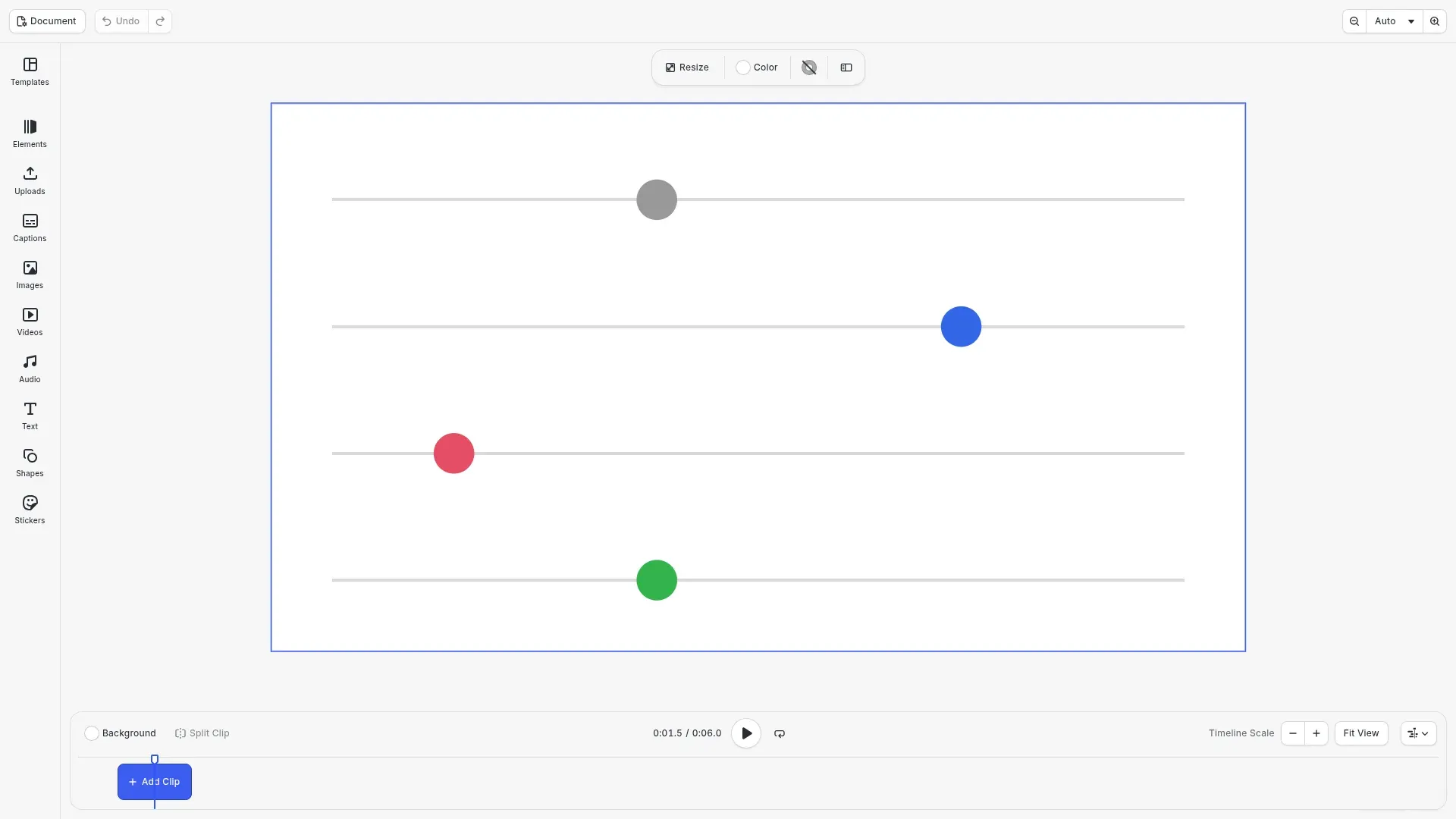
A composition group runs its children on its own clock, like a precomposition in a motion design tool. The clock starts when the group starts on the page, and the group’s speed runs it faster or slower. The editor has no composition control, so you set it with the block API.
This guide covers how to turn composition on, how to run the children faster, how to start them with the group, what a plain group does, and the error to expect.
Creating the Scene#
We create a video scene with a page of 6 seconds.
await cesdk.actions.run('scene.create', {  mode: 'Video',  layout: 'DepthStack',  page: { width: 1920, height: 1080, unit: 'Pixel' }});
const engine = cesdk.engine;const page = engine.block.findByType('page')[0]!;engine.block.setDuration(page, 6);
Creating the Lanes#
Each lane of the example is a group with a gray line and a ball. The ball has a position/x track and crosses the page in 4 seconds of its own time. group() groups the two blocks.
/** * Creates a lane: a group with a line and a ball that crosses the page in * 4 seconds of its own time. */function createLane(  engine: CreativeEngine,  page: number,  y: number,  color: { r: number; g: number; b: number; a: number }): number {  const line = engine.block.create('graphic');  engine.block.setShape(line, engine.block.createShape('rect'));  const lineFill = engine.block.createFill('color');  engine.block.setColor(lineFill, 'fill/color/value', {    r: 0.85,    g: 0.85,    b: 0.85,    a: 1  });  engine.block.setFill(line, lineFill);  engine.block.setWidth(line, 1680);  engine.block.setHeight(line, 6);  engine.block.setPositionX(line, 120);  engine.block.setPositionY(line, y + 37);  engine.block.appendChild(page, line);  // Long enough for every lane clock, so the line stays visible  engine.block.setDuration(line, 12);
  const ball = engine.block.create('graphic');  engine.block.setShape(ball, engine.block.createShape('ellipse'));  const ballFill = engine.block.createFill('color');  engine.block.setColor(ballFill, 'fill/color/value', color);  engine.block.setFill(ball, ballFill);  engine.block.setWidth(ball, 80);  engine.block.setHeight(ball, 80);  engine.block.setPositionY(ball, y);  engine.block.appendChild(page, ball);  engine.block.setDuration(ball, 4);  engine.block.setKeyframes(ball, 'position/x', [    { time: 0, value: { type: 'Float', value: 120 } },    { time: 1, value: { type: 'Float', value: 1720 } }  ]);
  const lane = engine.block.group([line, ball]);  engine.block.setDuration(lane, 6);  return lane;}
Turning Composition On#
group/composition is a bool property of a group and is off by default. setBool() turns it on, and getBool() reads it. The children of the first lane now run on the group’s clock, which starts when the group starts on the page.
// The first lane is a composition group. Its children run on the group's// own clock, which starts when the group starts on the page.const normal = createLane(engine, page, 150, { r: 0.6, g: 0.6, b: 0.6, a: 1});engine.block.setBool(normal, 'group/composition', true);console.log(engine.block.getBool(normal, 'group/composition')); // trueRunning the Children Faster#
setPlaybackSpeed() on a composition group runs its children that many times faster. The speed of a group has no upper bound, and getPlaybackSpeed() reads it back. At speed 2, the blue ball crosses the page in 2 seconds. Its duration of 4 seconds is measured on the composition clock, so the ball disappears after 2 seconds of the page.
// At speed 2, the children see 2 seconds for every second of the pageconst fast = createLane(engine, page, 400, { r: 0.2, g: 0.4, b: 0.9, a: 1});engine.block.setBool(fast, 'group/composition', true);engine.block.setPlaybackSpeed(fast, 2);console.log(engine.block.getPlaybackSpeed(fast)); // 2Starting the Children With the Group#
The time offsets of the children are measured on the composition clock, which starts with the group. setTimeOffset() starts the third group 1 second into the page, so its ball starts 1 second later than the others.
// The group starts 1 second into the page, and its children start with itconst late = createLane(engine, page, 650, { r: 0.9, g: 0.3, b: 0.4, a: 1});engine.block.setBool(late, 'group/composition', true);engine.block.setTimeOffset(late, 1);engine.block.setDuration(late, 5);A Plain Group#
A group without composition keeps its children on the page clock and ignores its speed. The green ball crosses the page at the same pace as the gray one, although its group has speed 2.
// Without composition, the speed of a group has no effectconst plain = createLane(engine, page, 900, { r: 0.2, g: 0.7, b: 0.3, a: 1});engine.block.setPlaybackSpeed(plain, 2);console.log(engine.block.getBool(plain, 'group/composition')); // falseHandling Errors#
A group runs at 0.25 times the page speed or faster. A lower speed throws an error with a code, and the speed stays unchanged.
try { // A group runs at 0.25 times the page speed or faster engine.block.setPlaybackSpeed(normal, 0.1);} catch (error) { if (isEngineError(error)) { console.log(error.code); // 'EDITOR.PLAYBACK_SPEED_TOO_LOW' }}Composition Groups and Other Block Operations#
- Nested composition groups multiply their speeds.
- A child’s duration is not clamped to the group duration. A child is hidden after its end on the composition clock.
playback/timeRemapwithplayback/timeRemapEnabledreplaces the group’s local time with a value or a keyframe track, and the speed still multiplies it.- Ungrouping a composition group converts the time offset and duration of each child to the page clock, so the children keep playing at the same moments.
- Saving and loading keep
group/compositionand the speed, and undo and redo restore them. - The HTML5 export does not export the composition clock, so the children play at page time there.
Troubleshooting#
- The speed is too low (
EDITOR.PLAYBACK_SPEED_TOO_LOW): use a speed of 0.25 or more. - The speed is not a number (
BLOCK.VALUE_NOT_FINITE): pass a finite speed. - The speed has no effect: turn on
group/compositionfor the group. - A child disappears early: its duration is measured on the composition clock, so a faster group ends it sooner on the page. Make the child longer.
API Reference#
| Method | Description |
|---|---|
block.group(ids) |
Group blocks into a group |
block.setBool(group, 'group/composition', value) |
Turn composition on or off |
block.getBool(group, 'group/composition') |
Check whether a group is a composition group |
block.setPlaybackSpeed(group, speed) |
Set the speed of a group, 0.25 or more |
block.getPlaybackSpeed(group) |
Read the speed of a group |
block.setTimeOffset(block, offset) |
Start a block or group later on the page |
block.setDuration(block, duration) |
Set the duration of a block or group |
block.setPlaybackTime(block, time) |
Show a frame at a playback time |
Next Steps#
- Keyframes: animate the children of a composition group.
- Create Animations: add preset animations to blocks.