Learn how to configure thumbnail images for assets in CE.SDK’s asset library.
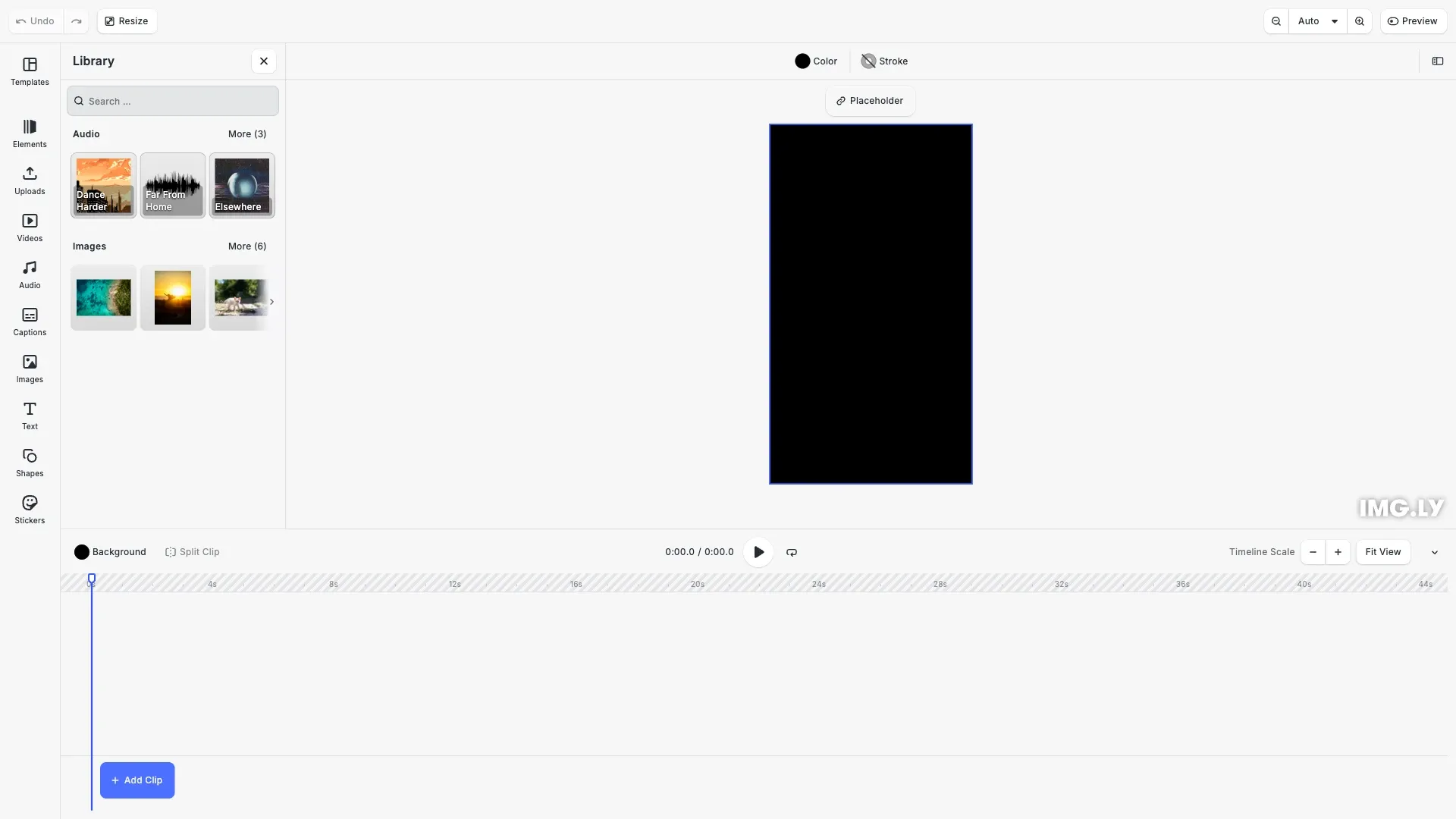
Thumbnails provide visual previews of assets in the asset library, improving the user experience when browsing images, videos, audio files, and other media. We recommend using 512px width for thumbUri to ensure quality across platforms.
This guide covers configuring basic thumbnails, preview URIs for audio playback, custom thumbnail mapping for external APIs, and UI customization options.
Understanding thumbUri vs previewUri#
Three URI properties control how assets are displayed and used in CE.SDK:
| Property | Purpose | Used For | Media Type | Set On Block |
|---|---|---|---|---|
thumbUri | Visual thumbnail (UI-only) | Asset library grid display | Image only | No |
previewUri | Preview content | Audio playback in library & set as block property on canvas | Any media type | Yes |
uri | Full asset | Final content on canvas | Any | Yes |
Key distinctions:
thumbUriis UI-only and must be an image. It displays in the asset library but is never set on the block itself.previewUriis set as a property on the block when the asset is applied to the canvas. It can be any media type (audio, video, etc.) and serves both for library preview playback and as the block’s preview content.
For images and video: Only thumbUri and uri are needed. The thumbUri provides the visual preview in the asset library.
For audio: Use all three properties. The thumbUri shows a waveform visualization in the asset library (image only, UI-only). The previewUri is set as block property when asset is applied; it plays a short preview clip when users click play in the asset library and serves as the block’s preview content on canvas. The uri loads the full audio file for final export.
The previewUri is a performance optimization for large audio files. Without it, the engine loads the full uri for preview playback, which can be slow for multi-minute files.
Thumbnail Configuration#
Basic Thumbnails#
Add thumbnails using the thumbUri property in asset metadata. We can register assets using engine.asset.addSource() for custom sources or engine.asset.addAssetToSource() for local sources.
// Add a local asset source with basic thumbnailsengine.asset.addLocalSource('custom-images');
// Add an image with 512px width thumbnail (recommended size)engine.asset.addAssetToSource('custom-images', {  id: 'sample-1',  label: { en: 'Landscape Photo' },  meta: {    uri: 'https://img.ly/static/ubq_samples/sample_1.jpg',    thumbUri: 'https://img.ly/static/ubq_samples/sample_1.jpg', // 512px recommended    blockType: '//ly.img.ubq/graphic'  }});
The thumbUri should point to a 512px width image for optimal quality across platforms. The engine displays this thumbnail in the asset library grid and preview panels.
Preview URIs for Audio#
For audio assets, use previewUri to provide lightweight preview clips. The engine uses previewUri in two scenarios:
- Asset library playback — The play button in audio asset cards loads
previewUriinstead of the full file - Canvas insertion — When adding an audio asset to the canvas,
previewUriis set as a block property and serves as the block’s content for preview playback
Without previewUri, the engine falls back to uri, which can cause slow loading for large audio files. Use shorter preview clips (30 seconds recommended) to improve performance.
// Add audio assets with preview URIs for playback in the asset libraryengine.asset.addLocalSource('custom-audio');
// Audio with full URIs and preview clipsengine.asset.addAssetToSource('custom-audio', {  id: 'dance-harder',  label: { en: 'Dance Harder' },  meta: {    uri: 'https://cdn.img.ly/assets/demo/v3/ly.img.audio/audios/dance_harder.m4a', // Full audio file    thumbUri:      'https://cdn.img.ly/assets/demo/v3/ly.img.audio/thumbnails/dance_harder.jpg', // Waveform visualization (image, UI-only)    previewUri:      'https://cdn.img.ly/assets/demo/v3/ly.img.audio/audios/dance_harder.m4a', // Preview clip - set as block property on canvas    mimeType: 'audio/x-m4a', // Required for audio preview to work    blockType: '//ly.img.ubq/audio',    duration: '212.531995'  }});
engine.asset.addAssetToSource('custom-audio', {  id: 'far-from-home',  label: { en: 'Far From Home' },  meta: {    uri: 'https://cdn.img.ly/assets/demo/v3/ly.img.audio/audios/far_from_home.m4a',    thumbUri:      'https://cdn.img.ly/assets/demo/v3/ly.img.audio/thumbnails/audio-wave.png',    previewUri:      'https://cdn.img.ly/assets/demo/v3/ly.img.audio/audios/far_from_home.m4a',    mimeType: 'audio/x-m4a',    blockType: '//ly.img.ubq/audio',    duration: '98.716009'  }});
engine.asset.addAssetToSource('custom-audio', {  id: 'elsewhere',  label: { en: 'Elsewhere' },  meta: {    uri: 'https://cdn.img.ly/assets/demo/v3/ly.img.audio/audios/elsewhere.m4a',    thumbUri:      'https://cdn.img.ly/assets/demo/v3/ly.img.audio/thumbnails/elsewhere.jpg',    previewUri:      'https://cdn.img.ly/assets/demo/v3/ly.img.audio/audios/elsewhere.m4a',    mimeType: 'audio/x-m4a',    blockType: '//ly.img.ubq/audio',    duration: '121.2'  }});
The thumbUri displays a waveform visualization in the asset library, while previewUri provides the audio content for playback preview.
Custom Asset Source Thumbnails#
We can map external API responses to CE.SDK format with thumbnails in the findAssets method. This example shows how to transform API responses (like Unsplash) that use different thumbnail field names into CE.SDK’s meta.thumbUri format.
// Create a custom asset source that maps external API responses to CE.SDK format// This example mimics how Unsplash thumbnails would be mappedengine.asset.addSource({  id: 'custom-api-source',  async findAssets(queryData) {    // Simulate external API response (e.g., from Unsplash)    const mockApiResponse = {      results: [        {          id: 'photo-1',          urls: {            full: 'https://img.ly/static/ubq_samples/sample_4.jpg', // High-res            small: 'https://img.ly/static/ubq_samples/sample_4.jpg' // 512px thumbnail          },          alt_description: 'Mountain landscape'        },        {          id: 'photo-2',          urls: {            full: 'https://img.ly/static/ubq_samples/sample_5.jpg',            small: 'https://img.ly/static/ubq_samples/sample_5.jpg'          },          alt_description: 'Ocean waves'        },        {          id: 'photo-3',          urls: {            full: 'https://img.ly/static/ubq_samples/sample_6.jpg',            small: 'https://img.ly/static/ubq_samples/sample_6.jpg'          },          alt_description: 'Forest path'        }      ],      total: 3    };
    // Map external API format to CE.SDK AssetResult format    return {      assets: mockApiResponse.results.map((photo) => ({        id: photo.id,        label: photo.alt_description,        meta: {          uri: photo.urls.full, // High-res image for canvas          thumbUri: photo.urls.small, // Thumbnail for asset library (512px recommended)          blockType: '//ly.img.ubq/graphic'        }      })),      total: mockApiResponse.total,      currentPage: queryData.page,      nextPage:        mockApiResponse.total > (queryData.page + 1) * queryData.perPage          ? queryData.page + 1          : undefined    };  }});
The custom source maps photo.urls.full to meta.uri for the high-resolution canvas image and photo.urls.small to meta.thumbUri for the 512px asset library thumbnail.
Display Customization#
Background Types#
We can configure how thumbnails scale in the asset library using gridBackgroundType and previewBackgroundType:
- cover — Crops the thumbnail to fill the entire card
- contain — Fits the entire thumbnail within the card, may leave empty space
// Configure how thumbnails scale in the asset librarycesdk.ui.updateAssetLibraryEntry('ly.img.image', {  sourceIds: ['custom-images', 'custom-api-source'],  gridBackgroundType: 'cover', // Crop to fill card  previewBackgroundType: 'contain' // Fit entire image in preview});
// Audio thumbnails with contain to show full waveform// Note: Audio assets automatically show a play button overlay for previewingcesdk.ui.updateAssetLibraryEntry('ly.img.audio', {  sourceIds: ['custom-audio'],  gridBackgroundType: 'contain', // Show full waveform  previewBackgroundType: 'contain',  cardBorder: true // Add border to make cards more visible});
Use cover for thumbnails that should fill cards completely (cropping if needed). Use contain to show the complete thumbnail without cropping, which is useful for waveforms or icons.
Grid Layout#
Configure the number of columns and item aspect ratio in the asset library grid:
// Configure grid columns and item heightcesdk.ui.updateAssetLibraryEntry('ly.img.image', {  gridColumns: 3, // 3 columns in grid view  gridItemHeight: 'square' // Square aspect ratio for all cards});
cesdk.ui.updateAssetLibraryEntry('ly.img.audio', {  gridColumns: 2, // 2 columns for audio  gridItemHeight: 'auto' // Auto height based on content});
The gridColumns property controls how many thumbnails appear per row. The gridItemHeight can be square for uniform sizing or auto for dynamic height based on content.
Card Background Preferences#
Configure the fallback order for card backgrounds when thumbnails are missing. The engine checks preferences in array order and uses the first available value.
// Configure fallback order for card backgrounds// Try vector path first, then thumbnail imagecesdk.ui.updateAssetLibraryEntry('ly.img.audio', {  cardBackgroundPreferences: [    { path: 'meta.vectorPath', type: 'svgVectorPath' }, // Try SVG first    { path: 'meta.thumbUri', type: 'image' } // Fallback to thumbnail  ]});
// For images, prioritize thumbnailcesdk.ui.updateAssetLibraryEntry('ly.img.image', {  cardBackgroundPreferences: [    { path: 'meta.thumbUri', type: 'image' } // Use thumbnail as primary background  ]});
The path property uses dot notation to access asset properties (e.g., meta.thumbUri accesses asset.meta.thumbUri). The type determines rendering:
- svgVectorPath — Renders SVG vector paths with theme-adaptive colors
- image — Displays images using CSS background
We can also provide a function that returns custom backgrounds per asset, allowing dynamic behavior based on asset properties.
Best Practices#
- Size: Use 512px width for
thumbUrito ensure quality across platforms - Format: Use JPEG for photos and PNG for graphics with transparency
- When to use previewUri:
- Audio: Provide shorter preview clip (30 seconds instead of 3 minutes). Important: Audio assets require
mimeType(e.g.,'audio/x-m4a') for preview buttons to appear in the asset library - Video: Not supported (use
thumbUri+uri, nopreviewUri) - Images: Not needed (
thumbUriis sufficient)
- Audio: Provide shorter preview clip (30 seconds instead of 3 minutes). Important: Audio assets require
- Media type constraints:
thumbUrimust be an image, whilepreviewUrican be any media type (currently used for audio, future support for video previews planned) - Block property: Unlike
thumbUri(UI-only),previewUriis set as a property on the block itself when the asset is applied to canvas - Performance: Optimize thumbnail file sizes and use CDN with proper cache headers
- Caching: Implement long cache TTLs for static thumbnails
- Memory: Enable the
clampThumbnailTextureSizessetting for large asset libraries - Fallbacks: Configure
cardBackgroundPreferencesfor missing thumbnail handling
Troubleshooting#
Thumbnails not displaying:
Check CORS configuration, URL validity, and browser network tab for 404 or CORS errors. Ensure thumbnail URLs are accessible from the browser.
Slow loading:
Optimize file sizes (512px max width recommended), use a CDN, and enable compression. For audio, ensure previewUri points to short preview clips instead of full files.
Distorted appearance:
Choose the correct backgroundType setting. Use cover when thumbnails should fill cards (allowing crop) or contain when the entire thumbnail must be visible.
Missing fallback:
Configure cardBackgroundPreferences to define fallback order. For example, try meta.vectorPath first, then fall back to meta.thumbUri for graceful degradation.
Audio preview not working:
Ensure audio assets include the mimeType property (e.g., 'audio/x-m4a' or 'audio/mpeg'). The asset library requires this property to display the play button overlay on audio thumbnails. Also verify previewUri or uri points to a valid audio file.
API Reference#
| Method/Property | Category | Purpose |
|---|---|---|
meta.thumbUri | Asset Metadata | Thumbnail for grid display (512px recommended) |
meta.previewUri | Asset Metadata | Preview for audio playback and canvas insertion |
meta.mimeType | Asset Metadata | MIME type for audio assets (required for preview buttons) |
engine.asset.addSource() | Asset API | Register custom source with thumbnails |
engine.asset.addAssetToSource() | Asset API | Add asset with thumbnail to source |
cesdk.ui.updateAssetLibraryEntry() | UI API | Configure thumbnail display |
gridBackgroundType | Entry Config | Thumbnail scaling in grid (cover/contain) |
previewBackgroundType | Entry Config | Thumbnail scaling in preview |
cardBackgroundPreferences | Entry Config | Background rendering priority and fallbacks |
gridColumns | Entry Config | Grid columns affecting thumbnail size |
gridItemHeight | Entry Config | Grid item aspect ratio (auto/square) |
Next Steps#
- Customize Asset Library — UI customization options
- Asset Concepts — Asset sources and metadata
- Unsplash Integration — Thumbnail mapping example
- Source Sets — Responsive asset rendering (not thumbnails)