Edit graphic block shapes through the Engine API — replace geometry, modify shape-specific properties, change fills and strokes, transform, combine, and group.
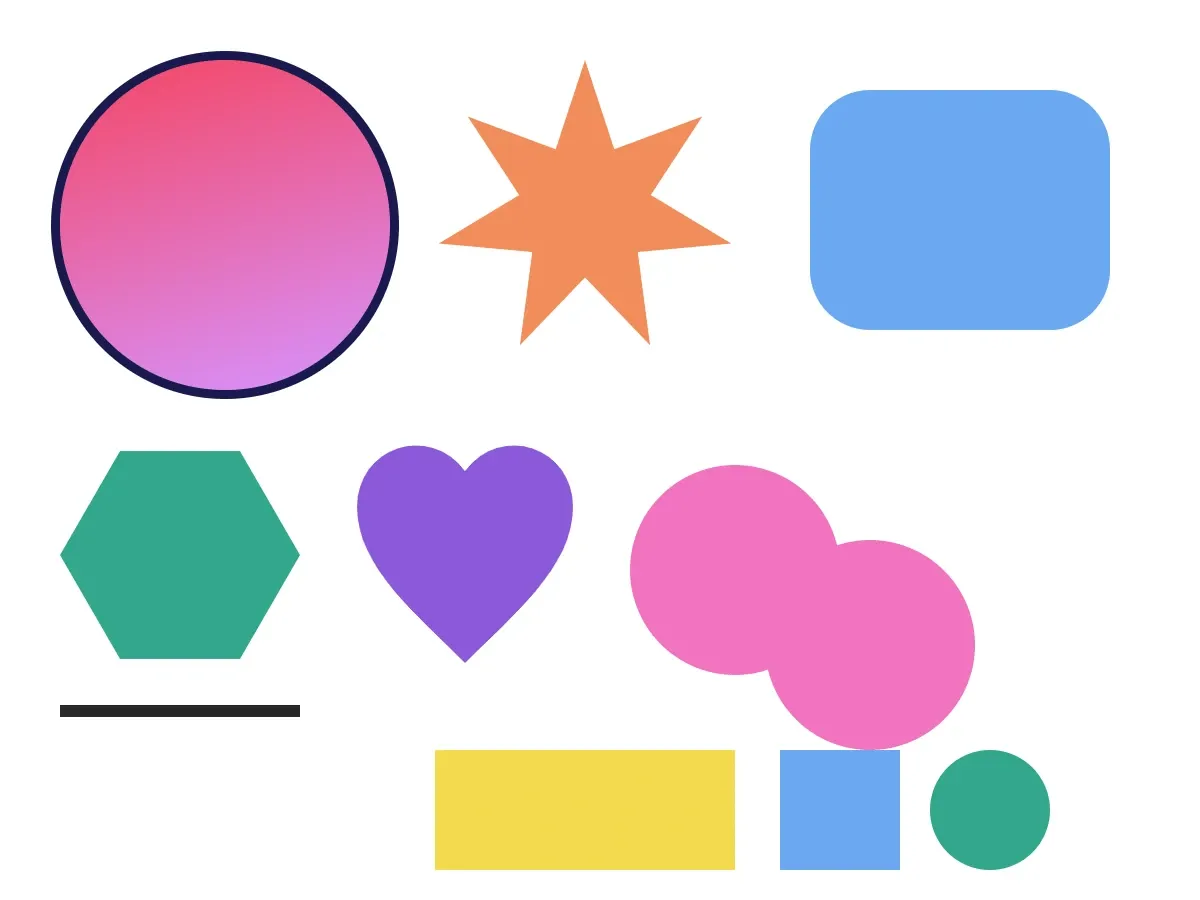
The graphic design block in CE.SDK pairs a shape — the geometric definition — with a fill — the color, gradient, image, or video that makes the shape visible. This guide covers editing every part of that pair: swapping the shape’s geometry, modifying shape-specific properties, changing fills and strokes, transforming the block, combining shapes with boolean operations, applying effects, and grouping.
// Start from a graphic block with a rectangle shape and a solid color fill.let demoBlock = try engine.block.create(.graphic)try engine.block.setShape(demoBlock, shape: engine.block.createShape(.rect))let demoFill = try engine.block.createFill(.color)try engine.block.setColor( demoFill, property: "fill/color/value", color: .rgba(r: 0.95, g: 0.85, b: 0.30, a: 1.0),)try engine.block.setFill(demoBlock, fill: demoFill)try engine.block.setWidth(demoBlock, value: 220)try engine.block.setHeight(demoBlock, value: 220)try engine.block.setPositionX(demoBlock, value: 40)try engine.block.setPositionY(demoBlock, value: 40)try engine.block.appendChild(to: page, child: demoBlock)Accessing Shapes#
Query whether a block supports shapes with supportsShape(_:). Only graphic blocks support shapes — text, scene, and page blocks do not. Read the attached shape with getShape(_:), then inspect it with the same APIs as any block — getType(_:), findAllProperties(_:), the typed getters.
let supportsShapes = try engine.block.supportsShape(demoBlock)let shape = try engine.block.getShape(demoBlock)let shapeType = try engine.block.getType(shape)print("Supports shape: \(supportsShapes), shape type: \(shapeType)")Changing Shape Type#
Replace a shape by creating the new type with createShape(_:) and assigning it to the block with setShape(_:shape:). The previously attached shape is not destroyed automatically — hold a reference to it, swap in the new shape, then call destroy(_:) on the old one so it doesn’t leak. Destroying the parent graphic destroys its attached shape as well.
// Hold a reference to the old shape, swap it for the new one, then destroy// the old shape so it doesn't leak.let oldShape = try engine.block.getShape(demoBlock)let ellipseShape = try engine.block.createShape(.ellipse)try engine.block.setShape(demoBlock, shape: ellipseShape)try engine.block.destroy(oldShape)Discovering Shape Properties#
Every shape type exposes its own set of property keys. Use findAllProperties(_:) to list them, then read or write with the typed setters that match the value type — setInt(_:property:value:) for integers, setFloat(_:property:value:) for floats, setString(_:property:value:) for strings.
// Each shape type exposes its own property keys. Use findAllProperties to// list them.let starBlock = try engine.block.create(.graphic)let starShape = try engine.block.createShape(.star)try engine.block.setShape(starBlock, shape: starShape)let starFill = try engine.block.createFill(.color)try engine.block.setColor(  starFill,  property: "fill/color/value",  color: .rgba(r: 0.95, g: 0.55, b: 0.35, a: 1.0),)try engine.block.setFill(starBlock, fill: starFill)try engine.block.setWidth(starBlock, value: 200)try engine.block.setHeight(starBlock, value: 200)try engine.block.setPositionX(starBlock, value: 290)try engine.block.setPositionY(starBlock, value: 40)try engine.block.appendChild(to: page, child: starBlock)
let starProperties = try engine.block.findAllProperties(starShape)print("Star properties: \(starProperties)")// Prints: ["includedInExport", "name", "shape/star/cornerRadius", "shape/star/innerDiameter", "shape/star/points", "type", "uuid"]
Star Properties#
shape/star/points (Int) controls the number of points. shape/star/innerDiameter (Float) is the inner-to-outer radius ratio — values closer to 0 make the points sharper, values closer to 1 make the star round.
try engine.block.setInt(starShape, property: "shape/star/points", value: 7)try engine.block.setFloat(starShape, property: "shape/star/innerDiameter", value: 0.45)Rectangle Corner Radii#
Rectangle corners are stored as four independent floats: shape/rect/cornerRadiusTL, cornerRadiusTR, cornerRadiusBR, and cornerRadiusBL. Set each corner explicitly when you need rounded corners — there is no single uniform property.
// Each corner has its own property — set them independently.let roundedBlock = try engine.block.create(.graphic)let roundedShape = try engine.block.createShape(.rect)try engine.block.setShape(roundedBlock, shape: roundedShape)let roundedFill = try engine.block.createFill(.color)try engine.block.setColor(  roundedFill,  property: "fill/color/value",  color: .rgba(r: 0.42, g: 0.66, b: 0.94, a: 1.0),)try engine.block.setFill(roundedBlock, fill: roundedFill)try engine.block.setWidth(roundedBlock, value: 200)try engine.block.setHeight(roundedBlock, value: 160)try engine.block.setPositionX(roundedBlock, value: 540)try engine.block.setPositionY(roundedBlock, value: 60)try engine.block.appendChild(to: page, child: roundedBlock)
try engine.block.setFloat(roundedShape, property: "shape/rect/cornerRadiusTL", value: 40)try engine.block.setFloat(roundedShape, property: "shape/rect/cornerRadiusTR", value: 40)try engine.block.setFloat(roundedShape, property: "shape/rect/cornerRadiusBR", value: 40)try engine.block.setFloat(roundedShape, property: "shape/rect/cornerRadiusBL", value: 40)
Polygon Properties#
shape/polygon/sides (Int) controls the number of sides.
let polygonBlock = try engine.block.create(.graphic)let polygonShape = try engine.block.createShape(.polygon)try engine.block.setShape(polygonBlock, shape: polygonShape)let polygonFill = try engine.block.createFill(.color)try engine.block.setColor(  polygonFill,  property: "fill/color/value",  color: .rgba(r: 0.20, g: 0.65, b: 0.55, a: 1.0),)try engine.block.setFill(polygonBlock, fill: polygonFill)try engine.block.setWidth(polygonBlock, value: 160)try engine.block.setHeight(polygonBlock, value: 160)try engine.block.setPositionX(polygonBlock, value: 40)try engine.block.setPositionY(polygonBlock, value: 290)try engine.block.appendChild(to: page, child: polygonBlock)
try engine.block.setInt(polygonShape, property: "shape/polygon/sides", value: 6)Line#
Line shapes expose no shape-specific properties — they render as a single horizontal segment whose visible thickness comes from the parent block’s stroke. Width and height set on the parent block control the line’s length and the box it occupies.
// Lines have no shape-specific properties. Their visual thickness comes// from the parent block's stroke.let lineBlock = try engine.block.create(.graphic)try engine.block.setShape(lineBlock, shape: engine.block.createShape(.line))try engine.block.setStrokeEnabled(lineBlock, enabled: true)try engine.block.setStrokeColor(lineBlock, color: .rgba(r: 0.15, g: 0.15, b: 0.15, a: 1.0))try engine.block.setStrokeWidth(lineBlock, width: 4)try engine.block.setWidth(lineBlock, value: 160)try engine.block.setHeight(lineBlock, value: 8)try engine.block.setPositionX(lineBlock, value: 40)try engine.block.setPositionY(lineBlock, value: 470)try engine.block.appendChild(to: page, child: lineBlock)Vector Path#
Vector path shapes accept the d attribute of an SVG <path> element through shape/vector_path/path (String). Multiple subpaths within a single path string (separated by M move commands) are supported; loading a complete SVG document is not — extract the path data first.
let vectorPathBlock = try engine.block.create(.graphic)let vectorPathShape = try engine.block.createShape(.vectorPath)try engine.block.setShape(vectorPathBlock, shape: vectorPathShape)let vectorPathFill = try engine.block.createFill(.color)try engine.block.setColor(  vectorPathFill,  property: "fill/color/value",  color: .rgba(r: 0.55, g: 0.35, b: 0.85, a: 1.0),)try engine.block.setFill(vectorPathBlock, fill: vectorPathFill)try engine.block.setWidth(vectorPathBlock, value: 160)try engine.block.setHeight(vectorPathBlock, value: 160)try engine.block.setPositionX(vectorPathBlock, value: 230)try engine.block.setPositionY(vectorPathBlock, value: 290)try engine.block.appendChild(to: page, child: vectorPathBlock)
// Single-path SVG-style path data (a heart shape).try engine.block.setString(  vectorPathShape,  property: "shape/vector_path/path",  value: "M 50,15 C 35,-5 5,5 5,30 C 5,55 30,75 50,95 C 70,75 95,55 95,30 C 95,5 65,-5 50,15 Z",)
Editing Fill Color#
The graphic block’s fill is a separate design block. Read it with getFill(_:), then set its fill/color/value property using a typed Color — .rgba(r:g:b:a:) for sRGB, .cmyk(c:m:y:k:tint:) for CMYK, or .spot(name:tint:externalReference:) for spot colors.
// Read the existing fill from the demo block and update its color.let fill = try engine.block.getFill(demoBlock)try engine.block.setColor( fill, property: "fill/color/value", color: .rgba(r: 0.95, g: 0.30, b: 0.45, a: 1.0),)For more on color fills, see Color Fills.
Replacing Fill Type#
Swap a fill type — color, gradient, image, video — by creating a new fill with createFill(_:) and assigning it with setFill(_:fill:). Destroy the previous fill so it doesn’t leak.
// Build a linear-gradient fill, then swap the demo block's color fill for it.let gradientFill = try engine.block.createFill(.linearGradient)try engine.block.setGradientColorStops( gradientFill, property: "fill/gradient/colors", colors: [ GradientColorStop(color: .rgba(r: 0.95, g: 0.30, b: 0.45, a: 1.0), stop: 0.0), GradientColorStop(color: .rgba(r: 0.85, g: 0.55, b: 0.95, a: 1.0), stop: 1.0), ],)// Destroy the previous fill before swapping so it doesn't leak.try engine.block.destroy(engine.block.getFill(demoBlock))try engine.block.setFill(demoBlock, fill: gradientFill)For gradient fills in depth, see Gradient Fills.
Editing Stroke Properties#
Strokes are off by default. Enable with setStrokeEnabled(_:enabled:), then configure color (setStrokeColor(_:color:)), width (setStrokeWidth(_:width:)), and the position where the stroke sits relative to the shape’s edge (setStrokePosition(_:position:) with .inner, .center, or .outer).
if try engine.block.supportsStroke(demoBlock) { try engine.block.setStrokeEnabled(demoBlock, enabled: true) try engine.block.setStrokeColor(demoBlock, color: .rgba(r: 0.10, g: 0.10, b: 0.30, a: 1.0)) try engine.block.setStrokeWidth(demoBlock, width: 6) try engine.block.setStrokePosition(demoBlock, position: .outer)}Transform Operations#
Position and dimensions move the block around the page; rotation expects radians; flips mirror the rendered content along the horizontal or vertical axis.
// Position and dimensions move the block around the page; rotation expects// radians; flips mirror the rendered content.try engine.block.setPositionX(demoBlock, value: 40)try engine.block.setPositionY(demoBlock, value: 40)try engine.block.setWidth(demoBlock, value: 220)try engine.block.setHeight(demoBlock, value: 220)try engine.block.setRotation(demoBlock, radians: .pi / 12)try engine.block.setFlipHorizontal(demoBlock, flip: true)Combining Shapes with Boolean Operations#
combine(_:booleanOperation:) merges two or more graphic or text blocks on the same page into a single new graphic carrying a vector path shape with the merged geometry. The input blocks are destroyed. Available operations on BooleanOperation:
.union— adds all input shapes into one..difference— removes the upper shapes from the bottom-most shape..intersection— keeps only the area where every input overlaps..xor— keeps the non-overlapping parts.
// Create two overlapping ellipses, then combine them into one graphic.let booleanA = try engine.block.create(.graphic)try engine.block.setShape(booleanA, shape: engine.block.createShape(.ellipse))let booleanFillA = try engine.block.createFill(.color)try engine.block.setColor(  booleanFillA,  property: "fill/color/value",  color: .rgba(r: 0.95, g: 0.45, b: 0.75, a: 1.0),)try engine.block.setFill(booleanA, fill: booleanFillA)try engine.block.setWidth(booleanA, value: 140)try engine.block.setHeight(booleanA, value: 140)try engine.block.setPositionX(booleanA, value: 420)try engine.block.setPositionY(booleanA, value: 310)try engine.block.appendChild(to: page, child: booleanA)
let booleanB = try engine.block.create(.graphic)try engine.block.setShape(booleanB, shape: engine.block.createShape(.ellipse))let booleanFillB = try engine.block.createFill(.color)try engine.block.setColor(  booleanFillB,  property: "fill/color/value",  color: .rgba(r: 0.95, g: 0.45, b: 0.75, a: 1.0),)try engine.block.setFill(booleanB, fill: booleanFillB)try engine.block.setWidth(booleanB, value: 140)try engine.block.setHeight(booleanB, value: 140)try engine.block.setPositionX(booleanB, value: 510)try engine.block.setPositionY(booleanB, value: 360)try engine.block.appendChild(to: page, child: booleanB)
// combine() destroys the input blocks and returns a new graphic that carries// a vector_path shape with the merged geometry.let union = try engine.block.combine([booleanA, booleanB], booleanOperation: .union)print("Union block: \(union)")
For a deeper look at boolean operations, see Combine Stickers and Shapes.
Applying Effects to Shapes#
Effects — blurs, shadows, filters, extrusions — attach to graphic blocks. Create the effect with createEffect(_:) using an EffectType case, configure its parameters with the typed setters (use findAllProperties(_:) to discover the property keys), then append it to the block with appendEffect(_:effectID:). A block can carry multiple effects.
let effectBlock = try engine.block.create(.graphic)try engine.block.setShape(effectBlock, shape: engine.block.createShape(.rect))let effectFill = try engine.block.createFill(.color)try engine.block.setColor(  effectFill,  property: "fill/color/value",  color: .rgba(r: 0.95, g: 0.85, b: 0.30, a: 1.0),)try engine.block.setFill(effectBlock, fill: effectFill)try engine.block.setWidth(effectBlock, value: 200)try engine.block.setHeight(effectBlock, value: 80)try engine.block.setPositionX(effectBlock, value: 290)try engine.block.setPositionY(effectBlock, value: 500)try engine.block.appendChild(to: page, child: effectBlock)
let extrudeBlur = try engine.block.createEffect(.extrudeBlur)try engine.block.setFloat(extrudeBlur, property: "effect/extrude_blur/amount", value: 0.8)try engine.block.appendEffect(effectBlock, effectID: extrudeBlur)
Grouping and Ungrouping#
group(_:) consumes an array of blocks and returns a new group container that transforms them together. ungroup(_:) dissolves the container and re-parents the children back to the group’s parent. Check whether blocks are eligible to be grouped with isGroupable(_:) — all blocks must be on the same page (or none of them on any page), none of them can be grouped with a group it sits inside, and pages and scenes cannot be grouped.
let groupChildA = try engine.block.create(.graphic)try engine.block.setShape(groupChildA, shape: engine.block.createShape(.rect))let groupFillA = try engine.block.createFill(.color)try engine.block.setColor(  groupFillA,  property: "fill/color/value",  color: .rgba(r: 0.42, g: 0.66, b: 0.94, a: 1.0),)try engine.block.setFill(groupChildA, fill: groupFillA)try engine.block.setWidth(groupChildA, value: 80)try engine.block.setHeight(groupChildA, value: 80)try engine.block.setPositionX(groupChildA, value: 520)try engine.block.setPositionY(groupChildA, value: 500)try engine.block.appendChild(to: page, child: groupChildA)
let groupChildB = try engine.block.create(.graphic)try engine.block.setShape(groupChildB, shape: engine.block.createShape(.ellipse))let groupFillB = try engine.block.createFill(.color)try engine.block.setColor(  groupFillB,  property: "fill/color/value",  color: .rgba(r: 0.20, g: 0.65, b: 0.55, a: 1.0),)try engine.block.setFill(groupChildB, fill: groupFillB)try engine.block.setWidth(groupChildB, value: 80)try engine.block.setHeight(groupChildB, value: 80)try engine.block.setPositionX(groupChildB, value: 620)try engine.block.setPositionY(groupChildB, value: 500)try engine.block.appendChild(to: page, child: groupChildB)
let canGroup = try engine.block.isGroupable([groupChildA, groupChildB])if canGroup { let groupBlock = try engine.block.group([groupChildA, groupChildB]) print("Group container: \(groupBlock)") // Call ungroup() to dissolve the container and re-parent the children: // try engine.block.ungroup(groupBlock)}Troubleshooting#
Shape Not Changing#
- Verify
supportsShape(_:)returnstruefor the block — only graphic blocks support shapes. - Confirm
setShape(_:shape:)was called on the graphic block, not on the shape block. - Destroy the previous shape only after
setShape(_:shape:)returns, so the block never holds a reference to a destroyed shape.
Property Modification Not Working#
- Use
findAllProperties(_:)on the shape to confirm the property key exists. - Match the setter to the property type —
setInt(_:property:value:)for integer properties,setFloat(_:property:value:)for floats,setString(_:property:value:)for strings. - Remember that shape-specific properties change when you replace one shape type with another —
shape/star/pointsonly exists on star shapes.
Fill Not Visible#
- Confirm the fill is enabled with
isFillEnabled(_:). - Verify the fill’s color has non-zero alpha.
- Confirm the block has non-zero width and height.
Boolean Operation Fails#
- Pass at least two blocks —
combine(_:booleanOperation:)rejects fewer than two. - Each input must be a graphic or text block; other block types are rejected.
- All inputs must resolve to the same page in the scene hierarchy.
Stroke Not Appearing#
- Confirm
setStrokeEnabled(_:enabled:)was called withtrue. - Verify the stroke width is greater than zero.
- Verify the stroke color has non-zero alpha.
- A center- or inner-positioned stroke can be hidden behind the fill on small shapes — try
.outer.
API Reference#
Methods#
| Method | Description |
|---|---|
engine.block.supportsShape(_:) |
Check whether a block can carry a shape |
engine.block.getShape(_:) |
Get the shape attached to a graphic block |
engine.block.createShape(_:) |
Create a new shape of a given ShapeType |
engine.block.setShape(_:shape:) |
Attach a shape to a graphic block |
engine.block.getType(_:) |
Read the type identifier of a block or shape |
engine.block.findAllProperties(_:) |
List the property keys exposed by a block, shape, fill, or effect |
engine.block.setInt(_:property:value:) |
Set an integer property (e.g. star points, polygon sides) |
engine.block.setFloat(_:property:value:) |
Set a float property (e.g. corner radius, inner diameter) |
engine.block.setString(_:property:value:) |
Set a string property (e.g. vector path data) |
engine.block.getFill(_:) |
Get the fill attached to a graphic block |
engine.block.createFill(_:) |
Create a new fill of a given FillType |
engine.block.setFill(_:fill:) |
Attach a fill to a graphic block |
engine.block.setColor(_:property:color:) |
Set a color property using a typed Color |
engine.block.setGradientColorStops(_:property:colors:) |
Set the gradient stops on a gradient fill |
engine.block.supportsStroke(_:) |
Check whether a block supports a stroke |
engine.block.setStrokeEnabled(_:enabled:) |
Toggle the stroke on or off |
engine.block.setStrokeColor(_:color:) |
Set the stroke color |
engine.block.setStrokeWidth(_:width:) |
Set the stroke width |
engine.block.setStrokePosition(_:position:) |
Set the stroke position relative to the shape edge |
engine.block.setPositionX(_:value:) / setPositionY(_:value:) |
Move the block on the page |
engine.block.setWidth(_:value:) / setHeight(_:value:) |
Resize the block |
engine.block.setRotation(_:radians:) |
Rotate the block around its center |
engine.block.setFlipHorizontal(_:flip:) |
Mirror the block horizontally |
engine.block.combine(_:booleanOperation:) |
Combine graphic blocks with a BooleanOperation |
engine.block.createEffect(_:) |
Create an effect of a given EffectType |
engine.block.appendEffect(_:effectID:) |
Attach an effect to a graphic block |
engine.block.isGroupable(_:) |
Check whether a set of blocks can be grouped |
engine.block.group(_:) |
Group blocks on the same page into a single container |
engine.block.ungroup(_:) |
Dissolve a group container |
engine.block.destroy(_:) |
Destroy a block, shape, fill, or effect |
Properties#
| Property | Type | Description |
|---|---|---|
fill/color/value |
Color | Solid color of a color fill |
fill/gradient/colors |
[GradientColorStop] |
Color stops on a gradient fill |
shape/rect/cornerRadiusTL |
Float | Top-left corner radius |
shape/rect/cornerRadiusTR |
Float | Top-right corner radius |
shape/rect/cornerRadiusBR |
Float | Bottom-right corner radius |
shape/rect/cornerRadiusBL |
Float | Bottom-left corner radius |
shape/star/points |
Int | Number of points on a star shape |
shape/star/innerDiameter |
Float | Inner-to-outer radius ratio of a star (closer to 0 = sharper points) |
shape/polygon/sides |
Int | Number of sides on a polygon |
shape/vector_path/path |
String | SVG-style path data for a vector path shape |
Next Steps#
- Create Shapes — Create and configure geometric shapes programmatically.
- Edit Stickers — Edit existing sticker blocks by changing their image fill and transforms.