Add rectangles, circles, lines, and redaction boxes on top of images or designs with shape blocks.
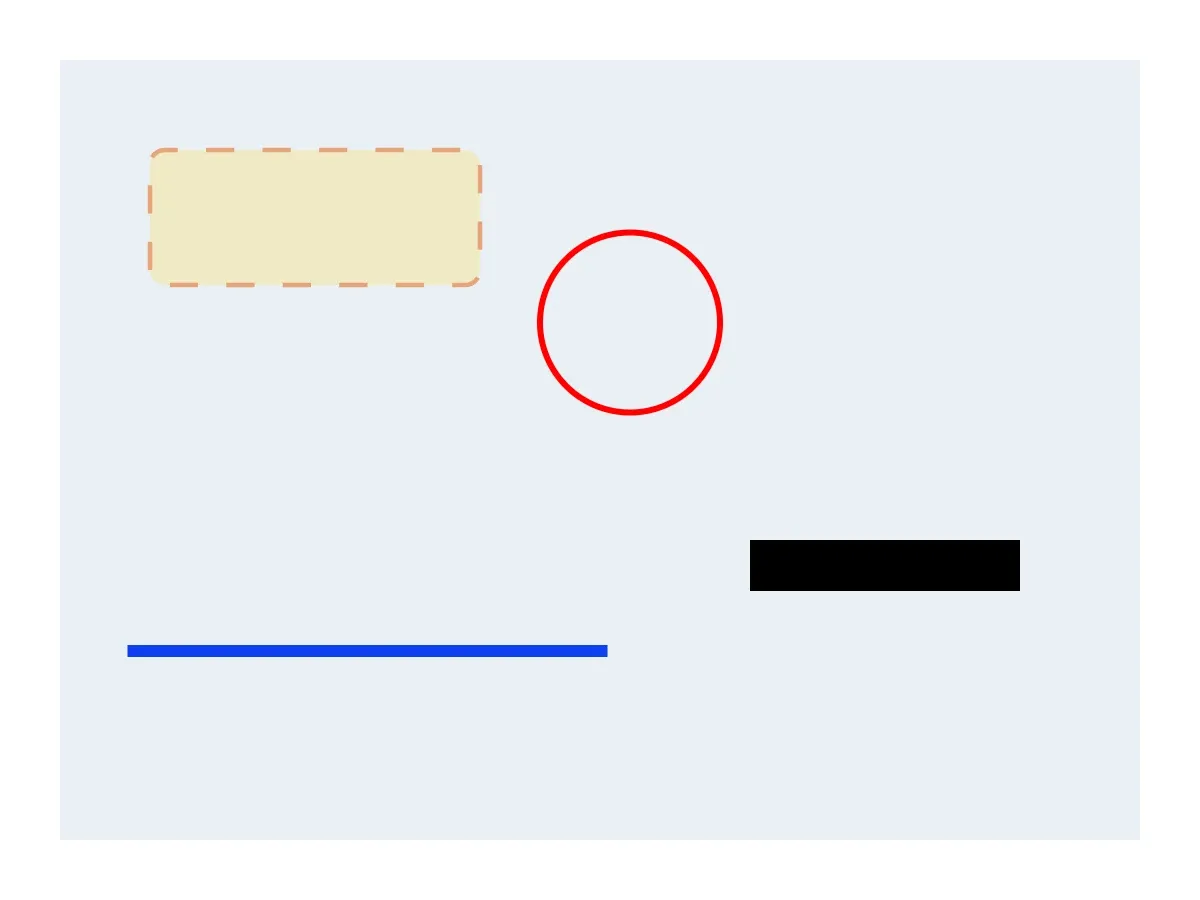
Annotations in CE.SDK are graphic blocks with shape geometry. Use them to highlight important areas, circle details, underline content, hide sensitive information, or add visual review marks on top of existing page content.
The examples below append annotations to an existing page. Position and dimensions are set on the graphic block, while rectangle-specific properties such as corner radius are set on the attached shape block.
Add Rectangle Annotation#
Create a graphic block, attach a rectangle shape, position it, and give it a semi-transparent color fill. A transparent fill keeps the underlying image or design visible while drawing attention to a region.
@MainActorfunc addRectangleAnnotation(engine: Engine, page: DesignBlockID) throws -> DesignBlockID {  let highlight = try engine.block.create(.graphic)  let rectShape = try engine.block.createShape(.rect)  try engine.block.setShape(highlight, shape: rectShape)
  try engine.block.setPositionX(highlight, value: 100)  try engine.block.setPositionY(highlight, value: 100)  try engine.block.setWidth(highlight, value: 220)  try engine.block.setHeight(highlight, value: 90)
  let fill = try engine.block.createFill(.color)  try engine.block.setColor(    fill,    property: "fill/color/value",    color: .rgba(r: 1.0, g: 0.82, b: 0.0, a: 0.4),  )  try engine.block.setFill(highlight, fill: fill)
  try engine.block.appendChild(to: page, child: highlight)  return highlight}
Add Circle Annotation#
Use an ellipse shape for circles and callouts. Disable the fill and enable a stroke when the annotation should outline an item without covering it.
@MainActorfunc addCircleAnnotation(engine: Engine, page: DesignBlockID) throws -> DesignBlockID {  let callout = try engine.block.create(.graphic)  let ellipseShape = try engine.block.createShape(.ellipse)  try engine.block.setShape(callout, shape: ellipseShape)
  try engine.block.setPositionX(callout, value: 360)  try engine.block.setPositionY(callout, value: 155)  try engine.block.setWidth(callout, value: 120)  try engine.block.setHeight(callout, value: 120)
  try engine.block.setFillEnabled(callout, enabled: false)  try engine.block.setStrokeEnabled(callout, enabled: true)  try engine.block.setStrokeColor(callout, color: .rgba(r: 1.0, g: 0.0, b: 0.0, a: 1.0))  try engine.block.setStrokeWidth(callout, width: 4)
  try engine.block.appendChild(to: page, child: callout)  return callout}
Use equal width and height for a circle. Different values produce an ellipse.
Add Line Annotation#
Use a line shape for underlines, separators, and markup strokes. The block width controls the line length.
@MainActorfunc addLineAnnotation(engine: Engine, page: DesignBlockID) throws -> DesignBlockID {  let underline = try engine.block.create(.graphic)  let lineShape = try engine.block.createShape(.line)  try engine.block.setShape(underline, shape: lineShape)
  try engine.block.setPositionX(underline, value: 85)  try engine.block.setPositionY(underline, value: 430)  try engine.block.setWidth(underline, value: 320)  let lineThickness: Float = 8  try engine.block.setHeight(underline, value: lineThickness)
  try engine.block.setStrokeEnabled(underline, enabled: true)  try engine.block.setStrokeColor(underline, color: .rgba(r: 0.05, g: 0.25, b: 0.95, a: 1.0))  try engine.block.setStrokeWidth(underline, width: lineThickness)
  try engine.block.appendChild(to: page, child: underline)  return underline}
Line shapes use stroke width for the visible thickness. Keep the block height in sync with the stroke width so the line bounds match the rendered stroke.
Add a Visual Redaction Overlay#
To visually cover content in flattened image output, place a solid rectangle over the sensitive area. Use an opaque fill so the covered content is not visible in the final flattened export.
The original block remains underneath the overlay in the editable CE.SDK scene and in layered or reusable outputs. For sensitive content, remove, crop, or replace the source content before sharing an editable scene.
@MainActorfunc addRedactionBox(engine: Engine, page: DesignBlockID) throws -> DesignBlockID {  let redaction = try engine.block.create(.graphic)  try engine.block.setShape(redaction, shape: engine.block.createShape(.rect))
  try engine.block.setPositionX(redaction, value: 500)  try engine.block.setPositionY(redaction, value: 360)  try engine.block.setWidth(redaction, value: 180)  try engine.block.setHeight(redaction, value: 34)
  let fill = try engine.block.createFill(.color)  try engine.block.setColor(    fill,    property: "fill/color/value",    color: .rgba(r: 0.0, g: 0.0, b: 0.0, a: 1.0),  )  try engine.block.setFill(redaction, fill: fill)
  try engine.block.appendChild(to: page, child: redaction)  return redaction}
Style Annotation Appearance#
Common rectangle styling changes include opacity, rounded corners, and dashed strokes. Apply opacity and stroke settings to the graphic block, then update rectangle-specific corner geometry on the attached shape block.
@MainActorfunc styleRectangleAnnotationAppearance(engine: Engine, rectangle: DesignBlockID) throws {  try engine.block.setOpacity(rectangle, value: 0.5)
  let shape = try engine.block.getShape(rectangle)  try engine.block.setFloat(shape, property: "shape/rect/cornerRadiusTL", value: 10)  try engine.block.setFloat(shape, property: "shape/rect/cornerRadiusTR", value: 10)  try engine.block.setFloat(shape, property: "shape/rect/cornerRadiusBL", value: 10)  try engine.block.setFloat(shape, property: "shape/rect/cornerRadiusBR", value: 10)
try engine.block.setStrokeEnabled(rectangle, enabled: true) try engine.block.setStrokeStyle(rectangle, style: .dashed) try engine.block.setStrokeWidth(rectangle, width: 3) try engine.block.setStrokeColor(rectangle, color: .rgba(r: 0.9, g: 0.35, b: 0.0, a: 1.0))}Troubleshooting#
| Issue | Solution |
|---|---|
| Shape not visible | Check that the block is appended to the page and that fill or stroke is enabled. |
| Shape positioned incorrectly | Verify x and y positions on the graphic block, not the shape block. |
| Stroke not showing | Enable stroke and set a stroke width greater than 0. |
| Rounded corners not changing | Set the corner radius properties on the rectangle shape returned by getShape(_:). |
| Shape covers too much content | Lower block opacity or use a stroke-only annotation. |
API Reference#
Methods#
| Method | Description |
|---|---|
engine.block.create(_:) |
Create a design block such as a graphic block (.graphic). |
engine.block.createShape(_:) |
Create a shape block such as .rect, .ellipse, or .line. |
engine.block.setShape(_:shape:) |
Attach a shape block to a graphic block. |
engine.block.setPositionX(_:value:) |
Set the graphic block’s x position. |
engine.block.setPositionY(_:value:) |
Set the graphic block’s y position. |
engine.block.setWidth(_:value:) |
Set the graphic block’s width. |
engine.block.setHeight(_:value:) |
Set the graphic block’s height. |
engine.block.createFill(_:) |
Create a fill block such as .color. |
engine.block.setFill(_:fill:) |
Assign a fill to a graphic block. |
engine.block.setFillEnabled(_:enabled:) |
Enable or disable the graphic block’s fill. |
engine.block.setStrokeEnabled(_:enabled:) |
Enable or disable the graphic block’s stroke. |
engine.block.setStrokeColor(_:color:) |
Set the graphic block’s stroke color. |
engine.block.setStrokeWidth(_:width:) |
Set the graphic block’s stroke width. |
engine.block.setStrokeStyle(_:style:) |
Set a stroke style such as .dashed. |
engine.block.setOpacity(_:value:) |
Set block opacity from 0 to 1. |
engine.block.getShape(_:) |
Get the shape block attached to a graphic block. |
engine.block.setColor(_:property:color:) |
Set a typed color property. |
engine.block.setFloat(_:property:value:) |
Set float shape properties such as rectangle corner radius. |
engine.block.appendChild(to:child:) |
Add the annotation block to a page or container. |
Properties#
| Property | Type | Description |
|---|---|---|
fill/color/value |
Color | Solid color of a color fill. |
shape/rect/cornerRadiusTL |
Float | Top-left corner radius of a rectangle shape. |
shape/rect/cornerRadiusTR |
Float | Top-right corner radius of a rectangle shape. |
shape/rect/cornerRadiusBL |
Float | Bottom-left corner radius of a rectangle shape. |
shape/rect/cornerRadiusBR |
Float | Bottom-right corner radius of a rectangle shape. |
Next Steps#
- Transform Images — Crop, resize, rotate, scale, or flip image content.
- Edit Shapes — Modify shape geometry, color, size, position, and corner radius.
- Grouping — Group multiple annotations together.
- Layer Management — Control annotation stacking order.